Monitoring and Alerting
Good alerting pages a human only when users are hurting and someone can act. Alert on symptoms and SLO burn rates instead of causes, keep alert hygiene, build useful dashboards, and see how Prometheus and Alertmanager turn a query into a page.
🎯 What you'll learn
- The goal of alerting and actionable pages
- Symptoms vs causes
- SLO burn-rate alerting (multi-window)
- Hygiene, dashboards, on-call and the Alertmanager flow
📚 Before you start
1The Goal of Alerting
An alert interrupts a human. Every page must be urgent, actionable, and real: something users feel (or will feel soon) that a person must act on now. Everything else is a ticket (needs attention this week) or a dashboard (look when investigating). Alert fatigue — dozens of pages that need no action — trains people to ignore the one that matters.
2Symptoms vs Causes
| Alert on symptoms (page) | Use causes for diagnosis (dashboards / tickets) |
|---|---|
| error ratio of user requests too high | CPU at 85% |
| latency p99 above SLO | one pod restarted |
| checkout success rate dropped | disk 70% full (ticket with forecast) |
| queue messages older than the freshness SLO | GC pauses |
A service can run at 95% CPU happily; it can also fail completely at 10% CPU. Users experience symptoms.
3SLO-Based Alerting
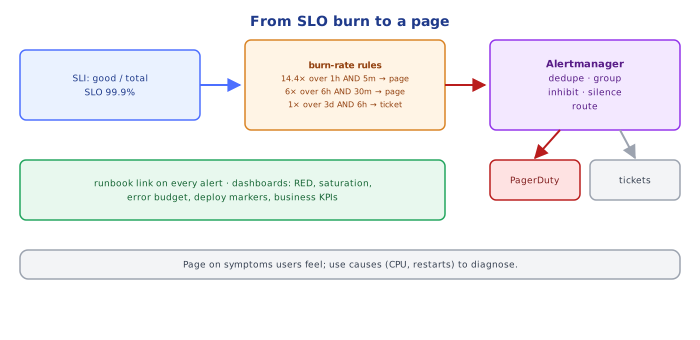
From system-design/system-design/07-observability_overview: define an SLI and SLO (e.g. 99.9% of checkout requests succeed within 1 s over 28 days → error budget 0.1%). Alert on the burn rate — how many times faster than "sustainable" the budget is being spent:
burn rate = observed error ratio / (1 − SLO) e.g. 1.44% errors / 0.1% = 14.4×Google SRE's multi-window, multi-burn-rate recipe:
| Severity | Burn rate | Long window | Short window | Budget consumed if it continues |
|---|---|---|---|---|
| page | 14.4× | 1 h | 5 min | 2% in 1 hour |
| page | 6× | 6 h | 30 min | 5% in 6 hours |
| ticket | 1× | 3 days | 6 h | 10% in 3 days |
The long window gives significance (not a blip); the short window makes the alert reset quickly once the problem is fixed.
(
  sum(rate(http_requests_total{job="checkout",code=~"5.."}[1h])) / sum(rate(http_requests_total{job="checkout"}[1h])) > (14.4 * 0.001)
)
and
(
  sum(rate(http_requests_total{job="checkout",code=~"5.."}[5m])) / sum(rate(http_requests_total{job="checkout"}[5m])) > (14.4 * 0.001)
)4Alert Hygiene
for:duration (Prometheus) / M-of-N datapoints (CloudWatch) to avoid flapping.- Routing and grouping (Alertmanager): group related alerts into one notification; route by team/service; inhibit downstream alerts when an upstream one fires (DB down → suppress 40 "API errors" alerts).
- Silences during maintenance, with expiry.
- Every alert has a runbook link: what it means, how to verify, first mitigation steps, escalation.
- Severity levels: page (wake someone up), ticket, info.
- Review alerts after every incident and monthly: delete noisy ones, add missing ones.
5Dashboards
Layer them:
- Service overview (one per service): RED metrics (rate, errors, duration p50/p95/p99), saturation (CPU, memory, pool usage), SLO + error budget remaining, recent deploys as annotations.
- Dependency views: per downstream call — rate, errors, latency (often from traces/metrics of the client side).
- Business view: orders/min, signups, payments — often the fastest signal of trouble.
- Infrastructure: nodes, cluster capacity, queues, databases.
Put deploy markers on graphs — "what changed?" is the first question in every incident.
6On-Call and Incident Flow
alert fires → on-call acknowledges (within minutes) → assess impact → mitigate first
(rollback, failover, scale, disable feature) → communicate (status page, stakeholders)
→ resolve → blameless post-incident review → action items (incl. alert/runbook fixes)
Measure: time to detect (TTD), time to mitigate (TTM), pages per on-call shift, % of pages that were actionable.
Under the HoodHow Prometheus and Alertmanager Evaluate and Notify▾
Prometheus evaluates each alerting rule on an interval (e.g. every 30 s) by running its PromQL expression; every resulting series is an alert instance with labels. If an instance stays true for the rule's for: duration it moves from pending to firing, and Prometheus sends it (repeatedly, as long as it fires) to Alertmanager. Alertmanager then:
- deduplicates identical alerts from HA Prometheus pairs,
- groups alerts by configured labels (
alertname,service) and waitsgroup_waitto batch the first notification, - applies inhibition rules (a firing
ClusterDownsuppressesPodNotReadyfor the same cluster) and silences, - routes through a tree of matchers to receivers (PagerDuty, Slack, email, webhooks),
- re-sends on
repeat_intervalwhile firing and sends a resolved notification when it stops.
Because evaluation is periodic and for: adds delay, time-to-detect = scrape interval + rule interval + for: + group_wait — tune them deliberately for page-worthy alerts.
⚠️ Common Pitfalls
- Paging on causes (CPU, pod restarts) instead of symptoms.
- No
for:— flapping alerts. - Alerts without runbooks or owners.
- Static thresholds on averages — use SLO burn rates and percentiles.
- Alerting only on errors — a service returning nothing (traffic drop to zero) is also broken; alert on absent/low traffic for critical flows.
- Never pruning alerts.
📋 Quick Reference
page = urgent + actionable + user-visible   ·   everything else = ticket / dashboard
SLO burn-rate alerts: 14.4× (1h & 5m) page, 6× (6h & 30m) page, 1× (3d & 6h) ticket
Alertmanager: dedupe → group → inhibit/silence → route → notify (runbook link!)
dashboards: RED + saturation + SLO budget + deploy markers + business KPIs
🧠 Key takeaways
- Page only for urgent, user-impacting, actionable problems; everything else is a ticket or dashboard.
- Alert on symptoms (errors, latency, SLO burn), not causes (CPU, memory).
- Use multi-window burn-rate alerts (e.g. 14.4× over 1 h and 5 min) to be fast and precise.
- Every alert needs an owner, a runbook and periodic review; Alertmanager groups, dedupes, silences and routes.
🎤 Interview Q&A
Q1What makes a good alert?core▾
It's actionable, urgent, user-impacting, and has a runbook. Page on symptoms (SLO burn rate, error rate, latency) rather than causes; send non-urgent issues to tickets or dashboards.
- What's alert fatigue? Too many noisy alerts, causing real ones to be ignored.
Q2What is SLO burn-rate alerting?core▾
Alerting on how fast the error budget is consumed: a fast burn (e.g. 14x over 1 hour) pages immediately, a slow burn (e.g. 2x over 6 hours) creates a ticket. Multi-window checks reduce false positives.
- Why better than static thresholds? Ties alerts directly to user impact and budget.
Q3What should a service dashboard show?senior▾
Golden signals (traffic, errors, latency percentiles, saturation), SLO status, dependency health, recent deployments as annotations, and key business metrics.
- Why annotate deploys? Most incidents correlate with changes.
Q4How do you monitor asynchronous systems?core▾
Queue depth, age of oldest message, consumer lag, processing rate, error and DLQ counts, and end-to-end latency from event creation to processing.
- Which is the best single signal? Age of the oldest message.
Q5What's the difference between monitoring and observability?core▾
Monitoring watches known failure modes with predefined dashboards and alerts. Observability is the ability to understand new, unknown problems by exploring rich telemetry (high-cardinality events, traces).
- Is one better? You need both.
🛠️ Practice exercises
Each exercise is a file in this topic folder. Code exercises are self-checking: run them and make the checks pass.
✅ Check yourself
Answer the questions — feedback is instant.
for: 2m on an alert rule do?