Redis
Redis is an in-memory data structure server: strings, hashes, lists, sets, sorted sets and streams, served in microseconds. Try the commands behind sessions, leaderboards and rate limits, and learn why one slow command can stall everything.
🎯 What you'll learn
- What Redis is: single-threaded, in-memory, data structures
- Strings, TTLs and atomic counters
- Hashes, lists, sets, sorted sets, streams
- Transactions, Lua, pub/sub, persistence and pitfalls
📚 Before you start
1What Redis Actually Is
Redis ("REmote DIctionary Server") is an in-memory data structure server. The "dictionary" in the name is the right mental model to start from: at its core, Redis is a single giant hash table mapping string keys to values — conceptually the same key-value structure as a JS Map (see languages/javascript/20-map/js_map_theory.md) or a hashing-based dictionary (see languages/javascript/23-hashing_and_hash_tables/js_hashing_and_hash_tables_theory_1.md for the underlying bucket/collision mechanics). Redis's own top-level keyspace is implemented as exactly this kind of hash table, internally called dict, with the same amortized O(1) get/set and the same incremental-resize-on-growth behavior described in that JS theory file.
What makes Redis more than "a hash table you can talk to over the network" is that values aren't limited to strings — each key can hold a richer data structure, and Redis exposes type-specific commands that operate on that structure server-side, atomically, without the client having to fetch-modify-write.
2Connecting and Basic String Commands
redis-cli SET user:1:name "Ana"
redis-cli GET user:1:name
# "Ana"

redis-cli SET pageviews 0
redis-cli INCR pageviews        # atomic +1, returns 1
redis-cli INCRBY pageviews 10   # returns 11

redis-cli SET session:abc123 "user_id=1" EX 3600   # set with 1-hour TTL, see the TTL topic
redis-cli SETNX lock:job42 "held"                   # set only if key doesn't exist — a cheap distributed lock primitive
redis-cli DEL user:1:name
redis-cli EXISTS user:1:name   # 0
From Node, the standard client is ioredis (or node-redis):
import Redis from "ioredis";
const redis = new Redis(); // defaults to localhost:6379

await redis.set("user:1:name", "Ana");
const name = await redis.get("user:1:name");        // "Ana"
await redis.incr("pageviews");
await redis.set("session:abc123", "user_id=1", "EX", 3600);3The Data Structures Beyond Strings
| Type | Redis commands | Analogous JS structure | Typical use |
|---|---|---|---|
| String | SET/GET/INCR/APPEND | string | cache entries, counters, flags |
| Hash | HSET/HGET/HGETALL/HDEL | Map / plain object | object records (a user profile) without re-serializing the whole thing to update one field |
| List | LPUSH/RPUSH/LRANGE/LPOP | Array (as a deque) | queues, recent-activity feeds |
| Set | SADD/SREM/SISMEMBER/SINTER | Set | tags, unique visitor tracking, set algebra (intersection/union between keys) |
| Sorted Set (ZSet) | ZADD/ZRANGE/ZRANK/ZINCRBY | none built into JS — closest is a Map kept manually sorted | leaderboards, priority queues, rate-limit windows |
| Stream | XADD/XREAD/XRANGE | none built into JS | append-only event logs, lightweight pub/sub with replay |
# Hash: update one field without touching the rest of the record
redis-cli HSET user:1 name "Ana" age 29 city "Tashkent"
redis-cli HGET user:1 age          # "29"
redis-cli HINCRBY user:1 age 1     # atomic increment of just this field -> 30

# Sorted set: a leaderboard, O(log n) insert/update, O(log n + k) range read
redis-cli ZADD leaderboard 1500 "ana" 1200 "leo"
redis-cli ZINCRBY leaderboard 50 "leo"
redis-cli ZREVRANGE leaderboard 0 2 WITHSCORES # top 3, highest score firstawait redis.hset("user:1", { name: "Ana", age: 29, city: "Tashkent" });
await redis.zadd("leaderboard", 1500, "ana", 1200, "leo");
const top3 = await redis.zrevrange("leaderboard", 0, 2, "WITHSCORES");Every one of these operations runs server-side, inside Redis's own process, on Redis's own in-memory representation of the structure — the client never pulls the whole hash or sorted set down, mutates it locally, and pushes it back. That server-side execution is what keeps operations atomic under concurrent access from many clients.
4Why Reach for Redis Instead of Hitting the Database
A typical read-heavy web request pattern:
without cache:  request -> app server -> SQL query (disk-backed, 5-50ms) -> response
with cache:     request -> app server -> Redis GET (in-memory, <1ms) -> response
                                       \-> on miss, query DB, then SET into Redis
The order-of-magnitude gap (single-digit milliseconds on disk-backed storage vs. sub-millisecond in-memory) is the entire reason caching layers exist. See cache_caching_strategies_theory.md in this folder for the read/write patterns built on top of this (cache-aside, etc. are covered in depth in 06-cache_aside_write_through_write_behind/).
5Transactions and Atomic Multi-Step Operations
redis-cli MULTI
redis-cli INCR views
redis-cli INCR unique_views
redis-cli EXECMULTI/EXEC queues commands on a connection and executes them as a single atomic block — no other client's command can interleave between them. This is weaker than a full relational transaction (no rollback on a command's runtime error, and no cross-key consistency checks beyond optional WATCH-based optimistic locking), but it's enough to make compound operations like "increment two counters together" race-free.
redis-cli WATCH inventory:sku42
# ... read inventory:sku42, decide new value client-side ...
redis-cli MULTI
redis-cli SET inventory:sku42 41
redis-cli EXEC # aborts (returns nil) if inventory:sku42 changed since WATCH6Pub/Sub
redis-cli SUBSCRIBE notifications
# in another terminal:
redis-cli PUBLISH notifications "job 42 completed"
Pub/Sub is fire-and-forget: a message published while no subscriber is connected is simply lost — Redis does not queue it. For durable, replayable messaging use Streams (XADD/XREAD) instead.
Under the HoodHow it works internally▾
Single-threaded event loop for command execution
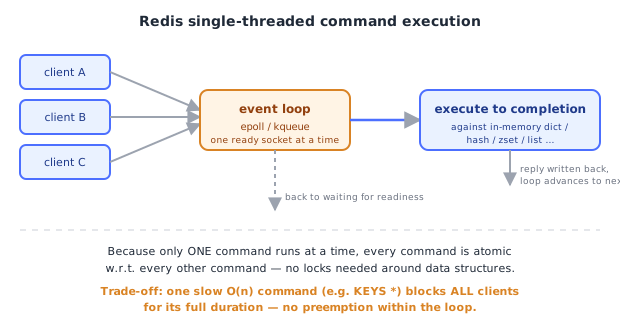
Redis's core command execution is single-threaded, and it's a deliberate design choice, not a limitation the project hasn't gotten around to fixing. A single reactor thread runs an event loop (built on epoll/kqueue, similar in spirit to how Node's libuv event loop multiplexes I/O — see backend/node/02-event_loop_libuv/) that:
- Waits for readiness on client sockets.
- Reads a command off a ready socket.
- Executes it synchronously, to completion, against the in-memory data structures.
- Writes the reply back.
- Moves to the next ready socket.
Because only one command ever executes at a time, every command is inherently atomic with respect to every other command — there's no possibility of two INCRs interleaving, no locks needed around the hash table, no torn reads on a HGETALL. This is the single biggest reason Redis's data-structure operations (transactions included) are safe by default without any explicit locking in application code.
The trade-off: a single slow command (an O(n) command like KEYS * or a huge SORT on a million-element list) blocks every other client for its entire duration, since there's no preemption within the event loop. This is why Redis documentation consistently warns against KEYS in production (use SCAN, which is cursor-based and does bounded work per call) and why commands with a data-size-dependent cost are flagged in the docs.
Since Redis 6, background threads exist for auxiliary work — I/O reading, and for UNLINK/lazy-freeing large deleted keys — but command execution itself remains single-threaded. This is a narrower use of extra threads than Memcached's fully multi-threaded model (see 02-memcached/cache_memcached_theory.md and the head-to-head in 03-redis_vs_memcached/).
Why it's fast: everything lives in RAM
Every key and value Redis serves a read for is already resident in process memory — there is no disk seek, no page cache miss, no filesystem call on the read path at all. Combined with data structures chosen specifically for their algorithmic complexity (hash table for the keyspace itself: O(1) average; skip list backing sorted sets: O(log n) insert/range; intrusive linked lists for the List type: O(1) push/pop at either end), the result is that almost every Redis operation completes in microseconds, bounded by CPU cache and memory bus speed rather than I/O latency.
This is also Redis's fundamental limitation: the dataset must fit in RAM (modulo Redis's own on-disk overflow features, which are exceptions, not the default mode), which is why capacity planning for Redis is a memory-sizing exercise, and why TTL-based eviction (see 07-ttl/) matters so much in practice — an unbounded cache is an unbounded RAM bill.
Persistence: RDB snapshots vs. AOF
An in-memory store needs an explicit strategy for surviving a restart or crash, since RAM is volatile. Redis offers two real, independently-configurable mechanisms:
RDB (Redis Database file) — point-in-time binary snapshots of the entire dataset.
redis-cli BGSAVE   # forks a child process; child writes a compact binary snapshot to disk
# the parent process keeps serving requests uninterrupted (copy-on-write pages)- Fast to load on restart (raw binary deserialization).
- Compact on disk.
- Data loss window: anything written between the last successful snapshot and a crash is gone. If you snapshot every 5 minutes and crash at minute 4:59, you lose ~5 minutes of writes.
AOF (Append-Only File) — logs every write command as it happens, in order.
# conceptually, the AOF file accumulates entries like:
SET user:1:name "Ana"
INCR pageviews
HSET user:1 age 30- Replaying the AOF from an empty database reconstructs exact state, command by command.
- Configurable
fsyncpolicy trades durability for throughput:appendfsync always(fsync every write — safest, slowest),everysec(fsync once per second — the common default compromise, up to ~1 second of loss),no(let the OS decide when to flush — fastest, largest loss window). - The file grows unboundedly with write volume; Redis periodically runs AOF rewrite (
BGREWRITEAOF) — forking a child process that writes a fresh, compact AOF reflecting only current state (functionally similar to how an RDB snapshot is produced), then atomically swaps it in. - Slower to replay on restart than loading an RDB (must re-execute every logged command), and the file is larger on disk.
The real trade-off, stated precisely: RDB minimizes restart time and disk footprint at the cost of a coarser data-loss window; AOF minimizes the data-loss window (down to sub-second with everysec) at the cost of restart time and disk space. Production Redis commonly runs both together — RDB for fast full backups/restores, AOF for tight durability — which is why redis.conf exposes both save (RDB) and appendonly yes (AOF) as independent settings rather than an either/or choice.
Eviction under memory pressure
When maxmemory is set and the limit is reached, Redis needs a policy for which keys to evict to make room for new writes — configured via maxmemory-policy (noeviction, allkeys-lru, volatile-lru, allkeys-lfu, volatile-ttl, etc.). This connects directly to TTL semantics (07-ttl/) and to eviction strategy comparisons in 04-caching_strategies/.
⚠️ Common Pitfalls
- Using
KEYS *in production — it's an O(n) full-keyspace scan that blocks the single event-loop thread for its entire duration; useSCAN(cursor-based, bounded work per call) instead. - Treating Redis as durable-by-default — with no persistence configured, an unclean restart loses everything; with only RDB, you accept a data-loss window; know which mode you're actually running.
- Storing everything as a giant JSON string in a plain key instead of using Hash/Set/ZSet types — forces read-modify-write-serialize round trips client-side for single-field updates, defeating the atomicity and efficiency the richer types provide.
- Assuming
MULTI/EXECbehaves like an SQL transaction — there's no rollback on a runtime error inside the block, and no automatic conflict detection without explicitWATCH. - Letting Pub/Sub carry data that must not be lost — a subscriber that's briefly disconnected simply misses those messages forever; use Streams for anything requiring replay/durability.
- Ignoring
maxmemory-policy— leaving it atnoevictionon a memory-constrained cache means writes start failing outright once RAM fills, rather than gracefully evicting old entries.
📋 Quick Reference
Strings:    SET k v [EX seconds]   GET k   INCR k   SETNX k v
Hashes:     HSET k f v   HGET k f   HGETALL k   HINCRBY k f n
Lists:      LPUSH/RPUSH k v   LRANGE k 0 -1   LPOP k
Sets:       SADD k m   SISMEMBER k m   SINTER k1 k2
Sorted Sets: ZADD k score m   ZRANGE k 0 -1 WITHSCORES   ZINCRBY k n m
Transactions: MULTI ... EXEC   (optionally WATCH key first)
Pub/Sub:    SUBSCRIBE ch   PUBLISH ch msg   (fire-and-forget, no durability)
Persistence: RDB = periodic binary snapshot (BGSAVE), fast restart, coarser loss window
             AOF = append-only write log, tight durability, slower restart
Architecture: single-threaded event loop -> commands are atomic, one slow command blocks all
🧠 Key takeaways
- Redis serves data structures from memory, typically sub-millisecond, with a single-threaded command loop.
- Pick the structure for the job: strings/counters, hashes, lists, sets, sorted sets, streams.
- Use TTLs, MULTI/EXEC or Lua for atomic multi-step operations; pub/sub is fire-and-forget (use Streams for durability).
- Avoid O(N) commands (KEYS, huge HGETALL); configure persistence (RDB/AOF) and maxmemory/eviction deliberately.
🎤 Interview Q&A
Q1Why is Redis so fast?core▾
Data lives in memory, operations work on efficient data structures, and command execution is single-threaded (no locks), with I/O multiplexing (epoll). Recent versions use extra threads for network I/O.
- Is single-threaded a limitation? One slow command (KEYS, large SORT) blocks all clients.
Q2Which Redis data structures do you use and for what?core▾
Strings (cache values, counters), hashes (objects), lists (queues), sets (unique members, tags), sorted sets (leaderboards, rate limiting, delayed jobs), streams (event logs with consumer groups), plus bitmaps, HyperLogLog (approximate unique counts) and geospatial indexes.
- Leaderboard implementation? Sorted set with
ZADDandZREVRANGE.
Q3How does Redis persist data?core▾
RDB snapshots periodically (compact, fast restarts, may lose minutes of data) and AOF append-only log of writes (fsync every second by default, larger, more durable). Many setups use both, or none for pure caches.
- What does fsync everysec mean for data loss? Up to about one second of writes can be lost on a crash.
Q4How do you scale Redis and keep it available?senior▾
Replication with Sentinel for automatic failover; Redis Cluster shards keys across nodes using 16,384 hash slots. Multi-key operations work only when keys are in the same slot (use hash tags like {user:1}).
- Is replication synchronous? No, asynchronous, so a failover can lose recent writes.
Q5How would you implement a distributed lock with Redis, and what are the caveats?core▾
SET lock:key <token> NX PX 30000 to acquire with expiry; release only if the token matches (Lua script). Caveats: a paused process can lose the lock after expiry while still working; use fencing tokens for correctness-critical cases, or a consensus system like etcd/ZooKeeper.
- What's Redlock? A multi-node lock algorithm whose safety under clock and pause issues is debated.
🛠️ Practice exercises
Each exercise is a file in this topic folder. Code exercises are self-checking: run them and make the checks pass.
✅ Check yourself
Answer the questions — feedback is instant.