N+1 Query Problem
One query for a list, then one more per item: 21 queries for 20 posts. See how N+1 hides behind ORM lazy loading, and fix it with a JOIN, an IN batch, or DataLoader-style batching.
🎯 What you'll learn
- The shape of the N+1 bug
- Why ORMs make it easy to write
- Fixes: eager loading (JOIN) and IN batching
- DataLoader-style automatic batching
📚 Before you start
1The Shape of the Bug
04-query_optimization/ covered diagnosing a single slow query. This topic is about a different failure mode entirely: not one slow query, but far too many fast ones, usually hidden behind an innocent-looking loop over ORM objects.
// 1 query to get all posts
const posts = await db.query("SELECT id, title, author_id FROM posts LIMIT 20");

// then N more queries -- one PER post, to get that post's author
for (const post of posts) {
  const author = await db.query("SELECT name FROM users WHERE id = ?", [post.author_id]);
  console.log(`${post.title} by ${author.name}`);
}
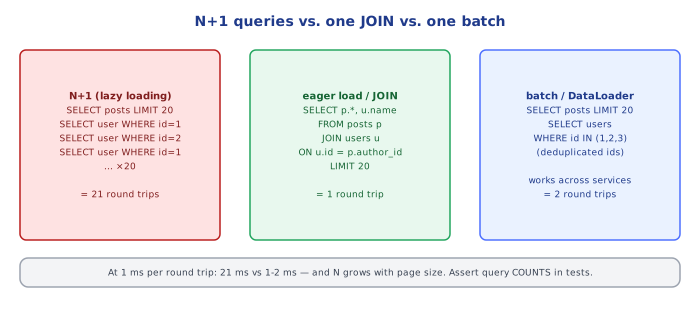
For 20 posts, this is 1 query for the post list, plus 20 more for their authors — 21 queries to render one page. This is the "N+1" in the name: 1 query for the parent collection, N queries for each child relation, where a single well-shaped query could have answered the whole thing.
2Why It's Easy to Write by Accident
This bug is almost never written deliberately — it hides behind ORM convenience. An ORM that lazily loads a related object the moment code accesses it (e.g. post.author.name) makes the N+1 shape invisible at the call site:
// looks like plain property access -- but each `.author` triggers a fresh query
// if the ORM is configured to lazily load relations
for (const post of posts) {
  console.log(`${post.title} by ${post.author.name}`);  // hidden query here!
}
The code reads as if author were already in memory. Nothing in the syntax signals "this line hits the database." This is exactly why N+1 bugs tend to survive code review and show up first in production, once the loop runs over hundreds of rows instead of the 3-row fixture used in local testing.
3The Fix: Eager Loading / a Single JOIN
// ONE query: JOIN authors in up front, instead of fetching them one at a time
const postsWithAuthors = await db.query(`
  SELECT posts.id, posts.title, users.name AS author_name
  FROM posts JOIN users ON posts.author_id = users.id
  LIMIT 20
`);
Most ORMs expose this as an explicit "eager load" / "include" option (e.g. .include("author"), populate: ["author"]) — the point is making the join/prefetch explicit at the call site, turning what was an invisible per-row cost into a single query decided once, up front.
4Batching: WHERE id IN (...) as a Middle Ground
Sometimes a full JOIN isn't the right shape (e.g. the child data comes from a different data source entirely, like a separate microservice or a different database). A batched load collects all the needed IDs first, then makes exactly one follow-up query for all of them:
const posts = await db.query("SELECT id, title, author_id FROM posts LIMIT 20");
const authorIds = [...new Set(posts.map(p => p.author_id))];

// ONE query for ALL authors needed, using their collected ids
const authors = await db.query("SELECT id, name FROM users WHERE id IN (?)", [authorIds]);
const authorById = new Map(authors.map(a => [a.id, a]));

for (const post of posts) {
  console.log(`${post.title} by ${authorById.get(post.author_id).name}`);
}
This goes from N+1 queries down to exactly 2, regardless of how many posts there are — and it works even when the parent and child data live in entirely different stores that can't be joined with SQL at all.
5DataLoader-Style Batching: Deferred, Automatic Collection
The pattern in section 4 requires manually collecting IDs before the loop. DataLoader (popularized by GraphQL resolvers, where N+1 is an especially common trap — see backend/api-design/12-graphql/ for the resolver-level version of this problem) automates that collection: instead of firing a query the instant .load(id) is called, it batches every .load() call made within the same event-loop tick into one combined request, transparently:
const userLoader = new DataLoader(async (ids: number[]) => {
  const users = await db.query("SELECT * FROM users WHERE id IN (?)", [ids]);
  const byId = new Map(users.map(u => [u.id, u]));
  return ids.map(id => byId.get(id));   // DataLoader requires results in the SAME order as ids
});

// each call LOOKS like a separate request, but DataLoader collects them
// into one batched query behind the scenes
for (const post of posts) {
  const author = await userLoader.load(post.author_id);
}
This preserves the ergonomic per-item .load(id) call site (no manual ID-collection loop needed) while still producing exactly one underlying query per batch — the batching happens transparently, deferred until the current synchronous tick finishes.
⚠️ Common Pitfalls
- Not noticing N+1 in local development — with 3 test rows, N+1 queries vs 1 query is invisible in wall-clock time; it only becomes a real problem at production scale, which is why query-count assertions (not just correctness assertions) matter in tests for list-rendering code paths.
- Fixing N+1 by removing the loop's abstraction entirely — e.g. writing one giant hand-rolled JOIN for every possible access pattern is overkill; batching (section 4) or DataLoader (section 5) fix the query count without sacrificing per-item code clarity.
- Batching without deduplicating IDs — if 20 posts share only 5 distinct authors,
WHERE id IN (...)should be called with 5 unique IDs, not 20 (with duplicates); forgettingnew Set(...)wastes nothing correctness-wise but does waste query payload size. - Assuming eager-loading everything is always better — a JOIN that pulls in a relation the page never actually uses wastes bandwidth on every request; eager-load the specific relations a given code path needs, not reflexively all of them.
📋 Quick Reference
N+1 = 1 query for a list + N queries (one per row) for each row's related data
Usually hidden behind lazy-loaded ORM property access (post.author.name)

Fix 1: eager load / JOIN up front       -> 1 query total
Fix 2: batch with WHERE id IN (...)      -> 2 queries total, works across data sources
Fix 3: DataLoader (deferred auto-batch)  -> keeps per-item .load(id) call sites, 1 query per batch

Detect it: count queries per request in tests/logging, not just correctness
🧠 Key takeaways
- N+1 = 1 list query + N per-item queries, often hidden by lazy-loading ORMs.
- Fix with eager loading / JOIN, or batch with
WHERE id IN (…). - DataLoader batches and caches per request automatically (GraphQL resolvers).
- Detect it with query logging/counters per request and tests that assert query counts.
🎤 Interview Q&A
Q1What is the N+1 query problem?core▾
Loading a list with 1 query and then running 1 extra query per item to fetch related data (e.g. each order's customer), resulting in N+1 round trips. It's usually caused by lazy loading in ORMs and gets dramatically slower as N grows.
- How do you spot it? Query logs or APM traces showing many identical queries with different IDs.
Q2How do you fix N+1 queries?core▾
Eager loading with a JOIN (Include in EF Core, select_related in Django), a second batched query with WHERE id IN (…) (prefetch_related, DataLoader), or a purpose-built query/view that returns exactly what the screen needs.
- JOIN vs batched IN query? JOIN for one-to-one; IN query for one-to-many to avoid row explosion.
Q3How does GraphQL make N+1 worse and how is it solved?core▾
Each resolver fetches its own data, so a list of 100 posts with authors triggers 100 author queries. DataLoader batches and caches loads within a request, turning them into one IN query.
- Why per-request caching? To avoid serving stale data across users while deduping within a request.
Q4Can eager loading cause problems too?senior▾
Yes: loading large object graphs you don't need, Cartesian explosion when including several collections in one JOIN, and huge result sets. EF Core's split queries or selecting projections (DTOs) help.
- What's a Cartesian explosion? Joining two collections multiplies rows: 10 items × 10 tags = 100 rows per parent.
Q5How do you prevent N+1 regressions?core▾
Tests asserting query counts for key endpoints, tools like Bullet (Rails), nplusone (Django), or EF Core logging warnings, plus APM alerts on queries per request.
- Is lazy loading always bad? No, but it should be a deliberate choice, not the default for lists.
🛠️ Practice exercises
Each exercise is a file in this topic folder. Code exercises are self-checking: run them and make the checks pass.
✅ Check yourself
Answer the questions — feedback is instant.