SQL Basics
SQL describes what you want, not how to get it. Practice the core: SELECT, joins, NULL logic, grouping, the logical evaluation order, CTEs, window functions and safe writes, with real query results.
🎯 What you'll learn
- Declarative SQL and the example schema
- SELECT, filtering, NULL three-valued logic
- Joins, GROUP BY/HAVING and logical evaluation order
- Subqueries, CTEs, window functions, and writes/upserts
1SQL Is Declarative, Not Imperative
Almost every language you've written describes how to get a result: loop here, branch there, accumulate into a variable. SQL describes what result you want, and the database's query planner decides how to produce it.
SELECT c.name, COUNT(o.id) AS order_count
FROM customers c
LEFT JOIN orders o ON o.customer_id = c.id
WHERE c.country = 'JP'
GROUP BY c.name
HAVING COUNT(o.id) > 3
ORDER BY order_count DESC
LIMIT 10;
Nothing in that statement says "scan the customers table," "use the index on country," or "build a hash table for the join." Those are plan decisions the engine makes, and it can make different ones tomorrow when the data grows. This is the single most important mental shift: you write intent, the planner writes the algorithm (covered in depth in databases/indexing-storage/04-query_optimization).
2The Schema Everything Below Runs Against
CREATE TABLE customers (
  id          BIGSERIAL PRIMARY KEY,
  name        TEXT        NOT NULL,
  email       TEXT        NOT NULL UNIQUE,
  country     CHAR(2)     NOT NULL,
  created_at  TIMESTAMPTZ NOT NULL DEFAULT now()
);

CREATE TABLE orders (
  id           BIGSERIAL PRIMARY KEY,
  customer_id  BIGINT      NOT NULL REFERENCES customers(id),
  status       TEXT        NOT NULL DEFAULT 'pending',
  total_cents  INTEGER     NOT NULL CHECK (total_cents >= 0),
  placed_at    TIMESTAMPTZ NOT NULL DEFAULT now()
);

CREATE TABLE order_items (
  order_id    BIGINT  NOT NULL REFERENCES orders(id) ON DELETE CASCADE,
  product_id  BIGINT  NOT NULL,
  quantity    INTEGER NOT NULL CHECK (quantity > 0),
  unit_cents  INTEGER NOT NULL,
  PRIMARY KEY (order_id, product_id)
);
Three things to notice. PRIMARY KEY is both an identity declaration and a uniqueness index the engine builds automatically. REFERENCES makes the engine reject an order whose customer_id doesn't exist — the database refuses to hold a broken graph. CHECK pushes a business rule into the storage layer, where no buggy application code can bypass it.
3SELECT: Projection and Filtering
-- Projection: choose columns
SELECT id, name, country FROM customers;

-- Filtering: choose rows
SELECT id, total_cents
FROM orders
WHERE status = 'shipped'
  AND total_cents > 5000
  AND placed_at >= now() - INTERVAL '30 days';

-- Set membership, ranges, pattern matching, NULL
SELECT * FROM orders WHERE status IN ('pending', 'paid');
SELECT * FROM orders WHERE total_cents BETWEEN 1000 AND 2000;   -- inclusive on both ends
SELECT * FROM customers WHERE email LIKE '%@example.com';
SELECT * FROM orders WHERE shipped_at IS NULL;                   -- NOT "= NULL"
SELECT * is fine at a psql prompt and a liability in application code: it breaks when a column is added, transfers columns you don't use, and prevents index-only scans (Section 8).
4NULL Is Not a Value — It's "Unknown"
This is where most SQL beginners produce silently wrong results.
SELECT NULL = NULL;        -- NULL, not true
SELECT NULL <> 5;          -- NULL, not true
SELECT 1 + NULL;           -- NULL
SELECT 'a' || NULL;        -- NULL
SQL uses three-valued logic: TRUE, FALSE, UNKNOWN. A WHERE clause keeps a row only when the predicate evaluates to TRUE — UNKNOWN is discarded exactly like FALSE.
-- If any row has status NULL, it appears in NEITHER of these results:
SELECT count(*) FROM orders WHERE status = 'pending';
SELECT count(*) FROM orders WHERE status <> 'pending';

-- Correct null handling:
SELECT * FROM orders WHERE status IS NULL;
SELECT * FROM orders WHERE status IS DISTINCT FROM 'pending';  -- NULL counts as "different"
SELECT coalesce(status, 'unknown') FROM orders;                -- first non-NULL argument
Aggregates skip NULLs, which produces a famous trap: COUNT(*) counts rows, COUNT(col) counts rows where col IS NOT NULL, and AVG(col) divides by the non-NULL count, not the row count.
5Joins
A join matches rows from two tables on a condition. The join type decides what happens to rows with no match.
-- INNER: only customers that have at least one order
SELECT c.name, o.id
FROM customers c
INNER JOIN orders o ON o.customer_id = c.id;

-- LEFT: every customer; NULL-filled order columns for those with none
SELECT c.name, o.id
FROM customers c
LEFT JOIN orders o ON o.customer_id = c.id;

-- "Customers who have never ordered" — the anti-join idiom
SELECT c.name
FROM customers c
LEFT JOIN orders o ON o.customer_id = c.id
WHERE o.id IS NULL;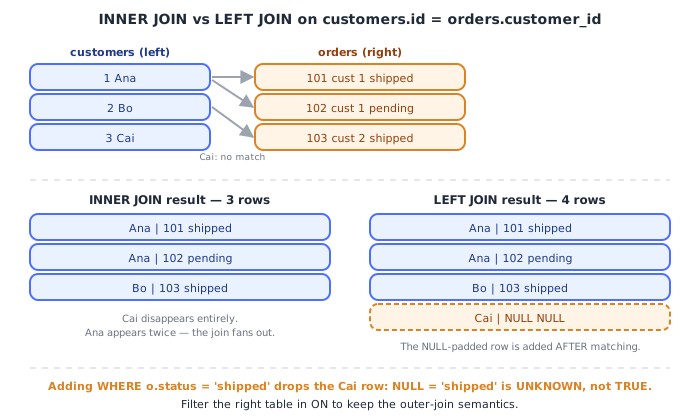
The most-repeated LEFT JOIN bug is moving a right-table predicate into WHERE:
-- BROKEN: silently becomes an INNER JOIN.
-- The NULL-filled rows have o.status = NULL, which is UNKNOWN, so WHERE drops them.
SELECT c.name, o.id
FROM customers c
LEFT JOIN orders o ON o.customer_id = c.id
WHERE o.status = 'shipped';

-- CORRECT: filter inside the ON clause, before the outer-join padding step.
SELECT c.name, o.id
FROM customers c
LEFT JOIN orders o ON o.customer_id = c.id AND o.status = 'shipped';6GROUP BY, Aggregates, and HAVING
SELECT
  c.country,
  count(*)                      AS order_count,
  sum(o.total_cents)            AS revenue_cents,
  round(avg(o.total_cents), 1)  AS avg_cents,
  max(o.placed_at)              AS last_order
FROM orders o
JOIN customers c ON c.id = o.customer_id
WHERE o.status <> 'cancelled'      -- filters INDIVIDUAL ROWS, before grouping
GROUP BY c.country
HAVING sum(o.total_cents) > 100000 -- filters GROUPS, after aggregation
ORDER BY revenue_cents DESC;
WHERE runs before rows are collapsed into groups, so it cannot reference an aggregate. HAVING runs after, so it can. Putting a cheap non-aggregate filter in HAVING still works but forces the engine to aggregate rows it will then throw away.
Every non-aggregated column in the SELECT list must appear in GROUP BY — otherwise the engine has N candidate values for one output row and no rule for choosing.
7The Logical Order of Evaluation
SQL is written in an order that does not match the order it is evaluated in. This one table explains a large fraction of beginner errors.
| Step | Clause | Why it matters |
|---|---|---|
| 1 | FROM / JOIN | rows are produced and matched first |
| 2 | WHERE | row-level filter — cannot see SELECT aliases or aggregates |
| 3 | GROUP BY | rows collapse into groups |
| 4 | HAVING | group-level filter — can see aggregates |
| 5 | SELECT | expressions computed, aliases created here |
| 6 | DISTINCT | duplicate output rows removed |
| 7 | ORDER BY | can see SELECT aliases, because step 5 already ran |
| 8 | LIMIT / OFFSET | rows discarded last |
SELECT total_cents / 100 AS dollars
FROM orders
WHERE dollars > 50      -- ERROR: "dollars" does not exist yet at step 2
ORDER BY dollars;       -- fine: step 7 runs after step 5
This is a logical order — a contract about meaning. The planner may physically execute it completely differently (pushing a filter below a join, streaming a sort out of an index) as long as the result matches.
8Subqueries and CTEs
-- Scalar subquery: must return exactly one row, one column
SELECT name, (SELECT count(*) FROM orders o WHERE o.customer_id = c.id) AS n
FROM customers c;

-- IN / EXISTS: EXISTS can stop at the first match and is NULL-safe
SELECT * FROM customers c
WHERE EXISTS (SELECT 1 FROM orders o WHERE o.customer_id = c.id AND o.total_cents > 10000);

-- CTE: names a subquery so the whole statement stays readable
WITH big_orders AS (
  SELECT customer_id, sum(total_cents) AS spend
  FROM orders
  WHERE status = 'shipped'
  GROUP BY customer_id
)
SELECT c.name, b.spend
FROM big_orders b
JOIN customers c ON c.id = b.customer_id
WHERE b.spend > 50000
ORDER BY b.spend DESC;
NOT IN with a subquery that can return NULL is a genuine landmine: x NOT IN (1, 2, NULL) is UNKNOWN for every x, so the query returns zero rows. NOT EXISTS has no such problem.
9Window Functions
An aggregate collapses rows. A window function computes across a set of rows and keeps every row.
SELECT
  id,
  customer_id,
  total_cents,
  sum(total_cents)  OVER (PARTITION BY customer_id)                      AS customer_lifetime,
  row_number()      OVER (PARTITION BY customer_id ORDER BY placed_at)   AS nth_order,
  lag(total_cents)  OVER (PARTITION BY customer_id ORDER BY placed_at)   AS previous_total
FROM orders;
PARTITION BY splits rows into independent windows; ORDER BY inside OVER defines the sequence used by ranking and offset functions. Window functions are evaluated after HAVING and before ORDER BY, which is why you cannot filter on one in WHERE — wrap it in a CTE and filter outside.
10Writes: INSERT, UPDATE, DELETE, UPSERT
INSERT INTO customers (name, email, country)
VALUES ('Ana Petrova', 'ana@example.com', 'BG')
RETURNING id, created_at;   -- get generated values back without a second round trip

UPDATE orders
SET status = 'shipped'
WHERE id = 42 AND status = 'paid';   -- guard clause makes the write idempotent

DELETE FROM orders WHERE placed_at < now() - INTERVAL '7 years';

-- UPSERT: insert, or update if the unique key already exists
INSERT INTO customers (name, email, country)
VALUES ('Ana P.', 'ana@example.com', 'BG')
ON CONFLICT (email) DO UPDATE SET name = EXCLUDED.name;
A bare UPDATE/DELETE with no WHERE clause modifies every row in the table. Run the WHERE as a SELECT first; wrap destructive work in an explicit transaction (databases/fundamentals/03-transactions_and_acid).
Under the HoodHow it works internally▾
The parse → plan → execute pipeline
Every statement you send travels the same road:
- Parse — text becomes an abstract syntax tree; syntax errors surface here.
- Analyze / bind — table and column names are resolved against the system catalog (in Postgres,
pg_class,pg_attribute) into internal OIDs, types are checked, views are expanded inline. - Rewrite — rule-based transformations: views substituted,
ANY (subquery)sometimes flattened into a semi-join. - Plan / optimize — the cost-based optimizer enumerates alternative physical plans (sequential scan vs index scan; nested-loop vs hash vs merge join) and estimates the cost of each using table statistics collected by
ANALYZE. - Execute — the chosen plan tree is run as a pipeline of operators, each pulling rows from its children.
EXPLAIN shows you step 4's output; EXPLAIN ANALYZE actually runs step 5 and prints estimated versus real row counts side by side.
EXPLAIN ANALYZE
SELECT * FROM orders WHERE customer_id = 42;

-- Index Scan using orders_customer_id_idx on orders
--   (cost=0.42..8.44 rows=3 width=48) (actual time=0.021..0.024 rows=3 loops=1)
--   Index Cond: (customer_id = 42)
--    ^estimate                          ^reality
When the estimated rows and the actual rows diverge by orders of magnitude, the planner was working from stale or missing statistics and almost certainly chose the wrong plan.
Rows live in fixed-size pages, and that fact leaks into SQL
Postgres stores table data in 8KB pages (BLCKSZ, fixed at compile time). A page holds a header, a line-pointer array, and the row tuples themselves packed from the end backwards. This is not trivia — it explains behavior you will observe:
SELECT *costs more thanSELECT id, nameeven with the same number of rows because whole pages are read into the buffer cache and wide columns mean fewer rows per page, so more pages to fetch. Selecting only indexed columns can allow an index-only scan, where the answer is read entirely from index pages and the table's heap pages are never touched at all.- Values wider than roughly a quarter of a page get pushed out of line into TOAST, a side table, compressed. A
TEXTcolumn holding 100KB of JSON is stored elsewhere and fetched only when that column is actually referenced — one more concrete reasonSELECT *is not free. OFFSET 100000 LIMIT 20is slow because the engine genuinely produces and discards 100,000 rows before returning yours. Keyset pagination (WHERE (placed_at, id) < (:last_ts, :last_id) ORDER BY placed_at DESC, id DESC LIMIT 20) seeks straight into the index instead and stays fast at any depth.
How the engine actually performs a join
JOIN is one keyword, but the executor has three very different algorithms, and the planner picks per query:
| Algorithm | How it works | Chosen when |
|---|---|---|
| Nested loop | for each outer row, probe the inner side (usually via index) | outer side is tiny, inner has a usable index |
| Hash join | build a hash table on the smaller side in memory, then stream the larger side through it | equality join, no useful index, one side fits in work_mem |
| Merge join | sort both sides, then walk them in lockstep like a merge sort | both inputs already sorted (e.g. by index order), or very large |
The hash join's build side is a real in-memory hash table — the same structure and the same collision handling described in languages/javascript/23-hashing_and_hash_tables. If the build side doesn't fit in work_mem, the engine spills to disk in batches and the join gets dramatically slower; that's why a hash join whose estimate was wrong by 100x hurts so much.
ORDER BY and GROUP BY may or may not sort
Neither clause forces a sort. If an index already delivers rows in the requested order, the planner can stream them and skip sorting entirely. For GROUP BY, the executor picks between HashAggregate (build a hash table keyed by the grouping columns — one pass, needs memory) and GroupAggregate (requires sorted input, streams with constant memory). Watch for Sort Method: external merge Disk: 84032kB in EXPLAIN ANALYZE: that's your sort spilling to disk because work_mem was too small.
⚠️ Common Pitfalls
- Filtering the right table of a LEFT JOIN in
WHERE— the NULL-padded rows fail the predicate under three-valued logic and get dropped, silently converting your outer join into an inner join. Put the condition inONinstead. - Using
= NULLor<> NULL— both evaluate toUNKNOWN, andWHEREkeeps onlyTRUE, so you get zero rows and no error. UseIS NULL/IS NOT NULL. NOT IN (subquery)where the subquery can yield NULL — a single NULL makes the predicateUNKNOWNfor every candidate row and the query returns nothing. UseNOT EXISTS, which compares row-existence rather than values.- Referencing a
SELECTalias inWHERE— aliases are created at step 5 of the logical order andWHEREis step 2, so the name genuinely does not exist yet. Repeat the expression, or wrap the query in a CTE. - Confusing
COUNT(*)withCOUNT(col)— the second one ignores NULLs, so the two disagree whenever the column is nullable, andAVGdivides by that same reduced count. - Applying a function to an indexed column in
WHERE—WHERE date(placed_at) = '2026-01-01'cannot use a plain index onplaced_at, because the index stores raw values, notdate()outputs. Rewrite as a range (>= '2026-01-01' AND < '2026-01-02') or build an expression index. SELECT *in application code — it breaks when someone adds a column, drags TOASTed values off disk you never read, and blocks index-only scans. Name your columns.- Deep
OFFSETpagination — the engine materializes and throws away every skipped row, so page 5,000 costs 5,000 pages' worth of work. Use keyset pagination. DISTINCTused to paper over a duplicating join — the duplicates mean your join condition is wrong (usually a fan-out through a one-to-many table).DISTINCThides the bug and forces an extra sort or hash pass.- Trusting
EXPLAINcost numbers as milliseconds — they are unitless, relative to an arbitrary "cost of one sequential page fetch." OnlyEXPLAIN ANALYZEgives real time, and only its estimated-vs-actual row counts tell you whether statistics are healthy.
📋 Quick Reference
-- Logical evaluation order (NOT the written order)
FROM/JOIN -> WHERE -> GROUP BY -> HAVING -> SELECT -> DISTINCT -> ORDER BY -> LIMIT

-- Three-valued logic
NULL = NULL      -> NULL (unknown)     |  use IS NULL / IS NOT NULL
x NOT IN (..NULL..) -> never TRUE      |  use NOT EXISTS
COUNT(*)  counts rows                  |  COUNT(col) skips NULLs

-- Joins
INNER  -> matched rows only
LEFT   -> all left rows, NULL-padded right   (filter the right side in ON, not WHERE)
anti-join idiom: LEFT JOIN ... WHERE right.id IS NULL

-- Filters
WHERE  -> rows, before grouping, no aggregates
HAVING -> groups, after aggregation, aggregates allowed

-- Window functions keep rows; aggregates collapse them
sum(x) OVER (PARTITION BY k ORDER BY t)

-- Inspecting
EXPLAIN          -> planner's chosen plan + cost estimates (unitless)
EXPLAIN ANALYZE  -> actually runs it; compare estimated rows vs actual rows
ANALYZE tbl      -> refresh statistics so the planner estimates correctly
🧠 Key takeaways
- SQL is declarative: the planner decides how to execute it.
- NULL is unknown: comparisons with = NULL are never true; use IS NULL.
- Know the logical order (FROM → WHERE → GROUP BY → HAVING → SELECT → ORDER BY → LIMIT) and join types.
- Use CTEs for readability, window functions for per-group rankings, and upserts (ON CONFLICT) for idempotent writes.
🎤 Interview Q&A
Q1Explain the different types of JOINs.core▾
INNER JOIN: rows matching in both tables. LEFT JOIN: all rows from the left, with NULLs where the right has no match. RIGHT JOIN: the mirror. FULL OUTER JOIN: all rows from both. CROSS JOIN: every combination. A self-join joins a table to itself (e.g. employee → manager).
- How do you find rows with no match? LEFT JOIN and filter
WHERE right.id IS NULL(an anti-join), orNOT EXISTS.
Q2What's the difference between WHERE and HAVING?core▾
WHERE filters rows before grouping; HAVING filters groups after GROUP BY and can use aggregates (HAVING COUNT(*) > 5). Logical order: FROM → WHERE → GROUP BY → HAVING → SELECT → ORDER BY → LIMIT.
- Why can't you use a SELECT alias in WHERE? WHERE is evaluated before SELECT.
Q3What are window functions? Give an example.core▾
Functions computed over a set of rows related to the current row without collapsing them: ROW_NUMBER(), RANK(), LAG(), running sums. Example, top order per customer: ROW_NUMBER() OVER (PARTITION BY customer_id ORDER BY total DESC) then filter = 1.
- RANK vs DENSE_RANK? RANK leaves gaps after ties (1,1,3); DENSE_RANK doesn't (1,1,2).
Q4How do you find the second-highest salary?core▾
SELECT MAX(salary) FROM emp WHERE salary < (SELECT MAX(salary) FROM emp); or with a window function: DENSE_RANK() OVER (ORDER BY salary DESC) and filter rank = 2, which generalizes to the Nth and handles ties.
- What if there's no second value? MAX returns NULL, which is usually the desired result.
Q5What's the difference between UNION and UNION ALL, and between IN and EXISTS?senior▾
UNION removes duplicates (requires sorting/hashing); UNION ALL keeps them and is faster. EXISTS stops at the first matching row and handles NULLs safely; NOT IN with a subquery containing NULL returns no rows, a classic bug.
- Prefer which for anti-joins?
NOT EXISTS.
🛠️ Practice exercises
Each exercise is a file in this topic folder. Code exercises are self-checking: run them and make the checks pass.
✅ Check yourself
Answer the questions — feedback is instant.
WHERE col = NULL returns…