Query Optimization
EXPLAIN tells you what the planner will do and EXPLAIN ANALYZE what it actually did. Read scans and joins, spot misestimated row counts, and fix classic anti-patterns like correlated subqueries, SELECT * and LIMIT without ORDER BY.
🎯 What you'll learn
- Reading EXPLAIN and EXPLAIN ANALYZE
- Seq scan vs index scan vs index-only scan; join algorithms
- Statistics and row estimates
- Anti-patterns: missing indexes, correlated subqueries, SELECT *, LIMIT without ORDER BY
📚 Before you start
1EXPLAIN: Ask the Planner What It's Going to Do
01-database_indexes/ and 02-b_tree/ covered how to build the right index. This topic is about verifying the engine actually uses it, and diagnosing when it doesn't. EXPLAIN shows the plan the query planner has chosen, without running the query:
EXPLAIN SELECT * FROM orders WHERE customer_id = 42;Seq Scan on orders (cost=0.00..1834.00 rows=12 width=64)
Filter: (customer_id = 42)EXPLAIN ANALYZE actually runs the query and reports real timing alongside the plan — essential when the planner's cost estimate and reality diverge:
EXPLAIN ANALYZE SELECT * FROM orders WHERE customer_id = 42;Seq Scan on orders (cost=0.00..1834.00 rows=12 width=64) (actual time=0.02..8.41 rows=11 loops=1)
Filter: (customer_id = 42)
Rows Removed by Filter: 49989
Planning Time: 0.08 ms
Execution Time: 8.44 ms2Sequential Scan vs. Index Scan vs. Index-Only Scan
CREATE INDEX idx_orders_customer ON orders (customer_id);
EXPLAIN ANALYZE SELECT * FROM orders WHERE customer_id = 42;Index Scan using idx_orders_customer on orders (cost=0.29..8.31 rows=12 width=64) (actual time=0.015..0.019 rows=11 loops=1)
Index Cond: (customer_id = 42)- Seq Scan: reads every row in the table, filtering as it goes — cost grows linearly with table size, regardless of how selective the filter is.
- Index Scan: uses an index (
01-database_indexes/) to find matching rows directly, then fetches each matching row from the table itself — one extra trip per match compared to reading straight off the index. - Index-Only Scan: the index alone contains every column the query needs (a covering index,
01-database_indexes/section 6), so the engine never touches the table at all.
3Join Algorithms, at a Conceptual Level
SELECT o.id, c.name FROM orders o JOIN customers c ON o.customer_id = c.id;The planner picks one of several strategies for combining two row sets, based on their estimated sizes and whether useful indexes exist:
- Nested Loop: for each row in the outer set, scan (or index-lookup into) the inner set. Cheap when one side is small, or when an index makes the inner lookup fast per row — expensive (quadratic) when both sides are large and unindexed.
- Hash Join: build an in-memory hash table from the smaller side, then scan the larger side probing that hash table. Good for large, unsorted inputs with no useful index — pays a memory cost to build the hash table.
- Merge Join: if both inputs are already sorted on the join key (or can be cheaply sorted), walk both in lockstep like a zipper. Good when both sides are pre-sorted (e.g. arriving from index scans on the join column) and large.
None of these is universally "best" — the planner picks based on estimated row counts and available indexes for the specific query at hand, which is exactly what the plan output tells you when you read it.
4Reading Cost Numbers
Seq Scan on orders  (cost=0.00..1834.00 rows=12 width=64)
                          ^       ^        ^        ^
                     startup   total   estimated  avg row
                      cost     cost    row count    size
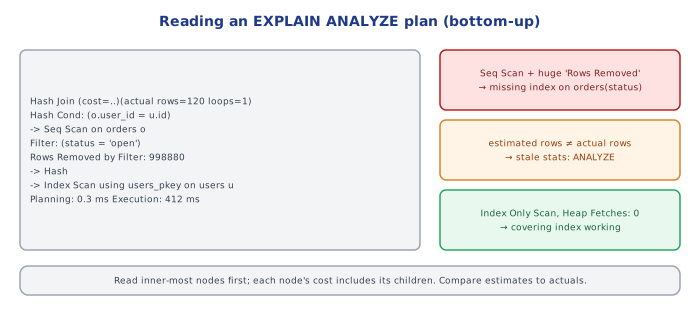
The two cost numbers are arbitrary planner units, not milliseconds — they're only meaningful for comparing candidate plans against each other, which is literally how the planner chooses: it estimates the cost of several possible plans for the same query and picks the cheapest one. startup cost is the estimated cost before the first row can be returned (near-zero for a sequential scan, higher for a plan that needs to sort or build a hash table first); total cost is the estimated cost to return every row.
📋 Quick Reference
EXPLAIN          -> shows the chosen plan, does NOT run the query
EXPLAIN ANALYZE   -> runs the query, shows plan + real timing + actual row counts

Seq Scan          -> reads the whole table, cost grows with table size
Index Scan         -> index finds matches, then fetches each row from the table
Index-Only Scan    -> answered entirely from a covering index, fastest

Nested Loop  -> good: one side small, or indexed inner lookup
Hash Join    -> good: large unsorted inputs, no useful index
Merge Join   -> good: both inputs already sorted on the join key

cost=X..Y -> arbitrary planner units for COMPARING plans, not real time
actual time=X..Y (from ANALYZE) -> real milliseconds, the ground truth1The Planner's Decisions Depend on Statistics, Not Magic
Part 1 covered reading a plan. This part covers why the planner picked what it picked, and the concrete moves that change its mind. Every cost estimate in EXPLAIN's output is derived from table statistics — row counts, distinct-value counts per column, and value-frequency histograms — that the engine maintains separately from the actual data, via ANALYZE:
ANALYZE orders; -- refresh statistics for the orders tableIf statistics are stale (a table grew 100x since the last ANALYZE, or its data distribution changed drastically), the planner's cost estimates can be badly wrong — leading it to choose a sequential scan when an index would clearly win, or the reverse. Most engines auto-run ANALYZE periodically (PostgreSQL's autovacuum daemon does this), but a bulk load or bulk delete can outpace that and warrants a manual ANALYZE immediately after.
2Diagnosing a Missing Index
EXPLAIN ANALYZE SELECT * FROM orders WHERE customer_id = 42;Seq Scan on orders (cost=0.00..1834.00 rows=12 width=64) (actual time=0.02..8.41 rows=11 loops=1)
Filter: (customer_id = 42)
Rows Removed by Filter: 49989Rows Removed by Filter: 49989 is the tell — the engine read 50,000 rows to find 11 matches. That's exactly the shape of query 01-database_indexes/ section 1 uses to motivate indexing in the first place. Adding CREATE INDEX idx_orders_customer ON orders (customer_id); and re-running would flip this to an Index Scan with a dramatically smaller cost, as shown in part 1 section 2.
3The Correlated Subquery Anti-Pattern
-- SLOW: runs the subquery once PER ROW of the outer query
SELECT c.name,
       (SELECT count(*) FROM orders o WHERE o.customer_id = c.id) AS order_count
FROM customers c;
A correlated subquery references a column from the outer query, which forces the engine to re-evaluate it once per outer row — for 10,000 customers, that's 10,000 separate subquery executions. Rewriting as a JOIN with GROUP BY lets the engine compute the aggregate in one pass:
-- FAST: one pass, one aggregation
SELECT c.name, count(o.id) AS order_count
FROM customers c
LEFT JOIN orders o ON o.customer_id = c.id
GROUP BY c.id, c.name;4SELECT * and Why It Costs More Than It Looks Like
SELECT * FROM orders WHERE customer_id = 42;          -- fetches every column
SELECT id, status FROM orders WHERE customer_id = 42;  -- fetches only what's needed
Beyond the obvious network/serialization cost of columns nobody uses, SELECT * also defeats index-only scans (part 1 section 2) — if a covering index exists for (customer_id) INCLUDE (status), only the narrower query can be answered from the index alone; SELECT * forces a trip back to the full table row no matter what indexes exist, because some selected column isn't in the index.
5LIMIT Without ORDER BY Is a Trap, Not an Optimization
SELECT * FROM orders WHERE status = 'pending' LIMIT 10; -- "fast" but arbitrary 10 rowsLIMIT alone can make a query look fast (fewer rows returned) without actually making the underlying scan cheaper — and worse, without ORDER BY, which 10 rows you get is unspecified and can change between runs. LIMIT only helps performance meaningfully when paired with an index that lets the engine stop scanning early (e.g. ORDER BY created_at DESC LIMIT 10 backed by an index on created_at, which can walk the index from one end and stop after 10 matches — see 02-b_tree/ section 4 on sorted leaf traversal).
⚠️ Common Pitfalls
- Tuning against stale statistics — always
ANALYZEafter a bulk load/delete before trusting a plan's cost estimates. - Adding an index and not verifying it's actually used —
EXPLAINafter every index change; the planner may still prefer a sequential scan if the table is small enough, or if the filter isn't selective enough to justify the index lookup overhead. - Optimizing a query that runs once a day while ignoring one that runs 10,000 times a minute — profile by total impact (frequency × cost), not by which single query looks slowest in isolation.
- Rewriting a correlated subquery into a JOIN without checking for row duplication — a naive
JOINcan multiply rows if the joined table has multiple matches per outer row;GROUP BY/aggregation (section 3) or aLEFT JOIN LATERALneeds to be chosen deliberately, not just "a JOIN instead of a subquery."
📋 Quick Reference
ANALYZE table  -> refresh planner statistics; run after bulk load/delete
Rows Removed by Filter: N  -> the sequential-scan smoking gun; add an index

Correlated subquery (references outer row) -> re-evaluated PER ROW -> rewrite as JOIN+GROUP BY
SELECT *  -> defeats index-only scans, ships unused columns -> select only needed columns
LIMIT without ORDER BY -> arbitrary rows, not a real optimization on its own

Diagnostic loop: EXPLAIN ANALYZE -> spot the expensive node -> fix (index / rewrite / ANALYZE)
                 -> EXPLAIN ANALYZE again -> confirm the plan actually changed
🧠 Key takeaways
- Use EXPLAIN (ANALYZE, BUFFERS) and compare estimated vs actual rows.
- Scans: sequential (whole table), index, index-only; joins: nested loop, hash, merge.
- The planner relies on statistics: run ANALYZE after bulk changes.
- Fix missing indexes, rewrite correlated subqueries as joins, select only needed columns, always ORDER BY with LIMIT.
🎤 Interview Q&A
Q1How do you approach a slow query?core▾
Reproduce it with real parameters, run EXPLAIN ANALYZE to see the plan and where time goes (sequential scans, misestimated row counts, sorts spilling to disk), check indexes and statistics, rewrite the query if needed, and measure again. Use slow query logs or pg_stat_statements to find the worst offenders first.
- What do misestimated rows indicate? Stale or insufficient statistics; run ANALYZE or add extended statistics.
Q2What does EXPLAIN show you?core▾
The execution plan: access methods (seq scan, index scan, index-only scan, bitmap scan), join algorithms (nested loop, hash join, merge join), estimated vs actual rows and timings (with ANALYZE), and buffers used.
- When is a nested loop bad? When the outer side returns many rows and the inner side lacks an index.
Q3Why is OFFSET pagination slow on large tables?core▾
OFFSET 100000 makes the database read and discard 100,000 rows. Keyset pagination (WHERE id > last_id ORDER BY id LIMIT 50) uses the index to jump straight to the next page.
- Downside of keyset? No jumping to arbitrary page numbers.
Q4What query anti-patterns do you look for?core▾
SELECT *, functions on indexed columns, N+1 queries, implicit type casts, OR across columns, missing LIMIT, unbounded IN lists, correlated subqueries that run per row, and fetching data only to filter in the application.
- Why avoid SELECT *? More I/O and network, prevents index-only scans, and breaks when columns change.
Q5How do you optimize queries at the system level, beyond indexes?senior▾
Connection pooling (PgBouncer), caching hot reads, read replicas, partitioning large tables, precomputing aggregates (materialized views), batching writes, and tuning memory settings (shared_buffers, work_mem).
- What's partition pruning? Skipping partitions that can't match the WHERE clause.
🛠️ Practice exercises
Each exercise is a file in this topic folder. Code exercises are self-checking: run them and make the checks pass.
✅ Check yourself
Answer the questions — feedback is instant.