Database Migrations
Schema changes are code: versioned, ordered, applied once, never edited. Learn up/down migrations and the applied-migrations table, then make changes safely on large live tables with expand/contract and concurrent indexes.
🎯 What you'll learn
- What migrations are: up/down and the applied-migrations table
- Why applied migrations are never edited
- Safe changes on live, populated tables
- Idempotency, reproducibility and why order matters
📚 Before you start
1What a Migration Is
A migration is a small, versioned script that changes the database schema by one increment — add a table, add a column, add an index, change a constraint. A sequence of migrations, applied in order, is how a schema evolves over the life of a project without anyone ever hand-editing a production database directly.
-- 0001_create_users.sql
CREATE TABLE users (
  id    SERIAL PRIMARY KEY,
  email TEXT NOT NULL UNIQUE
);-- 0002_add_users_display_name.sql
ALTER TABLE users ADD COLUMN display_name TEXT;Each file captures one deliberate, reviewable change. The schema at any point in time is fully defined by "which migrations have been applied, in order" — not by anyone's memory of what they last ran in a terminal.
2Up and Down
Most migration tools pair every migration with two directions: up (apply the change) and down (undo it).
-- 0002_add_users_display_name.up.sql
ALTER TABLE users ADD COLUMN display_name TEXT;

-- 0002_add_users_display_name.down.sql
ALTER TABLE users DROP COLUMN display_name;
up is run when moving the schema forward; down is run when rolling a specific migration back — typically during local development (undo a mistake before it ships) or an emergency rollback. down is not always achievable losslessly: dropping a column in down after up has been live for a while means genuinely discarding whatever data users put in that column, not just "undoing a change."
3The Applied-Migrations Table
Every migration tool needs to know, for a given database, which migrations have already run — otherwise 0001_create_users.sql would try to CREATE TABLE users a second time and fail. The mechanism is almost always the same: a small bookkeeping table the tool creates for itself.
CREATE TABLE schema_migrations (
  version     TEXT PRIMARY KEY,   -- e.g. '0002_add_users_display_name'
  applied_at  TIMESTAMPTZ NOT NULL DEFAULT now()
);
Running migrations is then a simple loop: list every migration file, list every row already in schema_migrations, and apply (in order) whichever files aren't yet represented by a row — inserting a row for each one as it succeeds. If a migration's UP script and its own insert into schema_migrations aren't wrapped in the same transaction, a crash mid-migration can leave the database changed but not recorded as applied (or vice versa), so a well-built tool always does both atomically.
BEGIN;
ALTER TABLE users ADD COLUMN display_name TEXT;
INSERT INTO schema_migrations (version) VALUES ('0002_add_users_display_name');
COMMIT;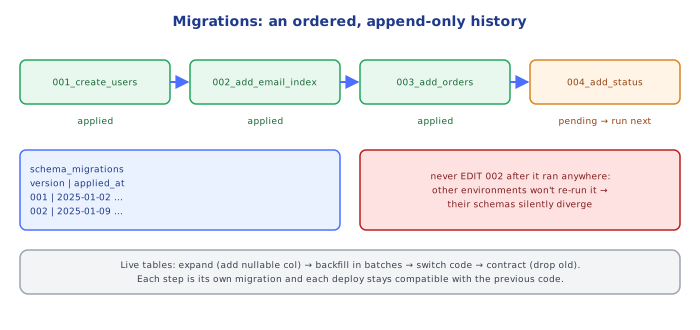
4Migrations Are Never Edited After They've Run Anywhere
Once a migration file has been applied to any shared environment (a teammate's machine, staging, production), it is never edited — not even to fix a typo. The bookkeeping table only records that 0002_... ran, not what SQL it contained; if the file's contents change after the fact, a fresh database applying it for the first time ends up with a different schema than one that applied the original version and never re-runs it. Mistakes are fixed by writing a new migration (0003_fix_display_name_typo.sql) that corrects the earlier one, exactly the way you'd never rewrite a past Git commit that's already been pushed and pulled by others — you write a new commit on top.
5Making a Migration Safe on a Live, Populated Table
A migration that reads perfectly on an empty dev database can lock or break a production table with real rows and real traffic. Three recurring cases:
Adding a NOT NULL column — can't just declare it not-null with no default against existing rows, since every existing row would violate it instantly:
-- BREAKS on a populated table: existing rows have no value for this column
ALTER TABLE users ADD COLUMN status TEXT NOT NULL;

-- SAFE: give existing rows a value via DEFAULT, or backfill explicitly first
ALTER TABLE users ADD COLUMN status TEXT NOT NULL DEFAULT 'active';
Renaming a column — a single ALTER TABLE ... RENAME COLUMN is instant at the schema level, but it's rarely actually safe on its own: any application code (old server instances still running during a rolling deploy, or a read replica lagging behind) that still references the old column name breaks the moment the rename lands. The safe version is a multi-step, multi-deploy process:
Deploy 1: ADD the new column; write to BOTH old and new columns from the app; backfill old rows into the new column.
Deploy 2: switch all reads to the new column (app code deploy only, no schema change).
Deploy 3: stop writing to the old column.
Deploy 4 (a later migration): DROP the old column, once nothing references it anymore.
Long table locks — some DDL statements (adding a column with a non-constant DEFAULT on older Postgres versions, adding an index without CONCURRENTLY, adding a constraint that must scan the whole table to validate) hold a lock that blocks reads and/or writes for as long as the operation takes, which on a large table can mean real, visible downtime:
-- Blocks writes to `users` for the full duration of the index build
CREATE INDEX idx_users_status ON users (status);

-- Builds the index without holding that lock (slower, but non-blocking)
CREATE INDEX CONCURRENTLY idx_users_status ON users (status);6Idempotency and Reproducibility
A migration script should be safe to think about as "this either fully ran, or never ran" for the database it targets — which is exactly what wrapping it in a transaction guarantees (Section 3). Idempotency at the file level matters differently: the migration tool's whole job is making sure each file runs exactly once per database, ever — so the script itself doesn't need IF NOT EXISTS defensiveness in normal operation. That said, many teams add IF NOT EXISTS/IF EXISTS guards anyway as a safety net for manual recovery scenarios (re-running a script by hand after a partial failure investigation), which is a reasonable belt-and-suspenders habit as long as it isn't relied on to replace the applied-migrations bookkeeping itself.
CREATE TABLE IF NOT EXISTS users (...); -- defensive habit, not a substitute for tracking what's appliedUnder the HoodWhy Order Is Load-Bearing▾
Migration filenames are almost always prefixed with a sortable identifier — a zero-padded sequence number (0001_, 0002_) or a timestamp (20250314120000_) — because the tool determines "pending migrations" by sorting filenames and comparing against what's in schema_migrations, not by reading file contents to infer dependency order. Two developers both branching off main and both creating "the next migration" can easily generate colliding sequence numbers or, worse, migrations whose actual dependency order (migration B assumes migration A's column already exists) doesn't match their filename order once merged — this is why some teams use timestamps instead of small sequential integers, since a timestamp collision across two people working at the literal same second is far less likely than two people picking the same next integer. Either way, the underlying invariant migration tooling depends on is the same: file order and application order must be identical, because a migration's UP script is written assuming every earlier migration (and only every earlier migration) has already run.
⚠️ Common Pitfalls
- Editing an already-applied migration file instead of writing a new one — a fresh database and an existing database silently diverge, since the bookkeeping table only knows "ran" vs. "didn't run," never "ran which exact version."
- Adding a
NOT NULLcolumn with noDEFAULTand no backfill — fails outright on any table with existing rows. - Running a schema change and its data backfill as separate, non-transactional steps — a crash between them can leave the schema changed but the data only half-migrated, with no automatic way to know which rows were touched.
- Renaming or dropping a column in one deploy that app code from the previous deploy still reads/writes — during a rolling deploy, old and new code run simultaneously against the same database; a same-deploy rename breaks the old instances until they finish rolling out.
- Running
CREATE INDEX(withoutCONCURRENTLY) or another table-locking operation on a large, live table during business hours — the lock duration scales with table size, and can visibly stall the application for real users. - Writing
downmigrations that quietly assume no data loss occurred inup— adownthat just drops a column added byupis only safe if nobody has written meaningful data into that column since; treat destructivedownscripts as a last resort, not a routine reversibility guarantee.
📋 Quick Reference
Migration      -> one versioned, incremental schema-change script
up / down      -> apply the change / attempt to undo it (down is not always lossless)
schema_migrations (or equivalent) -> bookkeeping table: which versions have run, and when
Applying N     -> BEGIN; run migration N's SQL; INSERT its version row; COMMIT — atomically

Golden rule: NEVER edit an already-applied migration -- write a new one to fix it.

Safe patterns for a live table:
  new NOT NULL column   -> add a DEFAULT, or backfill before enforcing NOT NULL
  rename a column        -> add new -> dual-write -> backfill -> switch reads -> drop old (multi-deploy)
  new index on big table -> CREATE INDEX CONCURRENTLY, not a plain CREATE INDEX
🧠 Key takeaways
- Migrations are versioned, ordered scripts recorded in a migrations table; every environment applies the same sequence.
- Never edit a migration that has run anywhere; add a new one.
- On big live tables use expand → backfill → contract, CREATE INDEX CONCURRENTLY, batched backfills and lock timeouts.
- Keep migrations backward compatible with the previous app version so deploys and rollbacks are safe.
🎤 Interview Q&A
Q1How do you run schema migrations safely?core▾
Version migrations in source control, run them automatically in CI/CD with a migration tool (Flyway, Liquibase, EF Core, Alembic, Prisma), make them backward compatible with the currently running code, test on production-like data, and have a rollback or roll-forward plan.
- Should migrations run at app startup? Better as a separate deploy step, so multiple instances don't race.
Q2What is the expand-and-contract (parallel change) pattern?core▾
To rename a column without downtime: expand (add the new column), deploy code that writes both and reads new with fallback, backfill old rows, switch reads to the new column, stop writing the old one, then contract (drop the old column) in a later release.
- Why so many steps? Old and new app versions run simultaneously during deploys, so every step must work with both.
Q3Which schema changes can lock tables in production?senior▾
Adding a column with a volatile default (in older versions), changing column types, adding NOT NULL constraints without validation, and creating indexes without CONCURRENTLY (Postgres) or online DDL (MySQL). Large tables can be locked for minutes.
- How do you add an index safely in Postgres?
CREATE INDEX CONCURRENTLY, outside a transaction.
Q4How do you backfill data in a large table?core▾
In small batches (e.g. 1,000–10,000 rows) with throttling, idempotent and resumable (track progress by primary key), off the hot path, monitoring replication lag and load.
- Why not one UPDATE? It locks many rows, bloats the WAL, and can stall replicas.
Q5How do you roll back a bad migration?core▾
Prefer roll forward with a new migration, because down migrations may lose data (dropped columns). Keep destructive steps (drops) in separate, later releases, and take backups/snapshots before risky migrations.
- Should every migration have a down script? Useful in development, but rarely trusted in production.
🛠️ Practice exercises
Each exercise is a file in this topic folder. Code exercises are self-checking: run them and make the checks pass.
✅ Check yourself
Answer the questions — feedback is instant.