JSON in SQL and NoSQL
Documents are great when data is read together and varies in shape. PostgreSQL's JSONB gives you documents inside a relational database. Query and index JSONB, and learn where the line between columns and JSON should be.
🎯 What you'll learn
- When embedding is the right model
- JSONB as a middle ground
- Querying and updating JSONB
- GIN indexes and the junk-drawer anti-pattern
📚 Before you start
1The Embedding Instinct, and When It's Actually Right
03-relationships/ (section 2) noted that a relational "one department has many employees" is answered by a query, never a stored list — the relational model's default is to normalize and join. A document store's default is the opposite: embed the related data directly inside the parent document, because the unit of atomicity and the unit of retrieval are both "the whole document."
// Document-store instinct: embed the order's line items directly
{
  "_id": "order_123",
  "customer_id": "cust_9",
  "items": [
    { "product_id": "p_1", "name": "Widget", "qty": 2, "price": 9.99 },
    { "product_id": "p_2", "name": "Gadget", "qty": 1, "price": 24.99 }
  ],
  "status": "shipped"
}
Embedding is the right call when the embedded data is always read together with its parent, never queried independently, and doesn't need to be updated by anything outside that one document write — an order's line items fit this well; they're only ever meaningful in the context of that specific order, and the whole order is usually fetched as one unit. Embedding is the wrong call when the "embedded" thing is actually its own entity with its own lifecycle — a product referenced inside every order line item should stay a reference (product_id), not a full copy, because the product's name and price change independently of any order that once referenced it, and copying it into every order document means every order line becomes a stale snapshot the moment the product changes (which is sometimes exactly what's wanted — an order's line items should freeze the price at purchase time — and sometimes a real bug, when the intent was "always show the current name").
2PostgreSQL's Middle Ground: JSONB Columns
A relational database doesn't force an all-or-nothing choice — a single column can hold a JSON document while the rest of the table stays fully relational:
CREATE TABLE product (
  id         BIGINT GENERATED ALWAYS AS IDENTITY PRIMARY KEY,
  name       TEXT NOT NULL,
  price      NUMERIC(10, 2) NOT NULL,
  attributes JSONB NOT NULL DEFAULT '{}'   -- flexible, schema-less catch-all
);

INSERT INTO product (name, price, attributes) VALUES
  ('T-Shirt', 19.99, '{"color": "blue", "size": "M", "material": "cotton"}'),
  ('Laptop',  999.00, '{"ram_gb": 16, "cpu": "M3", "ports": ["usb-c", "hdmi"]}');
name and price stay structured columns with real constraints (03/04's NOT NULL, CHECK, indexes) — every product has them, in a predictable shape. attributes holds whatever variable, product-category-specific fields exist ("ram_gb" for laptops, "material" for shirts) without needing a sparse table of thirty mostly-null columns, or a separate product_attribute(product_id, key, value) EAV table that turns every attribute lookup into a join. This hybrid — structured columns for what's universal and queried constantly, JSONB for what's variable and queried occasionally — is the pattern real schemas reach for, not a pure "JSON everywhere" or "JSON nowhere" choice.
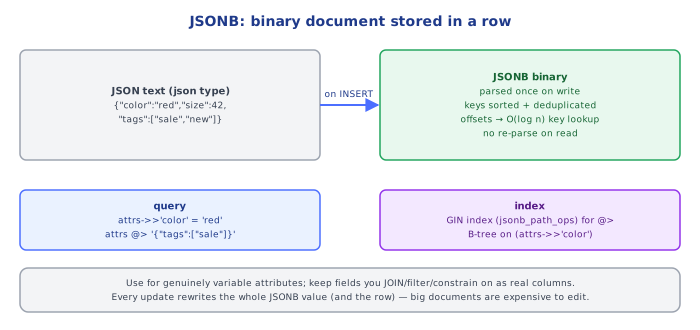
JSONB (as opposed to plain JSON) stores the value in a decomposed binary format rather than as text — it's slightly slower to write (the engine parses and reformats on insert) but meaningfully faster to query and index, because it doesn't need to re-parse the raw text on every access. There is essentially no reason to choose plain JSON over JSONB in PostgreSQL unless preserving exact key order or whitespace in the original text genuinely matters.
3Querying Into JSONB
-- -> returns a JSONB value (for further chaining); ->> returns TEXT
SELECT name, attributes -> 'color' AS color_json, attributes ->> 'color' AS color_text
FROM product WHERE attributes ->> 'color' = 'blue';

-- #> / #>> reach into a nested path
SELECT attributes #>> '{ports,0}' AS first_port FROM product WHERE name = 'Laptop';

-- @> containment: "does attributes contain this fragment?"
SELECT name FROM product WHERE attributes @> '{"material": "cotton"}';

-- ? key-existence: "does this top-level key exist at all?"
SELECT name FROM product WHERE attributes ? 'ram_gb';
->> (double arrow) is what's used to actually compare a value in a WHERE clause or select it as ordinary text, since -> alone returns a JSONB value (still quoted, still typed as JSON) rather than a plain string. @> (containment) is the operator that scales — it's the one that gets index support (section 4) — while chains of ->> comparisons on multiple keys generally don't.
4Updating JSONB and Indexing It
-- jsonb_set replaces a value at a path without touching the rest of the document
UPDATE product SET attributes = jsonb_set(attributes, '{color}', '"red"')
WHERE name = 'T-Shirt';

-- || merges/overwrites top-level keys from the right-hand document into the left
UPDATE product SET attributes = attributes || '{"on_sale": true}'
WHERE name = 'Laptop';

-- a GIN index makes @> containment queries fast, same complexity class as a
-- B-tree lookup on a normal column, instead of a full-table JSON scan
CREATE INDEX idx_product_attributes ON product USING GIN (attributes);
Without the GIN index, attributes @> '{"material": "cotton"}' has to deserialize and inspect every row's JSONB value — a full scan. With it, containment queries go through the index exactly like an equality lookup on a normal indexed column would, which is what makes JSONB viable for "flexible schema, but still fast to filter on" rather than just "flexible schema, full scan every time."
Under the HoodHow it works internally▾
JSONB's binary format is why containment queries can be indexed at all
Plain JSON in PostgreSQL is stored as the original input text, verbatim — querying it means re-parsing that text on every single access, and there's no meaningful way to build a general-purpose index over "arbitrary paths inside a text blob." JSONB instead decomposes the document at write time into a binary tree structure with a sorted key layout, discarding exact original formatting (whitespace, key order, duplicate keys) in exchange for a structure the GIN index type can actually build entries from — one entry per key and per key-value pair, roughly, which is what lets @> containment resolve through the index instead of a scan. This is the concrete mechanical reason the two types aren't just a formatting preference: one is queryable-at-scale, the other effectively isn't.
Schema flexibility trades away exactly what constraints give you
Every constraint mechanism from 04-primary_foreign_keys_constraints/ — NOT NULL, CHECK, a foreign key's referential guarantee — applies to a column, not to keys living inside a JSONB blob. A CHECK constraint can inspect a JSONB column's contents (CHECK (attributes ? 'sku')), but this is far weaker than a real structured constraint: it can't express "this JSONB key, if present, must be an integer greater than zero" without a more elaborate expression, and it's opt-in per table rather than a structural guarantee the way a NOT NULL column is. This is the actual cost of schema flexibility — not performance (a well-indexed JSONB column is fast), but that malformed or inconsistent documents are caught later, if at all, rather than rejected at write time.
Why a document database's "the document IS the transaction boundary" matters here
The reason embedding order line items (section 1) is safe is that a single-document write in a document store (and a single-row UPDATE of a JSONB column in Postgres) is atomic by construction — there's no way to observe a half-written document. The moment related data needs to be updated independently of its parent — a product's price changing without touching every order that ever referenced it — that atomicity boundary is exactly wrong for the data, which is the real, mechanical reason "this entity has its own update lifecycle" is the deciding signal for embed-vs-reference, not a stylistic preference.
⚠️ Common Pitfalls
- Embedding an entity that has its own independent lifecycle — copying a product's current name/price into every order line item means every past order silently goes stale (or is deliberately frozen — know which one is intended) the moment the product changes; a reference avoids the ambiguity for data that should always reflect current state.
- Reaching for a JSONB "attributes" column to avoid ever adding a real column — fields that are universal, queried constantly, or need real constraints (foreign keys,
CHECK,NOT NULL) belong as structured columns; JSONB is for what's genuinely variable per row, not a way to skip schema design. - Using
->where->>is needed — comparing a->-extracted JSONB value to a plain string with=frequently fails to match due to type/quoting mismatch;->>(text) is what mostWHEREcomparisons need. - Filtering on a JSONB column with no
GINindex and expecting index-speed lookups — without the index, every containment or key-existence query is a full scan; add the index the moment JSONB filtering shows up in a hot query path. - Assuming
CHECKon a JSONB column gives the same guarantees as normal column constraints — it's an opt-in expression per constraint, not a structural schema the way typed, constrained columns are; don't rely on it as the primary source of data integrity for anything load-bearing.
📋 Quick Reference
Embed when: always read together, never queried independently, one atomic write unit
Reference when: the "embedded" thing has its own lifecycle, is queried/updated independently

JSONB column: schema-flexible field inside an otherwise structured relational table
  -> extract as JSONB (for chaining)      ->> extract as TEXT (for comparisons)
  #> / #>>  path extraction (nested)      @>  containment ("does it include this fragment?")
  ?   top-level key existence             ||  merge/overwrite top-level keys
  jsonb_set(col, '{path}', new_value)     update one path without touching the rest

CREATE INDEX ... USING GIN (jsonb_col)    makes @> containment queries index-speed, not full-scan

JSON  = stored as raw text, re-parsed every access, not generally indexable
JSONB = decomposed binary format at write time, indexable via GIN — default choice almost always
🧠 Key takeaways
- Embed when data is owned by and read with its parent and varies in shape.
- JSONB stores parsed binary JSON with operators (
->,->>,@>, jsonb_path). - Index with GIN (or expression indexes on specific keys).
- Keep core, constrained, frequently filtered fields as real columns; don't use JSON as a junk drawer.
🎤 Interview Q&A
Q1When is storing JSON in a relational database a good idea?core▾
For semi-structured or variable attributes (product specs, user settings, event payloads), data read and written as a whole, or rapidly evolving fields, alongside normal columns for core, frequently queried fields.
- When is it a bad idea? For fields you join on, constrain or update individually and often.
Q2JSON vs JSONB in Postgres?core▾
json stores text as-is (preserves formatting and key order, re-parsed on every access). jsonb stores a parsed binary form: slightly slower writes, much faster queries, supports GIN indexes and containment operators (@>). Use jsonb almost always.
- How do you index a JSONB field? GIN index on the column, or an expression index on a specific path.
Q3How do you query and index JSON efficiently?senior▾
Use operators (->, ->>, @>, jsonb_path_query), add expression indexes for frequently filtered keys (CREATE INDEX ON orders ((data->>'status'))), or promote hot keys to generated columns.
- What's a generated column? A column computed from other columns, e.g. extracted from JSON, which can be indexed normally.
Q4What are the risks of putting too much in JSON columns?core▾
No schema enforcement (inconsistent shapes), weaker type checking, harder migrations, larger rows and updates that rewrite the whole document, and poorer query planner statistics.
- How do you enforce structure? CHECK constraints with
jsonb_typeof/JSON Schema extensions, or validation in the app.
Q5How does a document database differ from JSON columns in SQL?core▾
Document databases are built around documents: indexing on any field, partial updates of nested fields, sharding by document key, and schema validation options. SQL JSON columns give flexibility inside a relational model with transactions and joins to normal tables.
- Which would you choose? SQL + JSONB when most data is relational; a document DB when nearly everything is document-shaped.
🛠️ Practice exercises
Each exercise is a file in this topic folder. Code exercises are self-checking: run them and make the checks pass.
✅ Check yourself
Answer the questions — feedback is instant.
attrs->>'color' returns…-> returns JSON.attrs @> '{…}'?