ElastiCache
ElastiCache runs managed Redis/Valkey and Memcached. Choose deployment modes and endpoints, size memory and eviction, watch the metrics that matter, and follow an automatic failover.
🎯 What you'll learn
- Redis/Valkey vs Memcached on ElastiCache
- Cluster mode, replicas, Serverless and endpoints
- Sizing, eviction policies and key metrics
- Cache patterns and failover behaviour
📚 Before you start
1What It Is
Amazon ElastiCache runs managed in-memory data stores: Valkey (the open-source Redis fork, now AWS's default), Redis OSS, and Memcached (databases/caching/01-redis, 02-memcached, 03-redis_vs_memcached). AWS handles provisioning, patching, replication, failover, backups and monitoring. MemoryDB is the related service when you need Redis-compatible storage as a durable primary database (multi-AZ transaction log).
Typical uses: caching DB query results and rendered fragments (databases/caching/04-… to 08-…), sessions, rate limiting counters, leaderboards (sorted sets), pub/sub, distributed locks (with care), queues for small jobs.
2Deployment Options
| Option | Shape | Notes |
|---|---|---|
| Serverless | no nodes to size; scales memory and throughput automatically | pay per GB-hour stored + ECPUs; quickest start, spiky workloads |
| Node-based, cluster mode disabled | 1 primary + up to 5 replicas, one shard | simplest; vertical scaling; all keys on one primary |
| Node-based, cluster mode enabled | up to 500 shards, each primary + replicas; keys distributed by hash slot | horizontal scaling of memory and writes (databases/caching/08-distributed_caching) |
| Memcached | multiple independent nodes, client-side sharding | no replication/persistence; multithreaded; pure cache |
Production Redis/Valkey: Multi-AZ with automatic failover, at least one replica in another AZ, encryption in transit (TLS) and at rest, AUTH / RBAC users (IAM authentication supported), placed in private subnets with a security group allowing only app security groups on port 6379.
3Endpoints
- Primary endpoint (cluster mode disabled): always points at the current primary — use for writes; DNS flips on failover.
- Reader endpoint: load-balances across replicas — use for read scaling (replication is asynchronous; reads may be slightly stale).
- Configuration endpoint (cluster mode enabled): cluster-aware clients discover the slot map and talk to the right shard (
MOVED/ASKredirects).
Clients must handle failover: reconnect with backoff, short connect timeouts, and (for cluster mode) refresh topology.
4Sizing and Eviction
- Size memory for the working set + overhead (~25% for fragmentation/replication buffers; keep
DatabaseMemoryUsagePercentageunder ~75–80%). - Set
maxmemory-policyin the parameter group:allkeys-lru(orallkeys-lfu) for caches;volatile-*ornoevictionwhen Redis holds data that must not silently disappear. - Reserved memory for background saves/replication (
reserved-memory-percent). - Graviton node types (
cache.r7g,cache.m7g) for price/performance; data tiering (r6gd) moves cold data to SSD for large datasets.
5Key Metrics to Watch
| Metric | Why |
|---|---|
CPUUtilization / EngineCPUUtilization | Redis executes commands on one main thread — engine CPU > ~80% means saturation |
DatabaseMemoryUsagePercentage, Evictions | evictions with a low hit ratio = undersized cache |
CacheHitRate (hits / (hits+misses)) | cache effectiveness |
CurrConnections, NewConnections | connection storms (Lambda!) |
ReplicationLag | stale reads from replicas |
NetworkBandwidthOutAllowanceExceeded | instance network limits (hot keys, big values) |
6Patterns and Pitfalls on AWS
- Lambda + Redis: many concurrent environments × connections — reuse the client outside the handler, keep connection counts in mind, or use ElastiCache Serverless.
- Hot keys and big keys: one shard melts — split values, add local L1 caching, use read replicas.
KEYS *, bigSMEMBERS, long Lua scripts block the single thread → latency spikes for everyone; useSCANand bounded operations.- Cache stampede after failover or flush: jittered TTLs, single-flight, warm-up (
databases/caching/07-ttl). - Global Datastore: cross-region replication (one primary region, read replicas elsewhere, promotable for DR).
Under the HoodWhat Happens During a Failover▾
In a Multi-AZ Redis/Valkey replication group, ElastiCache monitors the primary node. When it detects a failure (node or AZ), it promotes the replica with the least replication lag to primary, updates the primary endpoint's DNS record to point to the new node (typically within ~30–60 s total), and replaces the failed node, which rejoins as a replica. Because replication is asynchronous, writes acknowledged by the old primary but not yet streamed to the replica are lost — acceptable for a cache, worth knowing for sessions or counters. Clients holding TCP connections to the old primary get errors or timeouts; well-configured clients reconnect, re-resolve DNS (respect the low TTL), and retry. In cluster mode, each shard fails over independently and clients refresh their slot map when they receive MOVED or connection errors.
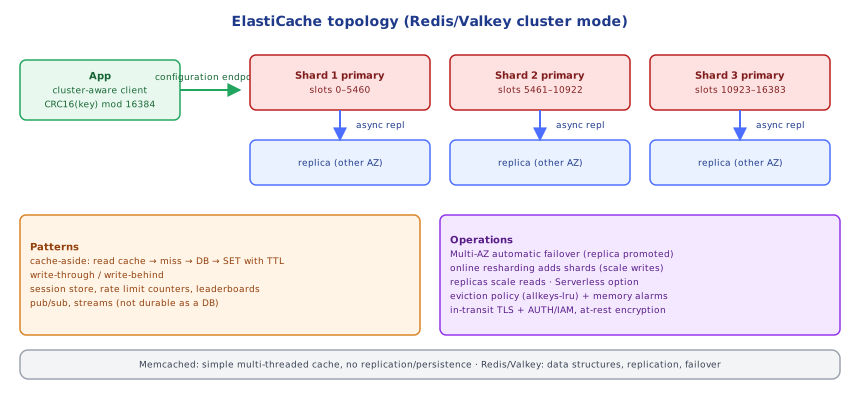
📋 Quick Reference
Valkey/Redis: serverless or node-based (cluster mode off: 1 shard; on: up to 500 shards) · Memcached: simple cache
prod: Multi-AZ + auto failover, TLS + at-rest encryption, AUTH/RBAC/IAM, private subnets + SG on 6379
endpoints: primary (writes) · reader (replicas) · configuration (cluster mode)
watch: EngineCPU, memory %, evictions, hit rate, connections, replication lag
avoid: KEYS *, huge values, hot keys, unbounded connections from Lambda
🧠 Key takeaways
- Redis/Valkey (data structures, replication, failover) vs Memcached (simple, multi-threaded, no persistence).
- Use Multi-AZ with automatic failover; cluster mode shards writes; Serverless removes sizing.
- Watch memory usage, evictions, CPU (engine), connections, replication lag; pick an eviction policy (allkeys-lru for caches).
- A cache is not a database: expect failovers and data loss, use TTLs, and make clients reconnect and fall back.
🎤 Interview Q&A
Q1What is ElastiCache and which engines does it support?core▾
Managed in-memory caching with Redis OSS/Valkey and Memcached: provisioning, patching, failover, backups (Redis/Valkey) and monitoring. There's also a serverless option.
- Which engine usually? Redis/Valkey for features and HA.
Q2Cluster mode disabled vs enabled?core▾
Disabled: one shard (primary + replicas); scale reads with replicas, writes vertically. Enabled: data sharded across multiple shards for more memory and write throughput; multi-key operations require keys in the same hash slot.
- Client requirement for cluster mode? A cluster-aware client.
Q3How do you make ElastiCache highly available?senior▾
Multi-AZ with automatic failover, at least one replica per shard in another AZ, and clients that reconnect using the configuration endpoint.
- What's lost on failover? Recent writes not yet replicated (async replication).
Q4How do you secure ElastiCache?core▾
Private subnets, security groups from app tiers only, in-transit and at-rest encryption, Redis AUTH or IAM authentication, and RBAC for users and commands.
- Why disable dangerous commands? Commands like FLUSHALL or KEYS can wipe or stall the cache.
Q5What metrics do you watch?core▾
CPU (engine CPU for Redis), memory usage and evictions, cache hit ratio, current connections, replication lag, and latency.
- High evictions mean? The cache is too small or TTLs/data choices need review.
🛠️ Practice exercises
Each exercise is a file in this topic folder. Code exercises are self-checking: run them and make the checks pass.
✅ Check yourself
Answer the questions — feedback is instant.