Terraform Basics
Providers, resources, data sources and the init → plan → apply workflow. Read real plan output for in-place updates, replacements and deletions, and watch Terraform build a dependency graph and create resources in parallel.
🎯 What you'll learn
- Providers, resources, data sources and the HCL syntax
- The init → plan → apply → destroy workflow
- Expressions, references and implicit dependencies
- Lifecycle rules, moved blocks and importing existing resources
📚 Before you start
1The Building Blocks
Terraform (and its open-source fork OpenTofu, CLI tofu, compatible syntax) reads *.tf files in a directory — a root module — written in HCL.
terraform {
  required_version = ">= 1.6"
  required_providers {
    aws = { source = "hashicorp/aws", version = "~> 5.0" }   # pin providers
  }
}

provider "aws" {
  region = "eu-west-1"
  default_tags { tags = { project = "petpal", managed_by = "terraform" } }
}

resource "aws_s3_bucket" "uploads" {          # resource "<TYPE>" "<LOCAL NAME>"
  bucket = "petpal-prod-uploads"
}

resource "aws_s3_bucket_public_access_block" "uploads" {
  bucket                  = aws_s3_bucket.uploads.id   # reference → implicit dependency
  block_public_acls       = true
  block_public_policy     = true
  ignore_public_acls      = true
  restrict_public_buckets = true
}

data "aws_caller_identity" "current" {}        # data source: READ existing info

output "bucket_arn" {
  value = aws_s3_bucket.uploads.arn
}| Block | Purpose |
|---|---|
terraform | Terraform version, required providers, backend |
provider | configures a plugin that talks to an API (AWS, GitHub, Cloudflare…) |
resource | something Terraform creates and manages |
data | something Terraform reads but doesn't manage (an AMI ID, an existing VPC, the account ID) |
variable / output / locals | inputs, outputs, computed values (04-variables_outputs_and_locals/) |
module | reuse a group of resources (05-modules/) |
Addresses: aws_s3_bucket.uploads (resource), data.aws_caller_identity.current, module.vpc.aws_subnet.private[0].
2The Workflow
terraform init        # download providers/modules, configure the backend (.terraform/, .terraform.lock.hcl)
terraform fmt         # canonical formatting
terraform validate    # syntax + internal consistency (no API calls)
terraform plan -out=tfplan   # compute the diff against real infrastructure
terraform apply tfplan       # execute exactly that plan
terraform destroy     # remove everything this configuration manages
Plan symbols: + create · ~ update in place · -/+ replace (destroy then create) · +/- create-before-destroy · - destroy · <= read data source. Always read the plan — a -/+ on a database or a - on a DNS zone is how outages happen.
Commit .terraform.lock.hcl (pins exact provider versions and checksums); never commit .terraform/ or state files.
3Expressions You'll Use Daily
resource "aws_instance" "web" {
  count         = var.web_count                         # N copies: aws_instance.web[0..N-1]
  ami           = data.aws_ami.al2023.id
  instance_type = var.env == "prod" ? "m7g.large" : "t4g.small"
  subnet_id     = element(var.private_subnet_ids, count.index)
  tags          = merge(local.common_tags, { Name = "web-${count.index}" })
}

resource "aws_iam_user" "devs" {
  for_each = toset(["ana", "bo", "cy"])                  # keyed copies: aws_iam_user.devs["ana"]
  name     = each.key
}

locals {
  subnet_cidrs = [for i in range(3) : cidrsubnet(var.vpc_cidr, 8, i)]   # for expression + built-in function
}- Prefer
for_eachovercountfor collections: removing an item from the middle of acountlist shifts indexes and causes unrelated resources to be replaced;for_eachkeys are stable. dynamicblocks generate repeated nested blocks (e.g. severalingressrules).- Functions:
cidrsubnet,merge,lookup,coalesce,jsonencode,templatefile,try,toset…
4Dependencies and Lifecycle
- Implicit dependencies come from references (
aws_s3_bucket.uploads.id). Usedepends_ononly for hidden dependencies (e.g. an IAM policy must exist before a Lambda can use it, without a direct reference). lifecyclemeta-argument:
resource "aws_db_instance" "main" {
  # ...
  lifecycle {
    prevent_destroy       = true            # plan fails if anything would destroy it
    create_before_destroy = false
    ignore_changes        = [password]      # managed elsewhere (rotation)
  }
}5Bringing Existing Resources Under Management
import {
  to = aws_s3_bucket.legacy
  id = "petpal-legacy-bucket"
}
terraform plan -generate-config-out=generated.tf writes starter HCL for imported resources; refine it until the plan shows no changes. Use moved {} blocks to rename/refactor addresses without destroying resources, and removed {} (or terraform state rm) to stop managing something without deleting it.
Under the HoodProviders Are Separate Programs▾
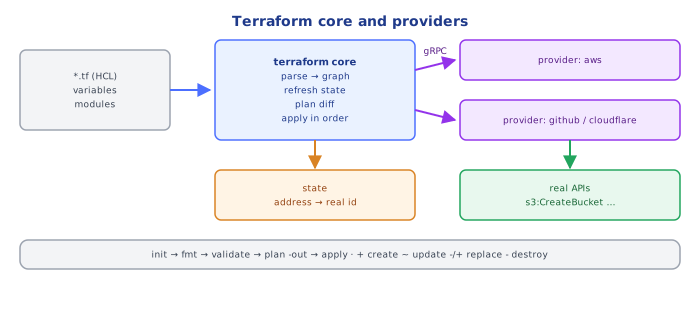
Terraform core knows nothing about AWS. Each provider is a separate executable (downloaded by init into .terraform/providers/) that Terraform launches as a child process and talks to over gRPC. Core parses HCL, builds the dependency graph, and for each resource asks the provider to PlanResourceChange (given prior state and config, what will change? which attributes force replacement?) and later ApplyResourceChange, which makes the real API calls (e.g. s3:CreateBucket) and returns the new attribute values. Values not known until apply (an ARN, a generated ID) appear in the plan as (known after apply). The provider's schema — every resource type, attribute, and which changes require replacement — is what powers validate, plan diffs and editor auto-completion. That separation is why one tool can manage AWS, GitHub teams and Datadog monitors in a single plan.
⚠️ Common Pitfalls
- Unpinned provider versions — a new major version changes behaviour under you.
countfor maps of things — index shifts cause replacements; usefor_each.- Not reading
-/+lines in the plan. - Committing
.terraform/orterraform.tfstate. - Overusing
depends_on— slows plans and hides real dependencies. - Renaming resources without
movedblocks — Terraform destroys and recreates them.
📋 Quick Reference
init → fmt → validate → plan -out → apply plan · destroy
resource (manage) · data (read) · provider (API plugin) · output
for_each > count · lifecycle { prevent_destroy, ignore_changes, create_before_destroy }
import {} + -generate-config-out · moved {} · removed {}
commit .terraform.lock.hcl; never state or .terraform/
🧠 Key takeaways
- Providers talk to APIs; resources are managed objects; data sources read existing ones.
- Workflow: init → plan (review!) → apply;
-/+means replacement. - References create implicit dependencies; Terraform builds a graph and parallelizes.
- Use lifecycle (prevent_destroy, create_before_destroy), moved blocks for renames, and import for existing resources.
🎤 Interview Q&A
Q1Describe the Terraform workflow.core▾
terraform init (download providers, configure backend) → plan (diff desired vs actual state) → apply (make changes) → destroy when needed. Always review the plan.
- What's a provider? A plugin translating resources into API calls for a platform.
Q2Resources vs data sources?core▾
Resources are infrastructure Terraform manages (creates/updates/deletes). Data sources read existing information (an AMI ID, a VPC created elsewhere) without managing it.
- Example data source?
data "aws_ami" "ubuntu".
Q3How does Terraform determine ordering?core▾
From references between resources, building a dependency graph and creating independent resources in parallel. depends_on adds explicit dependencies when there's no reference.
- When is depends_on needed? Hidden dependencies such as IAM policies needed before a resource uses them.
Q4What do count and for_each do, and which is safer?senior▾
Both create multiple instances. count indexes by number, so removing an item in the middle shifts indices and recreates resources; for_each keys by map/set keys, so changes are stable.
- Lifecycle meta-arguments?
create_before_destroy,prevent_destroy,ignore_changes.
Q5How do you pin versions?core▾
Pin Terraform (required_version) and providers (required_providers with version constraints), commit .terraform.lock.hcl, and upgrade deliberately.
- Why the lock file? Ensures everyone uses the same provider builds.
🛠️ Practice exercises
Each exercise is a file in this topic folder. Code exercises are self-checking: run them and make the checks pass.
✅ Check yourself
Answer the questions — feedback is instant.
-/+ mean in a plan?