State and Remote Backends
State maps your code to real resource IDs, and it's both essential and sensitive. Learn refresh, drift and state surgery, then move state to a remote backend with locking and watch two concurrent applies get safely serialized.
🎯 What you'll learn
- Why Terraform needs state and what it contains
- Refresh, plan and drift; state is sensitive
- Remote backends, locking and protecting the state bucket
- Splitting state to limit blast radius, and sharing data between units
📚 Before you start
1Why Terraform Needs State
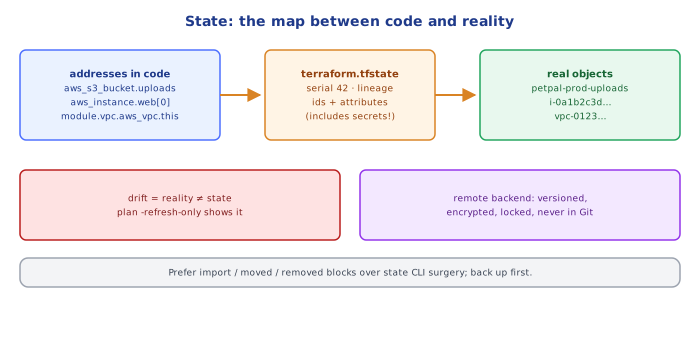
Terraform's configuration says what should exist. To compute a plan it must also know what it already manages and how configuration addresses map to real objects:
aws_s3_bucket.uploads   →   bucket "petpal-prod-uploads"  (arn, region, versioning…)
aws_instance.web[0]     →   i-0a1b2c3d4e5f67890
module.vpc.aws_vpc.this →   vpc-0123456789abcdef0
That mapping lives in the state (terraform.tfstate, JSON). State also caches attribute values (so plans don't need to read every attribute of every resource), records dependencies for correct destroy order, and stores outputs other configurations can read.
{
  "version": 4,
  "serial": 42,
  "lineage": "6f1c…",
  "resources": [{
    "mode": "managed", "type": "aws_s3_bucket", "name": "uploads",
    "instances": [{ "attributes": { "id": "petpal-prod-uploads", "arn": "arn:aws:s3:::petpal-prod-uploads", "...": "..." } }]
  }]
}{
"type": "aws_db_instance",
"name": "main",
"instances": [{
"attributes": {
"id": "petpal-prod",
"endpoint": "petpal-prod.c9x.eu-west-1.rds.amazonaws.com:5432",
"password": "s3cr3t-in-plain-text!"
}
}]
}The address aws_db_instance.main maps to the real ID petpal-prod. Note the password: state contains secrets, so encrypt it and restrict access.
2Refresh, Plan, Drift
On plan, Terraform refreshes: for each resource in state, it asks the provider to read the real object. Differences between state and reality are drift (someone changed something outside Terraform). The plan then compares config with the refreshed state.
terraform plan -refresh-onlyshows drift without proposing config changes;apply -refresh-onlyaccepts reality into state.- A resource deleted manually shows up as "will be created" again.
- A resource created manually is invisible to Terraform until imported (
02-terraform_basics/§5).
3State Is Sensitive
State contains every attribute of managed resources — including secrets: database master passwords set via Terraform, generated private keys (tls_private_key), access keys, connection strings. Even attributes marked sensitive = true are hidden only in CLI output, not in the state file.
Therefore:
- never commit state to Git;
- store it encrypted with tight access control (
03-…Part 2); - prefer resources that keep secrets out of state (e.g. RDS
manage_master_user_password = truestores the password in Secrets Manager instead).
4Local State Doesn't Work for Teams
With the default local backend (terraform.tfstate on a laptop):
- two people have two different states → each one's plan is wrong;
- simultaneous applies corrupt infrastructure;
- a lost laptop = Terraform no longer knows what it owns;
- CI can't run plans.
The fix is a remote backend with locking — Part 2.
5Inspecting and Repairing State
terraform state list                         # all managed addresses
terraform state show aws_s3_bucket.uploads   # attributes of one
terraform state mv  <from> <to>              # rename (prefer moved {} blocks)
terraform state rm  <addr>                   # forget (prefer removed {} blocks)
terraform import    <addr> <id>              # adopt (prefer import {} blocks)
terraform force-unlock <lock-id>             # only if a lock is truly stale
terraform state pull > backup.tfstate        # backup before surgery
Config-driven blocks (import, moved, removed) are reviewed in pull requests; CLI state surgery is not — use it only for emergencies, after a backup.
Under the HoodSerial and Lineage▾
Every state has a lineage (a UUID created with the state) and a serial (incremented on every write). When Terraform writes state, the backend can reject writes from an older serial or a different lineage — protecting against a stale copy (e.g. an old local file) overwriting newer state. The state also records each resource instance's dependencies, so even after you delete a resource from the configuration, Terraform knows the order in which to destroy it relative to others. Because state is the source of Terraform's knowledge, recovering from a corrupted or deleted state means re-importing every resource — which is why backends with versioning (S3 versioning, Terraform Cloud history) are essential.
⚠️ Common Pitfalls (Part 1)
- State in Git — leaks secrets, merge conflicts.
- Manual state edits without a backup.
- Ignoring drift until an apply reverts someone's emergency fix.
- Assuming
sensitive = trueencrypts state — it doesn't.
📋 Quick Reference (Part 1)
state = address → real object mapping + cached attributes + dependencies + outputs
plan = refresh (read reality) + diff config vs refreshed state
drift: plan -refresh-only · state contains secrets → encrypt, restrict, never commit
prefer import / moved / removed blocks over state CLI surgery; backup first1Remote Backends
A backend decides where state is stored and how it's locked. Common choices:
| Backend | Storage | Locking |
|---|---|---|
| s3 | S3 object (versioned, encrypted) | S3 native lockfile (use_lockfile = true, Terraform ≥ 1.10) or a DynamoDB table (legacy) |
| gcs | Google Cloud Storage | built-in |
| azurerm | Azure Blob Storage | blob lease |
| remote / cloud | HCP Terraform / Terraform Enterprise | built-in, plus runs, policies, history |
| pg, http, others | various | varies |
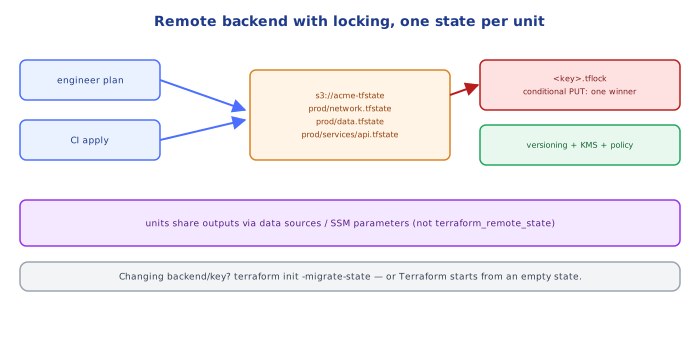
terraform {
  backend "s3" {
    bucket       = "acme-terraform-state"           # versioning + encryption + public access block ON
    key          = "prod/network/terraform.tfstate"  # one key per unit/environment
    region       = "eu-west-1"
    encrypt      = true
    use_lockfile = true                               # S3-native state locking
  }
}
The state bucket itself is created once (by a small bootstrap configuration or by hand) — it can't be created by the configuration that stores its state in it.
2Locking
Before any operation that might write state (plan with refresh, apply, destroy, import), Terraform acquires a lock. A second run on the same state waits (-lock-timeout=5m) or fails with the lock holder's info (who, when, which operation). This prevents two applies from interleaving API calls and racing to write state.
If a run crashed and left a stale lock, terraform force-unlock <ID> releases it — only after confirming no run is active.
3Protecting the State Bucket
- Versioning on (recover previous state versions after corruption or accidental deletion).
- Encryption (SSE-KMS with a dedicated key for tighter access control).
- Block public access, bucket policy restricted to the CI role and a break-glass admin role.
- Separate account for state in larger organizations (
devops-cloud/aws/…multi-account topic). - Access logging / CloudTrail for reads — state contains secrets.
4Splitting State: Blast Radius
One state file for an entire company means every plan touches every resource (slow, risky, lock contention). Split into units (separate root modules, separate state keys) along lines of ownership, change frequency and risk:
live/
  global/iam/          → s3://…/global/iam.tfstate
  prod/network/        → s3://…/prod/network.tfstate
  prod/data/           → s3://…/prod/data.tfstate          (RDS, ElastiCache — rare, risky changes)
  prod/services/api/   → s3://…/prod/services/api.tfstate  (frequent changes)
staging/...Split by lifecycle and blast radius: network (rarely changes), data (precious), services (change daily), per environment. A broken apply on a service unit can then never touch the VPC or the database.
5Sharing Data Between Units
Units need each other's outputs (the app needs the VPC's subnet IDs). Options:
# 1) terraform_remote_state — read another unit's outputs (needs read access to that state = all its secrets)
data "terraform_remote_state" "network" {
  backend = "s3"
  config  = { bucket = "acme-terraform-state", key = "prod/network/terraform.tfstate", region = "eu-west-1" }
}
subnet_ids = data.terraform_remote_state.network.outputs.private_subnet_ids

# 2) data sources by tag — decoupled, no access to the other state
data "aws_subnets" "private" {
  filter { name = "tag:tier"  values = ["private"] }
  filter { name = "vpc-id"    values = [data.aws_vpc.main.id] }
}

# 3) SSM Parameter Store — the network unit publishes, consumers read
data "aws_ssm_parameter" "private_subnets" { name = "/prod/network/private_subnet_ids" }
Data sources or a parameter store are usually preferable to terraform_remote_state: consumers don't need read access to the producer's whole state, and units stay loosely coupled. Tools like Terragrunt add dependency wiring between units on top.
Under the HoodHow S3-Native Locking Works▾
With use_lockfile = true, Terraform creates a lock object next to the state (<key>.tflock) using an S3 conditional write (PutObject with If-None-Match: *): S3 accepts the write only if no object with that key exists, atomically — so exactly one concurrent run can create it. The lock object contains JSON with the lock ID, operation, user and timestamp; other runs get a 412 Precondition Failed, read the object to report who holds the lock, and wait or fail. On completion Terraform deletes the lock object. Before S3 supported conditional writes, the same guarantee came from a DynamoDB table with a conditional PutItem on the LockID key — which is why older configurations still have dynamodb_table in the backend block.
⚠️ Common Pitfalls (Part 2)
- One state for everything — huge blast radius and lock contention.
- State bucket without versioning — one bad write and history is gone.
force-unlockwhile a run is still active — concurrent applies.terraform_remote_stateeverywhere — tight coupling, secrets exposure.- Changing the backend key/path without
terraform init -migrate-state— Terraform starts with empty state and plans to recreate everything.
📋 Quick Reference (Part 2)
backend "s3" { bucket, key (one per unit), region, encrypt = true, use_lockfile = true }
state bucket: versioning + KMS + public access block + restricted policy (+ separate account)
split by unit: global/iam, env/network, env/data, env/services/*
share outputs: data sources by tag / SSM params > terraform_remote_state
init -migrate-state when moving backends · force-unlock only for stale locks
🧠 Key takeaways
- State maps addresses → real IDs and caches attributes; plan compares code, state and reality (refresh).
- State contains secrets: encrypt it, restrict access, and never commit it to Git.
- Teams need a remote backend with locking (S3 + native lockfile or DynamoDB, HCP Terraform); version and protect the bucket.
- Split state by lifecycle and blast radius; share data via outputs/data sources thoughtfully.
🎤 Interview Q&A
Q1What is Terraform state and why is it needed?core▾
A mapping between configuration and real resources (IDs, attributes, dependencies). Terraform uses it to compute plans and track what it manages. It may contain secrets.
- What if state is lost? Terraform loses track of resources; you'd need to import them again.
Q2Why use a remote backend?core▾
Shared state for teams, locking to prevent concurrent applies, encryption, versioning and backups. Example: S3 with native lock files or a DynamoDB lock table, Terraform Cloud, GCS, Azure Storage.
- What happens without locking? Two applies can corrupt state or race on resources.
Q3How do you split state?senior▾
By environment and component (network, data, apps) to limit blast radius and speed up plans; share outputs via terraform_remote_state or data sources/SSM parameters.
- Downside of one huge state? Slow plans and risky changes affecting everything.
Q4How do you refactor without destroying resources?core▾
Use moved blocks (or terraform state mv) when renaming resources or moving them into modules, import blocks for adopting resources, and removed blocks/state rm to stop managing them.
- Why moved blocks over state mv? They're declarative, reviewed in PRs and applied in pipelines.
Q5How do you protect secrets in state?core▾
Encrypt the backend, restrict access tightly, avoid putting secrets in Terraform when possible (generate them in secret managers), and mark outputs sensitive.
- Does sensitive hide values from state? No; only from CLI output.
🛠️ Practice exercises
Each exercise is a file in this topic folder. Code exercises are self-checking: run them and make the checks pass.
✅ Check yourself
Answer the questions — feedback is instant.