Next.js Routing (App Router)
In the App Router, folders are routes. Map files to URLs for dynamic, catch-all and grouped segments, learn the special files each segment can have, and navigate with Link and the router.
🎯 What you'll learn
- The file system is the router
- Dynamic, catch-all and optional catch-all segments
- Special files and route groups
- Parallel/intercepting routes and navigation
📚 Before you start
1The Router Is the File System
There's no route-definition file to maintain — the folder structure under app/ is the route table. A folder maps to a URL segment; a page.tsx inside it makes that segment navigable.
app/
  page.tsx              → /
  about/page.tsx         → /about
  blog/page.tsx           → /blog
blog/[slug]/page.tsx → /blog/:slug (dynamic segment)2Dynamic Segments
// app/blog/[slug]/page.tsx
export default async function BlogPost({
  params,
}: {
  params: Promise<{ slug: string }>;
}) {
  const { slug } = await params;
  return <h1>Post: {slug}</h1>;
}
[slug] captures one path segment. Visiting /blog/hello-world renders this page with params.slug === "hello-world". In current Next.js versions, params is a Promise — it must be awaited (a change from earlier versions where it was a plain object), because Next.js needs to support cases where the value isn't known synchronously.
3Catch-All and Optional Catch-All Segments
app/docs/[...slug]/page.tsx      → /docs/a, /docs/a/b, /docs/a/b/c ...  (one or more segments)
app/docs/[[...slug]]/page.tsx → /docs, /docs/a, /docs/a/b ... (zero or more segments)// app/docs/[...slug]/page.tsx
export default async function Docs({ params }: { params: Promise<{ slug: string[] }> }) {
const { slug } = await params; // e.g. ["a", "b", "c"] for /docs/a/b/c
return <p>Path: {slug.join("/")}</p>;
}4Special Files Per Segment
| File | Purpose |
|---|---|
page.tsx | the route's unique UI, makes the segment public |
layout.tsx | shared UI that wraps this segment and its children, persists across navigations within it |
loading.tsx | instant loading UI, shown via React Suspense while the segment's data loads |
error.tsx | error boundary for this segment (must be a Client Component) |
not-found.tsx | rendered when notFound() is called or no route matches |
route.ts | an API endpoint (Route Handler) instead of a page, for this segment |
// app/blog/loading.tsx
export default function Loading() {
  return <p>Loading posts...</p>;
}// app/blog/error.tsx
"use client";
export default function Error({ error, reset }: { error: Error; reset: () => void }) {
return (
<div>
<p>Something went wrong: {error.message}</p>
<button onClick={() => reset()}>Try again</button>
</div>
);
}Next.js automatically wraps a segment's page.tsx in a <Suspense> boundary using its sibling loading.tsx as the fallback, and in an error boundary using error.tsx — you don't write the boundary components yourself.
5Route Groups — Organize Without Affecting the URL
app/
  (marketing)/
    about/page.tsx    → /about   (the "(marketing)" segment is invisible in the URL)
    contact/page.tsx    → /contact
  (shop)/
    products/page.tsx    → /products
Parentheses around a folder name ((marketing)) create a route group: it organizes files and can hold its own layout.tsx applying only to routes inside it, but contributes nothing to the URL path.
6Parallel Routes and Intercepting Routes (Advanced)
app/
  @analytics/page.tsx
  @team/page.tsx
layout.tsx// app/layout.tsx
export default function Layout({
children,
analytics,
team,
}: {
children: React.ReactNode;
analytics: React.ReactNode;
team: React.ReactNode;
}) {
return (
<>
{children}
{analytics}
{team}
</>
);
}A @folder is a parallel route slot — the layout receives it as a named prop and can render multiple independent, simultaneously-active pages in the same layout (dashboards with independently loading widgets are the canonical use case).
7Navigating Between Routes
import Link from "next/link";

<Link href="/about">About</Link>;"use client";
import { useRouter } from "next/navigation";
function BackButton() {
const router = useRouter();
return <button onClick={() => router.back()}>Go back</button>;
}<Link> is the primary navigation primitive — it prefetches the target route's code (and, for static routes, its rendered payload) when it scrolls into view, and performs a client-side transition instead of a full page reload. useRouter() (from next/navigation, not the old next/router) gives imperative navigation (push, replace, back, refresh) for use inside event handlers.
Under the HoodHow it works internally▾
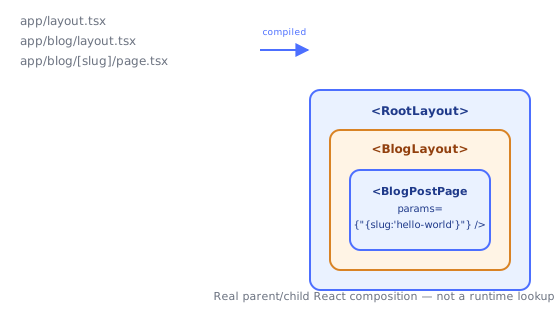
The route tree is compiled into a nested React composition, not resolved dynamically per request. During next build, Next.js walks app/ and builds an actual tree of React elements where each layout.tsx wraps its child segment's layout.tsx/page.tsx. For a URL like /blog/hello-world matching app/layout.tsx → app/blog/layout.tsx → app/blog/[slug]/page.tsx, the real rendered tree is:
<RootLayout>
  <BlogLayout>
    <BlogPostPage params={{ slug: "hello-world" }} />
  </BlogLayout>
</RootLayout>
This is genuine React parent/child composition — a layout.tsx receiving children and rendering it is just a component receiving a prop, exactly like any other composed React tree.
 The "route matching" step at request time is really just: match the URL to a leaf
 page.tsx, then walk back up the folder tree collecting every ancestor layout.tsx to build this nested element tree before rendering it (server-side, as covered in the Server Components topic). This is also why layouts don't re-render on navigation between sibling routes that share them — React's reconciliation sees the same component instance in the same tree position and preserves it, exactly as it would for any unchanged parent in a normal React update, rather than remounting shared chrome on every navigation.
loading.tsx is sugar for <Suspense fallback={<Loading />}> wrapped around the segment. Next.js doesn't invent a new async-boundary primitive — it uses React's real Suspense component, automatically inserting it into the composed tree above the segment that has a sibling loading.tsx. When the async Server Component for that segment suspends (its promise hasn't resolved), React's existing Suspense mechanism shows the fallback and swaps to the real content when the promise resolves — the same mechanism React.lazy and use() rely on elsewhere in React, not something routing-specific.
error.tsx must be a Client Component because React error boundaries are a class-component feature under the hood, and the boundary needs interactive recovery. Next.js's error.tsx convention is compiled into a real React error boundary wrapping the segment. Error boundaries fundamentally require the componentDidCatch/getDerivedStateFromError class lifecycle — there is no hook-based equivalent in React itself — so error.tsx needs "use client" both to run that boundary logic in the browser and to support the reset() callback it's handed, which re-renders the segment's subtree by remounting it.
⚠️ Common Pitfalls
- Forgetting
paramsis a Promise in current versions —params.slugdirectly (withoutawait) either errors or silently gives you a Promise object instead of the string; alwaysawait params(oruse(params)in a Client Component) first. - Putting
page.tsxwhere you meant a layout-only route group — any folder with apage.tsxbecomes a real, navigable URL segment; use(groupName)parentheses if you only want organization/shared layout without a URL segment. - Expecting
error.tsxto catch errors in its own parent layout — an error boundary only catches errors from its children, so an error thrown inside the layout aboveerror.tsxpropagates further up to the nearest ancestorerror.tsxinstead. - Overusing catch-all routes for what should be separate pages —
[...slug]is powerful but pushes all matching logic into runtime code (usually a CMS lookup); prefer explicit segments when the set of routes is known ahead of time. - Not providing a
loading.tsxand being surprised navigation feels like it "hangs" — without it, the whole segment (and everything under it) waits for all data before showing anything, instead of streaming a fallback immediately.
📋 Quick Reference
app/page.tsx                    → /
app/about/page.tsx               → /about
app/blog/[slug]/page.tsx          → /blog/:slug        (params.slug)
app/docs/[...slug]/page.tsx        → /docs/a/b/c ...     (params.slug: string[])
app/docs/[[...slug]]/page.tsx       → /docs, /docs/a ...  (optional catch-all)
app/(group)/...                      → organizational only, no URL segment
app/@slot/page.tsx                    → parallel route, injected as a named layout prop
layout.tsx / loading.tsx / error.tsx / not-found.tsx / route.ts  → per-segment special files
<Link href="...">                      → prefetching client-side navigation
useRouter() from "next/navigation"      → imperative navigation (push/replace/back/refresh)
🧠 Key takeaways
- Folders = URL segments; a route is public only when it has page.tsx (or route.ts).
[id]dynamic,[...slug]catch-all,[[...slug]]optional catch-all.(group)folders organize code and layouts without changing URLs.- Special files: layout, loading, error, not-found, route; navigate with
<Link>(prefetching) anduseRouter.
🎤 Interview Q&A
Q1How does file-based routing work in the App Router?core▾
Folders define route segments; page.tsx makes a segment routable; layout.tsx wraps children; dynamic segments use [id], catch-all [...slug], optional catch-all [[...slug]]; route groups (group) organize without affecting URLs.
- Where do API endpoints go?
route.tsfiles.
Q2How do navigation and prefetching work?core▾
<Link> performs client-side navigation and prefetches routes in the viewport (static parts by default), so transitions are fast; useRouter enables programmatic navigation.
- Does navigation reload the page? No; only changed segments re-render.
Q3What are parallel and intercepting routes?senior▾
Parallel routes (@slot folders) render multiple pages in the same layout simultaneously (dashboards). Intercepting routes ((.)photo/[id]) show a route in a modal while keeping the underlying page, with a full page on direct load.
- Classic example? Instagram-style photo modal.
Q4How does middleware fit into routing?core▾
middleware.ts runs before matching routes (on the edge by default) for redirects, rewrites, auth checks, A/B testing and locale detection, configured with a matcher.
- Should auth rely only on middleware? No; also check in server code accessing data.
Q5How do you read params and search params?core▾
Server components receive params and searchParams props (async in recent versions); client components use useParams and useSearchParams.
- Why might useSearchParams need Suspense? It opts that part into client rendering during static generation.
🛠️ Practice exercises
Each exercise is a file in this topic folder. Code exercises are self-checking: run them and make the checks pass.
✅ Check yourself
Answer the questions — feedback is instant.