Next.js Server Components
Server Components render on the server and send a serialized component tree, not JavaScript, to the browser. See where the server/client boundary falls in a real page, then follow the Flight payload as it streams in and hydrates.
🎯 What you'll learn
- What a Server Component is and why it matters
- Server components rendering client components
- What server components cannot do
- The Flight payload, streaming, 'use client' and hydration
📚 Before you start
1What a Server Component Is
In the App Router, every component is a Server Component by default — it runs only on the server (or at build time for static routes), never ships its code to the browser, and can do things client code normally can't: read files, query a database directly, use server-only secrets, await inside the component body.
// app/page.tsx — a Server Component, no directive needed, this is the default
import { db } from "@/lib/db";

export default async function Page() {
  const posts = await db.post.findMany(); // direct DB access, never sent to the browser
  return (
    <ul>
      {posts.map((p) => (
        <li key={p.id}>{p.title}</li>
      ))}
    </ul>
  );
}
There is no useEffect + loading state here — the component itself is async, and Next.js waits for it (or streams around it, per the Routing topic's loading.tsx) before sending HTML.
2Why This Is a Big Deal
| Client-fetched data (old SPA pattern) | Server Component data | |
|---|---|---|
| Where the fetch runs | browser, after JS loads and hydrates | server, before any HTML is sent |
| Waterfall | client requests API, API queries DB — 2 network hops from the user's perspective | server directly queries DB — 0 extra client-visible hops |
| Bundle size | fetching library + data-shape code ships to the browser | zero — the component and its imports never leave the server |
| Secrets | API keys must go through a backend proxy, never in client code | can use DB credentials, private API keys directly |
Server Components collapse the client→API→database chain into a single server-side step, and the code that does it is never part of the JavaScript bundle sent to the browser.
3Server Components Can Render Client Components
// app/page.tsx (Server Component)
import LikeButton from "./LikeButton"; // a Client Component

export default async function Page() {
  const post = await getPost();
  return (
    <article>
      <h1>{post.title}</h1>
      <LikeButton postId={post.id} initialLikes={post.likes} />
    </article>
  );
}// app/LikeButton.tsx
"use client";
import { useState } from "react";
export default function LikeButton({ postId, initialLikes }: { postId: string; initialLikes: number }) {
const [likes, setLikes] = useState(initialLikes);
return <button onClick={() => setLikes((n) => n + 1)}>{likes} likes</button>;
}This is the core composition pattern: static/data-heavy parts of the tree stay Server Components (zero client JS), and only the genuinely interactive leaf (LikeButton) is a Client Component, marked with "use client" — covered fully in its own topic. Server Components can pass serializable props (strings, numbers, plain objects, JSX) down into Client Components, but not functions or class instances, since those props have to cross the server/client boundary.
4What Server Components Cannot Do
export default function Page() {
  // ❌ no useState, useEffect, useContext, event handlers — no client runtime exists here
  // const [count, setCount] = useState(0);
  // ❌ no browser APIs (window, document, localStorage)
  return <div>...</div>;
}
Server Components have no lifecycle, no state, no effects, no event handlers — they run once, produce output, and that's the entire extent of their behavior. Anything interactive has to live in a Client Component.
5Composition Rule: Client Components Cannot Import Server Components
"use client";
// ❌ This is NOT allowed — importing a Server Component directly into a Client Component
// file forces it to also become part of the client bundle, defeating the purpose.
// import ServerOnlyThing from "./ServerOnlyThing";// ✅ Instead, pass the Server Component as `children` from a parent Server Component:
// app/page.tsx (Server Component)
import ClientWrapper from "./ClientWrapper";
import ServerOnlyThing from "./ServerOnlyThing";
export default function Page() {
return (
<ClientWrapper>
<ServerOnlyThing />
</ClientWrapper>
);
}// app/ClientWrapper.tsx
"use client";
export default function ClientWrapper({ children }: { children: React.ReactNode }) {
return <div className="wrapper">{children}</div>;
}ClientWrapper never imports ServerOnlyThing — it just receives already-rendered content as children, so the Server Component's code still never enters the client bundle, even though it visually ends up "inside" a Client Component.
1Server Components Don't Render to HTML Directly
It's tempting to think "Server Component runs on the server, so it must just produce an HTML string." That's not what happens. A Server Component tree is first serialized into React's own wire format — informally called "Flight" or the RSC payload — and that is what the server sends. HTML is generated from the Flight payload as a separate step (for the initial page load); on subsequent client-side navigations, the Flight payload is sent alone and the client's React runtime updates the DOM from it directly, with no full HTML re-render at all.
2What the Flight Payload Actually Looks Like
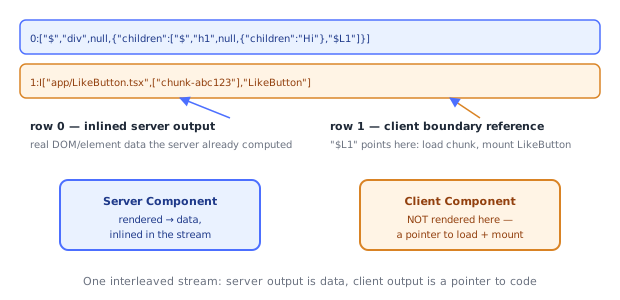
It's a compact, streaming, line-oriented format — not JSON, not HTML. A simplified real excerpt for a tree like <Page><Article title="Hi"><LikeButton/></Article></Page> looks roughly like:
0:["$","div",null,{"className":"page","children":[
  "$","article",null,{"children":[
    "$","h1",null,{"children":"Hi"},
    "$L1"
  ]}
]}]
1:I["app/LikeButton.tsx",["chunk-abc123"],"LikeButton"]
Two structural ideas make this format what it is:
- Server-rendered elements are inlined directly —
["$", type, key, props]tuples describe actual DOM/host elements the server already resolved, including everything a Server Component computed (data it fetched, loops it ran, conditionals it evaluated). - Client Component boundaries are references, not inlined output —
"$L1"is a placeholder pointing at row1, which is anI[...]("import") instruction telling the client runtime: don't try to render this inline — instead, load the JS module forLikeButtonfrom this chunk, and mount it here, on the client.
This is the literal mechanism behind "Server Components render on the server, Client Components render (or at least hydrate/mount) on the client, in the same tree": the payload is one interleaved stream where server output is data and client output is a pointer to code.
3Streaming: Why It's Sent in Chunks, Not One Blob
0:["$","div",null,{"children":["$","h1",null,{"children":"Post"},"$L1"]}]
1:I["app/Comments.tsx",["chunk-xyz"],"Comments"]

/* ... network gap while the server awaits a slow data source for Comments ... */

2:["$","ul",null,{"children":[["$","li",null,{"children":"First comment"}], ...]}]
Because Flight is a stream of numbered rows, not a single JSON document, the server can send the shell of the page immediately and append rows as slower async Server Components resolve — this is the actual mechanism loading.tsx/<Suspense> rely on: the fallback is shown from the rows already received, and swapped for real content the moment the corresponding later row arrives, without waiting for the entire tree to finish.
4"use client" Is a Real Compiler Directive, Not a Runtime Flag
"use client";

export default function Counter() {
  /* ... */
}
When the string literal "use client" appears as the first statement in a file, Next.js's compiler treats the entire module as a client boundary at build time — this changes what gets bundled, not just how the code behaves at runtime:
- The compiler bundles
Counter.tsxand everything it imports into a client-side JS chunk, the same way any client bundler (Webpack/Turbopack) would bundle browser code. - In the server build, that same file is replaced with a small stub — a reference object carrying the chunk ID and export name — instead of the real function. This is exactly the
I["app/LikeButton.tsx", [...], "LikeButton"]instruction from Section 2: it exists because the server-side module graph literally does not containCounter's real implementation anymore, only a pointer to where the client can fetch it. - Every module
Counter.tsximports transitively also gets pulled into the client bundle — this is why putting"use client"at the top of a file that imports a huge library pulls that whole library into the browser bundle, even if only a small piece of the file is actually interactive.
The inverse is not marked at all: Server Components have no directive — the default, un-annotated state — because they're the baseline; "use client" is the opt-out that tells the compiler "stop treating this subtree as server-only, start treating it as a real client bundle entry point, and insert a boundary reference here."
5Hydration on the Client
// generated (conceptually) by Next.js's client entry point
import { hydrateRoot } from "react-dom/client";
import { createFromFetch } from "react-server-dom-webpack/client";

const flightResponse = createFromFetch(fetch("/page-rsc-payload"));
hydrateRoot(document, flightResponse);
On the initial page load, the browser already has server-rendered HTML (for fast paint) and the Flight payload (embedded in a <script> tag). React's client runtime parses the Flight stream, reconstructs the element tree — inlining the server-computed parts and mounting real React components at every $L reference — and hydrates the existing HTML rather than re-rendering it from scratch, attaching event listeners and client state to the DOM nodes that already exist.
⚠️ Common Pitfalls
- Importing a Client Component's file just to use a non-component export — if
utils.tshas"use client"at the top because one function needswindow, importing any other export from that file (even a pure function) still pulls the whole client bundle in; keep client-only utilities in their own small file. - Assuming
"use client"makes a component "run on the client only" — it actually still renders once during SSR too (for the initial HTML), then hydrates in the browser; it's not exclusively client-side, it's also client-side, in addition to an initial server render for fast paint. - Passing non-serializable props from a Server Component into a Client Component — functions, class instances,
Dateobjects passed carelessly, and Symbols can't cross the Flight boundary; only plain serializable data and JSX survive the trip. - Fetching the same data in multiple sibling Server Components without deduplication — Next.js dedupes identical
fetch()calls made during a single render pass automatically, but hand-rolled data-fetching functions that don't usefetchneedReact.cache()to get the same deduplication. - Thinking the Flight format is "just JSON with extra steps" — the
$Lreference/streaming-rows structure is why partial hydration and streaming SSR work at all; treating it as an implementation detail hides why Suspense boundaries stream in strict arrival order per branch, not in tree order.
📋 Quick Reference
Server Component (default, no directive)
  - runs on server / at build time only, code never sent to browser
  - can be async, await data directly, use secrets/DB access
  - no useState/useEffect/event handlers/browser APIs

"use client" (compiler directive, top of file)
  - marks the whole module + its imports as a client bundle entry
  - server build replaces it with an { chunk, export } reference stub
  - component still does an initial server render for fast paint, THEN hydrates

Flight payload
  - streaming, row-based format: "$",type,key,props tuples for server output
  - "$L<n>" placeholders + I[...] import instructions for client boundaries
  - enables streaming (rows arrive as slow data resolves) and partial hydration

Composition rule: Client Components cannot import Server Components directly
  - pass Server Components as `children`/props from a Server Component parent instead
🧠 Key takeaways
- Server Components run only on the server: direct data access, secrets, zero client JS.
- Client components (
'use client') handle state, effects and event handlers; they're bundled and hydrated. - Server → client props must be serializable; clients receive server components as
children. - Output is the Flight payload: a streamed, serialized tree that React merges and hydrates progressively.
🎤 Interview Q&A
Q1What are React Server Components?core▾
Components that render only on the server: they can access databases and secrets directly, ship no JavaScript to the client, and stream their output (RSC payload). They can't use state, effects or browser APIs.
- Default in the App Router? Yes, components are server components unless marked 'use client'.
Q2What are the benefits of Server Components?core▾
Smaller client bundles, data fetching close to the data without client waterfalls, secure access to backend resources, and streaming with Suspense for faster first paint.
- Do they replace SSR? They complement it; client components are still SSR'd and hydrated.
Q3How do server and client components compose?core▾
Server components can render client components and pass them serializable props (or server components as children). Client components can't import server components directly but can receive them as children.
- What can't be passed as props? Functions (except server actions), class instances, non-serializable values.
Q4How do you avoid waterfalls in server components?senior▾
Start independent fetches in parallel (Promise.all), use Suspense boundaries to stream slow parts, preload data, and dedupe requests with cache().
- What does streaming do? Sends the shell first, then fills in suspended parts as they resolve.
Q5How do you keep server-only code out of the client?core▾
Import server-only in modules that must never be bundled for the client; avoid passing secrets as props; env vars without NEXT_PUBLIC_ aren't exposed to the client.
- What happens if you import server-only in a client component? A build error.
🛠️ Practice exercises
Each exercise is a file in this topic folder. Code exercises are self-checking: run them and make the checks pass.
✅ Check yourself
Answer the questions — feedback is instant.