Next.js Client Components
Client components bring interactivity at the cost of shipped JavaScript. See what happens to the bundle when 'use client' sits at the top of a page versus on the one leaf that needs it, and how client components still receive server data.
🎯 What you'll learn
- What a client component is
- When you actually need one
- Pushing the boundary as low as possible
- Receiving server data and client-local state
📚 Before you start
1What a Client Component Is
A Client Component is any module that starts with the "use client" directive. It renders once on the server for the initial HTML (like every component does), then hydrates and continues running in the browser, where it has full access to React's interactive hooks and browser APIs.
// app/Counter.tsx
"use client";

import { useState } from "react";

export default function Counter() {
  const [count, setCount] = useState(0);
  return <button onClick={() => setCount((c) => c + 1)}>Clicked {count} times</button>;
}
Without "use client", this file would fail to compile as part of a Server Component tree — useState and onClick require a client runtime that Server Components don't have.
2When You Actually Need One
| Need | Use a Client Component? |
|---|---|
useState, useReducer, useContext | yes |
useEffect, useLayoutEffect | yes |
Event handlers (onClick, onChange, ...) | yes |
Browser-only APIs (window, localStorage, IntersectionObserver) | yes |
| Custom hooks that use any of the above | yes |
| Third-party libraries that assume a browser (many UI kits, animation libs) | yes |
| Reading data, rendering static markup, formatting | no — keep it a Server Component |
The default assumption should be Server Component; add "use client" only at the specific leaf that genuinely needs interactivity, not preemptively at the top of the tree.
3Pushing the Boundary as Low as Possible
// ❌ marks the ENTIRE page (and everything it renders) as client code
"use client";

export default function ProductPage({ product }: { product: Product }) {
  return (
    <div>
      <ProductGallery images={product.images} /> {/* static, no interactivity */}
      <ProductDescription text={product.description} /> {/* static */}
      <AddToCartButton productId={product.id} /> {/* the only genuinely interactive part */}
    </div>
  );
}// ✅ Server Component page, only the button is a Client Component
// app/product/[id]/page.tsx (no directive — Server Component)
import AddToCartButton from "./AddToCartButton"; // "use client" lives INSIDE this file only
export default function ProductPage({ product }: { product: Product }) {
return (
<div>
<ProductGallery images={product.images} />
<ProductDescription text={product.description} />
<AddToCartButton productId={product.id} />
</div>
);
}// app/product/[id]/AddToCartButton.tsx
"use client";
import { useState } from "react";
export default function AddToCartButton({ productId }: { productId: string }) {
const [added, setAdded] = useState(false);
return <button onClick={() => setAdded(true)}>{added ? "Added!" : "Add to cart"}</button>;
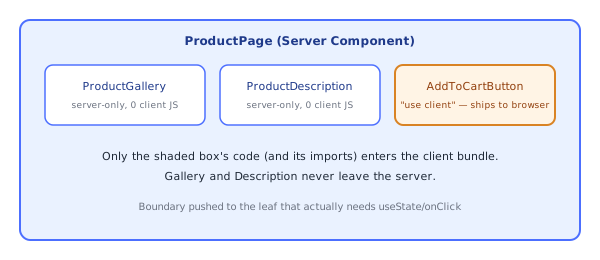
}Only AddToCartButton's code (and whatever it imports) ships to the browser; the gallery and description stay server-rendered with zero client JS.
4Client Components Can Still Receive Server Data
// Server Component fetches, Client Component just displays + reacts
export default async function Page() {
  const product = await getProduct(); // server-only fetch
  return <AddToCartButton productId={product.id} initialPrice={product.price} />;
}
Props flow from Server Components into Client Components across the render boundary — this is the primary way server-fetched data reaches interactive UI, rather than the Client Component re-fetching it itself in a useEffect.
5useState for Client-Local UI State
"use client";
import { useState } from "react";

export default function Accordion({ title, children }: { title: string; children: React.ReactNode }) {
  const [open, setOpen] = useState(false);
  return (
    <div>
      <button onClick={() => setOpen((o) => !o)}>{title}</button>
      {open && <div>{children}</div>}
    </div>
  );
}
Note children here can itself be a Server Component's output passed down from a Server Component parent — Accordion never imports whatever produced children, it just renders the slot, which is exactly the pattern from the Server Components topic for keeping server code out of the client bundle even when it's visually nested inside client UI.
Under the HoodHow it works internally▾
"use client" doesn't mean "only runs in the browser" — it means "this module is a client bundle entry point AND it still participates in the server render pass." On the very first request for a page, Next.js's server-side React renderer executes Client Components too — it needs their initial output to produce the HTML sent to the browser for fast first paint. What "use client" actually controls is bundling: the compiler includes that module (and its import graph) in the client JS bundle, and on the server build, replaces references to it with the chunk-reference stub (I[...]) covered in the Server Components topic, so that on the server this module's real code is still available to render once, but the client bundle also gets a shippable copy that will run again in the browser for hydration and every interaction after.
Hydration then reconciles the server-rendered DOM with what the client-side render of the same tree produces, attaching real event listeners and wiring up React's fiber tree to the existing DOM nodes rather than throwing them away and re-rendering from scratch — a mismatch between server output and client output (the classic "hydration mismatch" warning) happens exactly when these two passes disagree, e.g. code that reads window or Date.now() unguarded in a Client Component's render body and gets different values each time.
Serialization at the boundary is a real constraint enforced at build/runtime, not a style guideline. Props passed from a Server Component into a Client Component have to survive being written into the Flight stream as data — functions, class instances, and other non-serializable values either get stripped (with a dev-time warning) or throw, because there's no way to represent "a live JS closure" as a row in that stream. This is why event handlers are always defined inside the Client Component itself rather than passed in as a prop from a Server Component parent.
⚠️ Common Pitfalls
- Slapping
"use client"on a whole page to fix one hook error, instead of extracting just the interactive piece into its own small Client Component — this silently balloons the client bundle with everything that page imports. - Reading
window/documentat the top level of a Client Component's render — the component still renders once on the server first; guard browser-only code insideuseEffect(which only runs client-side) instead. - Expecting a Client Component to "fetch its own data efficiently" — client-side
useEffectfetches still cost a network round trip after the JS loads; prefer fetching in a Server Component parent and passing the result down as props when the data is needed for first paint. - Passing a function as a prop from a Server Component to a Client Component — this isn't serializable across the Flight boundary and will error or silently fail; only Server Actions (their own topic) are allowed to cross this way, because they compile to a callable reference, not a raw closure.
- Forgetting hydration mismatches are real runtime errors, not just warnings — server/client output disagreeing (locale-dependent date formatting, random IDs generated per render) produces visibly broken or flickering UI, not just a console message to ignore.
📋 Quick Reference
"use client" at top of file
  → this module + its imports become a client bundle entry
  → still server-rendered once for initial HTML, then hydrates in the browser
  → gets useState/useEffect/useContext/event handlers/browser APIs

Push "use client" as far down the tree as possible
  → smaller client bundle, more of the page stays server-only

Server Component → Client Component props must be serializable
  → strings/numbers/plain objects/JSX: yes
  → functions/class instances: no (except Server Actions)

Client Component can still receive `children` that is server-rendered output
  → it never imports the Server Component producing that content
🧠 Key takeaways
- Client components are needed for state, effects, event handlers, browser APIs and client-only libraries.
'use client'marks a boundary: everything imported below it becomes client code.- Push the boundary to the smallest interactive leaf; pass server data as serializable props.
- Client components still pre-render to HTML on the server; then they hydrate.
🎤 Interview Q&A
Q1When do you need 'use client'?core▾
For interactivity and browser APIs: state, effects, event handlers, refs, context consumers, and libraries relying on them. The directive marks a boundary: that module and its imports go to the client bundle.
- Does 'use client' disable SSR? No; client components are still pre-rendered on the server and hydrated.
Q2How do you minimize client JavaScript?core▾
Push 'use client' to the leaves (small interactive islands), keep data fetching and heavy rendering in server components, and pass server-rendered content as children into client wrappers.
- Example? A server-rendered article with a small client 'Like' button.
Q3What causes hydration mismatches?senior▾
Server and client rendering different output: using Date.now()/random values, browser-only APIs during render, locale/timezone differences, or invalid HTML nesting.
- Fixes? Render such values in effects, use
suppressHydrationWarningsparingly, or dynamic import with ssr: false.
Q4How do you use context providers in the App Router?core▾
Create a client component Providers that wraps children with providers, and render it in the root layout (a server component), passing server-rendered children through.
- Why can't the layout be the provider directly? Context requires a client component.
Q5How do you load a heavy client-only library?core▾
Dynamic import with next/dynamic and ssr: false inside a client component, plus a loading fallback, so it doesn't bloat initial bundles or break SSR.
- Example? Chart or map libraries.
🛠️ Practice exercises
Each exercise is a file in this topic folder. Code exercises are self-checking: run them and make the checks pass.
✅ Check yourself
Answer the questions — feedback is instant.