Next.js Server Actions
Server Actions let a form or button call a server function directly. Follow a submission from the form through validation and mutation to cache revalidation and the updated UI, and handle errors without extra client state.
🎯 What you'll learn
- What a Server Action is
- Inline actions and calling actions outside forms
- Returning data and validation errors
- Revalidation and how actions work under the hood
📚 Before you start
1What a Server Action Is
A Server Action is an async function marked with the "use server" directive that can be called directly from a Client Component, as if it were a local function — even though it actually runs on the server. It's the App Router's answer to "how do I mutate data without hand-writing an API route and a fetch call."
// app/actions.ts
"use server";

import { db } from "@/lib/db";
import { revalidatePath } from "next/cache";

export async function addTodo(formData: FormData) {
  const text = formData.get("text") as string;
  await db.todo.create({ data: { text } });
  revalidatePath("/todos"); // re-render the /todos route with fresh data
}// app/todos/TodoForm.tsx
"use client";
import { addTodo } from "@/app/actions";
export default function TodoForm() {
return (
<form action={addTodo}>
<input name="text" />
<button type="submit">Add</button>
</form>
);
}Passing addTodo straight to a <form>'s action prop wires up progressive-enhancement-friendly submission: it works even before JS hydrates (a real HTML form POST), and once hydrated, React intercepts the submission to call the action without a full page reload.
2Inline Server Actions in a Server Component
// app/todos/page.tsx (Server Component)
export default function TodosPage() {
  async function addTodo(formData: FormData) {
    "use server"; // directive at the TOP of the function body marks just this function
    const text = formData.get("text") as string;
    await db.todo.create({ data: { text } });
  }

  return (
    <form action={addTodo}>
      <input name="text" />
      <button type="submit">Add</button>
    </form>
  );
}
"use server" can be placed at the top of a standalone module (every export in that file becomes an action) or inside a single function body defined directly in a Server Component (only that function becomes an action) — either form works, the module-level version is preferred when the action is reused across multiple components.
3Calling a Server Action Outside a Form
"use client";
import { useState, useTransition } from "react";
import { likePost } from "@/app/actions";

export default function LikeButton({ postId }: { postId: string }) {
  const [isPending, startTransition] = useTransition();
  const [liked, setLiked] = useState(false);

  return (
    <button
      disabled={isPending}
      onClick={() => {
        startTransition(async () => {
          await likePost(postId);
          setLiked(true);
        });
      }}
    >
      {liked ? "Liked" : "Like"}
    </button>
  );
}
Server Actions aren't limited to <form> — they're callable from any event handler, typically wrapped in useTransition so the UI can show a pending state without blocking other interactions.
4Returning Data and Validation Errors
"use server";

interface ActionResult {
  success: boolean;
  error?: string;
}

export async function createUser(formData: FormData): Promise<ActionResult> {
  const email = formData.get("email") as string;
  if (!email.includes("@")) {
    return { success: false, error: "Invalid email" };
  }
  await db.user.create({ data: { email } });
  return { success: true };
}"use client";
import { useActionState } from "react";
import { createUser } from "@/app/actions";
export default function SignupForm() {
const [state, formAction] = useActionState(createUser, { success: false });
return (
<form action={formAction}>
<input name="email" />
{state.error && <p>{state.error}</p>}
<button type="submit">Sign up</button>
</form>
);
}Server Actions can return a serializable value (same rules as any Server-to-Client data crossing), which useActionState (its own React topic) wires up into component state automatically, including a pending flag.
5Revalidation — Making a Mutation Actually Show Up
"use server";
import { revalidatePath, revalidateTag } from "next/cache";

export async function deleteTodo(id: string) {
  await db.todo.delete({ where: { id } });
  revalidatePath("/todos");     // invalidate a specific route's cache
  // or: revalidateTag("todos"); // invalidate every fetch tagged "todos", wherever it's used
}
Because statically/ISR-cached routes don't automatically know their underlying data changed, a Server Action that mutates data must explicitly call revalidatePath/revalidateTag (or redirect()) — otherwise users keep seeing stale cached output after a successful mutation.
Under the HoodHow it works internally▾
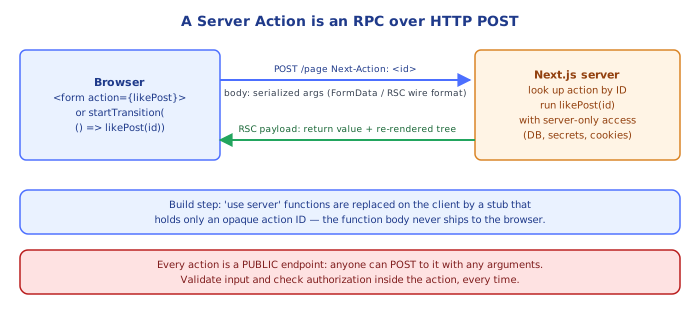
A Server Action compiles into a real HTTP POST endpoint with a generated, opaque action ID — it is genuinely an RPC call, not a local function call that happens to run "somewhere." When the build compiler encounters "use server", it does two things: (1) it registers the function server-side under a unique, content-derived ID (an encrypted reference so the ID can't be guessed or reused to invoke arbitrary server code), and (2) on the client, it replaces the function reference with a small stub that, when called, performs a fetch POST to the current route's URL carrying a special header (Next-Action) set to that function's ID, plus the serialized arguments as the request body.
Client calls likePost(postId)
        │
        ▼
stub does: fetch(currentUrl, {
  method: "POST",
  headers: { "Next-Action": "<generated-action-id>" },
  body: serialize([postId]),
})
        │
        ▼
Server receives the request, looks up the function registered under
that action ID, calls it with the deserialized arguments, and
streams back the return value (and, if the tree needs to reflect new
data, an updated RSC payload) as the response.
This is why Server Actions "just work" as regular async function calls syntactically — the compiler is doing real codegen to turn a function reference into a fetch call with a routing key, the same fundamental shape as any RPC framework's client stub, just generated for you instead of hand-written.
<form action={serverAction}> works without JavaScript because Server Actions piggyback on a real HTML form submission first. A <form> whose action is a Server Action reference renders to actual HTML with a POST target the browser understands natively — if JS hasn't loaded yet, the browser does a real full-page form POST and the server handles it exactly as it would any traditional form submission (progressive enhancement). Once React hydrates, it intercepts the submit event and performs the same POST via fetch instead, without a full navigation, layering the SPA-like experience on top of a submission path that works even in a no-JS environment.
Security implication of the generated-ID mechanism: because the ID is server-registered and not derived from anything guessable (like the function's name or file path), a Server Action cannot be invoked by crafting an arbitrary POST unless you know the exact ID the current build generated for it — but this is not an authorization system. A Server Action still runs with no built-in caller identity check; any code that has that ID (including anyone inspecting network requests in the browser) can invoke it, so actions that mutate data must independently verify the caller is authorized, exactly like any other server endpoint.
⚠️ Common Pitfalls
- Forgetting
revalidatePath/revalidateTagafter a mutation — the action succeeds, but statically or ISR-cached pages keep showing old data because nothing told the cache it's stale. - Treating a Server Action's callability as an authorization boundary — it is not; always re-check permissions/ownership inside the action itself, the same as you would for a public API route.
- Passing non-serializable arguments into a Server Action call from the client — functions, class instances, and DOM nodes can't cross the RPC boundary as arguments, only plain data.
- Not handling the pending state, leaving a form submittable multiple times before the first submission resolves — wrap the call in
useTransitionor useuseActionState's built-in pending flag. - Defining an inline Server Action that closes over sensitive server-only values incorrectly — closed-over values ARE bundled and encrypted for a component-scoped action, but it's easy to assume they're excluded entirely; large closures increase the payload sent per invocation.
📋 Quick Reference
"use server" at top of a file        → every export in that file is a Server Action
"use server" at top of a function     → just that function is a Server Action (inline, in a Server Component)

<form action={someServerAction}>       → works without JS (real POST), intercepted once hydrated
onClick(() => startTransition(...))     → call a Server Action outside a form, get a pending state
useActionState(action, initialState)     → wires the action's return value + pending into component state

revalidatePath("/route")               → invalidate a specific route's cache after a mutation
revalidateTag("tag")                    → invalidate every fetch tagged with "tag"

Mechanism: compiles to a POST to the current URL with a "Next-Action: <id>" header
Security: NOT an auth boundary by itself — always re-check permissions inside the action
🧠 Key takeaways
- A Server Action is an async server function (
'use server') callable from forms and client code. - Treat it like a public API endpoint: authenticate, authorize, validate.
- Return serializable results (errors, data); pair with useActionState / useFormStatus / useOptimistic.
- Call revalidatePath / revalidateTag (or redirect) so the UI reflects the mutation.
🎤 Interview Q&A
Q1What are Server Actions?core▾
Async functions marked 'use server' that run on the server and can be called from forms (<form action={fn}>) or client code. Next.js creates an endpoint for them, handling serialization, and supports progressive enhancement.
- Typical uses? Form submissions and mutations followed by revalidation.
Q2How do you secure Server Actions?senior▾
Treat them as public API endpoints: authenticate and authorize inside each action, validate input (Zod), avoid trusting hidden fields, and rate-limit sensitive actions. Next.js checks Origin to mitigate CSRF.
- Are closures' captured values safe? They're encrypted, but don't rely on them for authorization.
Q3How do you refresh data after a mutation?core▾
Call revalidatePath or revalidateTag in the action, or redirect to a new page; the client receives fresh RSC payloads.
- Optimistic UI? useOptimistic with the action.
Q4How do you return validation errors to the form?core▾
Return an error object from the action and read it with useActionState; show field errors next to inputs and keep submitted values.
- Pending state?
isPendingoruseFormStatusin the submit button.
Q5Server Actions vs Route Handlers?core▾
Server Actions suit mutations from your own UI (forms) with tight integration and progressive enhancement. Route Handlers suit public APIs, webhooks, third-party clients, and non-POST methods/caching.
- Which for a Stripe webhook? A Route Handler.
🛠️ Practice exercises
Each exercise is a file in this topic folder. Code exercises are self-checking: run them and make the checks pass.
✅ Check yourself
Answer the questions — feedback is instant.