React Router
React Router maps URLs to components in the browser without full page reloads. Declare nested routes, see layouts render their children through Outlet as the URL changes, read params and search params, and protect routes.
🎯 What you'll learn
- Why client-side routing exists
- Declaring routes
- Reading the URL and navigating
- Nested routes with Outlet and protected routes
📚 Before you start
1Why a Client-Side Router Exists at All
A plain React app rendered by ReactDOM.createRoot() has no concept of URLs — one component tree, one screen. React Router is a library that maps URL paths to components on the client, so navigating between "pages" swaps out parts of the tree instead of triggering a full page reload. This is distinct from Next.js's file-system router (covered in "Nextjs routing"): that one is a framework-level convention baked into the build; React Router is a library you install into any React app (SPA, or non-Next.js setups) and configure yourself in code.
Next.js routing    → file path IS the route, framework-owned, server+client aware
React Router → routes declared in code as data/JSX, client-side library, you own the config2Declaring Routes
import { BrowserRouter, Routes, Route } from "react-router-dom";

function App() {
  return (
    <BrowserRouter>
      <Routes>
        <Route path="/" element={<Home />} />
        <Route path="/about" element={<About />} />
        <Route path="/users/:userId" element={<UserProfile />} />
        <Route path="*" element={<NotFound />} /> {/* catch-all, must be last */}
      </Routes>
    </BrowserRouter>
  );
}
BrowserRouter uses the browser's History API (pushState/popState) so the URL bar updates and back/forward work, without the browser actually requesting a new document. Routes picks the single best-matching Route for the current URL and renders its element — unlike plain conditional rendering, it handles path-pattern matching (including dynamic segments and specificity ranking) for you.
3Reading the URL: useParams, useLocation, useSearchParams
import { useParams, useLocation, useSearchParams } from "react-router-dom";

function UserProfile() {
  const { userId } = useParams();          // { userId: "42" } for /users/42
  const location = useLocation();          // { pathname, search, hash, state, key }
  const [searchParams] = useSearchParams(); // URLSearchParams for ?tab=posts

  const tab = searchParams.get("tab") ?? "profile";
  return <p>User {userId}, tab: {tab}, path: {location.pathname}</p>;
}
useParams reads the dynamic segments declared with a : prefix in the matched route's path. useSearchParams (a [value, setter] pair, mirroring useState's shape) reads and updates the query string without triggering a full route re-match.
4Navigating Programmatically: useNavigate and <Link>
import { Link, useNavigate } from "react-router-dom";

function Toolbar() {
  const navigate = useNavigate();

  return (
    <>
      <Link to="/about">About</Link> {/* renders a real <a>, intercepted on click */}
      <button onClick={() => navigate("/users/42")}>Go to user 42</button>
      <button onClick={() => navigate(-1)}>Back</button> {/* -1 = history.back() */}
    </>
  );
}
<Link> renders an actual <a href> (so right-click "open in new tab" and crawlers still work) but intercepts left-clicks to perform a client-side navigation via the History API instead of a full page load. useNavigate is the imperative escape hatch for navigating from event handlers, effects, or after an async action completes (e.g. redirecting after a successful form submit).
5Nested Routes and <Outlet>
<Routes>
  <Route path="/dashboard" element={<DashboardLayout />}>
    <Route index element={<DashboardHome />} />       {/* /dashboard */}
    <Route path="settings" element={<Settings />} />   {/* /dashboard/settings */}
    <Route path="billing" element={<Billing />} />     {/* /dashboard/billing */}
  </Route>
</Routes>function DashboardLayout() {
return (
<div>
<Sidebar />
<Outlet /> {/* renders whichever child route matched — DashboardHome, Settings, or Billing */}
</div>
);
}A parent <Route> with child <Route>s renders its own element (the shared layout, here DashboardLayout) and delegates to <Outlet /> for wherever the matched child route's content goes — this is the client-side-router equivalent of Next.js's layout.tsx + nested page.tsx composition. index marks the child that renders when the parent's path matches exactly, with no further segment.
6Protected Routes
function RequireAuth({ children }: { children: React.ReactNode }) {
  const isAuthenticated = useAuth(); // some hook checking session/token state
  const location = useLocation();

  if (!isAuthenticated) {
    // redirect to login, remembering where the user was headed
    return <Navigate to="/login" state={{ from: location }} replace />;
  }
  return <>{children}</>;
}

<Route
  path="/dashboard"
  element={
    <RequireAuth>
      <DashboardLayout />
    </RequireAuth>
  }
/>
There's no special "protected route" primitive — it's an ordinary wrapper component that reads auth state and either renders children or issues a <Navigate> redirect. replace swaps the current history entry instead of pushing a new one, so the login redirect doesn't leave a broken "back" step pointing at the page the user was denied.
Under the HoodHow it works internally▾
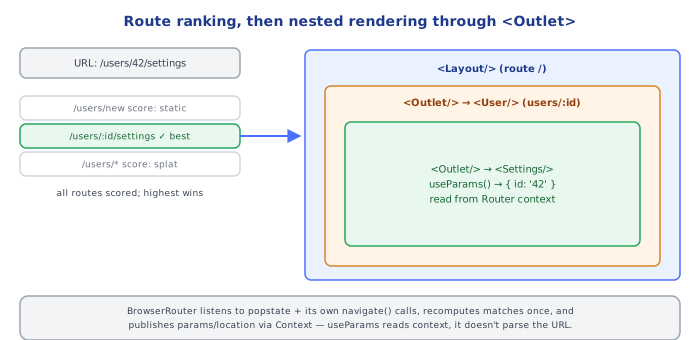
Route matching is a path-ranking algorithm, not first-match-wins. When <Routes> renders, it doesn't walk its <Route> children in JSX order and stop at the first pattern that matches the current URL. It scores every route in the tree against the current pathname (static segments score higher than dynamic :param segments, which score higher than the wildcard *) and picks the single highest-specificity match. This is why path="*" as a catch-all works regardless of where you place it in JSX — but by convention it's still written last for readability, since ranking (not position) is what actually decides the winner.
useParams/useLocation/etc. work via React Context, not URL parsing on every call. BrowserRouter subscribes to window's popstate event and to its own internal navigation calls, and on every URL change it re-computes the matched route tree once and pushes the result (params, location, matched routes) down through React Context. Every useParams()/useLocation() call in a descendant component is just a context read — cheap, synchronous, and automatically consistent across every component reading it during the same render, rather than each hook independently re-parsing window.location.
⚠️ Common Pitfalls
- Forgetting the catch-all
*route — an unmatched URL renders nothing (an empty<Routes>output) instead of a 404 page, unless a wildcard route is present. - Using
<a href>instead of<Link to>for internal navigation — a plain anchor triggers a full page reload (and loses all client-side state), defeating the purpose of a client-side router. - Nested routes without an
<Outlet />in the parent layout — the child route's content silently never renders, because nothing tells React where to put it. - Reading
useParams()outside a matched route's component tree — it only works inside a component rendered as (or nested under) a<Route>'selement; called elsewhere it returns an empty object. - Confusing
useNavigate'sreplaceoption — omitting it pushes a new history entry (back button returns to the previous page); passingreplace: trueswaps the current entry (back button skips over it) — picking the wrong one breaks user expectations around the back button.
📋 Quick Reference
<BrowserRouter><Routes><Route path="/x" element={<X/>} /></Routes></BrowserRouter>
path="/users/:id"          → dynamic segment, read via useParams().id
path="*"                    → catch-all, ranked lowest, put last for readability
<Route index element={} />  → renders when parent path matches exactly

useParams()        → { [paramName]: string } from the matched dynamic segments
useLocation()       → { pathname, search, hash, state, key }
useSearchParams()   → [URLSearchParams, setSearchParams] for ?query=strings
useNavigate()       → navigate("/path") | navigate(-1) | navigate("/path", {replace: true})
<Link to="/path">    → real <a>, intercepted client-side navigation
<Outlet />           → renders the matched CHILD route inside a parent layout route
<Navigate to="/x" />  → declarative redirect (e.g. inside an auth guard)
🧠 Key takeaways
- Client-side routing updates the URL with the History API and swaps components without reloads.
- Routes nest; parent layouts render children via
<Outlet/>and stay mounted. useParams,useSearchParams,useLocationread the URL;<Link>/useNavigatechange it.- Protected routes improve UX only; APIs must enforce authorization. Data routers add loaders/actions.
🎤 Interview Q&A
Q1How does React Router handle routing in an SPA?core▾
It maps URL paths to component trees with nested routes and layouts (<Outlet/>), updates the URL via the History API without page reloads, and provides hooks like useParams, useNavigate, useSearchParams.
- What's a nested route? A child route rendered inside the parent's Outlet, sharing layout.
Q2What are loaders and actions (data routers)?core▾
Route-level functions that fetch data before rendering (loader) and handle mutations (action), letting navigation and data loading happen in parallel and avoiding effect-based waterfalls. Errors go to route errorElements.
- Hook to read loader data?
useLoaderData.
Q3How do you protect routes?core▾
Check auth in loaders (redirect if unauthenticated) or wrap routes in a guard layout; the server must still enforce authorization on API calls.
- Why loaders over component guards? They redirect before rendering, avoiding flicker.
Q4How do you code-split routes?senior▾
Lazy route modules (lazy: () => import('./routes/admin')) so each route's code loads on demand.
- Prefetching? Load route code/data on link hover or intent.
Q5What's the relationship between React Router and Remix?core▾
Remix's data loading model merged into React Router v7, which can run as a library (SPA) or as a full-stack framework with SSR.
- Framework mode gives? SSR, server loaders/actions and file-based routing options.
🛠️ Practice exercises
Each exercise is a file in this topic folder. Code exercises are self-checking: run them and make the checks pass.
✅ Check yourself
Answer the questions — feedback is instant.