Material UI
Material UI is a complete component library driven by a theme object. Configure the theme, style one-offs with the sx prop, build reusable variants with styled(), and compare the approach with Tailwind.
🎯 What you'll learn
- A pre-built component library
- The theme object
- The sx prop and styled()
- Contrast with Tailwind and how styles are generated
1A Pre-Built Component Library, Not a Utility Toolkit
Material UI (MUI) ships finished, accessible components — buttons, dialogs, data tables, form fields — implementing Google's Material Design system out of the box. This is a fundamentally different model from Tailwind's utility classes: instead of composing a button from px-4 py-2 rounded bg-blue-600 ... yourself, you install @mui/material and render <Button variant="contained">Click</Button>, and MUI supplies the markup, ARIA attributes, keyboard interaction, and ripple-click animation for you.
import Button from "@mui/material/Button";
import TextField from "@mui/material/TextField";

function LoginForm() {
  return (
    <form>
      <TextField label="Email" variant="outlined" fullWidth />
      <Button variant="contained" color="primary" type="submit">
        Log in
      </Button>
    </form>
  );
}
TextField alone bundles a label, an input, focus/error states, helper text support, and correct label-input association — behavior you would otherwise hand-assemble from a raw <input> plus your own CSS and ARIA wiring.
2The Theme Object
import { ThemeProvider, createTheme } from "@mui/material/styles";

const theme = createTheme({
  palette: {
    primary: { main: "#5b21b6" },
    mode: "light", // or "dark"
  },
  typography: {
    fontFamily: "Inter, sans-serif",
  },
  shape: {
    borderRadius: 8,
  },
});

function App() {
  return (
    <ThemeProvider theme={theme}>
      <LoginForm />
    </ThemeProvider>
  );
}
Every MUI component reads its colors, spacing, typography, and shape from a single theme object provided via React Context (ThemeProvider). Changing theme.palette.primary.main retheme every <Button color="primary"> in the app at once — this is the library's answer to consistent, centralized design tokens, achieved through a JS object rather than a CSS custom-property file.
3The sx Prop — Inline, Theme-Aware Styling
<Button
  sx={{
    mt: 2,                 // margin-top: theme.spacing(2) = 16px by default
    bgcolor: "primary.main", // resolves against the theme's palette, not a literal string
    "&:hover": { bgcolor: "primary.dark" },
  }}
>
  Save
</Button>
The sx prop is a per-component styling escape hatch: a plain object (or callback receiving the theme) that MUI compiles into CSS-in-JS at render time. Unlike Tailwind's static utility classes, sx values can reference the live theme by path ("primary.main", "error.light"), so a value automatically follows theme changes (e.g. light/dark mode) without you hand-writing conditional class names.
4Customizing Components with styled()
import { styled } from "@mui/material/styles";
import Button from "@mui/material/Button";

const GradientButton = styled(Button)(({ theme }) => ({
  background: `linear-gradient(45deg, ${theme.palette.primary.main}, ${theme.palette.secondary.main})`,
  borderRadius: theme.shape.borderRadius * 2,
  "&:hover": {
    opacity: 0.9,
  },
}));

// used exactly like the base <Button>, with the custom styles baked in
<GradientButton variant="contained">Upgrade</GradientButton>;
styled() wraps an existing MUI component (or a plain HTML tag) and returns a new component with additional CSS baked in via a callback that receives the theme — this is MUI's version of styled-components/emotion's tagged-template API, used when a style needs to be reused as its own named component rather than repeated inline via sx at every usage site.
5Contrast with Tailwind's Approach
Tailwind  → you build components FROM utility classes; no components ship pre-built
MUI       → components ship pre-built and pre-styled; you theme/override them
Tailwind gives maximum layout/visual freedom but zero built-in component behavior (accessibility, interaction states, composition) — you build and re-build every component's internals yourself. MUI gives a large library of correct, accessible components immediately, at the cost of working within Material Design's visual language and component API surface (harder to make it look nothing like "a Material UI app" without significant theme overrides). Some teams pair them (Tailwind for layout/spacing around plain elements, MUI for complex interactive components like date pickers or data grids) — but MUI's own sx/theme system generally covers most one-off styling needs without pulling in Tailwind at all.
Under the HoodHow it works internally▾
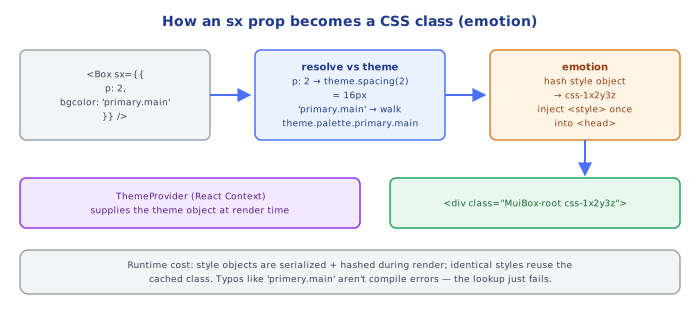
sx and styled() both compile to real CSS classes at runtime via emotion (MUI's default CSS-in-JS engine), not inline style attributes. When a component renders with an sx prop, MUI's emotion integration hashes the resulting style object into a deterministic class name, injects a <style> rule for it into the document <head> (deduplicating identical style objects across renders/instances so the same visual style doesn't generate redundant CSS rules), and applies that class name to the DOM node — not a style="..." attribute. This matters because real CSS classes participate in the normal cascade (so &:hover/media queries work, which inline styles can't express) and can be overridden by a later stylesheet rule if specificity allows, whereas true inline styles always win regardless of specificity.
Theme resolution in sx walks the theme object by string path at style-computation time, not at TypeScript-compile time. Writing bgcolor: "primary.main" doesn't reference a variable — MUI's sx implementation takes that string, splits it on ., and looks up theme.palette.primary.main on the actual theme object passed down via context, then substitutes the resolved value into the generated CSS. This is why switching ThemeProvider's theme prop (e.g. toggling to a dark-mode theme object) instantly reflows every component using theme-path strings in sx, without any component re-writing its own sx object — the indirection is resolved fresh on every render against whatever theme is currently in context.
⚠️ Common Pitfalls
- Overriding MUI component internals with raw CSS class selectors targeting emotion's generated hash classes — those hashes are non-deterministic implementation details across builds; use
sx,styled(), or the theme'scomponentsoverride key instead of fighting generated class names. - Forgetting
ThemeProviderentirely — components still render (MUI falls back to a default theme), but any custom palette/typography/shape configuration silently has no effect, which is confusing when the app "looks unthemed" with no visible error. - Using
sxfor large, reused style blocks instead ofstyled()—sxrecomputes and re-injects its style object on every render of that instance; a style reused across many components/instances is cheaper and more maintainable as a singlestyled()component defined once. - Mixing MUI's spacing unit assumption incorrectly —
sx={{ mt: 2 }}istheme.spacing(2)(8px × 2 = 16px by default), not literally2px; forgetting the theme's spacing multiplier produces layouts far tighter or looser than intended. - Fighting Material Design's visual identity with heavy per-component overrides instead of centralizing changes in the theme object — scattered one-off
sxoverrides across the codebase for the same visual change are exactly the maintenance problem centralized theming exists to prevent.
📋 Quick Reference
<Button variant="contained" color="primary">   → pre-built, pre-styled, accessible component
createTheme({ palette, typography, shape })     → central design-token object
<ThemeProvider theme={theme}>                    → provides the theme via Context to all MUI components

sx={{ mt: 2, bgcolor: "primary.main" }}          → inline, theme-aware styling (per-instance)
styled(Component)((props) => ({ ... }))          → reusable component with baked-in theme-aware styles

Mechanism: sx/styled compile to real injected CSS classes via emotion, not inline `style`
Theme paths ("primary.main") resolve against the live theme object at render/style time
🧠 Key takeaways
- MUI ships accessible, ready-made components (Button, Dialog, DataGrid…) following Material Design.
- The theme centralizes palette, spacing, typography, shape and component defaults.
- sx for one-off theme-aware styles; styled() for reusable variants; theme
componentsfor global overrides. - Trade-off vs Tailwind: speed and completeness vs runtime CSS-in-JS cost and a more opinionated look.
🎤 Interview Q&A
Q1What does Material UI (MUI) provide?core▾
A comprehensive React component library implementing Material Design: inputs, data display, navigation, layout, with theming, accessibility built in, and advanced components (MUI X: data grid, date pickers).
- When choose MUI? Internal tools and dashboards needing many polished components fast.
Q2How do you customize MUI's look?core▾
A theme (createTheme) for palette, typography, spacing, breakpoints and component default props/style overrides; the sx prop for one-off styles; styled() for custom components.
- Why prefer theme overrides? Consistency across the app.
Q3What are the trade-offs of MUI?senior▾
Fast development and accessibility, but larger bundles, runtime CSS-in-JS cost (Emotion), opinionated design that takes effort to make unique, and upgrade churn.
- Pigment CSS? MUI's zero-runtime styling direction.
Q4How do you keep MUI bundles small?core▾
Use path or named imports with tree-shaking, avoid importing entire icon sets, and lazy-load heavy components like data grids.
- Icons gotcha? Importing from the root of @mui/icons-material slows dev builds.
Q5How does MUI handle accessibility?core▾
Components implement ARIA roles, keyboard navigation and focus management (dialogs, menus), but you must still provide labels, alt text and correct semantics.
- Example? TextField with a label connects
labelandinputautomatically.
🛠️ Practice exercises
Each exercise is a file in this topic folder. Code exercises are self-checking: run them and make the checks pass.
✅ Check yourself
Answer the questions — feedback is instant.