shadcn/ui
shadcn/ui isn't a dependency: its CLI copies component source code into your project. Watch add button write files you own, built from Radix primitives and Tailwind, then theme everything with CSS variables.
🎯 What you'll learn
- Not a package: a code generator
- Radix UI primitives + Tailwind
- The ownership model
- Composing components and theming via CSS variables
📚 Before you start
1Not a Package — a Code Generator
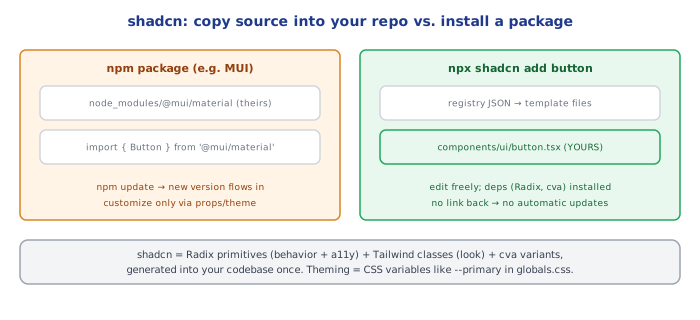
Every library covered so far in this group installs as an npm dependency: import Button from "@mui/material/Button" pulls compiled component code out of node_modules, and you never see or edit its source. shadcn/ui inverts this completely: it is a CLI tool that copies component source code directly into your own project. There is no shadcn package sitting in node_modules providing components at runtime — after running the CLI, the component's actual .tsx file lives in your repo, under your version control, editable like any file you wrote yourself.
npx shadcn@latest add button
# creates: components/ui/button.tsx — real source, now YOURS// components/ui/button.tsx (excerpt — this file is generated once, then you own it)
import * as React from "react";
import { cva, type VariantProps } from "class-variance-authority";
import { cn } from "@/lib/utils";
const buttonVariants = cva(
"inline-flex items-center justify-center rounded-md text-sm font-medium transition-colors",
{
variants: {
variant: {
default: "bg-primary text-primary-foreground hover:bg-primary/90",
destructive: "bg-destructive text-destructive-foreground hover:bg-destructive/90",
outline: "border border-input bg-background hover:bg-accent",
},
size: {
default: "h-10 px-4 py-2",
sm: "h-9 rounded-md px-3",
lg: "h-11 rounded-md px-8",
},
},
defaultVariants: { variant: "default", size: "default" },
}
);2Built From Radix UI Primitives + Tailwind
shadcn components aren't written from scratch — each one wraps an unstyled, fully-accessible Radix UI primitive (handling focus trapping, keyboard navigation, ARIA attributes, portal rendering for overlays) and applies Tailwind utility classes for visual styling, composed via class-variance-authority (cva) for variant-based styling (the variant/size props above) and the cn() helper (a clsx + tailwind-merge combo, see the Tailwind CSS topic's twMerge exercise for the underlying idea) for merging classes without conflicts.
Radix UI primitive   → unstyled behavior/accessibility (focus, keyboard nav, ARIA)
Tailwind + cva        → the visual styling layered on top
shadcn CLI → glues the two together and writes the result into YOUR repo3The Ownership Model — What "You Own It" Actually Means
// You can open components/ui/button.tsx and just... edit it.
// Want a new variant? Add a key to buttonVariants' "variant" object.
// Want different default padding? Change the "default" size string directly.
// No wrapper component, no "swizzling," no fighting an npm package's API surface.
Because the component is plain source code in your repo, customizing it beyond what a variant/size prop exposes means directly editing the file — there's no separate "theming API" to learn, no risk of a npm update silently changing the component's behavior out from under you, and no need to reach for MUI-style theme overrides or !important CSS overrides to fight a black-box package's default styles. The cost is the inverse of MUI's: you're now responsible for that file's maintenance (bug fixes, accessibility regressions) instead of a maintainer upstream — there's no npm update @mui/material equivalent that pulls in improvements automatically once a component has been generated into your project.
4Composing shadcn Components
import { Button } from "@/components/ui/button";
import { Dialog, DialogContent, DialogHeader, DialogTitle, DialogTrigger } from "@/components/ui/dialog";

function DeleteConfirmDialog() {
  return (
    <Dialog>
      <DialogTrigger asChild>
        <Button variant="destructive">Delete account</Button>
      </DialogTrigger>
      <DialogContent>
        <DialogHeader>
          <DialogTitle>Are you sure?</DialogTitle>
        </DialogHeader>
        <p>This action cannot be undone.</p>
      </DialogContent>
    </Dialog>
  );
}
Components compose as ordinary JSX, same as any React component — Dialog/DialogTrigger/DialogContent are compound-component pieces (inherited from the underlying Radix primitive's API shape) that share implicit state (open/closed) via context, rather than one monolithic <Dialog open={...} content={...}> prop-driven component.
5Theming via CSS Variables
/* globals.css, generated by the shadcn CLI */
:root {
  --primary: 222.2 47.4% 11.2%;
  --primary-foreground: 210 40% 98%;
  --radius: 0.5rem;
}
.dark {
  --primary: 210 40% 98%;
  --primary-foreground: 222.2 47.4% 11.2%;
}
shadcn's generated Tailwind config maps utility classes like bg-primary to these CSS custom properties rather than fixed hex values, so a single :root/.dark variable swap re-themes every generated component at once — conceptually similar to MUI's theme object, but implemented as plain CSS variables rather than a JS object resolved through React Context.
Under the HoodHow it works internally▾
The shadcn CLI is fundamentally a file-copy-and-template-fill operation, not a package manager action. Running npx shadcn add button fetches a registry entry (a JSON manifest describing the component's source file(s), its dependencies like class-variance-authority or @radix-ui/react-slot, and where each file should be written in your project), installs any missing npm dependencies it declares, and writes the component's actual .tsx source into components/ui/ using your project's configured path aliases (from components.json, generated on first shadcn init). There is no runtime registry lookup, no version pin to a "shadcn version" tracked anywhere after that point — the file is now indistinguishable from any other file you wrote, and future shadcn add runs for OTHER components don't touch it.
This is precisely why there's no automatic-update story. A traditional npm package's package.json entry records an installed version, and npm update can fetch a newer one; shadcn's registry entries carry no such persistent link back to your already-generated files. If the upstream button.tsx template improves (an accessibility fix, a new Radix API), your project's copy doesn't know or care — picking up the improvement means manually diffing the new template against your (possibly already-edited) local file and merging by hand. This tradeoff is the direct, unavoidable consequence of the ownership model in section 3: full editability requires giving up automatic propagation of upstream fixes.
⚠️ Common Pitfalls
- Expecting
npm updateor a similar command to update shadcn components — there is no such mechanism; updates to already-generated components require manually re-runningshadcn add <component>(which will prompt to overwrite) and re-applying any local edits, or diffing by hand. - Treating the generated files as read-only vendor code — the entire point of the model is that they're yours to edit; leaving them untouched and reaching for wrapper components or CSS overrides instead defeats the ownership benefit and reintroduces the "fighting a black box" problem shadcn exists to avoid.
- Not running
shadcn initfirst — the CLI needscomponents.json(path aliases, Tailwind config location, CSS variable vs. utility-class color mode) beforeaddcommands know where to write files; skipping init produces confusing path errors. - Forgetting a component's Radix dependency comes along with it — deleting a generated component file without also removing its now-unused
@radix-ui/react-*package leaves a dangling dependency; conversely, editing away all Radix usage from a file without removing the import breaks it. - Assuming visual identity is Tailwind-only — a decent portion of a shadcn component's appearance comes from the CSS variable theme (section 5), not just inline utility classes; changing
--primaryinglobals.csshas effects a pure Tailwind utility edit on one component won't replicate app-wide.
📋 Quick Reference
npx shadcn init              → sets up components.json, Tailwind config, CSS variables
npx shadcn add <component>    → copies real source into components/ui/, installs deps

Ownership: generated files are YOURS — edit them directly, no theming API to learn
Built from: Radix UI primitive (behavior/a11y) + Tailwind + cva (variants) + cn() (class merge)
No auto-update: unlike an npm package, there's no version-tracked update path after generation
Theming: CSS custom properties (--primary, --radius, ...) in globals.css, swapped per .dark etc.

Contrast: MUI  = black-box package, theme object, npm-updatable
          shadcn = generated source, CSS variables, manually re-synced
🧠 Key takeaways
- shadcn/ui copies source code into your repo; there's no runtime UI package to upgrade.
- Components wrap Radix primitives (accessibility, focus, keyboard) and style them with Tailwind.
- You own the code: customize anything, but you also own updates.
- Theme via CSS variables (
--primary,--radius), with dark mode by swapping variable sets.
🎤 Interview Q&A
Q1What is shadcn/ui and how is it different from a component library?core▾
A collection of copy-paste components built on Radix UI primitives and Tailwind, added to your codebase via a CLI. You own and modify the code instead of depending on a versioned package.
- Main benefit? Full control and customization without fighting a library's styling.
Q2What does Radix UI provide underneath?core▾
Unstyled, accessible primitives (dialog, dropdown, popover, tabs) handling focus management, keyboard interaction and ARIA, while you supply the styles.
- Why headless components? Accessibility and behaviour are hard; styling is yours.
Q3What are the trade-offs of owning component code?senior▾
Flexibility and no breaking upgrades forced on you, but you maintain the code, and getting upstream fixes means re-copying or merging updates manually.
- How do you update? Re-run the CLI or diff against new versions.
Q4How do variants work in shadcn components?core▾
With class-variance-authority (cva) defining variant and size classes, and a cn() helper combining clsx and tailwind-merge.
- What's cn()? A utility merging class names and resolving Tailwind conflicts.
Q5How do you theme shadcn/ui?core▾
Through CSS variables (colors, radius) mapped into Tailwind's config, switching values for dark mode or brands.
- Benefit of CSS variables? Runtime theme switching without rebuilding CSS.
🛠️ Practice exercises
Each exercise is a file in this topic folder. Code exercises are self-checking: run them and make the checks pass.
✅ Check yourself
Answer the questions — feedback is instant.
add button?