State
State is data a component remembers between renders. Learn why three setCount(count + 1) calls add only one, when to use functional updates, why useState doesn't merge objects, and when to derive values instead of storing them.
🎯 What you'll learn
- Props vs state
- Declaring state with useState
- Batched updates, no merging, and instance-local state
- Deriving vs storing, lifting state up, and where state lives
📚 Before you start
1Props vs State
Props are data handed to a component from outside; state is data a component owns and manages itself, which can change over time and causes the component to re-render when it does.
function Counter() {
  const [count, setCount] = useState(0); // state: owned by Counter
  return <button onClick={() => setCount(count + 1)}>{count}</button>;
}
count belongs to this exact instance of Counter. No parent passed it in; nothing outside Counter can read or change it directly.
| Props | State | |
|---|---|---|
| Owner | Parent component | The component itself |
| Mutable by | Parent (by re-rendering with new props) | The component (via its setter function) |
| Triggers re-render on change | Yes | Yes |
| Initial value set by | Parent, every render | The component, only on first render |
2Declaring State with useState
const [value, setValue] = useState(initialValue);useState returns a pair: the current value, and a function to request a change to it. Calling the setter does not mutate value in place — it schedules a re-render in which useState will return the new value.
function NameForm() {
  const [name, setName] = useState("");
  return (
    <input value={name} onChange={(e) => setName(e.target.value)} />
  );
}3State Updates Are Asynchronous (Batched) and Don't Merge
Two things trip people up constantly:
function BuggyCounter() {
  const [count, setCount] = useState(0);
  function handleClick() {
    setCount(count + 1); // count is still 0 here (closed over from this render)
    setCount(count + 1); // still reads count === 0 — NOT count === 1
    // net effect: count becomes 1, not 2
  }
  return <button onClick={handleClick}>{count}</button>;
}
count inside handleClick is a value captured from the render that created this closure — it never changes mid-function no matter how many times you call setCount. Use the updater function form to base a new value on the actual latest state:
function FixedCounter() {
  const [count, setCount] = useState(0);
  function handleClick() {
    setCount((prev) => prev + 1); // prev is guaranteed the latest value
    setCount((prev) => prev + 1); // net effect: count becomes 2
  }
  return <button onClick={handleClick}>{count}</button>;
}
Also — unlike class this.setState, the useState setter replaces the value entirely; it does not shallow-merge object state for you:
const [user, setUser] = useState({ name: "Ana", age: 30 });
setUser({ age: 31 }); // ❌ WRONG — name is now gone, user is { age: 31 }
setUser((prev) => ({ ...prev, age: 31 })); // ✅ correct — spread to merge4State Is Local to the Component Instance
Each rendered instance of a component gets its own, independent state — even if it's the exact same function, rendered twice:
function App() {
  return (
    <>
      <Counter /> {/* has its own count */}
      <Counter /> {/* completely separate count, starts at 0 */}
    </>
  );
}
Clicking one <Counter />'s button never affects the other's — they are different fiber instances (see the "Under the Hood" section for exactly how React tells them apart).
5Deriving State vs Storing It
A very common source of bugs: storing something in state that could instead be computed from existing state/props during render.
// Unnecessary state — fullName can drift out of sync with first/last
const [firstName, setFirstName] = useState("Ana");
const [lastName, setLastName] = useState("Lee");
const [fullName, setFullName] = useState("Ana Lee"); // ❌ redundant, can desync

// Just derive it — always correct, no separate state to manage
const fullName = `${firstName} ${lastName}`; // ✅
Rule of thumb: if a value can be computed from other state/props in one line during render, don't put it in useState — compute it directly (or with useMemo if the computation is expensive; see "Performance optimization").
6Lifting State Up
When two sibling components need to share/coordinate state, the state moves to their closest common parent, which then passes it down as props (to both) plus a callback (to whichever needs to change it):
function Parent() {
  const [selectedId, setSelectedId] = useState<string | null>(null);
  return (
    <>
      <List selectedId={selectedId} onSelect={setSelectedId} />
      <Details selectedId={selectedId} />
    </>
  );
}
Neither List nor Details owns selectedId — it lives one level up, in the component that's the common ancestor of everyone who needs it.
Under the HoodWhere useState's Value Actually Lives▾
It's not a closure variable — it's a linked-list entry on the fiber
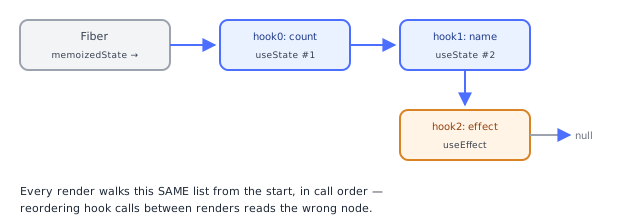
useState does not store its value in some hidden module-level map keyed by component. It stores it as a node in a singly linked list of hooks hung off the component's own fiber, at fiber.memoizedState. Each hook object looks roughly like:
{ memoizedState: <the value>, queue: <pending updates>, next: <next hook's node or null> }Every useState/useEffect/useRef/etc. call in your component appends one node to this list, in call order. This is exactly why the fiber, not a closure, is the source of truth — the fiber persists across renders (see "React fundamentals"), so the linked list (and the values inside it) survives even though your component function runs fresh, top to bottom, every single render.
What actually happens when your component function runs again
On every re-render, React walks the same linked list from the start, and each useState() call in your function simply reads the next node in that list — it doesn't create a new one. This is why hook call order has to be identical every render (the Rules of Hooks): if render N calls useState then useEffect, but render N+1 calls useEffect then useState, React reads the wrong node for each — there's no name-based lookup happening, only positional linked-list traversal.
Fiber.memoizedState → [hook0: count]  →  [hook1: name]  →  [hook2: effect]  →  null
                        (useState #1)     (useState #2)     (useEffect)
What setCount(x) actually does
Calling the setter doesn't write x into memoizedState synchronously. It pushes an update object onto that specific hook's queue, and schedules a re-render (marks the fiber as needing work, via the scheduler's lane mechanism). On the next render pass, React processes the queue for that hook — folding all pending updates in order (running any updater functions with the previous state as input) — and that result becomes the new memoizedState for the hook. This queue-then-process design is exactly why multiple setCount(count + 1) calls in the same event handler don't stack additively when they all close over the same stale count — they each push "set to 0 + 1" onto the queue, not "increment," unless you use the updater-function form, which pushes an actual increment operation instead of a fixed value.
Why two instances of the same component don't share state
Each rendered <Counter /> gets its own fiber, and therefore its own memoizedState linked list — "state belongs to the fiber" is not a metaphor, it's the literal storage location, and two fibers are two separate objects in memory no matter how identical their component function is.
⚠️ Common Pitfalls
- Reading stale state from a closure in the same handler — use the
setCount(prev => ...)updater form when the new value depends on the previous one. - Assuming
setStatemerges objects — it replaces; spread the previous state yourself ({ ...prev, field: newValue }). - Calling hooks conditionally or inside loops — breaks the positional linked-list traversal described above; always call hooks unconditionally, at the top level, in the same order every render.
- Storing derivable values in state — causes desync bugs; compute during render instead (see section 5).
- Expecting
setStateto updatecountimmediately after calling it — it doesn't; the new value is only visible on the next render, not on the very next line of the same function.
📋 Quick Reference
const [value, setValue] = useState(initial);

setValue(newValue);          // replace — direct value
setValue(prev => prev + 1);  // replace — computed from latest actual state (use for correctness in handlers)
setValue(prev => ({...prev, field: x})); // merge an object manually| Situation | Use |
|---|---|
| New value depends on previous state | Updater function: setX(prev => ...) |
| New value is independent | Direct value: setX(newValue) |
| Value can be computed from other state/props | Don't store it — derive it during render |
| Two siblings need the same state | Lift it to their common parent |
🧠 Key takeaways
- Props come from the parent; state is owned by the component and triggers re-renders when set.
- Updates are batched; each render sees a snapshot. Use functional updates when the next value depends on the previous.
useStatereplaces values; spread objects yourself.- Don't store what you can derive; lift state to the closest common parent when siblings share it.
🎤 Interview Q&A
Q1How does React state update work?core▾
Calling a setter schedules a re-render with the new state; updates are batched within events (and everywhere in React 18). State is a snapshot per render, so reading state right after setting it gives the old value.
- When use the functional updater?
setCount(c => c + 1)when the new state depends on the previous one.
Q2Why must state be treated as immutable?core▾
React compares references to detect changes; mutating an object/array in place keeps the same reference, so React may skip re-rendering and memoized children won't update. Create new objects/arrays instead.
- Helper for deep updates? Immer (used by Redux Toolkit).
Q3Where should state live?core▾
As close as possible to where it's used; lift it to the nearest common parent when siblings need it; use context or a store for widely shared app state; and keep server state in a data-fetching cache (TanStack Query, SWR).
- What's server state vs client state? Server state is remote data with caching/sync needs; client state is UI state.
Q4What is derived state and why avoid duplicating it?senior▾
Values computable from existing state/props (filtered lists, totals). Storing them separately risks inconsistency; compute during render, memoizing with useMemo if expensive.
- Classic bug? Copying props into state and not updating when props change.
Q5How do you reset a component's state?core▾
Change its key: React unmounts and remounts it with fresh state, e.g. <Profile key={userId} />.
- Why does position matter? React preserves state for the same component type at the same tree position.
🛠️ Practice exercises
Each exercise is a file in this topic folder. Code exercises are self-checking: run them and make the checks pass.
✅ Check yourself
Answer the questions — feedback is instant.