useContext
useContext reads the nearest provider's value without prop drilling. Watch a provider update re-render every consumer, including one inside a memoized parent, and learn to type and compose contexts properly.
🎯 What you'll learn
- The basic API and what the default value is for
- All-or-nothing re-renders per provider
- Composing multiple providers
- Typing context in TypeScript and internals
📚 Before you start
1The Basic API
useContext reads a value from the nearest matching Provider above the calling component in the tree, without that value being threaded through every intermediate component's props ("prop drilling").
import { createContext, useContext } from "react";

type Theme = "light" | "dark";
const ThemeContext = createContext<Theme>("light"); // "light" is the DEFAULT value

function App() {
  return (
    <ThemeContext.Provider value="dark">
      <Toolbar />
    </ThemeContext.Provider>
  );
}

function Toolbar() {
  return <ThemedButton />; // Toolbar never touches theme — no drilling needed
}

function ThemedButton() {
  const theme = useContext(ThemeContext); // "dark" — read directly, however deep
  return <button className={theme}>Click me</button>;
}
createContext(defaultValue) creates the context object; <Context.Provider value={...}> makes a value available to everything beneath it; useContext(Context) reads whatever value the nearest enclosing Provider supplied.
2What the Default Value Is Actually For
The value passed to createContext(defaultValue) is used only when a component calls useContext with no matching Provider anywhere above it in the tree — it is not a fallback for "a Provider exists but forgot to pass a value prop," and it is not used if a Provider is present, even if that provider's value is undefined.
const ThemeContext = createContext<Theme>("light");

function OrphanButton() {
  return <ThemedButton />; // no <ThemeContext.Provider> anywhere above this
}
// useContext(ThemeContext) inside ThemedButton here returns "light" — the default,
// used purely because no Provider was found during the walk up the tree.
This makes the default value mostly useful for components rendered/tested in isolation, or as a documented "this is what you get if you forget to wrap the tree" contract.
3Re-render Behavior: All-or-Nothing per Provider
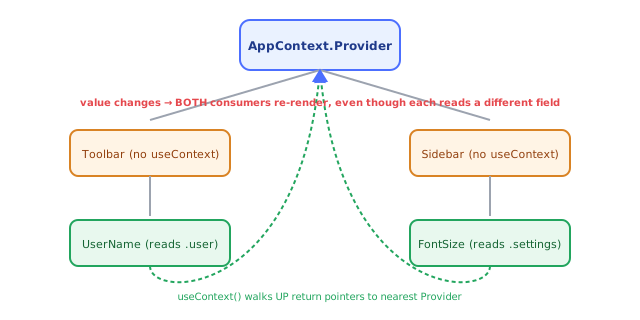
Every component that calls useContext(SomeContext) re-renders whenever the nearest Provider's value prop changes by reference — regardless of whether that specific component reads the part of value that actually changed.
interface AppState { user: { name: string }; settings: { fontSize: number } }
const AppContext = createContext<AppState | undefined>(undefined);

function UserName() {
  const ctx = useContext(AppContext);
  return <span>{ctx?.user.name}</span>; // only reads `user`...
  // ...but still re-renders every time `settings.fontSize` changes, because the
  // Provider's whole `value` object got a new reference on that update.
}
This is context's most common performance gotcha. The two standard fixes:
// Fix 1: split one big context into several narrower ones
const UserContext = createContext<{ name: string } | undefined>(undefined);
const SettingsContext = createContext<{ fontSize: number } | undefined>(undefined);
// UserName now only subscribes to UserContext — settings changes don't touch it

// Fix 2: memoize the value object so its reference is stable across unrelated renders
function AppProvider({ children }: { children: React.ReactNode }) {
  const [user, setUser] = useState({ name: "Ana" });
  const [settings, setSettings] = useState({ fontSize: 14 });
  const value = useMemo(() => ({ user, settings }), [user, settings]);
  return <AppContext.Provider value={value}>{children}</AppContext.Provider>;
}
Memoizing only helps if user and settings themselves don't change reference on unrelated renders — splitting contexts is the more robust fix when consumers genuinely only care about one slice.
4Composing Multiple Providers
Real apps typically nest several independent providers, each owning one concern:
function App() {
  return (
    <ThemeProvider>
      <AuthProvider>
        <Dashboard />
      </AuthProvider>
    </ThemeProvider>
  );
}

function Dashboard() {
  const theme = useTheme();   // custom hook wrapping useContext(ThemeContext)
  const { user } = useAuth(); // custom hook wrapping useContext(AuthContext)
  return <div className={theme}>Welcome, {user.name}</div>;
}
Nesting order only matters if one provider's logic depends on another (e.g. an AuthProvider that reads ThemeContext internally must be nested inside ThemeProvider).
5Typing Context Properly in TypeScript
The cleanest pattern: type the context as T | undefined, default it to undefined (no fake default object), and export a custom hook that throws immediately if called outside its provider — turning a silent "wrong default value" bug into a loud, immediate error at the call site:
interface AuthState { user: { id: string; name: string } | null; login: () => void; logout: () => void }
const AuthContext = createContext<AuthState | undefined>(undefined);

function AuthProvider({ children }: { children: React.ReactNode }) {
  const [user, setUser] = useState<AuthState["user"]>(null);
  const value: AuthState = {
    user,
    login: () => setUser({ id: "1", name: "Ana" }),
    logout: () => setUser(null),
  };
  return <AuthContext.Provider value={value}>{children}</AuthContext.Provider>;
}

function useAuth(): AuthState {
  const ctx = useContext(AuthContext);
  if (ctx === undefined) throw new Error("useAuth must be used within an AuthProvider");
  return ctx; // TypeScript now knows this is AuthState, not AuthState | undefined
}
This pattern — a context plus a custom hook wrapping useContext and validating it — is exactly the shape the Custom Hooks topic builds on.
Under the HoodHow it works internally▾
React does not attach state to the component function — a function component is just a function, called fresh every render with no persistent this and no memory of its own. Hook data has to live somewhere else: it lives on the fiber, React's internal object representing one component instance in the tree.
Each fiber holds a memoizedState pointer to the head of a singly linked list of hook objects, one node per hook call, built in the exact order those hooks are called. Every render, React walks this list from the head, one node per hook call, in lockstep with your function body executing top to bottom. Matching is done purely by call order — not by variable name, not by any key. This is the entire reason the Rules of Hooks forbid conditional hook calls: wrap a hook in an if and, on some render, every hook call after it shifts one slot in the walk — silently reading and writing the wrong hook's stored data.
Unlike useState/useReducer, a useContext hook node does not hold a value that persists between renders in the usual sense — instead, calling useContext(SomeContext) makes React walk up the fiber tree from the calling component, following return pointers toward the root, looking for the nearest ancestor fiber whose type is SomeContext.Provider, and reads the current value prop off that provider fiber. (In practice React maintains a context value stack that's pushed when entering a Provider fiber during the render walk and popped when leaving it — a faster equivalent of "walk up looking for a Provider," but "walk up to the nearest Provider" remains the accurate mental model.) Because all of a Provider's descendants that call useContext on that context are subscribed to that Provider's value, React marks every one of those consuming fibers as needing re-render whenever the Provider re-renders with a new value reference — this subscription is coarse-grained: it does not know or care which specific field of value a given consumer actually reads, only that the reference changed, which is exactly why splitting a large value object into multiple narrower contexts (or memoizing it) is the standard fix for unnecessary re-renders.
⚠️ Common Pitfalls
- Passing a brand-new object literal inline —
<Context.Provider value={{ user, settings }}>creates a new object every render, defeating any memoization downstream and re-rendering every consumer on every Provider render, regardless of whetheruser/settingsactually changed. - Assuming useContext only re-renders components that use the changed field — it doesn't; it's all-or-nothing per Provider
valuereference. - Forgetting a Provider entirely and silently getting the default value instead of a visible error — mitigated by the
throw-on-undefinedcustom-hook pattern from section 5. - Overusing Context for frequently-changing, high-frequency state (mouse position, every keystroke) — every consumer re-renders on every change; prop drilling to a narrow subtree, or a dedicated state library with selector-based subscriptions, performs far better for high-frequency updates.
📋 Quick Reference
const Ctx = createContext<T>(defaultValue)        → create context, default used only w/o a Provider
<Ctx.Provider value={v}>...</Ctx.Provider>          → supply a value to the subtree
useContext(Ctx)                                     → read nearest Provider's value
createContext<T | undefined>(undefined) + throw     → recommended TS pattern via custom hook
useMemo(() => ({ ...}), [deps])                     → stabilize a Provider's value reference
🧠 Key takeaways
useContext(Ctx)reads the nearest Provider above; the default is used only with no provider.- When the provider value changes (Object.is), all consumers re-render, even through
memoparents. - Memoize provider values; split contexts by update frequency; compose providers in one component.
- Type with
createContext<T | null>(null)+ a custom hook that throws outside the provider.
🎤 Interview Q&A
Q1What is context for?core▾
Passing data deeply without prop drilling: theme, current user, locale, feature flags, or a store's dispatch. A Provider supplies a value; useContext reads the nearest one.
- Is context a state manager? It's a transport mechanism; state still lives in useState/useReducer.
Q2What's the performance pitfall of context?core▾
Every consumer re-renders when the provider's value changes (by reference). Passing a new object literal each render re-renders all consumers.
- Fixes? Memoize the value, split contexts by update frequency, separate state and dispatch contexts, or use selector-based libraries.
Q3When should you not use context?core▾
For frequently changing, widely consumed values (mouse position, large app state) where re-renders hurt, and for data only a few levels down where props or composition are clearer.
- Alternative? Zustand, Redux, Jotai with selective subscriptions.
Q4How do you make a safe custom context hook?senior▾
Create the context with undefined default and a useX() hook that throws if used outside the provider, giving clear errors and typed non-null values.
- Why throw? Silent undefined values cause confusing bugs.
Q5Can context values be overridden?core▾
Yes: nested providers override the value for their subtree, useful for theming sections or testing.
- Testing tip? Wrap components in providers with test values.
🛠️ Practice exercises
Each exercise is a file in this topic folder. Code exercises are self-checking: run them and make the checks pass.
✅ Check yourself
Answer the questions — feedback is instant.