useEffect
useEffect synchronizes a component with something outside React. See a fast user switch display the wrong profile because of a request race, fix it with a cleanup flag, then learn exactly when effects run relative to rendering and paint.
🎯 What you'll learn
- The signature and the dependency array's three forms
- Cleanup functions and stale-request guards
- Object/function dependency gotchas
- Timing, effect order, StrictMode and internals
📚 Before you start
1The Basic Signature
useEffect lets a component run code that reaches outside the render — touching the DOM, a subscription, a timer, a network request — after React has committed the render's output to the screen.
import { useEffect, useState } from "react";

function DocumentTitle({ title }: { title: string }) {
  useEffect(() => {
    document.title = title; // side effect: mutating something outside React's own tree
  }, [title]);

  return null;
}
useEffect(setup, deps) takes a setup function and a dependency array. Critically, the setup function runs after the browser has painted the new UI, and it runs asynchronously — never during render, and never blocking the paint the user sees. Render must stay a pure computation of "props/state → JSX"; anything that isn't that computation belongs in an effect (or an event handler — see section 5 and the Common Pitfalls in Part 2).
2The Dependency Array's Three Forms
function Example({ id }: { id: number }) {
  useEffect(() => {
    console.log("runs after EVERY render, no array at all");
  });

  useEffect(() => {
    console.log("runs ONCE, only after the first render (mount)");
  }, []);

  useEffect(() => {
    console.log("runs after mount, and again whenever `id` changes");
  }, [id]);
}| Form | When it runs |
|---|---|
| (omitted) | After every render, no exceptions |
[] | Once, after the initial mount only |
[a, b] | After mount, then again whenever a or b differs from its previous value |
An omitted array is rarely what you want — it's usually a sign the effect should either depend on specific values ([a, b]) or run once ([]). Section 5 (and Part 2's pitfalls) covers what "differs" actually means for objects and functions.
3Cleanup Functions
If the setup function returns a function, React treats that as cleanup — it runs before the effect runs again (right before the next execution) and on unmount.
function WindowSize() {
  const [width, setWidth] = useState(window.innerWidth);

  useEffect(() => {
    function handleResize() {
      setWidth(window.innerWidth);
    }
    window.addEventListener("resize", handleResize);

    return () => {
      window.removeEventListener("resize", handleResize); // cleanup: undo exactly what setup did
    };
  }, []);

  return <p>{width}px</p>;
}
Every subscription-style effect (event listeners, setInterval/setTimeout, WebSocket connections, third-party library instances) should return a cleanup function that undoes it — otherwise every mount/re-run leaks another listener, another timer, another connection.
function Timer() {
  const [seconds, setSeconds] = useState(0);

  useEffect(() => {
    const id = setInterval(() => setSeconds((s) => s + 1), 1000);
    return () => clearInterval(id); // stop the OLD interval before any new one starts
  }, []);

  return <p>{seconds}s</p>;
}4Data Fetching With a Stale-Request Guard
A fetch effect that depends on a changing value (like an id prop) has a race condition: if id changes quickly, an earlier, slower request can resolve after a later, faster one — and overwrite the correct result with a stale one. The fix is a flag (or an AbortController) checked before committing the result:
function UserProfile({ userId }: { userId: number }) {
  const [user, setUser] = useState<{ name: string } | null>(null);

  useEffect(() => {
    let ignore = false; // flips to true if this effect is cleaned up before the fetch resolves

    fetch(`/api/users/${userId}`)
      .then((res) => res.json())
      .then((data) => {
        if (!ignore) setUser(data); // only commit if this is still the LATEST request
      });

    return () => {
      ignore = true; // a newer effect run (new userId) invalidates this in-flight request
    };
  }, [userId]);

  return <p>{user?.name ?? "Loading..."}</p>;
}
An AbortController does the same job and additionally cancels the underlying network request instead of just ignoring its result:
useEffect(() => {
  const controller = new AbortController();
  fetch(`/api/users/${userId}`, { signal: controller.signal })
    .then((res) => res.json())
    .then(setUser)
    .catch((err) => {
      if (err.name !== "AbortError") throw err; // an abort is expected, not a real failure
    });
  return () => controller.abort();
}, [userId]);5Gotcha: Object/Function Dependencies
Dependency comparison uses Object.is on each array element — for objects and functions, that means reference equality, not deep equality. An inline object or function literal creates a brand-new reference on every render, so an effect depending on one never sees "unchanged":
function Broken({ userId }: { userId: number }) {
  const options = { userId }; // NEW object reference every render

  useEffect(() => {
    fetchData(options);
  }, [options]); // "changed" on every render — options is never `Object.is`-equal to last render's
  // → this effect runs after every single render, not just when userId changes
}
The fix is either depending on the primitive values directly ([userId] instead of [options]), or memoizing the object with useMemo so its reference is stable across renders when its contents haven't changed (its own topic — this exact problem is useMemo's primary motivation).
6Effect Timing Relative to Render and Paint
Rendering, committing, and running effects are three distinct phases, and they do not happen back-to-back synchronously:
- Render — React calls your component function, producing a description of the desired UI. No DOM is touched yet.
- Commit — React applies the minimal set of DOM mutations needed to match that description.
- Browser paint — the browser draws the updated DOM to the screen. The user sees the update here.
- Effects run — only after the paint, and asynchronously (React schedules them, it doesn't run them inline as part of the commit).
function Example() {
  console.log("1: render");
  useEffect(() => {
    console.log("3: effect (after paint)");
  });
  return null;
}
// Commit + paint happens between steps 1 and 3, invisible in this log,
// but it is a real step: the user's screen updates BEFORE the effect runs.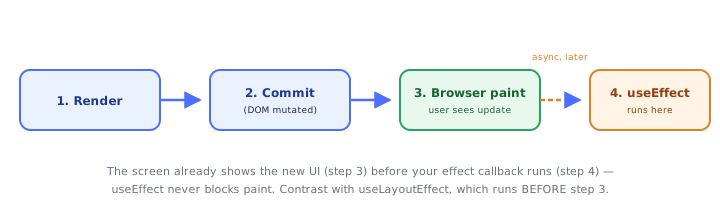
This ordering is exactly why useEffect is the wrong tool for anything the user must never see flash incorrectly (e.g. measuring a DOM node and immediately repositioning it) — the paint already happened by the time the effect runs. useLayoutEffect (its own topic) exists specifically for that case, running synchronously before paint instead.
7Multiple Effects and Their Order
A component can call useEffect any number of times. Each call gets its own node on the fiber's hook linked list (see useState's "Under the Hood" for the linked-list mechanism itself), and effects run in the same order they were declared:
function Example() {
  useEffect(() => console.log("effect A"), []);
  useEffect(() => console.log("effect B"), []);
  // on mount, logs "effect A" then "effect B", always in this order
}
Cleanups run in that same relative order too, but in reverse when a component unmounts entirely — the last-mounted effect's cleanup fires first, mirroring how nested resources are usually torn down (most-recently-acquired, first released).
8StrictMode's Dev-Only Double Invoke
In development, wrapping a subtree in <React.StrictMode> makes React run each component's mount sequence twice: mount → run effects → clean up those effects → mount again → run effects again. This is dev-only (StrictMode has no effect in production builds) and exists specifically to surface effects with missing or incorrect cleanup — a subscription that isn't properly undone will visibly leak (double-fire, double-subscribe) under this pattern, whereas without StrictMode the bug is silent until a real remount happens in production, often much later and harder to trace.
useEffect(() => {
  const id = setInterval(tick, 1000);
  return () => clearInterval(id);
}, []);
// Under StrictMode: setInterval → clearInterval → setInterval again.
// If the cleanup were missing, TWO intervals would end up running — a bug
// that's invisible without StrictMode until an actual unmount/remount occurs.
The fix for a component that "behaves wrong under StrictMode" is essentially never to remove StrictMode — it's to write cleanup that actually cleans up.
Under the HoodHow it works internally▾
React does not attach state to the component function — a function component is just a function, called fresh every render with no persistent this and no memory of its own. Hook data has to live somewhere else: it lives on the fiber, React's internal object representing one component instance in the tree.
Each fiber holds a memoizedState pointer to the head of a singly linked list of hook objects, one node per hook call, built in the exact order those hooks are called. Every render, React walks this list from the head, one node per hook call, in lockstep with your function body executing top to bottom. Matching is done purely by call order — not by variable name, not by any key. This is the entire reason the Rules of Hooks forbid conditional hook calls: wrap a hook in an if and, on some render, every hook call after it shifts one slot in the walk — silently reading and writing the wrong hook's stored data.
useEffect's own hook node stores two things from its last completed run: (1) the dependency array, and (2) the cleanup function it returned (or undefined if it returned nothing). On each render, React does not run the effect immediately — it compares the new dependency array against the stored one, element by element, using Object.is specifically (not loose ===, and not a deep-equality check). This is a meaningful distinction at the edges: Object.is(NaN, NaN) is true, so a NaN dependency correctly compares as "unchanged," while Object.is(0, -0) is false, so +0 and -0 compare as "changed" even though 0 === -0 is true — a rare but real edge case worth knowing exists. If every element compares equal (or the array reference itself is stable, as with a literal [], which never has any elements to differ), React skips scheduling the effect entirely for this render. If anything differs, React schedules the effect onto the fiber's effect list, tagged for the passive effects phase — meaning the browser is allowed to paint first, and only then does React flush passive effects asynchronously, batched together across the whole tree, so a slow effect never blocks the visual update the user is waiting on.
Before running the new effect function, React first invokes the stored cleanup function from the previous run, if one exists — which is why a cleanup closure always captures the previous render's props/state, never the current one; it's cleaning up exactly what that previous run set up, nothing more. useLayoutEffect (its own topic) uses this exact same hook-node structure and the exact same Object.is dependency-diffing — the only difference is which phase it's tagged for: layout effects run synchronously, after the DOM mutation but before the browser paints, blocking the paint until they finish; passive effects (useEffect) run after paint, non-blocking. Same mechanism, different scheduling phase, different consequences for what each is safe to use for.
⚠️ Common Pitfalls
- Missing a dependency — closing over a prop/state value without listing it in the dependency array means the effect keeps using the value from whichever render it was last scheduled in, not the current one (a stale closure).
- Inline object/function literal dependencies — a new reference every render means
Object.isnever reports "unchanged," so the effect re-runs on every single render regardless of whether anything meaningful changed. - Forgetting cleanup — every subscription, timer, or connection set up in an effect needs a matching teardown in its returned cleanup function, or repeated runs leak more of them each time.
- Fetching without a stale-request guard — without an
ignoreflag orAbortController, a slower earlier request can resolve after a faster later one and overwrite correct state with stale data. - Using
useEffectto compute derived data — if a value can be computed directly from existing props/state during render, computing it in an effect and storing it withuseStateadds an unnecessary extra render and a window where the UI shows stale derived data; just compute it inline (or withuseMemoif the computation is expensive). - Using
useEffectwhere an event handler belongs — code that should run in response to a user action (e.g. "when the user submits, POST the form") belongs in the event handler that fires on submit, not in an effect watching for state changes caused by that handler; using an effect adds an indirect, harder-to-trace path for something that has a direct one.
📋 Quick Reference
useEffect(() => { ... })                  → runs after every render
useEffect(() => { ... }, [])              → runs once, after mount only
useEffect(() => { ... }, [a, b])          → runs after mount, and when a or b changes (Object.is)
useEffect(() => { return () => {...} })   → cleanup: runs before next run AND on unmount
let ignore = false; ... return () => { ignore = true }  → stale-fetch guard
new AbortController(); ... return () => controller.abort()  → cancels an in-flight request
🧠 Key takeaways
- Effects synchronize with external systems (network, subscriptions, DOM APIs); not for deriving state.
- Deps: none = every render,
[]= mount only,[a, b]= when they change (Object.is). - Return a cleanup; guard async results (ignore flag / AbortController) to avoid races.
- Effects run after paint; objects/functions created in render change every time, so memoize or move them inside the effect.
🎤 Interview Q&A
Q1What is useEffect for?core▾
Synchronizing a component with external systems after render: subscriptions, timers, DOM APIs, network requests, analytics. Not for transforming data for rendering or handling user events.
- 'You might not need an effect' examples? Derived values, resetting state on prop change, event-specific logic.
Q2How do dependencies work?core▾
The effect re-runs after renders where any dependency changed (Object.is comparison). [] runs once after mount; no array runs after every render. The lint rule exhaustive-deps ensures you include everything used.
- Object dependencies problem? New object each render re-triggers the effect; memoize or depend on primitives.
Q3How do you fetch data correctly in an effect?core▾
Use an AbortController or an ignore flag in cleanup to prevent race conditions when dependencies change, handle loading and errors, and prefer data libraries (TanStack Query, SWR) or framework loaders/server components in real apps.
- What race condition? An older slower request resolving after a newer one and overwriting state.
Q4When does the cleanup function run?senior▾
Before the effect re-runs (with the previous values) and when the component unmounts. Cleanup should undo exactly what the effect set up.
- useEffect vs useLayoutEffect timing? useEffect runs after paint; layout effect before paint.
Q5How do you avoid infinite effect loops?core▾
Don't set state that is also a dependency unconditionally, memoize object/function dependencies, compute derived data during render, and use functional updates.
- Classic loop? Effect fetches and sets
data, anddatais in its dependency array.
🛠️ Practice exercises
Each exercise is a file in this topic folder. Code exercises are self-checking: run them and make the checks pass.
✅ Check yourself
Answer the questions — feedback is instant.