useState
useState gives a component memory that triggers re-renders when updated. Use lazy initialization for expensive defaults, functional updates for values that depend on the previous one, and never mutate state in place.
🎯 What you'll learn
- The basic API
- Lazy initialization
- Functional updates and batching
- Replacing not mutating; useState vs useReducer
📚 Before you start
1The Basic API
useState gives a function component a piece of state that survives across re-renders — something a plain function cannot do on its own, since a plain function's local variables are recreated (and forgotten) on every call.
import { useState } from "react";

function Counter() {
  const [count, setCount] = useState(0); // 0 is the INITIAL value, used only on mount

  return (
    <button onClick={() => setCount(count + 1)}>
      Clicked {count} times
    </button>
  );
}
useState(initialValue) returns a [value, setter] pair. Calling the setter does two things: it records the new value, and it tells React "this component needs to re-render." The count variable in the next render's function call carries the updated value — count itself never mutates in place.
2Lazy Initialization
If computing the initial value is expensive, pass a function instead of a value — React calls it only once, on mount, never on subsequent renders:
function ExpensiveList() {
  // BAD: parseHugeDataset() runs on every single render, then the result is thrown away
  // const [items, setItems] = useState(parseHugeDataset(rawData));

  // GOOD: the function itself is only invoked on mount
  const [items, setItems] = useState(() => parseHugeDataset(rawData));
  return <ul>{items.map((i) => <li key={i.id}>{i.label}</li>)}</ul>;
}
Passing useState(parseHugeDataset(rawData)) still calls parseHugeDataset on every render (the call happens before useState ever sees the result) — only the lazy-initializer form avoids that.
3Functional Updates
The setter accepts either a new value directly, or an updater function (prevState) => newState. The updater form is the only safe way to compute new state from old state when the update doesn't happen synchronously inside the render that reads it:
function Counter() {
  const [count, setCount] = useState(0);

  function handleTripleClick() {
    // BUG: all three calls close over the SAME `count` value from this render
    setCount(count + 1); // schedules "set to 0 + 1"
    setCount(count + 1); // schedules "set to 0 + 1" — same stale `count`
    setCount(count + 1); // schedules "set to 0 + 1" — same stale `count`
    // result: count becomes 1, not 3
  }

  function handleTripleClickFixed() {
    // CORRECT: each updater receives the LATEST pending state, not the render's closure value
    setCount((prev) => prev + 1);
    setCount((prev) => prev + 1);
    setCount((prev) => prev + 1);
    // result: count becomes 3
  }

  return <button onClick={handleTripleClickFixed}>{count}</button>;
}
Rule of thumb: if the new state depends on the previous state, use the function form.
4Batching
React batches multiple setState calls that occur within the same event handler (and, since React 18, within promises, setTimeout, and native event handlers too) into a single re-render, rather than re-rendering once per call:
function handleClick() {
  setCount((c) => c + 1);
  setFlag((f) => !f);
  // Only ONE re-render happens after handleClick finishes, not two —
  // React 18's "automatic batching" applies everywhere, not just inside
  // React event handlers like it did pre-18.
}
This is why reading count immediately after calling setCount(count + 1) in the same function still shows the old value — the state variable in the current closure never changes; only the next render's count reflects the update.
5State Must Be Replaced, Not Mutated
React decides whether to re-render (for objects/arrays passed to setState) partly by comparing the old and new references. Mutating an object/array in place and passing the same reference back to setState means React sees no change and may skip re-rendering:
function TodoList() {
  const [todos, setTodos] = useState<string[]>([]);

  function addBad(todo: string) {
    todos.push(todo);        // mutates the existing array in place
    setTodos(todos);         // same reference — React may bail out, UI doesn't update
  }

  function addGood(todo: string) {
    setTodos((prev) => [...prev, todo]); // NEW array reference — always triggers a render
  }
}
The same applies to objects: setUser({ ...user, name: "New" }), never user.name = "New"; setUser(user).
6useState vs useReducer
useState is a thin, general-purpose wrapper — internally, React actually implements it on top of the exact same reducer mechanism useReducer uses (a built-in reducer that just replaces the value). Reach for useReducer instead when: several state fields update together as one atomic transition, the next state depends on complex logic that's easier to test as a pure function, or update logic should be described declaratively as named "actions" rather than ad-hoc setter calls. See the useReducer topic for details.
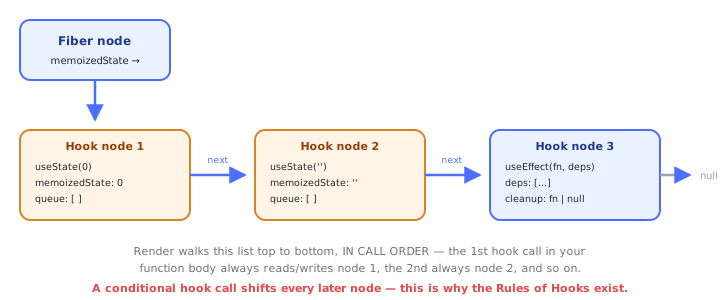
Under the HoodHow it works internally▾
React does not attach state to the component function — a function component is just a function, called fresh every render with no persistent this and no memory of its own. State has to live somewhere else: it lives on the fiber, React's internal object representing one component instance in the tree.
Each fiber holds a memoizedState pointer to the head of a singly linked list of hook objects, one node per hook call, built in the exact order those hooks are called. Every render, React walks this list from the head, one node per hook call, in lockstep with your function body executing top to bottom: the first useState() call reads/writes node 1, the second reads/writes node 2, and so on. Matching is done purely by call order — not by variable name, not by any key. This is the entire reason the Rules of Hooks forbid conditional hook calls: "the 3rd hook call in this render" is React's only address for "hook 3's stored data." Wrap a useState in an if and, on a render where the branch is skipped, every hook call after it shifts one slot to the left in the walk — silently reading and writing the wrong hook's state, usually with no error thrown at all.
On mount, React builds this list node by node, allocating a fresh object as each hook is called for the first time. On every later render, React reuses the same node objects — it does not rebuild the list — it just reads and updates whatever is already sitting in each node as the walk reaches it.
useState's own node stores two things: (1) a memoizedState slot holding the current, committed value, and (2) a queue of pending updates. Calling the setter does not mutate that slot synchronously — it pushes an update object (either a plain value or an updater function) onto that hook's queue and calls scheduleUpdateOnFiber, which marks the fiber and its ancestors as needing work and schedules a re-render. On the next render, before your component body runs, React walks that hook's pending-update queue front to back, applies each queued update in order (calling the updater function with the running result so far, or just overwriting with a plain value), and writes the final result into memoizedState. That's why count read anywhere inside the current render is always "this render's committed value" — it can never change mid-render, and it's also why three back-to-back functional updates in one handler correctly compound (each updater in the queue sees the previous updater's result), while three back-to-back plain-value updates using the same stale closured count overwrite each other instead of compounding.
⚠️ Common Pitfalls
- Reading
countright after callingsetCountand expecting the updated value in the same render — the setter schedules a future render; the current closure's variable never changes. - Using
setCount(count + 1)multiple times in one handler when the intent is to increment multiple times — each call closes over the same stalecount; use the functional updatersetCount(c => c + 1)instead. - Mutating an object/array then calling the setter with the same reference — React's bailout check can skip the re-render entirely since the reference didn't change.
- Calling
useStateconditionally or inside a loop — breaks the fixed call-order the fiber's hook linked list depends on. - Passing an expensive expression directly to
useState(...)instead ofuseState(() => ...)— the expression re-evaluates (and is discarded) on every render, not just on mount.
📋 Quick Reference
const [value, setValue] = useState(initial)     → basic state
useState(() => compute())                        → lazy initializer, runs once on mount
setValue(newValue)                                → replace with a plain value
setValue(prev => prev + 1)                        → functional update, safe from stale closures
setValue({ ...obj, key: newVal })                 → replace objects immutably
setValue([...arr, item])                          → replace arrays immutably
🧠 Key takeaways
const [value, setValue] = useState(initial); calling the setter schedules a re-render.- Pass a function to useState for expensive initial values.
- Use functional updates when the next state depends on the previous one (and in intervals/closures).
- Replace, don't mutate: same reference = no re-render. Switch to useReducer for complex transitions.
🎤 Interview Q&A
Q1How does useState work and what are the rules of hooks?core▾
const [value, setValue] = useState(initial) stores state per component instance, identified by call order. Rules: call hooks only at the top level of components/custom hooks, never in conditions or loops, so the order is stable.
- Why does order matter? React matches hook state by call position.
Q2What is lazy initialization?core▾
useState(() => expensiveCompute()) runs the initializer only on the first render instead of every render.
- Common mistake?
useState(expensiveCompute())calls it every render.
Q3Why might state appear stale?core▾
Each render captures state values in closures; async callbacks or intervals set up in an earlier render see old values. Use functional updates or refs, and correct effect dependencies.
- Example?
setInterval(() => setCount(count + 1))stuck at 1; usec => c + 1.
Q4When do multiple setState calls cause one render?core▾
React 18 batches updates automatically in event handlers, timeouts, promises and native events; flushSync forces a synchronous update when needed.
- Does setting the same value re-render? React bails out if
Object.isequal (may render once more).
Q5useState vs useReducer?senior▾
useState for simple independent values; useReducer when state has multiple sub-values updated together, next state depends on complex logic, or you want testable pure update logic.
- Combine with context? useReducer + context for small app-level stores.
🛠️ Practice exercises
Each exercise is a file in this topic folder. Code exercises are self-checking: run them and make the checks pass.
✅ Check yourself
Answer the questions — feedback is instant.