useRef
useRef is a mutable box that survives re-renders without causing them. Use it for DOM access and instance-like values such as timer IDs, and learn why refs must not be read or written during render.
🎯 What you'll learn
- A mutable box that survives re-renders
- The DOM ref pattern
- The instance-variable pattern
- Not mutating refs during render; refs and custom components
📚 Before you start
1A Mutable Box That Survives Re-renders
useRef(initialValue) returns a plain object shaped { current: initialValue }. React hands back the exact same object on every render of that component instance, so mutating .current directly is a way to keep a value alive across renders — but, critically, changing .current does not trigger a re-render and does not update anything on screen.
import { useRef } from "react";

function ClickLogger() {
  const clickTimes = useRef<number[]>([]);

  function handleClick() {
    clickTimes.current.push(Date.now()); // mutated directly — no re-render happens
    console.log("total clicks so far:", clickTimes.current.length);
  }

  return <button onClick={handleClick}>Click me</button>;
}
Contrast with useState: setState schedules a re-render because React needs the new value reflected in what's rendered. A ref is for data the component needs to remember, but that the UI itself doesn't depend on.
2The DOM Ref Pattern
The most common use: get a handle to a real DOM node so you can call an imperative browser API (focus, scroll, measure) that has no declarative React equivalent.
import { useEffect, useRef } from "react";

function AutoFocusInput() {
  const inputRef = useRef<HTMLInputElement>(null);

  useEffect(() => {
    inputRef.current?.focus(); // runs once, after the input has mounted
  }, []);

  return <input ref={inputRef} placeholder="focused on mount" />;
}
React sets inputRef.current to the actual <input> DOM element after it's committed to the page, and back to null if the element unmounts. This is why the ref read happens inside an effect (after commit), never during render (before the DOM node exists yet).
3The "Instance Variable" Pattern
Beyond DOM nodes, useRef is the standard way to hold any mutable value that must persist across renders but should never itself cause one: interval/timeout IDs, a "did this already run" flag, a previous-value tracker, an abort controller, or a manual render counter.
function Timer() {
  const intervalId = useRef<ReturnType<typeof setInterval> | null>(null);

  function start() {
    intervalId.current = setInterval(() => console.log("tick"), 1000);
  }

  function stop() {
    if (intervalId.current !== null) clearInterval(intervalId.current);
  }

  return (
    <>
      <button onClick={start}>Start</button>
      <button onClick={stop}>Stop</button>
    </>
  );
}
intervalId needs to be readable by both start and stop, and needs to outlive individual renders — a plain local variable inside the component body would be recreated (and lose the ID) on every render. A ref is exactly the right tool.
4Don't Mutate Refs During Render
Reading or writing ref.current should generally happen in event handlers or effects — not in the render body itself (with the narrow exception of a one-time lazy-initialization check, e.g. if (ref.current === null) ref.current = createExpensiveThing()).
function Bad({ value }: { value: number }) {
  const history = useRef<number[]>([]);
  history.current.push(value); // BUG: mutating a ref during render

  return <p>{history.current.length}</p>;
}
Render should be a pure computation of "what does the UI look like given current props/state." Mutating a ref during render breaks that: under React's concurrent features (Strict Mode's intentional double-invoke in development, or an in-progress render that gets interrupted and re-started for something more urgent), a component's render function can run more than once for what is conceptually "one" render — and each of those extra invocations would push a duplicate entry into history.current. useState updates don't have this problem because they're properly queued and applied by React's own scheduling; a raw ref mutation during render is invisible to that machinery and just happens immediately, every time the function body runs.
5Refs and Custom Components
Attaching ref={someRef} only works out of the box on DOM elements (<input>, <div>, ...) and class components. In React 19+, a function component can accept ref as a regular prop and forward it manually to whatever DOM node it wants — no special wrapper needed:
// React 19+
function FancyInput({ ref, ...props }: { ref?: React.Ref<HTMLInputElement> } & React.ComponentProps<"input">) {
  return <input ref={ref} {...props} />;
}
In React 18 and earlier (and in most existing codebases you'll encounter), function components don't receive ref as a prop at all — the component has to be wrapped in forwardRef((props, ref) => ...) for the parent's ref to reach the DOM node inside. Expect to see forwardRef in older code, but treat plain ref-as-prop as the current, simpler approach going forward.
Under the HoodHow it works internally▾
React does not attach state to the component function — a function component is just a function, called fresh every render with no persistent this and no memory of its own. Hook data has to live somewhere else: it lives on the fiber, React's internal object representing one component instance in the tree.
Each fiber holds a memoizedState pointer to the head of a singly linked list of hook objects, one node per hook call, built in the exact order those hooks are called. Every render, React walks this list from the head, one node per hook call, in lockstep with your function body executing top to bottom. Matching is done purely by call order — not by variable name, not by any key. This is the entire reason the Rules of Hooks forbid conditional hook calls: wrap a hook in an if and, on some render, every hook call after it shifts one slot in the walk — silently reading and writing the wrong hook's stored data.
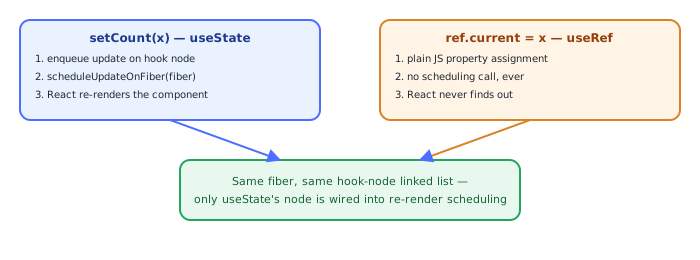
useRef's own hook node stores exactly one thing: the ref object itself, { current: initialValue } — allocated once, on mount. On every later render, React's useRef implementation just returns that same stored object from the node, unchanged — it doesn't recompute or replace it (there's no dependency array, no comparison, nothing to diff). This is the key difference from every hook covered before this one: useState/useReducer explicitly call scheduleUpdateOnFiber when their setter/dispatch runs, marking the fiber (and its ancestors) as needing new work; mutating ref.current = newValue is a completely ordinary, synchronous JavaScript property assignment on a plain object — it never calls into any React scheduling function, never marks any fiber dirty, and never goes through the render/commit machinery at all. React simply isn't watching .current. That's precisely why it's safe for values that must survive across renders without ever influencing what gets rendered, and exactly why it can't be used to make something appear on screen.
⚠️ Common Pitfalls
- Expecting a UI update after mutating
ref.current— it won't re-render; if the value needs to appear in the rendered output, it belongs inuseState, not a ref. - Mutating
ref.currentduring render (outside the narrow one-time lazy-init exception) — render can run more than once per commit under Strict Mode or concurrent rendering, and a raw ref mutation has no protection against being duplicated across those extra runs. - Reading
ref.currentfor a DOM node before it has mounted — it'snulluntil after the initial commit; accessing it synchronously during the first render (rather than in an effect) getsnull. - Forgetting to clean up a ref-stored interval/timeout/subscription in a
useEffectcleanup function — the ref keeps the ID alive, but nothing clears it automatically on unmount. - Reaching for a ref to avoid a re-render that should actually happen — if changing the value should ever change what's on screen, using a ref to dodge the re-render just produces a UI that's silently out of sync with the data.
📋 Quick Reference
const ref = useRef(initial)          → { current: initial }, same object every render
ref.current = x                       → plain mutation, NO re-render, NO scheduling
<input ref={inputRef} />              → React sets .current to the DOM node after mount
ref.current                           → null before mount / after unmount
useEffect(() => { ref.current...})    → safe place to read/write DOM refs
forwardRef((props, ref) => ...)       → pre-React-19 way to accept a ref in a function component
🧠 Key takeaways
useRef(initial)returns the same object every render;.currentis mutable.- Changing
.currentdoesn't re-render: good for timer IDs, previous values, DOM nodes. - Access DOM refs in effects or handlers (null during first render).
- Don't read/write refs during render; in React 19, pass
refas a regular prop to function components.
🎤 Interview Q&A
Q1What is useRef used for?core▾
- Accessing DOM elements (
ref={inputRef}theninputRef.current.focus()). 2) Storing mutable values that persist across renders without causing re-renders (timer IDs, previous values, latest callbacks).
- Does changing ref.current re-render? No.
Q2useRef vs useState?core▾
useState triggers re-renders and its value is a snapshot per render; useRef is a mutable box that doesn't trigger renders. Use refs for values not needed for rendering.
- Why not read refs during render? Rendering should be pure; refs can change outside React's knowledge.
Q3How do you forward refs to child components?senior▾
In React 19, ref is a regular prop for function components; earlier versions use forwardRef. useImperativeHandle exposes a limited API instead of the DOM node.
- Why limit exposed API? Encapsulation: parents shouldn't manipulate internals.
Q4What are callback refs?core▾
Passing a function as ref, called with the node when it mounts and null when it unmounts (in React 19 it can return a cleanup). Useful for measuring elements or attaching observers dynamically.
- Use case? ResizeObserver on an element that appears conditionally.
Q5How do you keep the latest callback in a ref?core▾
Store it in a ref updated in an effect/layout effect, so long-lived subscriptions call the latest version without re-subscribing (the 'latest ref' pattern; React's useEffectEvent addresses this).
- Why needed? Avoids stale closures in intervals/listeners.
🛠️ Practice exercises
Each exercise is a file in this topic folder. Code exercises are self-checking: run them and make the checks pass.
✅ Check yourself
Answer the questions — feedback is instant.