Exception Handling
finally runs whether the try block completes normally, throws and gets caught, or throws and is NOT caught (it runs on the way out before the exception propagates further). It's the right place for cleanup that must happen regardless of outcome — though using/using var (see Common Pitfalls) is usually a better fit for…
🎯 What you'll learn
- try/catch/finally
- Catching Multiple Exception Types
- The Exception Hierarchy — No Checked Exceptions
- Custom Exceptions
- Exception Filters —
catch (Exception e) when (condition)
1try/catch/finally
try
{
    int[] arr = { 1, 2, 3 };
    Console.WriteLine(arr[10]); // throws IndexOutOfRangeException
}
catch (IndexOutOfRangeException e)
{
    Console.WriteLine($"Caught: {e.Message}");
}
finally
{
    Console.WriteLine("Always runs — cleanup goes here");
}
finally runs whether the try block completes normally, throws and gets caught, or throws and is NOT caught (it runs on the way out before the exception propagates further). It's the right place for cleanup that must happen regardless of outcome — though using/using var (see Common Pitfalls) is usually a better fit for disposable resources specifically.
2Catching Multiple Exception Types
try
{
    ProcessOrder(orderId);
}
catch (InvalidOperationException e)
{
    Console.WriteLine($"Business rule violated: {e.Message}");
}
catch (ArgumentException e)
{
    Console.WriteLine($"Bad input: {e.Message}");
}
catch (Exception e)
{
    Console.WriteLine($"Unexpected: {e.Message}");
    throw; // re-throw, preserving the original stack trace
}
C# has no multi-catch syntax like Java's catch (A | B e) — instead, list separate catch clauses, most specific first. The runtime tries them top-to-bottom and enters the first one whose type matches (including matching a subtype). A bare catch (Exception e) at the end acts as a catch-all; ending it with throw; (not throw e;) re-raises the exact original exception with its original stack trace intact — throw e; instead resets the stack trace to this rethrow point, discarding where it actually originated.
3The Exception Hierarchy — No Checked Exceptions
// System.Exception
//   └── System.SystemException
//         ├── ArgumentException
//         │     └── ArgumentNullException
//         ├── InvalidOperationException
//         ├── IndexOutOfRangeException
//         └── NullReferenceException
//   └── ApplicationException (legacy, rarely used for custom exceptions today)
Every exception in .NET ultimately derives from System.Exception. Unlike Java, C# has no "checked" exceptions — nothing in the method signature declares what a method might throw, and the compiler never forces a caller to catch or declare anything. Every exception in C# behaves like Java's unchecked (RuntimeException) exceptions: any method can throw any exception at any time with zero compile-time obligation on callers. This is a deliberate language design choice — C#'s designers considered Java's checked-exception requirement to encourage swallowing exceptions with empty catch blocks just to satisfy the compiler, so C# dropped the mechanism entirely and relies on documentation/convention (and XML doc <exception> tags) to communicate what a method might throw.
4Custom Exceptions
class InsufficientFundsException : Exception
{
    public decimal Requested { get; }
    public decimal Available { get; }

    public InsufficientFundsException(decimal requested, decimal available)
        : base($"requested {requested}, only {available} available")
    {
        Requested = requested;
        Available = available;
    }
}

static decimal Withdraw(decimal balance, decimal amount)
{
    if (amount > balance) throw new InsufficientFundsException(amount, balance);
    return balance - amount;
}
A custom exception is an ordinary class deriving from Exception (or a more specific built-in exception when that's semantically accurate). Calling the base constructor with a message populates .Message; any extra domain data (like Requested/Available here) is just plain properties set in the constructor, readable by any catch block that catches this specific type.
5Exception Filters — catch (Exception e) when (condition)
try
{
    CallExternalApi();
}
catch (HttpRequestException e) when (e.StatusCode == HttpStatusCode.TooManyRequests)
{
    Console.WriteLine("Rate limited — back off and retry");
}
catch (HttpRequestException e) when (e.StatusCode >= HttpStatusCode.InternalServerError)
{
    Console.WriteLine("Server error — safe to retry");
}
catch (HttpRequestException e)
{
    Console.WriteLine($"Client error, not retrying: {e.StatusCode}");
}
The when clause is a C#-specific feature with no Java equivalent: the runtime only enters a catch block if BOTH the type matches AND the when predicate evaluates true — otherwise it keeps searching subsequent catch clauses (or propagates further if none match), rather than entering the block and needing an if/re-throw inside it. This also means a filter that returns false never unwinds the stack past that point, which matters for debugging: the original throw site's full state is still inspectable if a debugger is attached, unlike code that catches broadly and re-throws based on an internal if.
Under the HoodStack Unwinding and Why throw; Preserves the Trace▾
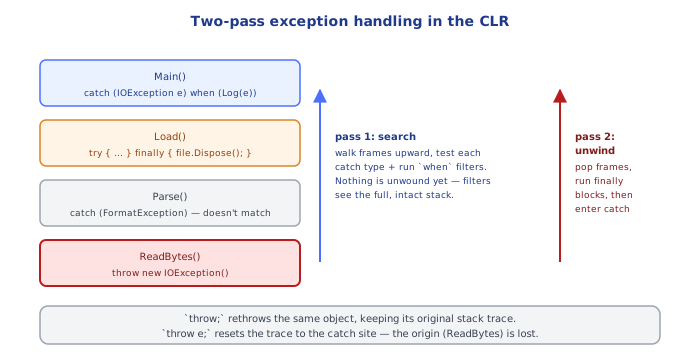
When an exception is thrown, the CLR walks up the call stack frame by frame looking for a matching catch block (matching by type, and now also by any when filter — filters are actually evaluated before the stack unwinds past that frame, which is what lets a debugger still see the original throw-site state even for a filter that ultimately returns false). Each exception object carries a StackTrace property that the runtime populates incrementally as it's thrown; throw; inside a catch block re-raises the same exception object without touching that property, while throw e; is treated as throwing a new throw event from that location, resetting StackTrace to start from the rethrow point and losing the original failure location — a very common debugging pitfall traced directly to this mechanism.
⚠️ Common Pitfalls
- Using
throw e;instead ofthrow;inside a catch block — silently discards the original stack trace, making the real failure site invisible in logs. - Catching
Exceptionbroadly and swallowing it (empty catch block, or just logging and continuing) — since C# has no checked exceptions forcing acknowledgment, this is easy to do accidentally and it hides real bugs; catch the most specific type you can actually handle meaningfully. - Using exceptions for ordinary control flow (e.g. parsing a string and catching
FormatExceptioninstead of usingint.TryParse) — exceptions are relatively expensive (stack trace capture, unwinding) andTry*-pattern methods exist in the BCL specifically to avoid this. - Manually calling
.Dispose()in afinallyblock instead ofusing— verbose and easy to get wrong (forgetting a branch, or disposing twice);using/using varcompiles to the exact same try/finally pattern automatically and can't be forgotten. - Assuming
catch (ArgumentException e) when (someCondition)skips evaluatingsomeConditionif the type doesn't match — filters are only evaluated once the type already matches, so a filter never runs against an exception of the wrong type; but a filter that itself throws will propagate that new exception, silently masking the original.
📋 Quick Reference
try { ... } catch (SpecificEx e) { ... } catch (Exception e) { ... } finally { ... }
throw;              → re-throw, preserves original stack trace
throw e;             → re-throw, RESETS stack trace to here (usually wrong)
catch (T e) when (cond)  → only enters if type matches AND cond is true
class MyEx : Exception { public MyEx(...) : base(message) { ... } }
No checked exceptions — nothing is enforced by the compiler, ever
using var x = ...;     → deterministic Dispose(), even on exception (finally-equivalent)
🎤 Interview Q&A
Q1What are exception handling best practices in C#?core▾
Catch specific exceptions where you can handle them, use using/await using for cleanup, preserve stack traces with throw;, add context by wrapping with inner exceptions, and don't use exceptions for normal control flow.
- throw vs throw ex?
throw ex;resets the stack trace.
Q2What are exception filters?core▾
catch (HttpRequestException ex) when (ex.StatusCode == 404) catches only when the condition is true, without unwinding the stack otherwise, useful for logging (when (Log(ex))) and selective handling.
- Why not rethrow inside catch? Filters keep the original stack and are cleaner.
Q3How do you handle exceptions globally in ASP.NET Core?core▾
UseExceptionHandler with IExceptionHandler implementations and AddProblemDetails() to return RFC 7807 responses, logging exceptions centrally.
- Developer exception page? Only in development.
Q4How are exceptions surfaced in async code?senior▾
Awaiting a faulted task rethrows its exception; Task.WhenAll throws the first, with all available in task.Exception.InnerExceptions. async void exceptions crash the process (except event handlers).
- Unobserved task exceptions? Raised via TaskScheduler.UnobservedTaskException.
Q5When should you use the Result pattern instead of exceptions?core▾
For expected business outcomes (validation failures, not found, insufficient funds) in hot paths or where explicit error handling improves clarity; exceptions for unexpected failures.
- Libraries? FluentResults, ErrorOr, OneOf.
🛠️ Practice exercises
Each exercise is a file in this topic folder. Code exercises are self-checking: run them and make the checks pass.