Async/Await
A Task represents an operation that may not be finished yet — a future/promise. Task<T> is a Task that produces a result of type T when it completes. A method marked async can use await inside it to suspend execution until an awaited Task completes, without blocking the calling thread.
🎯 What you'll learn
TaskandTask<T>— the Building Blocksasync/awaitIs Not "Running on Another Thread"- Awaiting Multiple Tasks
ConfigureAwait(false)- The Classic Deadlock: Blocking on Async Code
1Task and Task<T> — the Building Blocks
using System.Threading.Tasks;

Task<int> ComputeAsync()
{
    return Task.FromResult(42); // a Task<int> that's already completed
}

async Task<int> FetchAndAddAsync()
{
    int value = await ComputeAsync(); // suspends here until the Task completes
    return value + 1;
}
A Task represents an operation that may not be finished yet — a future/promise. Task<T> is a Task that produces a result of type T when it completes. A method marked async can use await inside it to suspend execution until an awaited Task completes, without blocking the calling thread.
2async/await Is Not "Running on Another Thread"
async Task<string> DownloadAsync(string url)
{
    using var client = new HttpClient();
    string result = await client.GetStringAsync(url); // I/O-bound wait, no thread blocked
    return result;
}
await does not spawn a new thread. For I/O-bound work (network calls, file access, database queries), the underlying operation is handled by the OS/runtime asynchronously, and the calling thread is released back to do other work while waiting — no thread is dedicated to "waiting." This is fundamentally different from Task.Run(() => ...), which explicitly schedules synchronous work onto a thread-pool thread for CPU-bound work. Using await on I/O-bound async APIs is thread-efficient; using Task.Run to fake-asyncify blocking I/O just moves the block to a different thread and wastes a thread-pool slot.
3Awaiting Multiple Tasks
async Task RunAllAsync()
{
    Task<int> t1 = FetchAsync(1);
    Task<int> t2 = FetchAsync(2);
    Task<int> t3 = FetchAsync(3);

    int[] results = await Task.WhenAll(t1, t2, t3); // waits for ALL, runs them concurrently
    Console.WriteLine(results.Sum());
}

async Task RunFirstAsync()
{
    Task<int> winner = await Task.WhenAny(FetchAsync(1), FetchAsync(2)); // waits for the FIRST to finish
    Console.WriteLine(await winner);
}
Starting all three tasks (by calling the async methods without awaiting immediately) before awaiting them lets them run concurrently — each method begins executing up to its first await point right away. Awaiting them one at a time in sequence (await FetchAsync(1); await FetchAsync(2); ...) would run them one after another instead, losing all the concurrency benefit. Task.WhenAll collects every result (or throws an AggregateException if any failed); Task.WhenAny resolves as soon as the fastest one finishes.
4ConfigureAwait(false)
async Task LibraryMethodAsync()
{
    await SomeIoOperationAsync().ConfigureAwait(false);
    // continuation here does NOT need to resume on the original context
}
By default, await captures the current SynchronizationContext (e.g. a UI thread's context in a desktop/mobile app) and resumes the continuation on it after the awaited task completes — necessary so UI-updating code after an await still runs on the UI thread. Library code that never touches UI state can opt out with .ConfigureAwait(false), letting the continuation run on any available thread-pool thread instead, which avoids unnecessary context-switching overhead and — more importantly — avoids a specific deadlock (see section 5).
5The Classic Deadlock: Blocking on Async Code
// DANGEROUS in a context with a SynchronizationContext (e.g. old ASP.NET, WPF, WinForms):
async Task<int> GetValueAsync()
{
    await Task.Delay(100);
    return 42;
}

int value = GetValueAsync().Result; // or .Wait() — BLOCKS the calling thread
Calling .Result or .Wait() on a Task synchronously blocks the current thread until it completes. If that thread owns the SynchronizationContext that GetValueAsync's await is trying to resume on (common in older ASP.NET/WPF/WinForms apps), a deadlock results: the blocking call never returns because it's waiting for the async method to finish, but the async method's continuation can never run because the one thread that could run it is busy blocking. This is precisely the failure mode ConfigureAwait(false) sidesteps — the golden rule for async code is "async all the way down": once a call chain goes async, avoid ever synchronously blocking on it.
Under the Hoodthe Compiler-Generated State Machine▾
async Task<int> AddOneAsync(Task<int> source)
{
    int value = await source;
    return value + 1;
}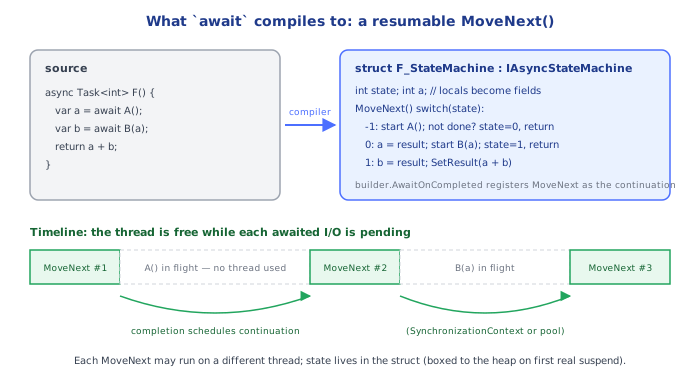
The compiler does NOT run this method's body top-to-bottom when called. It rewrites the entire method into a compiler-generated struct (or class) implementing a state machine with a MoveNext() method, roughly:
state 0: call source.GetAwaiter(); if already completed, jump straight to state 1;
         otherwise register a continuation callback (via OnCompleted) that will
         call MoveNext() again later, and RETURN CONTROL to the caller immediately
         (this is the actual suspension — no thread is blocked, the stack frame
         for AddOneAsync is unwound and its local state saved on the heap in
         the state machine struct/class instance)
state 1: (resumed later, possibly on a different thread) retrieve the awaited
         result, compute value + 1, mark the outer Task as completed with that result
Calling an async method returns a Task immediately — synchronously, on the calling thread — representing "the eventual result of running this state machine to completion." Everything after the first await runs later, as a continuation, whenever the awaited operation signals completion; this is why await can "pause" a method without blocking anything — there's no thread sitting idle inside AddOneAsync between suspension and resumption, only a heap-allocated object holding the saved local variables and the next state to resume from.
⚠️ Common Pitfalls
async voidmethods (instead ofasync Task) — exceptions thrown inside them can't be caught by a caller's try/catch (they crash the process instead), and there's noTaskto await. Only ever useasync voidfor top-level event handlers, which have no other option.- Blocking on async code with
.Result/.Wait()— risks the deadlock described in section 5, and even without aSynchronizationContext, wastes a thread sitting blocked instead of returned to the pool. - Sequentially awaiting independent operations (
await A(); await B();when A and B don't depend on each other) instead of starting both thenTask.WhenAll— throws away free concurrency. - Forgetting
awaitentirely on a call to an async method — the method starts running but the caller doesn't wait for it (a "fire and forget" that's usually accidental), and any exception it throws becomes an unobserved task exception rather than something the caller's try/catch can see. - Wrapping a
Task.Run(...)around I/O-bound async work thinking it makes it "more async" — this just burns a thread-pool thread waiting on I/O that could have used zero dedicated threads via a trueawait.
📋 Quick Reference
async Task Foo()          → returns a Task, no result value
async Task<T> Foo()        → returns a Task<T>, awaitable to get a T
await someTask;              → suspends here, doesn't block the thread
Task.WhenAll(t1, t2, ...)     → wait for all, run concurrently
Task.WhenAny(t1, t2, ...)      → wait for the first to finish
.ConfigureAwait(false)           → don't resume on the captured context (library code)
.Result / .Wait()                  → BLOCKS synchronously — avoid in async code, deadlock risk
async void                          → only for top-level event handlers, never elsewhere
Compiler rewrites async methods into a state machine — no thread blocks on await
🎤 Interview Q&A
Q1How does async/await work in C#?core▾
The compiler turns async methods into state machines; await on an incomplete task registers a continuation and returns the thread to the pool, resuming later. It frees threads during I/O, improving scalability.
- Does async make code run in parallel? No; it's about not blocking threads during waits.
Q2Why is sync-over-async (.Result, .Wait()) dangerous?core▾
It blocks a thread waiting for async work; in contexts with a SynchronizationContext (UI, classic ASP.NET) it can deadlock, and in ASP.NET Core it causes thread pool starvation under load.
- Fix? Async all the way.
Q3What does ConfigureAwait(false) do?core▾
It tells the await not to resume on the captured SynchronizationContext; important in library code to avoid deadlocks and overhead. ASP.NET Core has no SynchronizationContext, so it matters mainly for libraries and UI apps.
- Should app code use it everywhere? Not needed in ASP.NET Core apps.
Q4Task vs ValueTask?senior▾
Task is a reference type, fine almost always. ValueTask avoids allocation when results are often available synchronously (cached paths), but must be awaited only once and not stored.
- When to prefer ValueTask? Hot paths measured to allocate too much.
Q5How do you cancel async operations?core▾
Pass CancellationToken through call chains (ASP.NET Core provides HttpContext.RequestAborted), check ThrowIfCancellationRequested, and pass tokens to I/O APIs; use CancelAfter for timeouts.
- Run independent tasks concurrently?
await Task.WhenAll(a, b).
🛠️ Practice exercises
Each exercise is a file in this topic folder. Code exercises are self-checking: run them and make the checks pass.