.NET Project Structure
A typical layered backend:
🎯 What you'll learn
- Solutions, Projects, Assemblies
- The SDK-Style
.csproj - The CLI Workflow
- Dependency Direction
- Visibility Across Assemblies
1Solutions, Projects, Assemblies
| Thing | File | What it is |
|---|---|---|
| Solution | *.sln / *.slnx | a list of projects that are opened/built together. Not a build unit itself. |
| Project | *.csproj | MSBuild file: what to compile, target framework, dependencies. One project → one assembly. |
| Assembly | *.dll / *.exe | compiled IL + metadata — the unit of deployment, versioning and internal visibility. |
| Namespace | namespace X.Y; | a naming scope only. Unrelated to folders or assemblies (by convention it mirrors them). |
A typical layered backend:
Shop.sln
src/
  Shop.Api/            Shop.Api.csproj           (ASP.NET Core host, controllers)
  Shop.Application/    Shop.Application.csproj   (use cases, interfaces)
  Shop.Domain/         Shop.Domain.csproj        (entities, no dependencies)
  Shop.Infrastructure/ Shop.Infrastructure.csproj(EF Core, external APIs)
tests/
  Shop.Domain.Tests/   Shop.Domain.Tests.csproj  (xUnit)
Directory.Build.props   shared MSBuild settings for every project below it
global.json pins the SDK version2The SDK-Style .csproj
<Project Sdk="Microsoft.NET.Sdk">
  <PropertyGroup>
    <OutputType>Exe</OutputType>              <!-- Library (default) or Exe -->
    <TargetFramework>net8.0</TargetFramework>
    <Nullable>enable</Nullable>
    <ImplicitUsings>enable</ImplicitUsings>
    <RootNamespace>Shop.Api</RootNamespace>
  </PropertyGroup>

  <ItemGroup>
    <PackageReference Include="Serilog.AspNetCore" Version="8.0.0" />
    <ProjectReference Include="..\Shop.Application\Shop.Application.csproj" />
  </ItemGroup>
</Project>
SDK-style projects glob every **/*.cs under the folder automatically — you don't list source files. Sdk="Microsoft.NET.Sdk.Web" adds ASP.NET Core references and defaults.
3The CLI Workflow
dotnet new sln -n Shop
dotnet new classlib -o src/Shop.Domain
dotnet new webapi   -o src/Shop.Api
dotnet new xunit    -o tests/Shop.Domain.Tests
dotnet sln add src/Shop.Domain src/Shop.Api tests/Shop.Domain.Tests

dotnet add src/Shop.Api reference src/Shop.Domain     # ProjectReference
dotnet add src/Shop.Api package Serilog.AspNetCore     # PackageReference

dotnet restore   # resolve NuGet graph -> obj/project.assets.json
dotnet build     # compile -> bin/Debug/net8.0/
dotnet test
dotnet run --project src/Shop.Api
dotnet publish -c Release -o out # deployable output4Dependency Direction
Project references form a directed acyclic graph — MSBuild refuses cycles. That makes the .csproj graph a cheap, compiler-enforced architecture rule: if Shop.Domain has no references, domain code cannot accidentally depend on EF Core or ASP.NET.
Api ──► Application ──► Domain
└────► Infrastructure ─┘ (implements Application's interfaces)5Visibility Across Assemblies
internal means "visible inside this assembly only." Tests sometimes need internals:
<ItemGroup>
  <InternalsVisibleTo Include="Shop.Domain.Tests" />
</ItemGroup>6Configuration and Entry Point
Modern apps use top-level statements in Program.cs (the compiler generates the Main method) and layered configuration: appsettings.json → appsettings.{Environment}.json → environment variables → command line, later sources overriding earlier ones.
var builder = WebApplication.CreateBuilder(args);
var conn = builder.Configuration.GetConnectionString("Default");
var app = builder.Build();
app.MapGet("/health", () => "ok");
app.Run();
Under the HoodRestore, Build, and What Lands in bin/▾
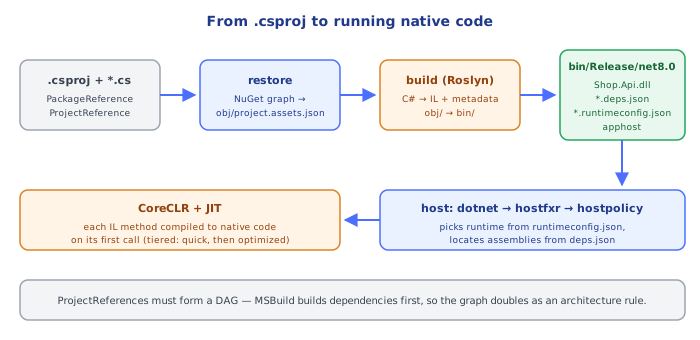
- Restore walks every
PackageReferenceandProjectReferencetransitively, resolves one version per package (nearest-wins; the lowest version that satisfies the range), downloads into the global cache (~/.nuget/packages) and writesobj/project.assets.json— the lock-like graph the build reads. - Build runs MSBuild targets:
CoreCompileinvokes Roslyn (csc) with every source file and the resolved reference assemblies, producing an IL assembly inobj/, then copies it plus dependencies intobin/<Configuration>/<TFM>/. - Alongside your
.dll, the output has*.deps.json(dependency manifest the host uses to locate assemblies) and, for executables,*.runtimeconfig.json(which runtime version to load) and an apphost (Shop.Api/Shop.Api.exe). - At run time the host (
dotnetmuxer →hostfxr→hostpolicy) reads those JSON files, loads the CoreCLR, and the JIT compiles IL methods to native code the first time each is called.
⚠️ Common Pitfalls
- Circular project references — MSBuild errors out. Extract the shared piece into a lower project or introduce an interface in the lower layer.
- Mismatched
TargetFrameworks — anet8.0project can't reference anet9.0library. - Editing files under
bin/orobj/— they're regenerated; never commit them (dotnet new gitignore). - Package versions drifting between projects — use Central Package Management (
Directory.Packages.props+ManagePackageVersionsCentrally) so every project agrees. - Putting secrets in
appsettings.json— use user-secrets in dev and environment variables / a vault in production.
📋 Quick Reference
| Command | Effect |
|---|---|
dotnet new <template> -o <dir> | scaffold a project |
dotnet sln add <proj> | add to solution |
dotnet add reference <proj> | project-to-project dependency |
dotnet add package <id> | NuGet dependency |
dotnet build / test / run | compile / test / execute |
dotnet publish -c Release | deployable output |
Directory.Build.props | shared settings for a folder tree |
global.json | pin the SDK version |
🎤 Interview Q&A
Q1What are solutions, projects and assemblies?core▾
A solution (.sln/.slnx) groups projects; each project (.csproj) builds an assembly (DLL/EXE). Project references define dependencies; NuGet packages bring external libraries.
- SDK-style projects? Concise csproj with implicit file globbing.
Q2How would you structure a clean architecture solution?core▾
Projects such as Domain (entities, no dependencies), Application (use cases, interfaces), Infrastructure (EF Core, external services), Api (ASP.NET Core), plus test projects; references point inward.
- Enforce boundaries? Project references and NetArchTest architecture tests.
Q3What's Directory.Build.props and central package management?core▾
Directory.Build.props shares MSBuild settings (nullable, warnings as errors, analyzers) across projects; Directory.Packages.props centralizes NuGet versions so all projects use the same versions.
- Why centralize versions? Avoid version drift and conflicts.
Q4How does configuration work in .NET?senior▾
Layered providers: appsettings.json, appsettings.{Environment}.json, user secrets (dev), environment variables, command line, Key Vault; bound to typed classes with the Options pattern and validated at startup.
- ValidateOnStart? Fails fast on invalid configuration.
Q5What deployment options exist for .NET apps?core▾
Framework-dependent or self-contained publishes, single-file executables, ReadyToRun or Native AOT for faster startup, and container images (dotnet publish /t:PublishContainer).
- Native AOT trade-offs? Fast startup and small memory, but limited reflection/dynamic code.
🛠️ Practice exercises
Each exercise is a file in this topic folder. Code exercises are self-checking: run them and make the checks pass.