Symbols
Symbol is a primitive type introduced in ES6 whose only purpose is to be a guaranteed-unique value, typically used as an object property key that will never accidentally collide with any other key — including keys from other libraries.
🎯 What you'll learn
- What a Symbol Is
- Symbols as Object Keys
- Symbols Are Hidden from Normal Enumeration
- Well-Known Symbols
Symbol.for()— the Global Symbol Registry
1What a Symbol Is
Symbol is a primitive type introduced in ES6 whose only purpose is to be a guaranteed-unique value, typically used as an object property key that will never accidentally collide with any other key — including keys from other libraries.
const s1 = Symbol("id");
const s2 = Symbol("id");
console.log(s1 === s2); // false — every Symbol() call creates a distinct value, even with the same description
The string passed to Symbol() is just a description for debugging — it has no effect on uniqueness or equality.
2Symbols as Object Keys
const ID = Symbol("id");

const user = {
  name: "Ana",
  [ID]: 12345, // computed key — stores under the Symbol, not the string "id"
};

console.log(user[ID]);      // 12345
console.log(user["ID"]);    // undefined — a string key "ID" is unrelated to the Symbol ID
console.log(Object.keys(user)); // ["name"] — Symbol keys are excluded by default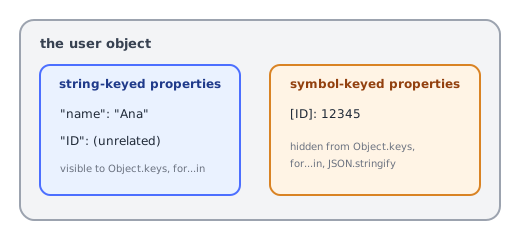
3Symbols Are Hidden from Normal Enumeration
| Method | Includes Symbol keys? |
|---|---|
Object.keys() / Object.values() / Object.entries() | ❌ no |
for...in | ❌ no |
JSON.stringify() | ❌ no |
Object.getOwnPropertySymbols() | ✅ yes — the only way to explicitly retrieve them |
Reflect.ownKeys() | ✅ yes (includes both strings and Symbols) |
This makes Symbols useful for attaching metadata to an object without it showing up in normal iteration, serialization, or accidentally colliding with a user-supplied property name.
4Well-Known Symbols
JavaScript itself uses Symbols to let objects hook into language-level behavior:
class Range {
  constructor(start, end) { this.start = start; this.end = end; }
  [Symbol.iterator]() { /* makes this object work with for...of, see Iterators topic */ }
}

class Money {
  constructor(amount) { this.amount = amount; }
  [Symbol.toPrimitive](hint) {
    if (hint === "number") return this.amount;
    if (hint === "string") return `$${this.amount.toFixed(2)}`;
    return `Money(${this.amount})`;
  }
}
const price = new Money(9.5);
console.log(+price);         // 9.5 — hint "number"
console.log(`${price}`); // "$9.50" — hint "string"Symbol.iterator, Symbol.toPrimitive, Symbol.hasInstance, and Symbol.toStringTag are all "well-known symbols" that customize built-in language operations for your own classes.
5Symbol.for() — the Global Symbol Registry
const a = Symbol.for("shared-key");
const b = Symbol.for("shared-key");
console.log(a === b); // true — Symbol.for reuses the SAME symbol for the same string, across the entire runtime
Unlike Symbol("x") (always unique), Symbol.for("x") looks up (or creates) a shared Symbol in a global registry — useful when multiple, independently-loaded modules need to agree on the same Symbol key.
6Symbols Are Not Enumerable by JSON
const obj = { name: "Ana", [Symbol("secret")]: "hidden" };
console.log(JSON.stringify(obj)); // {"name":"Ana"} — Symbol-keyed data is silently dropped
This is a deliberate design choice: Symbols are meant for in-memory metadata, not serialized data.
Under the HoodWhy Symbols Never Collide With String Keys▾
Separate key spaces, not just "different-looking" keys
It's tempting to think of a Symbol key as just "a weird string that's hard to guess" — but internally, engines maintain genuinely separate storage for string-keyed and Symbol-keyed properties on an object's hidden class (see the Objects and Prototypes topics). A Symbol is never coerced to a string for the purpose of key comparison, unlike numeric keys (obj[1] really is stored and compared as the string "1" internally). This is why user[ID] and user["ID"] in section 2 can never collide, even in principle — they're not just different values being compared, they're looked up through entirely different property-key mechanisms.
Well-known symbols are just symbol-keyed properties on built-in prototypes
console.log(typeof Array.prototype[Symbol.iterator]); // "function"Symbol.iterator isn't special engine magic layered on top of objects — it's a genuine, engine-predefined Symbol value, and Array.prototype[Symbol.iterator] is a real Symbol-keyed property sitting on Array.prototype, found via the exact same prototype-chain lookup mechanism as any inherited method (Prototype Chain topic). Defining [Symbol.iterator] on your own class (Iterators topic) works for exactly the same reason a well-known symbol works on a built-in — for...of simply looks up whatever is stored at that Symbol key on the object's chain, without caring whether that Symbol came from the engine or from your own code.
Symbol.for()'s registry is one real, engine-wide table
Symbol.for("app:id"); // first call: registry has no entry for "app:id" -> creates one, stores it, returns it
Symbol.for("app:id"); // second call, ANY module, ANY time later: registry already has it -> returns the SAME symbol
The global symbol registry is a genuine key-value table maintained once per JavaScript realm (roughly: once per running engine instance/tab/worker), mapping string keys to their associated Symbol. This is exactly the mechanism that lets two independently-bundled libraries — which have no direct reference to each other's code — agree on the same Symbol key purely by using the same string with Symbol.for(), something two separate Symbol("app:id") calls could never achieve, since each Symbol() call always allocates a brand-new, structurally unique value with no registry lookup involved at all.
⚠️ Common Pitfalls
- Expecting
Symbol("x") === Symbol("x")— they are always different values; onlySymbol.for("x")provides equality across calls. - Trying to use
new Symbol()— throws aTypeError;Symbolis a function, not a constructor, and must be called withoutnew. - Assuming Symbol-keyed properties are truly private —
Object.getOwnPropertySymbols()can still retrieve them; use#privateclass fields (see the Classes topic) for genuine access-restricted privacy. - Forgetting
JSON.stringifydrops Symbol keys entirely — a common surprise when debugging "missing" data after serialization.
📋 Quick Reference
Symbol("desc")        → always unique, even with the same description
Symbol.for("key")      → shared/global, same value for the same key
obj[sym] = value        → hidden from Object.keys/for-in/JSON.stringify
Symbol.iterator          → well-known symbol powering for...of
🎤 Interview Q&A
Q1What is a Symbol?core▾
A unique, immutable primitive used as an object property key that won't collide with other keys. Symbol('desc') creates a new unique symbol; Symbol.for('key') uses a global registry.
- Are symbol keys private? Not truly;
Object.getOwnPropertySymbolsreveals them.
Q2What are well-known symbols?core▾
Built-in symbols customizing language behaviour: Symbol.iterator (iteration), Symbol.asyncIterator, Symbol.toPrimitive (conversion), Symbol.hasInstance (instanceof), Symbol.toStringTag.
- Example? Implementing
[Symbol.iterator]makes a class usable with for…of.
Q3Why use symbols for metadata?core▾
Libraries can attach hidden-ish properties to objects without colliding with user keys or showing up in JSON.stringify, Object.keys or for…in.
- JSON.stringify and symbols? Symbol-keyed properties are ignored.
Q4How do symbols compare?core▾
Each Symbol() call is unique even with the same description; Symbol.for('x') === Symbol.for('x') is true across realms.
- Can you use new Symbol()? No, it throws.
Q5Where do you see symbols in frameworks?senior▾
React uses Symbol.for('react.element') to tag elements (protecting against JSON injection), and libraries use them for brand checks and private registries.
- Why does React's tagging help security? JSON can't contain symbols, so injected objects aren't treated as elements.
🛠️ Practice exercises
Each exercise is a file in this topic folder. Code exercises are self-checking: run them and make the checks pass.