Map
Map is a dedicated key-value collection that fixes several long-standing limitations of using plain objects as dictionaries.
🎯 What you'll learn
- Why Map Instead of a Plain Object
- Basic Usage
- Initializing from an Iterable
- Iterating a Map
- Object Keys — the Feature Objects Can't Offer
1Why Map Instead of a Plain Object
Map is a dedicated key-value collection that fixes several long-standing limitations of using plain objects as dictionaries.
| Plain Object | Map | |
|---|---|---|
| Key types | strings and Symbols only (numbers get coerced to strings) | any value, including objects, functions, NaN |
| Key order | mostly insertion order, but integer-like keys are reordered first | always insertion order |
| Size | manual (Object.keys(obj).length) | .size property |
| Accidental prototype collisions | obj.toString clashes with inherited methods | none — Map has no such inherited key collisions |
| Iteration | needs Object.entries/for...in | directly iterable, for...of works natively |
| Performance for frequent add/remove | can degrade with many keys | optimized for exactly this |
2Basic Usage
const map = new Map();
map.set("name", "Ana");
map.set(42, "the answer");
map.set(true, "boolean key");

const objKey = { id: 1 };
map.set(objKey, "keyed by an object reference");

map.get("name");     // "Ana"
map.get(objKey);      // "keyed by an object reference"
map.has("name");      // true
map.size;               // 4
map.delete(42);3Initializing from an Iterable
const map = new Map([
  ["a", 1],
  ["b", 2],
]);
// equivalent to two .set() calls, using [key, value] pairs4Iterating a Map
const scores = new Map([["Ana", 90], ["Leo", 85]]);

for (const [name, score] of scores) console.log(name, score);
for (const key of scores.keys()) console.log(key);
for (const value of scores.values()) console.log(value);
for (const entry of scores.entries()) console.log(entry); // same as default iteration

scores.forEach((value, key) => console.log(key, value)); // note: (value, key) order, matching Array.forEach's (element, index)
Iteration is always in insertion order, guaranteed by the spec — unlike plain objects, where integer-like keys get reordered first.
5Object Keys — the Feature Objects Can't Offer
const cache = new Map();
function memoizedCompute(inputObject) {
  if (cache.has(inputObject)) return cache.get(inputObject);
  const result = expensiveComputation(inputObject);
  cache.set(inputObject, result);
  return result;
}
Using an object as a plain-object key would silently coerce it to the string "[object Object]", colliding every distinct object into the same key. Map keeps them genuinely distinct, by reference.
6Converting Between Map and Object/Array
const map = new Map([["a", 1], ["b", 2]]);

Object.fromEntries(map);     // { a: 1, b: 2 }
[...map];                     // [["a", 1], ["b", 2]]
[...map.keys()];               // ["a", "b"]

const obj = { x: 1, y: 2 };
new Map(Object.entries(obj)); // Map { "x" => 1, "y" => 2 }7When to Still Use a Plain Object
- The keys are always known string literals set at author time (config objects, function options).
- You need
JSON.stringifysupport directly (Mapis not JSON-serializable without manual conversion viaObject.fromEntries). - You're passing data across a boundary that expects plain objects (many APIs, React state, etc.).
Under the HoodHow Map Actually Stores Data▾
Map is not just "a hash table with extra steps" — the spec requires it to preserve insertion order, which a raw hash table (see the Hashing topic) cannot do on its own, since bucket position depends on a hash, not arrival order. Engines solve this with a design called an ordered hash table: two backing structures working together instead of one.
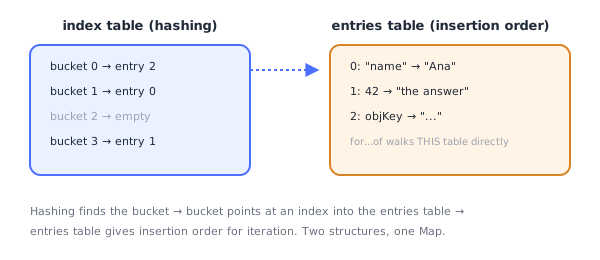
index table (the actual hash table)     entries table (insertion order, may contain holes)
┌───────────────────────────┐            ┌─────┬─────────────┬─────────────┐
│ bucket 0: -> entry 2        │            │ idx │ key         │ value        │
│ bucket 1: -> entry 0        │            ├─────┼─────────────┼─────────────┤
│ bucket 2: empty              │            │  0  │ "name"      │ "Ana"        │
│ bucket 3: -> entry 1        │            │  1  │ 42          │ "the answer" │
└───────────────────────────┘            │  2  │ objKey      │ "..."        │
└─────┴─────────────┴─────────────┘- The index table does the actual hashing:
hash(key) % capacityfinds a bucket, which stores the index of the matching entry — not the entry itself. - The entries table stores every
[key, value]pair in the exact order they were inserted.for...of,.forEach(), and spread all walk this table directly, which is why iteration order is guaranteed — it has nothing to do with hashing at all.
V8 (Chrome/Node's engine) implements this almost literally as described — its internal classes are named OrderedHashMap/OrderedHashSet, the same general design Python adopted for dict since 3.6. Other engines (SpiderMonkey, JavaScriptCore) use conceptually equivalent structures; exact internal names differ, but the two-table, order-preserving approach is effectively mandated by the spec's observable behavior.
What happens when the table is "full"
There's no literal "full" error — instead, the index table has a load factor (entries ÷ capacity). Once it crosses an internal threshold, the engine:
- Allocates a new, larger index table (capacity roughly doubles).
- Rehashes every live entry — recomputes
hash(key) % newCapacityfor each one and re-inserts its index into the new table. - Swaps the old index table out for the new one.
This is an O(n) operation, but because it only happens when capacity roughly doubles, the amortized cost per .set() call stays O(1) on average — exactly the same amortized-growth trade-off arrays make with .push().
Why .delete() doesn't shrink anything immediately
Physically removing an entry from the middle of the entries table would require shifting every entry after it — an O(n) cost on every single delete. Engines avoid this by leaving a tombstone (a hole marker) in that slot instead, and removing its pointer from the index table. The entry stays physically present but is skipped during iteration.
Consequence: a Map that has many .set() + .delete() cycles can accumulate tombstones and hold more backing memory than its current .size would suggest — until the next resize happens, at which point the rehash pass also compacts the entries table, dropping every tombstone and reclaiming that space. A resize is therefore triggered by either growth or by tombstone accumulation crossing a threshold, not just by adding new entries.
How object keys get hashed
A primitive like a string or number hashes to the same value every time trivially. An object key is trickier: its memory address can't be used as a stable hash, because JavaScript engines use moving garbage collectors — an object can physically relocate in memory during a GC pass. If the hash changed every time GC moved the object, every Map/Set/WeakMap containing it would break.
The fix: the first time an object is used as a hash key, the engine lazily generates a random identity hash and stamps it onto the object (in a hidden internal slot). That same identity hash is reused for the object's entire lifetime, regardless of how many times GC relocates it in memory — this is what makes map.set(objKey, ...) reliable even though objKey itself might move.
Complexity, Concretely
| Operation | Average | Worst case | Why |
|---|---|---|---|
.set() / .get() / .has() / .delete() | O(1) | O(n) | worst case = many keys colliding into the same bucket |
| Growth resize (amortized across many inserts) | O(1) per insert | O(n) for the one resize call | doubles capacity, rehashes every live entry |
Iteration (for...of, spread) | O(entries + tombstones) | — | walks the entries table directly, skipping holes |
⚠️ Common Pitfalls
- Forgetting Map is not JSON-serializable —
JSON.stringify(new Map())gives"{}"; convert withObject.fromEntries(map)first. - Using
map[key] = valueinstead ofmap.set(key, value)— this sets a regular object property on the Map instance itself, bypassing the Map's actual storage entirely; it will not show up in.size, iteration, or.get(). - Assuming
NaNcan't be a key —Mapuses "SameValueZero" equality, soNaNworks correctly as a key (unlike===, whereNaN !== NaN), while object identity still applies to object keys. - Not realizing
forEach's callback argument order is(value, key), not(key, value)— easy to reverse when translating fromfor...ofdestructuring.
📋 Quick Reference
new Map([[k,v], ...])   map.set(k,v)   map.get(k)   map.has(k)   map.delete(k)
map.size                 for (const [k,v] of map) {}
Object.fromEntries(map)  ↔  new Map(Object.entries(obj))
🎤 Interview Q&A
Q1Map vs plain object?core▾
Map accepts any key type (objects, functions), preserves insertion order, has size, is iterable directly, performs well with frequent additions/deletions, and has no prototype key collisions. Objects are better for fixed-shape records and JSON.
- How do you convert?
new Map(Object.entries(obj))andObject.fromEntries(map).
Q2How are Map keys compared?core▾
By SameValueZero: primitives by value (NaN equals NaN), objects by reference, so two different {} are different keys.
- Using objects as keys gotcha? You need the same object reference to retrieve.
Q3What's the time complexity of Map operations?core▾
Average O(1) for get, set, has, delete; iteration is O(n) in insertion order.
- Use case? Counting frequencies, caches, grouping.
Q4How would you implement an LRU cache with Map?senior▾
On get, delete and re-set the key to move it to the end (most recent); on set, if size exceeds capacity, delete map.keys().next().value (the oldest).
- Why Map works? Insertion order iteration.
Q5How do you serialize a Map to JSON?core▾
JSON.stringify gives {}; convert first: JSON.stringify([...map]) or Object.fromEntries(map) for string keys, and reconstruct with new Map(parsed).
- Grouping helper?
Map.groupBy(items, fn).
🛠️ Practice exercises
Each exercise is a file in this topic folder. Code exercises are self-checking: run them and make the checks pass.