Synchronous vs Asynchronous Execution
In synchronous code, each statement finishes completely before the next one starts. Nothing else can happen while a synchronous operation is running — the entire program is blocked.
🎯 What you'll learn
- Synchronous Execution
- Why Asynchronous Execution Exists
- Blocking vs Non-Blocking
- The Three Ways to Write Async Code (Overview)
- Synchronous Code Always Runs to Completion First
1Synchronous Execution
In synchronous code, each statement finishes completely before the next one starts. Nothing else can happen while a synchronous operation is running — the entire program is blocked.
console.log("1");
console.log("2");
console.log("3");
// always prints 1, 2, 3 — strictly in order, nothing can interleave2Why Asynchronous Execution Exists
JavaScript is single-threaded — only one line of code executes at any given instant. If a slow operation (reading a file, waiting for a network response, a timer) blocked that single thread, the entire program — including UI rendering in a browser — would freeze until it finished.
Asynchronous operations let JavaScript start a slow operation, immediately move on to other code, and come back to handle the result later, once it's ready — without blocking anything in the meantime.
console.log("1: start");
setTimeout(() => console.log("3: timer finished"), 1000);
console.log("2: end");
// prints: 1: start, 2: end, 3: timer finished
// "2: end" runs BEFORE the timer callback, even though setTimeout was called first3Blocking vs Non-Blocking
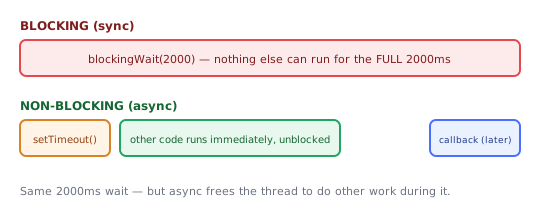
// BLOCKING — synchronous, freezes everything until done
function blockingWait(ms) {
  const start = Date.now();
  while (Date.now() - start < ms) {} // busy-loop, wastes CPU, blocks the thread
}
console.log("before");
blockingWait(2000); // nothing else can run for 2 seconds — the whole program is frozen
console.log("after");

// NON-BLOCKING — asynchronous, lets other code run in the meantime
console.log("before");
setTimeout(() => console.log("after (async)"), 2000);
console.log("other code runs immediately, unblocked");4The Three Ways to Write Async Code (Overview)
| Style | Example | Covered in |
|---|---|---|
| Callbacks | fs.readFile(path, (err, data) => {}) | Callbacks topic |
| Promises | fetch(url).then(res => res.json()) | Promises topic |
async/await | const data = await fetch(url) | Async/Await topic |
All three are ultimately built on the same underlying mechanism — the event loop (its own topic) — which decides when queued async callbacks actually get to run.
5Synchronous Code Always Runs to Completion First
A critical rule: all currently-running synchronous code finishes completely before any queued asynchronous callback gets a turn — no matter how short the async delay was set to.
console.log("A");
setTimeout(() => console.log("C"), 0); // even 0ms delay doesn't mean "immediately"
console.log("B");
// always: A, B, C — never A, C, B
setTimeout(fn, 0) does not mean "run fn right now" — it means "run fn as soon as possible after the current synchronous code finishes and the call stack is empty."
Under the HoodWhat Actually Handles the "Waiting" Part▾
When JavaScript "hands off" an async operation, something has to actually do the waiting — and in Node.js, that something differs depending on what kind of operation it is, which explains a lot about relative async performance characteristics.
Network I/O: real OS-level asynchrony, no extra threads needed
For network operations (HTTP requests, TCP sockets), Node's underlying library libuv uses the operating system's native async I/O facilities directly — epoll on Linux, kqueue on macOS/BSD, IOCP on Windows. These let the OS itself watch thousands of sockets simultaneously and notify the process only when one actually has data ready, without dedicating any extra thread to "wait" on each connection. This is genuinely async all the way down to the kernel — no JavaScript thread, and no extra OS thread either, is blocked waiting.
File system, DNS, and some crypto: a real thread pool underneath
Many operating systems' file-system APIs don't offer good native async equivalents the way socket APIs do. For these, libuv maintains an actual thread pool (4 threads by default, configurable via the UV_THREADPOOL_SIZE environment variable) — an fs.readFile call is dispatched to one of these background OS threads, which performs the (blocking, from its own perspective) file read, then signals completion back to the main JavaScript thread's event loop when done.
fetch() / http.request()   → OS-level async I/O (epoll/kqueue) → NO extra thread consumed
fs.readFile() / fs.stat()   → libuv's fixed-size thread pool (default 4 threads)
Why this matters practically
Because the thread pool has a fixed size, launching more concurrent file operations than available pool threads causes some of them to queue up and wait for a free thread — a real, measurable form of contention that pure network-bound async code doesn't experience the same way. This is part of why heavy filesystem-bound Node applications sometimes tune UV_THREADPOOL_SIZE upward, while network-bound applications rarely need to.
⚠️ Common Pitfalls
- Assuming
setTimeout(fn, 0)runs immediately — it always waits for the current synchronous block to finish first, however brief the delay. - Writing blocking loops for delays — a busy-wait loop like
blockingWaitabove freezes the entire program (and, in a browser, the UI); always prefersetTimeout/Promises for delays. - Expecting async operations to complete in the order they were started — without proper sequencing (
await,.then()chains), multiple async operations started together can finish in any order, depending on how long each actually takes. - Forgetting synchronous code inside an async callback still blocks — once an async callback does start running, any synchronous code inside it still runs to completion before yielding control again.
📋 Quick Reference
sync    → blocks, runs top to bottom, one thing at a time, no gaps
async    → starts an operation, returns control immediately, result handled later
setTimeout(fn, 0)  → "as soon as possible after current sync code finishes," not "now"
🎤 Interview Q&A
Q1Is JavaScript single-threaded?core▾
The language runs on one main thread per realm with an event loop; async operations (I/O, timers) are handled by the host (browser/Node) and their callbacks are queued back. Web Workers/worker_threads provide extra threads.
- So how is it concurrent? Through non-blocking I/O and the event loop.
Q2What does 'blocking the main thread' mean?core▾
Long synchronous work prevents the event loop from processing other tasks: in browsers the UI freezes (no rendering or input), in Node all requests stall.
- How do you avoid it? Chunk work, use workers, or move it off the main thread/server.
Q3What's the output order of console.log(1); setTimeout(() => console.log(2)); Promise.resolve().then(() => console.log(3)); console.log(4);?core▾
1, 4, 3, 2: synchronous code first, then microtasks (promise callbacks), then macrotasks (timers).
- Why is setTimeout(0) not immediate? It queues a task that runs after the current stack and microtasks.
Q4Is async code always parallel?senior▾
No; async/await interleaves on one thread. Awaiting sequentially runs operations one after another; Promise.all lets independent I/O run concurrently.
- CPU-bound async? Still blocks; use workers.
Q5How do you break up long tasks in the browser?core▾
Split work into chunks yielding to the event loop (setTimeout, scheduler.yield(), requestIdleCallback), or move it to a Web Worker.
- Which metric suffers from long tasks? INP (Interaction to Next Paint).
🛠️ Practice exercises
Each exercise is a file in this topic folder. Code exercises are self-checking: run them and make the checks pass.