Error Handling in Asynchronous Code
A rejected awaited Promise behaves exactly like a synchronous throw — this is the core reason async/await reads more naturally than Promise chains for error-heavy code.
🎯 What you'll learn
- try/catch Works Naturally with
await .catch()Is the Promise-Chain Equivalent- Catching Errors from Multiple Awaited Steps at Once
- Unhandled Rejections
Promise.alland Error Handling
1try/catch Works Naturally with await
async function loadUser(id) {
  try {
    const res = await fetch(`/users/${id}`);
    if (!res.ok) throw new Error(`HTTP ${res.status}`);
    return await res.json();
  } catch (e) {
    console.error("Failed to load user:", e.message);
    throw e; // re-throw so the caller also knows it failed
  }
}
A rejected awaited Promise behaves exactly like a synchronous throw — this is the core reason async/await reads more naturally than Promise chains for error-heavy code.
2.catch() Is the Promise-Chain Equivalent
// Promise-chain style
fetchUser(id)
  .then(processUser)
  .catch(e => console.error("failed:", e.message));

// async/await style — behaviorally equivalent
async function run() {
  try {
    const user = await fetchUser(id);
    processUser(user);
  } catch (e) {
    console.error("failed:", e.message);
  }
}3Catching Errors from Multiple Awaited Steps at Once
async function loadDashboard(userId) {
  try {
    const user = await fetchUser(userId);
    const orders = await fetchOrders(user.id);
    const shipping = await fetchShipping(orders[0].id);
    return { user, orders, shipping };
  } catch (e) {
    // catches a failure from ANY of the three awaits above — the FIRST
    // one to fail short-circuits the rest, exactly like a Promise chain
    console.error("dashboard load failed at some step:", e.message);
    throw e;
  }
}4Unhandled Rejections
If a rejected Promise is never caught — no .catch(), no surrounding try/catch around its await — it becomes an unhandled rejection. Node.js logs a warning (and, depending on version/config, can crash the process); browsers log to the console and fire a window.onunhandledrejection event.
async function riskyOperation() {
  throw new Error("nobody is watching for this");
}
riskyOperation(); // fire-and-forget, no await, no .catch() — unhandled rejection!

riskyOperation().catch(e => console.error("caught:", e.message)); // fixed
Rule: never call an async function without either awaiting it inside a try/catch, or attaching a .catch().
5Promise.all and Error Handling
async function loadAll() {
  try {
    const [a, b, c] = await Promise.all([fetchA(), fetchB(), fetchC()]);
    return { a, b, c };
  } catch (e) {
    // fires as soon as ANY of the three rejects — the other two may
    // still be running in the background, but their results are lost here
    console.error("one of the parallel fetches failed:", e.message);
  }
}
If you need to know about every failure individually rather than just the first, use Promise.allSettled instead (see the Promises topic).
6Cleanup with finally in Async Code
async function loadWithSpinner() {
  showSpinner();
  try {
    return await fetchData();
  } catch (e) {
    showErrorMessage(e.message);
    throw e;
  } finally {
    hideSpinner(); // runs whether fetchData succeeded, failed, or even if the catch block re-threw
  }
}
finally guarantees cleanup logic (hiding a loading state, releasing a lock, closing a connection) runs regardless of outcome — the same guarantee it provides for synchronous code.
Under the HoodWhy the "Unhandled Rejection" Warning Isn't Instant▾
A rejected Promise with no .catch() attached doesn't get flagged as "unhandled" the very instant it rejects — engines deliberately wait, because a .catch() might still be attached moments later, in the same synchronous turn or a very next one, and shouldn't be flagged as a problem if so.
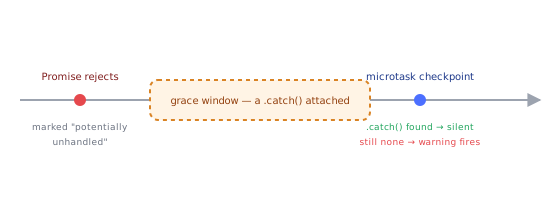
The reject/handle tracking mechanism
The spec defines this via a host-level tracking hook (HostPromiseRejectionTracker, with "reject" and "handle" operations). When a Promise rejects with no reaction attached yet, the engine records it as potentially unhandled and schedules a check — rather than reporting immediately. If a .catch() (or a rejection-handling .then()) gets attached before that check runs, the tracker records a matching "handle" operation, and no warning is ever surfaced.
const p = Promise.reject(new Error("boom")); // marked "potentially unhandled" internally

setTimeout(() => {
  p.catch(e => console.log("handled late:", e.message)); // attached within the SAME turn/soon after — no warning fires
}, 0);
When the check actually fires
Engines perform this check at the end of a microtask checkpoint (V8: after the microtask queue is fully drained — see the Microtasks vs Macrotasks topic's checkpoint discussion) — if, at that point, a rejected Promise still has no reaction attached anywhere, only then does Node emit its unhandledRejection warning (or a browser fire window.onunhandledrejection). This is exactly why the warning can feel like it fires "a tick late" relative to where the rejection actually happened in your code — it's not a delay bug, it's the engine deliberately giving late-attached handlers a real window to attach before judging the rejection unhandled.
Why "fire and forget" is genuinely risky, precisely because of this window
async function riskyOperation() { throw new Error("nobody is watching"); }
riskyOperation(); // rejects; the tracker waits for a handler that will NEVER come — genuinely unhandled
Because nothing in this code path ever attaches a .catch() at all — not late, not ever — the tracker's grace period expires with no matching "handle" operation recorded, and the warning fires for real. The mechanism isn't lenient about whether you handle a rejection, only about exactly when within the same logical turn you're allowed to do it.
⚠️ Common Pitfalls
- Forgetting
awaitbefore a function call insidetry— withoutawait, a rejected Promise won't be caught by the surroundingtry/catch; thecatchblock only intercepts synchronous throws and awaited rejections. - "Fire and forget" async calls with no error handling — the #1 source of unhandled rejection warnings/crashes.
- Swallowing errors silently in
catch— logging nothing and not re-throwing hides real failures from callers who need to know. - Catching too broadly around multiple unrelated awaits — makes it unclear which specific step failed; consider per-step try/catch when the distinction matters.
- Not using
finallyfor cleanup, instead duplicating cleanup code in both the success path and every catch branch.
📋 Quick Reference
try { await risky() } catch (e) { handle(e) } finally { cleanup() }
async fn() without await/.catch()   → unhandled rejection risk
Promise.all + try/catch              → fails fast on first rejection
Promise.allSettled                    → no rejection, per-item status instead
🎤 Interview Q&A
Q1How do you handle errors with async/await?core▾
Wrap awaits in try/catch where you can handle them, let others propagate to a boundary (route handler, error boundary), and always handle the final promise of fire-and-forget work.
- Go-style alternative? Helpers returning
[err, data]tuples.
Q2How do you handle errors when running tasks in parallel?core▾
Promise.all rejects on the first error (others keep running unaware); use Promise.allSettled to collect all results and errors, and AbortController to cancel siblings when one fails.
- Why cancel siblings? Avoid wasted work and side effects.
Q3How do you implement retries with backoff?core▾
Loop with attempts: try the call, on retryable errors wait base * 2^attempt + jitter (via await sleep), stop after max attempts and rethrow; respect Retry-After and abort signals.
- Which errors to retry? Network errors, 429, 5xx; not 4xx validation errors.
Q4Why do errors in event handlers or timers escape try/catch?senior▾
They run later on a new stack; the surrounding try/catch has already exited. Handle errors inside the callback or use promise-based APIs you can await.
- Global safety net? unhandledrejection/error listeners for logging.
Q5How do you preserve error context across async layers?core▾
Wrap errors with new Error('message', { cause: err }), add identifiers (request IDs), and log once at the boundary with full stack and cause chain.
- Why log once? Avoids duplicate noise.
🛠️ Practice exercises
Each exercise is a file in this topic folder. Code exercises are self-checking: run them and make the checks pass.