Parallel vs Sequential Async Operations
Each await blocks the function (not the whole program — see the Async/Await topic) from proceeding until that specific operation finishes, before even starting the next one.
🎯 What you'll learn
- Sequential: Each Step Waits for the Previous One
- Parallel: All Operations Start Immediately
- The Bug Pattern: Accidental Serialization
- When Sequential Is Actually Required
- Partial Parallelism — Mixing Both
1Sequential: Each Step Waits for the Previous One
async function sequential() {
  const a = await delay(100, "a"); // starts, waits 100ms
  const b = await delay(100, "b"); // does NOT start until `a` is done — another 100ms
  const c = await delay(100, "c"); // does NOT start until `b` is done — another 100ms
  return [a, b, c];
}
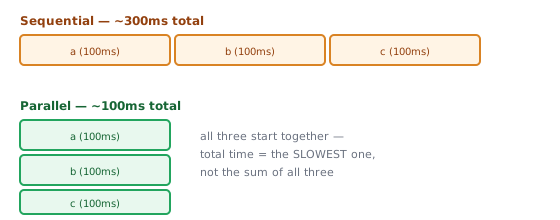
// total time: ~300ms
Each await blocks the function (not the whole program — see the Async/Await topic) from proceeding until that specific operation finishes, before even starting the next one.
2Parallel: All Operations Start Immediately
async function parallel() {
  const promiseA = delay(100, "a"); // starts immediately, NOT awaited yet
  const promiseB = delay(100, "b"); // starts immediately too — overlaps with A
  const promiseC = delay(100, "c"); // starts immediately too — overlaps with A and B

  const [a, b, c] = await Promise.all([promiseA, promiseB, promiseC]); // wait for all THREE at once
  return [a, b, c];
}
// total time: ~100ms — all three ran concurrently
The critical detail: calling delay(100, "a") starts the operation immediately, whether or not you await it right away. Sequential code accidentally forces this waiting by awaiting each call before starting the next.
3The Bug Pattern: Accidental Serialization
// LOOKS like it should be fine, but is needlessly sequential:
async function loadAllUsersSlow(ids) {
  const users = [];
  for (const id of ids) {
    const user = await fetchUser(id); // each iteration waits for the PREVIOUS one
    users.push(user);
  }
  return users;
}

// Fixed — starts all requests immediately, waits for all together:
async function loadAllUsersFast(ids) {
  const promises = ids.map(id => fetchUser(id)); // all fetches START here, immediately
  return Promise.all(promises);                    // NOW wait for all of them together
}
loadAllUsersSlow with 5 users taking 100ms each takes ~500ms total. loadAllUsersFast takes ~100ms total (limited by the slowest single request, not the sum of all of them).
4When Sequential Is Actually Required
Sequential execution is necessary — not just accidental — when a later step genuinely depends on an earlier step's result:
async function checkoutFlow() {
  const cart = await getCart();                 // step 2 needs cart's contents
  const total = await calculateTotal(cart);       // step 3 needs the calculated total
  const receipt = await chargeCard(total);         // each step's INPUT comes from the previous OUTPUT
  return receipt;
}
Also required when operations must not overlap for correctness (writing to the same file, respecting a strict rate limit, maintaining a specific order of side effects).
5Partial Parallelism — Mixing Both
async function loadPage(userId) {
  // These two are INDEPENDENT of each other — run them in parallel:
  const [user, settings] = await Promise.all([
    fetchUser(userId),
    fetchSettings(userId),
  ]);

  // This DEPENDS on `user` — must run sequentially after the above:
  const recommendations = await fetchRecommendations(user.preferences);

  return { user, settings, recommendations };
}
Identify genuine dependencies first; run everything else concurrently.
6Controlled Concurrency (Not Fully Parallel, Not Fully Sequential)
Running 10,000 requests all at once via Promise.all can overwhelm a server or hit rate limits. A common middle ground processes a limited batch size at a time:
async function processInBatches(items, batchSize, asyncFn) {
  const results = [];
  for (let i = 0; i < items.length; i += batchSize) {
    const batch = items.slice(i, i + batchSize);
    const batchResults = await Promise.all(batch.map(asyncFn)); // parallel WITHIN a batch
    results.push(...batchResults);
    // sequential BETWEEN batches — waits for one batch before starting the next
  }
  return results;
}
Under the HoodHow Promise.all Actually Tracks Completion▾
Promise.all isn't implemented as "poll every promise until they're all done" — the spec algorithm (PerformPromiseAll) sets up a real counter and a fixed-size results array up front, then lets each individual promise's own resolution mechanism (the [[PromiseFulfillReactions]] machinery from the Promises topic) do the actual work of reporting back.
The algorithm, precisely
- Allocate a results array sized to the input list, and a counter initialized to the number of promises still remaining.
- For each input promise at index
i, attach a.then()reaction that, when it fires, writes the resolved value intoresults[i]and decrements the counter. - When the counter reaches zero, resolve
Promise.all's own returned promise with the completedresultsarray. - Separately, attach a rejection reaction to every input promise that, on first firing, immediately rejects
Promise.all's returned promise with that reason — and does nothing on any subsequent rejection (the returned promise can only settle once, per the Promises topic's single-settlement guard).
promises: [P0, P1, P2]   counter starts at 3
P1 resolves first  → results[1] = value, counter → 2
P0 resolves second  → results[0] = value, counter → 1
P2 resolves third    → results[2] = value, counter → 0  → Promise.all's promise resolves with results
Why results preserve input order despite resolving out of order
Section 1's examples show Promise.all([a, b, c]) giving back [a, b, c] in order, even though b might genuinely finish first. This is why: each reaction writes to a fixed index (results[i], based on the promise's position in the input array, not the order it resolves in) — order preservation isn't a sorting step at the end, it's baked into which array slot each reaction targets from the start.
Why one rejection is final even though other promises keep running
The other, still-pending promises in the array are not cancelled when one rejects — nothing in JavaScript's Promise model supports cancelling a promise (that's precisely the gap the Abort Controller topic's AbortController exists to fill at the operation level, not the Promise level). They continue running to completion in the background; their eventual results are simply never read, because Promise.all's own promise already settled and its single-settlement guard makes any further resolve/reject attempts on it a no-op.
⚠️ Common Pitfalls
- Using
awaitinside aforloop when operations are independent — the single most common accidental-serialization bug; fix with.map()+Promise.all. - Assuming
Promise.alllimits concurrency — it doesn't; it starts everything at once, which can overwhelm a downstream service with truly large arrays (see section 6 for the fix). - Forcing sequential execution "to be safe" when there's no real dependency — needlessly slows things down; only serialize when a genuine ordering or dependency requirement exists.
- Missing a real dependency and parallelizing anyway — running
chargeCard()beforecalculateTotal()finishes would be a correctness bug, not just a performance one.
📋 Quick Reference
for (x of items) { await f(x) }         → sequential, ~sum of all durations
await Promise.all(items.map(f))          → parallel, ~duration of the slowest one
independent steps → parallelize (Promise.all)
dependent steps (B needs A's result)      → must stay sequential
🎤 Interview Q&A
Q1How do you run async operations sequentially vs in parallel?core▾
Sequential: for (const x of items) await work(x). Parallel: await Promise.all(items.map(work)). Bounded concurrency: a pool/limiter running N at a time.
- Which is fastest? Parallel, if the downstream can handle it.
Q2Why limit concurrency?core▾
Unbounded parallelism can overload APIs (rate limits), databases (connection pools), memory and sockets. A limit like 5–20 concurrent requests balances speed and safety.
- Implement a simple limiter? Keep a queue and start the next task when one finishes.
Q3Is Promise.all truly parallel?core▾
It runs I/O concurrently on one thread; the JavaScript callbacks still execute one at a time. CPU-bound work isn't parallelized.
- True parallelism? Workers.
Q4How do you process results as they complete?senior▾
Attach handlers to each promise, or use an async iterator/Promise.race loop to yield results in completion order; streams of results improve perceived performance.
- Ordering concern? Results arrive out of input order.
Q5When must operations be sequential?core▾
When each depends on the previous result, when order of side effects matters (migrations), or when rate limits require pacing.
- Compromise? Batches processed sequentially, items within a batch in parallel.
🛠️ Practice exercises
Each exercise is a file in this topic folder. Code exercises are self-checking: run them and make the checks pass.