Declaration Files
A declaration file describes the shape of code without providing any implementation — no function bodies, no runnable logic, only type information. It exists purely for the checker to read.
🎯 What you'll learn
- What a
.d.tsFile Is - Why Declaration Files Exist
declare— Describing Something That Exists Elsewhere- Auto-Generated Declaration Files
@typesPackages — Community-Maintained Declarations
1What a .d.ts File Is
A declaration file describes the shape of code without providing any implementation — no function bodies, no runnable logic, only type information. It exists purely for the checker to read.
// math-utils.d.ts
export function add(a: number, b: number): number;
export function subtract(a: number, b: number): number;
This tells TypeScript "somewhere, a real math-utils.js exists with these exact exports" — without tsc ever needing to see (or care about) the actual implementation to type-check code that imports from it.
2Why Declaration Files Exist
Plenty of real-world JavaScript has no types at all — older libraries, plain .js files, browser globals. Declaration files let you describe that untyped code's shape separately, so TypeScript code that uses it still gets full checking, without needing the original code rewritten in TypeScript at all.
// jquery.d.ts (simplified)
declare function $(selector: string): { hide(): void; show(): void };// app.ts — using the plain untyped jquery.js, but with real type checking
$("#modal").hide(); // ✅ checked against the declaration
$("#modal").hidee(); // ❌ caught — typo, even though jquery.js itself has no types3declare — Describing Something That Exists Elsewhere
declare const VERSION: string; // tells the checker: trust me, a global VERSION exists at runtime
declare function track(event: string): void;

declare module "legacy-library" {
  export function doThing(x: number): string;
}
declare is how you tell the checker about something whose actual implementation lives outside the file it's declared in — a global variable injected by a <script> tag, or an entire untyped module.
4Auto-Generated Declaration Files
// tsconfig.json
{ "compilerOptions": { "declaration": true } }
With this option, tsc automatically emits a matching .d.ts file alongside every compiled .js file — this is how published TypeScript libraries ship types for their consumers: the library author writes normal .ts, and the compiler generates the accompanying declaration files during the build, without the author hand-writing them separately.
5@types Packages — Community-Maintained Declarations
npm install --save-dev @types/lodashFor popular untyped JavaScript libraries, the community maintains declaration files separately in the DefinitelyTyped repository, published as @types/<package-name> packages — installing one gives you full type checking for a library that never shipped its own types.
6Ambient vs Module Declaration Files
// global.d.ts — AMBIENT, no import/export at all — everything here becomes globally visible
declare const APP_VERSION: string;

// api-types.d.ts — has export statements, so it's a MODULE declaration file
export interface ApiResponse { data: unknown; status: number; }
A .d.ts file with no top-level import/export is treated as ambient — everything it declares becomes globally available everywhere, without needing an explicit import. The moment a .d.ts file has even one export, it becomes a real module, and its declarations must be imported normally like any other module's exports.
Under the HoodModule Resolution and Zero Runtime Footprint▾
Declaration files are the only TypeScript construct that was NEVER anything more than types
Every other topic in this stack involves erasure — real TypeScript syntax (interfaces, type annotations, generics) that gets stripped away at compile time (Type System Fundamentals topic). A .d.ts file has nothing to erase in the first place — it never contained implementation code to begin with. It exists exclusively to feed the checker information; tsc never emits anything from a .d.ts file's content (aside from possibly re-exporting/copying it during a build, unrelated to compilation).
How tsc actually finds the right .d.ts for an import
import { add } from "./math-utils";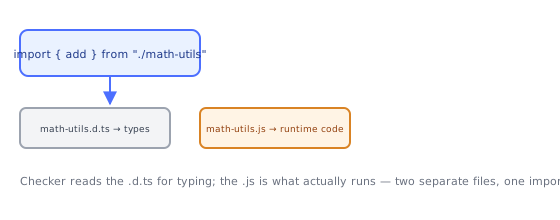
Resolution roughly follows this search order:
- Is there a
math-utils.tsright there? Use it directly (implementation + types together). - Is there a
math-utils.d.tsnext to amath-utils.js? Use the.d.tsfor types, the.jsfor the actual runtime code. - For a package import (
import _ from "lodash"): check the package's ownpackage.jsonfor a"types"/"typings"field pointing at its bundled declarations; if absent, look for a matching@types/lodashpackage innode_modules/@types.
This layered resolution is exactly why installing @types/lodash "just works" without any explicit configuration pointing at it — tsc's module resolution algorithm checks that specific location automatically, by convention, as one of its standard fallback steps.
declare module performs a kind of ambient "patch" into the resolution system
declare module "some-untyped-package" {
  export function doThing(): void;
}
Writing this doesn't create a real module — it inserts an entry directly into the checker's internal module registry, so that when your code does import { doThing } from "some-untyped-package", the resolution process finds this ambient declaration instead of failing to locate real types for that package. This is the exact mechanism section 3's example relies on.
Declaration merging (Interfaces topic) is how community @types packages extend built-ins
// a library's .d.ts file
declare global {
  interface Window {
    myLibraryGlobal: () => void;
  }
}
This combines the Interfaces topic's declaration-merging mechanism with declare global — a package's declaration file can reach into the ambient global scope and merge additional members onto Window or other built-in global types, which is exactly how libraries that attach themselves to window get typed without you writing that augmentation yourself.
⚠️ Common Pitfalls
- Writing implementation code inside a
.d.tsfile — it's a type-only context; real function bodies, variable initializers with actual logic, etc. don't belong there and often aren't even valid syntax. - Forgetting a
.d.tsfile with anyexportbecomes a module — this flips its declarations from globally-ambient to import-required, a common source of "why can't I see this global anymore" confusion after adding one export. - Manually writing declarations for a library instead of checking for
@types/<package>first — often the community package already exists, is more complete, and stays maintained as the library updates. - Assuming a
.d.tsfile's types are actually verified against real runtime behavior — they're not; a hand-written or outdated declaration file can describe a shape the actual JavaScript no longer matches, and nothing catches that mismatch automatically.
📋 Quick Reference
.d.ts file                    → types only, zero runtime code, nothing to erase
declare const/function/module   → describe something that exists elsewhere
"declaration": true              → tsc auto-generates .d.ts alongside compiled .js
@types/<package>                  → community-maintained types for untyped libraries
declare global { ... }              → merge additional members onto built-in global types
🎤 Interview Q&A
Q1What are .d.ts files?core▾
Declaration files containing only types (no implementation), describing JavaScript modules to TypeScript. Libraries ship them (types in package.json) or the community provides them via DefinitelyTyped (@types/…).
- Generate them?
declaration: truein tsconfig.
Q2How do you type an untyped JavaScript library?core▾
Install @types/lib if available; otherwise write declare module 'lib' { export function f(x: string): number; } in a .d.ts file, starting with the parts you use.
- Quick escape hatch?
declare module 'lib';(typed as any).
Q3What does declare do?core▾
Tells TS that something exists at runtime without emitting code: global variables (declare const __APP_VERSION__: string), modules, namespaces, or ambient types.
- Global types for env vars? Augment
ProcessEnvorImportMetaEnv.
Q4How do you augment existing module types?senior▾
Module augmentation: declare module 'express-serve-static-core' { interface Request { user?: User } } in a .d.ts that's part of the compilation.
- Why must the file be a module? Augmentation requires the file to have an import/export.
Q5What's skipLibCheck and should you use it?core▾
It skips type checking of .d.ts files, speeding builds and avoiding conflicts between dependency types. Commonly enabled; your own code is still checked.
- Risk? Errors in declarations go unnoticed.
🛠️ Practice exercises
Each exercise is a file in this topic folder. Code exercises are self-checking: run them and make the checks pass.