TypeScript Configuration (tsconfig.json)
tsconfig.json configures every aspect of how tsc parses, checks, and emits your project — which files are included, which JavaScript version to target, how strict the checker should be, and where compiled output goes.
🎯 What you'll learn
- What
tsconfig.jsonControls target— Which JavaScript Version to Emitmodule— Which Module System to Emitstrict— The Big Safety SwitchoutDirandrootDir
1What tsconfig.json Controls
tsconfig.json configures every aspect of how tsc parses, checks, and emits your project — which files are included, which JavaScript version to target, how strict the checker should be, and where compiled output goes.
{
  "compilerOptions": {
    "target": "ES2020",
    "module": "ESNext",
    "strict": true,
    "outDir": "./dist",
    "rootDir": "./src"
  },
  "include": ["src/**/*"],
  "exclude": ["node_modules", "dist"]
}2target — Which JavaScript Version to Emit
{ "compilerOptions": { "target": "ES2015" } }Controls how modern the output JavaScript syntax is allowed to be — e.g. whether class syntax is emitted directly (ES2015+) or downleveled into constructor-function-and-prototype code (for older targets, matching the JavaScript Prototypes topic's pre-class patterns). Set this to match the oldest runtime your compiled code actually needs to support.
3module — Which Module System to Emit
{ "compilerOptions": { "module": "CommonJS" } }Controls whether import/export compiles to Node's require/module.exports (CommonJS) or stays as native ES module syntax (ESNext/ES2020) — see the Modules topic for the full contrast between these two systems.
4strict — The Big Safety Switch
{ "compilerOptions": { "strict": true } }strict isn't one setting — it's a bundle that turns on roughly eight individual stricter-checking flags at once (full list in "Under the Hood"), including strictNullChecks (the single most impactful one: without it, null/undefined are silently assignable to every type, defeating most of what makes the Union Types and Type Guards topics' patterns actually safe). Virtually every real-world TypeScript project should enable strict.
5outDir and rootDir
{ "compilerOptions": { "outDir": "./dist", "rootDir": "./src" } }rootDir marks where your source tree starts; outDir is where compiled .js (and .d.ts, if declaration: true) files get written, mirroring the source tree's folder structure underneath it.
6include / exclude / files
{
  "include": ["src/**/*"],
  "exclude": ["node_modules", "**/*.test.ts"],
  "files": ["src/entry.ts"]
}
include (glob patterns) and exclude (glob patterns to remove from that set) control which files tsc considers part of the project; files is an explicit, non-glob list, usually used only for very small or single-entry-point projects.
7extends — Sharing Configuration
// tsconfig.base.json
{ "compilerOptions": { "strict": true, "target": "ES2020" } }// tsconfig.json
{
"extends": "./tsconfig.base.json",
"compilerOptions": { "outDir": "./dist" }
}extends lets multiple projects (or multiple build targets within one project — e.g. a separate test config) share a common base configuration, overriding only what differs.
8esModuleInterop and skipLibCheck — Two Common Practical Flags
{ "compilerOptions": { "esModuleInterop": true, "skipLibCheck": true } }esModuleInterop smooths over interoperability friction between CommonJS and ES module import/export default conventions (lets import React from "react" work cleanly against CommonJS-authored packages). skipLibCheck skips type-checking .d.ts files themselves (including ones in node_modules) — a common, safe performance optimization, since you rarely need to re-verify a third-party library's own shipped type declarations.
Under the HoodWhat strict and target Actually Expand Into▾
strict: true is genuinely just shorthand for several independent flags
strict: true  is equivalent to setting ALL of:
  strictNullChecks           strictFunctionTypes
  strictBindCallApply         strictPropertyInitialization
  noImplicitAny                 noImplicitThis
  alwaysStrict                   useUnknownInCatchVariables
Each of these can also be set individually — strict: true is a convenience bundle, not a single atomic behavior. This matters practically because you can enable strict broadly and then selectively turn OFF one specific sub-flag (e.g. "strictPropertyInitialization": false) if one particular rule doesn't fit a specific codebase yet, without losing the rest of strict mode's protection.
target affects two genuinely independent things, not just syntax
Most people think of target as only controlling syntax downleveling (whether class/arrow functions/etc. get transformed for older engines) — but it also determines which built-in global types are available to the checker at all, via which lib.d.ts files get included by default.
{ "compilerOptions": { "target": "ES5" } }const map = new Map(); // ❌ error under target: ES5, unless `lib` is explicitly extended —
// ES5's default lib doesn't include Map's type declarations at all,
// because Map didn't exist in the ES5 JavaScript specification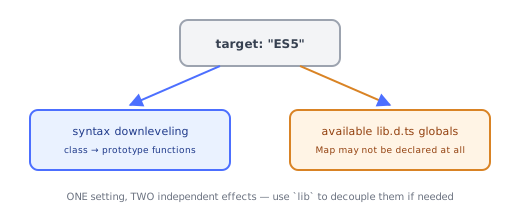
This is why upgrading target can sometimes make previously-valid code fail to compile — not because the syntax changed, but because the set of globally-available type declarations (from lib.d.ts and friends) is tied to which JS specification version target implies, separately from the syntax-emission behavior. The lib compiler option lets you decouple these two concerns explicitly when needed (e.g. targeting old syntax while still declaring access to modern runtime globals a polyfill provides).
extends performs a genuine deep merge, not a full replacement
When a config extends a base config, tsc doesn't just use one or the other — it merges compilerOptions key by key, with the extending file's values taking priority for anything it explicitly sets, while everything unmentioned falls through from the base config unchanged. This is why the section 7 example project can inherit strict and target from the base while only adding its own outDir, without repeating the inherited settings.
include/exclude are resolved into a concrete file list before checking begins
Before any type-checking happens, tsc resolves the glob patterns in include/exclude into a concrete, final list of source files — this resolved file set, together with anything pulled in transitively via import statements from those files, is exactly what gets parsed, bound, and checked (the same pipeline from the Type System Fundamentals topic), and exactly what "the project" means for purposes of cross-file features like declaration merging and global ambient declarations.
⚠️ Common Pitfalls
- Leaving
strictoff "for now" in a new project — retrofitting strict mode onto an already-large codebase later is far more painful than starting with it enabled from day one. - Setting
targetwithout consideringlib— using modern built-ins (Map,Promise,Array.prototype.flat) while targeting an old JS version can fail to type-check even though the actual runtime has a polyfill providing them; adjustlibexplicitly in that case. - Assuming
excludeprevents a file from being checked if it's still reachable viaimport—excludeonly affects the initial file-discovery glob; a file imported from an included file is still pulled in and checked regardless ofexclude. - Forgetting
extendsmerges rather than replaces — expecting to have to fully re-specify every option in an extending config, when only the differences need to be listed.
📋 Quick Reference
target        → output JS syntax version AND which lib.d.ts globals are available
module          → import/export vs require/module.exports emission
strict           → bundle of ~8 stricter-checking flags, expand individually if needed
outDir/rootDir     → where compiled output goes / where source starts
include/exclude      → which files are part of the project (resolved before checking begins)
extends                → deep-merges a base config, override only what differs
🎤 Interview Q&A
Q1Which tsconfig options matter most?core▾
strict, target (emitted JS version), module and moduleResolution (e.g. NodeNext or Bundler), lib, outDir/rootDir, paths, esModuleInterop, skipLibCheck, noEmit (when a bundler compiles), isolatedModules.
- Why isolatedModules? Ensures each file can be transpiled alone by esbuild/SWC/Babel.
Q2module and moduleResolution: how do you choose?core▾
For Node packages, module: NodeNext (follows Node's ESM/CJS rules, requires file extensions in imports). For apps built by bundlers (Vite, Next.js), moduleResolution: Bundler.
- Why extensions in NodeNext? Node ESM requires full specifiers.
Q3How do project references help in monorepos?senior▾
Split the codebase into projects with composite: true and references; tsc -b builds incrementally in dependency order, speeding up type checking and enforcing boundaries.
- Alternative? Workspace tooling with per-package tsconfigs.
Q4How do path aliases work?core▾
paths ("@/*": ["src/*"]) map import specifiers for type checking, but runtime/bundlers must be configured to resolve them too (Vite alias, tsconfig-paths, Node subpath imports).
- Node-native alternative?
importsfield with#specifiers in package.json.
Q5Which strictness flags beyond strict are worth enabling?core▾
noUncheckedIndexedAccess, exactOptionalPropertyTypes, noImplicitOverride, noFallthroughCasesInSwitch, noPropertyAccessFromIndexSignature.
- Trade-off? More explicit code, fewer runtime surprises.
🛠️ Practice exercises
Each exercise is a file in this topic folder. Code exercises are self-checking: run them and make the checks pass.