WebSockets
WebSockets upgrade one HTTP request into a long-lived, full-duplex TCP connection. Watch the handshake and framed messages in both directions, then secure it: check the Origin, authenticate, and reconnect with backoff.
🎯 What you'll learn
- Why request/response isn't enough
- The Upgrade handshake and the browser API
- Framing, ping/pong and one TCP connection
- Origin validation, authentication, reconnection and app-level framing
📚 Before you start
This topic assumes the Browser Request Lifecycle and HTTP topics for general request/response background. Part 1 covers the connection model and basic API; Part 2 covers origin validation, authentication, reconnection, and message framing considerations — security-relevant material that only makes sense once the basic model here is understood.
1The Core Problem: HTTP Is Request/Response, Not a Conversation
Ordinary HTTP is fundamentally one-shot: the client sends a request, the server sends back a response, and the connection's job (for that exchange) is done. Getting the server to push new data to the client without the client re-asking requires workarounds — polling (ask repeatedly), long-polling (ask and have the server hold the response open until it has something). WebSockets solve this directly: after a one-time handshake, both sides can send messages to each other at any time, independently, over a single connection that stays open.
HTTP request/response:        Client ──request──>  Server
                               Client <──response── Server
                               (connection then typically closes or is reused for the NEXT unrelated request)

WebSocket (after handshake):  Client <──message──>  Server   (either side, any time, same connection)
                               Client <──message──>  Server
                               Client <──message──>  Server
                               ... connection stays open until explicitly closed ...
This is called full-duplex: both directions are simultaneously and independently open, unlike HTTP's strict request-then-response turn-taking.
2The Handshake: An HTTP Upgrade Request
A WebSocket connection doesn't start as something different from HTTP — it starts as a completely normal HTTP GET request that asks the server to switch protocols:
GET /chat HTTP/1.1
Host: example.com
Upgrade: websocket
Connection: Upgrade
Sec-WebSocket-Key: dGhlIHNhbXBsZSBub25jZQ==
Sec-WebSocket-Version: 13
If the server supports WebSockets on that path, it responds:
HTTP/1.1 101 Switching Protocols
Upgrade: websocket
Connection: Upgrade
Sec-WebSocket-Accept: s3pPLMBiTxaQ9kYGzzhZRbK+xOo=
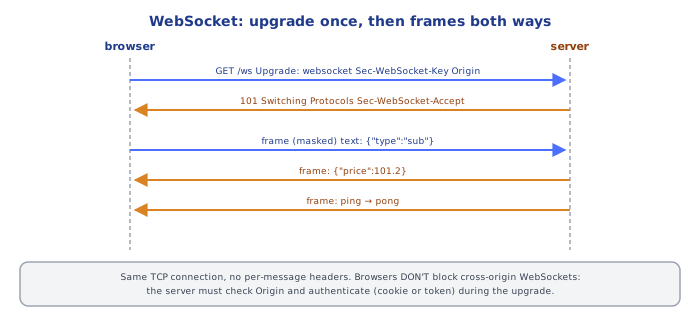
The 101 Switching Protocols status is the signal: the same underlying TCP connection that carried this HTTP exchange is now repurposed to carry WebSocket frames instead of further HTTP requests. Sec-WebSocket-Accept is a hash the server computes from the client's Sec-WebSocket-Key (per the spec) — proving the response actually came from a real WebSocket-aware server and wasn't, say, a cached HTTP response or a misconfigured proxy replaying something unrelated.
Because it starts as a real HTTP request, everything you already know about HTTP applies to this one request: it goes over TLS if the URL is wss:// (the WebSocket-secure scheme, analogous to https://), it can carry cookies (attached by destination, exactly as covered in the Browser Request Lifecycle topic), and it can be behind a reverse proxy (which must be explicitly configured to forward Upgrade/Connection headers, or the upgrade will fail — a very common real-world misconfiguration).
3The Browser API
const socket = new WebSocket("wss://example.com/chat");

socket.onopen = () => {
  console.log("connected");
  socket.send("hello server");
};

socket.onmessage = (event) => {
  console.log("received:", event.data);
};

socket.onerror = (event) => {
  console.error("socket error", event);
};

socket.onclose = (event) => {
  console.log("closed:", event.code, event.reason);
};

// later, to close deliberately:
socket.close(1000, "done chatting");
new WebSocket(url)immediately starts the handshake — there's no separate "connect" call..send(data)works only afteronopenhas fired (the connection is in theOPENstate — checksocket.readyStateif unsure); calling it before that throws..onmessagefires for every message the server sends, independently of anything the client did — this is the "push" capability plain HTTP doesn't have..onclosefires whether the close was clean (.close()called, or the server closed normally) or the connection dropped unexpectedly (network failure) —event.codeandevent.wasCleandistinguish these cases.
4Message Types: Text and Binary
WebSocket messages are either UTF-8 text or binary:
socket.send("a plain text message");           // text frame
socket.send(new Blob([...]));                   // binary frame (Blob)
socket.send(new ArrayBuffer(8));                 // binary frame (ArrayBuffer)

socket.binaryType = "arraybuffer"; // default is "blob" — controls what event.data is for incoming binary frames
socket.onmessage = (event) => {
  if (typeof event.data === "string") {
    // text message
  } else {
    // binary message — a Blob or ArrayBuffer depending on socket.binaryType
  }
};
There's no built-in structured message format (no automatic JSON) — applications almost universally adopt a convention of sending JSON-encoded text frames and parsing them on receipt, entirely at the application level; the WebSocket protocol itself has no opinion about message content.
Under the HoodOne TCP Connection, Framed Messages▾
After the 101 handshake, the same TCP connection carries a sequence of WebSocket frames — a lightweight binary framing format (a few header bytes indicating frame type, payload length, and whether it's the final fragment of a message, followed by the payload) that lets both sides parse out complete messages from the byte stream, including distinguishing text from binary and detecting connection-close signals, without needing anything HTTP-shaped anymore. This is why WebSockets are dramatically more efficient than repeated HTTP polling for high-frequency bidirectional traffic: there's no repeated handshake, no repeated header overhead per message (HTTP headers are relatively large; a WebSocket frame header is a handful of bytes), and no round-trip latency spent re-establishing a request each time — just one persistent connection with minimal per-message overhead in both directions.
⚠️ Common Pitfalls
- Calling
.send()beforeonopenhas fired. The socket isn't ready yet — always send from inside (or after) theonopenhandler, or checkreadyState === WebSocket.OPENfirst. - Forgetting a reverse proxy needs explicit configuration to forward the Upgrade handshake. A default proxy config that works fine for ordinary HTTP will often silently fail (or hang) on a WebSocket upgrade unless
Upgrade/Connectionheaders are explicitly passed through — see the Proxy and Reverse Proxy topic in the HTTP group. - Assuming
wss://is optional "for later." Plainws://sends everything, including any auth token or cookie riding along on the handshake, unencrypted — treatwss://as no more optional thanhttps://is for a login page. - Not handling
onclose/onerrorat all, leaving the application with no idea the connection dropped — a real client needs reconnection logic (covered in Part 2), not just happy-path handlers. - Expecting message ordering or delivery guarantees the protocol doesn't actually promise beyond TCP's own in-order-per-connection delivery. If the connection drops and reconnects, any messages in flight during the drop are simply gone — the application, not the protocol, is responsible for detecting gaps and requesting missed state if that matters.
📋 Quick Reference
Handshake: plain HTTP GET + Upgrade: websocket -> server replies 101 Switching Protocols
Scheme: ws:// (plain, avoid) vs wss:// (TLS, use this — analogous to http/https)

new WebSocket(url)      -> starts handshake immediately
.onopen                 -> connection ready, .send() now valid
.send(data)              -> string (text frame) or Blob/ArrayBuffer (binary frame)
.onmessage(event)        -> event.data: string, or Blob/ArrayBuffer per .binaryType
.onerror / .onclose      -> connection problems / termination (event.code, event.wasClean)
.close(code, reason)     -> deliberate clean close

Full-duplex: either side sends anytime, independently — not request/response turn-taking
One TCP connection, lightweight binary frames — no per-message handshake/header overhead
Part 1 covered the handshake and the basic full-duplex API. This part covers the security-relevant gap the handshake leaves open, how real applications authenticate a WebSocket connection, and the client-side resilience patterns (reconnection, message framing) every production WebSocket client needs.
1WebSocket Does NOT Enforce Same-Origin — the Server Must Check Itself
This is the single most important security fact about WebSockets, and it's easy to miss because everything else in this group (fetch, CORS, cookies) trains you to expect the browser to enforce origin restrictions automatically. It does not, for WebSocket connections.
fetch() to a cross-origin URL is gated by CORS (the CORS topic) — the browser sends the request but withholds the response from JS unless the server opts in. A cross-origin new WebSocket(url) handshake, by contrast, is allowed to complete and open successfully by default, with no CORS-style preflight or opt-in header required at all. If a malicious page does:
// evil.example's page, opening a WebSocket to a victim's service
const socket = new WebSocket("wss://api.bank.example.com/live-feed");
...the browser will happily attempt this handshake, and any cookies for api.bank.example.com (subject to SameSite, exactly as in the CSRF topic) get attached to the handshake's underlying HTTP request. If the server accepts the connection based on the cookie alone, without checking where the request actually came from, evil.example has just opened an authenticated real-time connection to the victim's account — a WebSocket-flavored analog of CSRF.
The fix is entirely server-side: the server must inspect the Origin header (which the browser does still send honestly on the handshake request, even though it won't enforce anything based on it) and reject handshakes from origins it doesn't recognize:
// server-side (e.g. in a Node WebSocket server's upgrade handler)
function isAllowedOrigin(origin) {
  return origin === "https://app.bank.example.com";
}

server.on("upgrade", (request, socket, head) => {
  if (!isAllowedOrigin(request.headers.origin)) {
    socket.destroy(); // reject the handshake outright
    return;
  }
  // proceed with the WebSocket upgrade
});
This is the exact same "browser sends it, server must verify it" pattern already established for CSRF — WebSocket just makes it more surprising, because there's no automatic CORS-style gate to lean on at all.
2Authentication: Cookies Aren't the Whole Story
Because the handshake is a real HTTP request, a session cookie CAN authenticate it (subject to the origin-check requirement from §1). But two common alternatives exist, often preferred specifically because they sidestep cookie/CSRF-adjacent concerns:
- Auth token in the connection URL or a subprotocol:
new WebSocket("wss://api.example.com/socket?token=eyJ..."). Simple, but the token can end up in server access logs and browser history — generally discouraged for long-lived secrets, more acceptable for short-lived, single-use connection tokens minted specifically for this purpose. - Post-connect authentication message: connect first, then immediately send an auth message as the first application-level frame, and have the server hold the connection in an "unauthenticated" state (rejecting all other message types) until it validates that first message:js
socket.onopen = () => {
  socket.send(JSON.stringify({ type: "auth", token: sessionToken }));
};
This keeps the credential out of the URL/logs entirely, at the cost of a small window where the connection is open-but-unauthenticated (the server must actively enforce that window, not just trust
onopen).
Whichever mechanism is used, it does not replace the origin check from §1 — token-based auth defeats a cross-origin attacker who doesn't have a valid token, but a server should still reject connections from unexpected origins as defense-in-depth, exactly as the CSRF topic recommends layering SameSite and tokens together rather than relying on just one.
3Reconnection: the Client's Job, Not the Protocol's
Part 1 noted that onclose fires on any disconnection, clean or not, and that the protocol gives no delivery guarantees across a dropped connection. Production clients need explicit reconnection logic — and naive immediate-retry-in-a-loop is a real operational hazard: if a server restarts and every client tries to reconnect instantly and simultaneously, the resulting connection storm can prevent the server from ever finishing its restart. The standard fix is exponential backoff with jitter:
function getReconnectDelay(attemptNumber) {
  const base = Math.min(1000 * 2 ** attemptNumber, 30000); // cap the exponential growth
  const jitter = Math.random() * base * 0.5; // randomize so clients don't all retry in lockstep
  return base + jitter;
}
Each failed attempt waits longer than the last (up to a cap), and the random jitter spreads simultaneous reconnection attempts out over time instead of letting them all land on the server in the same instant.
4Message Framing at the Application Level
The WebSocket protocol frames transport-level messages (Part 1, §5) but has no opinion about the content of a message. Real applications need their own framing convention on top, typically a small JSON envelope distinguishing message types:
// a simple application-level envelope convention
socket.send(JSON.stringify({ type: "chat_message", payload: { text: "hi" } }));
socket.send(JSON.stringify({ type: "typing_indicator", payload: { userId: 42 } }));

socket.onmessage = (event) => {
  const { type, payload } = JSON.parse(event.data);
  switch (type) {
    case "chat_message": /* ... */ break;
    case "typing_indicator": /* ... */ break;
    default: console.warn("unknown message type:", type);
  }
};
This matters for the same reason API versioning and request validation matter elsewhere in this curriculum: a long-lived connection will eventually need to evolve its message vocabulary, and an explicit type field (with a default/unknown-type fallback, as above) lets old and new clients coexist during a rollout rather than one side crashing on an unrecognized shape.
⚠️ Common Pitfalls
- Trusting a WebSocket connection just because the session cookie was valid, without checking
Origin. Per §1, this is a real, exploitable cross-origin hijack vector — WebSocket gives you none of CORS's automatic protection. - Putting a long-lived, sensitive token directly in the connection URL as a query parameter. It ends up in server logs and browser history; prefer a post-connect auth message or a short-lived, single-purpose token if a URL parameter is used at all.
- Reconnecting immediately and unconditionally on every
onclose. Without backoff and jitter, a server restart or blip becomes a self-inflicted denial-of-service from the client fleet's own reconnection storm. - Assuming messages sent right before a disconnect were delivered. There's no acknowledgment built into the protocol — an application that needs delivery guarantees must build its own ack/retry scheme on top, at the message-framing layer from §4.
- Skipping a
defaultcase in the message-type dispatcher. An older client encountering a messagetypeintroduced after it shipped will throw or misbehave instead of gracefully ignoring what it doesn't understand.
📋 Quick Reference
WebSocket does NOT enforce same-origin — server MUST check the Origin header itself
  (cross-origin handshakes complete successfully by default, cookies included)

Auth options:
  cookie (subject to SameSite, needs Origin check per above)
  token in URL/subprotocol (logs/history risk — prefer short-lived tokens)
  post-connect auth message (keeps token out of URL, needs an enforced "unauthenticated" window)

Reconnection: exponential backoff + jitter — never immediate unconditional retry-in-a-loop

Message framing: WebSocket has no content opinion — applications define their own envelope,
  typically { type, payload } JSON, with an unknown-type fallback for forward compatibility

No built-in delivery guarantees across a reconnect — application-level acks if that matters
🧠 Key takeaways
- A WebSocket starts as an HTTP Upgrade (101) and becomes a full-duplex framed TCP connection.
- Browsers send Origin but don't enforce same-origin for WebSockets: the server must validate Origin.
- Authenticate at the handshake (cookie + Origin check, or short-lived ticket), never a long-lived token in the URL.
- Reconnection is the client's job: exponential backoff + jitter, resume state, app-level message IDs.
🎤 Interview Q&A
Q1How does a WebSocket connection start?core▾
As an HTTP/1.1 request with Upgrade: websocket and Sec-WebSocket-Key; the server replies 101 Switching Protocols, after which both sides exchange framed messages over the same TCP connection, full-duplex.
- ws vs wss? wss is WebSocket over TLS; always use it in production.
Q2When would you use WebSockets vs SSE vs long polling?core▾
WebSockets: bidirectional low-latency (chat, games, collaborative editing). Server-Sent Events: server → client streaming over plain HTTP with auto-reconnect (notifications, live feeds). Long polling: fallback when neither is available.
- Why prefer SSE when possible? Simpler, works with HTTP infrastructure, auto-reconnects.
Q3How do you scale WebSocket servers?senior▾
Connections are stateful, so use L7 load balancers that support upgrades, track which server holds each user's connection, and broadcast across servers with pub/sub (Redis, Kafka). Plan for connection limits (file descriptors, memory) and reconnect storms after deploys.
- How do you deploy without dropping everyone at once? Drain connections gradually and have clients reconnect with jittered backoff.
Q4How do you secure WebSockets?core▾
Use wss, authenticate during the handshake (cookie or token) and re-validate periodically, check the Origin header (WebSockets aren't covered by CORS, enabling cross-site WebSocket hijacking), validate every message, and rate-limit.
- Why not put the token in the URL? URLs end up in logs; prefer a short-lived ticket or cookie.
Q5How do you detect dead connections?core▾
Ping/pong frames or application heartbeats at an interval; close connections that miss several. Also helps keep NAT and proxy mappings alive.
- Typical interval? 20–30 seconds.
🛠️ Practice exercises
Each exercise is a file in this topic folder. Code exercises are self-checking: run them and make the checks pass.
✅ Check yourself
Answer the questions — feedback is instant.