CSRF (Cross-Site Request Forgery) and CSRF Tokens
CSRF tricks a logged-in browser into sending a request the user never intended, using the cookies it attaches automatically. Watch the attack succeed, then get blocked by SameSite cookies and by a synchronizer token.
🎯 What you'll learn
- The one-sentence explanation of CSRF
- The attack, step by step
- Why CORS doesn't protect you
- SameSite cookies, synchronizer tokens, and combining defenses
📚 Before you start
This topic assumes you already understand sessions, cookies, and authentication generally — see the
security/securitygroup's Authentication and JWT topics for that background. Here we focus specifically on the CSRF attack mechanic and its defenses, not on authentication itself.
1The One Sentence That Explains CSRF
Browsers automatically attach cookies to requests based on the request's destination, not based on which site's HTML or JavaScript triggered the request — and CSRF is simply an attacker exploiting that fact to make your browser send a state-changing request to a site you're logged into, using your own valid session cookie, without your intent.
This is the same fact from the Browser Request Lifecycle topic's Under the Hood section (§4, cookie attachment by destination) — CSRF is that fact turned into an attack.
2The Attack, Concretely
Say https://bank.example.com has a transfer endpoint that trusts the session cookie alone:
POST /transfer HTTP/1.1
Host: bank.example.com
Cookie: session=abc123...
Content-Type: application/x-www-form-urlencoded

to=attacker&amount=5000
The server sees a valid session cookie and processes the transfer — it has no way to know, from the cookie alone, whether the user meant to submit this request or whether it was submitted on their behalf by another site.
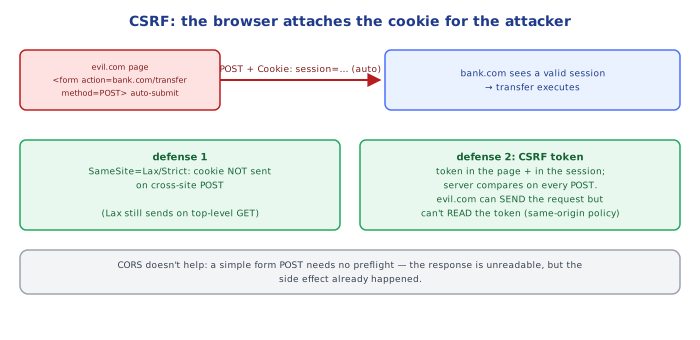
Now the attacker hosts this innocuous-looking page at https://evil.example:
<!-- evil.example/page.html -->
<form id="f" action="https://bank.example.com/transfer" method="POST">
  <input type="hidden" name="to" value="attacker">
  <input type="hidden" name="amount" value="5000">
</form>
<script>document.getElementById("f").submit();</script>
If a logged-in bank user merely visits this page (no click needed — the script auto-submits), their browser:
- Builds a
POSTrequest tobank.example.com/transfer— a plain cross-site navigation-style form submission, which the Browser Request Lifecycle topic established browsers always send regardless of origin. - Looks up cookies for the destination (
bank.example.com), finds the user's valid session cookie, and attaches it automatically — because that's just how cookies work, with no per-request opt-in required by default (beforeSameSite, see §4). - Sends the request. The bank server sees a fully valid, authenticated request and processes the transfer.
The attacker never sees or steals the session cookie — they don't need to. They just get the victim's own browser to spend the cookie on their behalf.
3Why CORS Does Not Protect Against This
A common misconception: "CORS prevents cross-origin requests, so it must prevent CSRF." It does not, for two independent reasons:
- The attack above is a plain HTML form submission (a navigation-style request), not a
fetch/XHRcall. As established in the Browser Request Lifecycle topic, the browser always sends navigation/form requests cross-origin — CORS's preflight/response-reading gate simply doesn't apply to<form>submissions at all. - Even for a
fetch-based CSRF-style attack, CORS only blocks reading the response, not sending the request. The attacker's page doesn't need to read the response — it only needs the side effect (the transfer) to happen. A blind cross-origin POST with attached cookies achieves the attacker's goal whether or not they can read what came back.
CORS and CSRF defenses solve different problems: CORS is about confidentiality of responses; CSRF defenses are about verifying the request's origin/intent before acting on it.
4Defense 1: SameSite Cookie Attribute
SameSite is a cookie attribute the server sets that tells the browser: "only attach this cookie to requests that originate from a navigation/request considered same-site."
Set-Cookie: session=abc123; SameSite=Lax; Secure; HttpOnly| Value | Behavior |
|---|---|
Strict | Cookie is never sent on any cross-site request, including top-level navigation (clicking a link from another site to yours won't include it either — can break "log in via link from email" flows). |
Lax | Cookie IS sent on top-level cross-site GET navigations (clicking a link), but NOT on cross-site POSTs, <form> submissions via other methods, <img>/<script>/fetch-triggered requests, or subresource loads. This is the modern browser default when SameSite is unspecified. |
None | Cookie is sent on all cross-site requests regardless of origin — the pre-SameSite behavior. Requires Secure (HTTPS-only) to be set alongside it. |
SameSite=Lax (now the de facto default in Chrome, Firefox, and Safari when a cookie doesn't specify SameSite at all) directly defangs the attack in §2: the forged POST request from evil.example to bank.example.com is cross-site, and Lax cookies are withheld from cross-site non-GET requests — so the browser simply never attaches the session cookie, and the server sees an unauthenticated request.
Mechanically, this works because SameSite is evaluated by the browser at the exact same "attach cookies by destination" step identified in the Browser Request Lifecycle topic — the browser now also checks "is the page that triggered this request the same site as the cookie's site, and if not, does the request type/method qualify under this cookie's SameSite value?" before deciding to attach it.
5Defense 2: The Synchronizer Token Pattern (CSRF Tokens)
SameSite protects against the browser-cookie-auto-attach mechanic specifically. The synchronizer token pattern is a complementary, server-driven defense that doesn't rely on cookie attributes at all — useful as defense-in-depth, for older browsers, or where cookies aren't the only credential in play.
Mechanism:
- The server generates a random, unpredictable, per-session (or per-request) token and embeds it in the page it serves — typically as a hidden form field or a value your JS reads and sends as a custom header.
- The server also stores that token (or a way to verify it, e.g. tied to the session) server-side.
- Every state-changing request (
POST/PUT/DELETE/PATCH) must include this token. - The server checks the submitted token against the expected one. If missing or wrong, the request is rejected — even though the cookie itself was completely valid.
<form action="/transfer" method="POST">
  <input type="hidden" name="csrf_token" value="f3a9c1e7b2...">
  <input type="hidden" name="amount" value="100">
  <input type="hidden" name="to" value="alice">
</form>
Why this defeats CSRF: the attacker's forged form on evil.example cannot know the victim's current CSRF token. Same-Origin Policy prevents evil.example's script from reading bank.example.com's page to extract the token (this is exactly the SOP guarantee from the Browser Request Lifecycle topic — the attacker can cause a cross-origin request, but cannot read cross-origin content to steal the token first). Without a valid token, the forged request is rejected even though the cookie rode along automatically.
Double-submit cookie variant
A common simplified implementation avoids server-side token storage:
- Server sets the token as a second, readable (non-
HttpOnly) cookie AND expects the same value in a request header or body field. - The browser auto-attaches the cookie (attacker can't prevent this), but the attacker's forged cross-site request can't set a custom header or read the cookie's value to also include it as the request body/header field — because reading another site's cookies is blocked by SOP.
- The server just compares "does the cookie value match the header/body value?" — no server-side session storage required.
6Combining Defenses: The Real-World Recommendation
Modern practice layers both:
Set-Cookie: session=...; SameSite=Lax; Secure; HttpOnly     ← primary defense
+ CSRF token validated on all state-changing requests ← defense in depthSameSite=Strict/Lax alone is often considered sufficient against classic CSRF today in modern browsers, but CSRF tokens remain standard because: (a) not every user is on an up-to-date browser, (b) some legitimate flows need SameSite=None (e.g. cross-site embedded widgets), and (c) tokens also protect flows authenticated by means other than cookies alone.
Under the HoodWhy the Attacker Can Trigger the Request but Can't Read the Token▾
The precise reason CSRF tokens work is worth stating exactly, because it ties directly back to two facts already established elsewhere in this group:
- Sending a cross-origin request has always been allowed by browsers (Browser Request Lifecycle topic, §5) — a
<form>POST, an<img>GET, afetchwithmode: "no-cors"are all requests the browser will happily construct and send to any destination, cookies and all. Nothing about SOP or CORS stops the sending. - Reading a cross-origin response has never been allowed by default (CORS topic, §2) — this is enforced by the browser withholding the response body from the requesting page's JS unless the target explicitly opts in via
Access-Control-Allow-Origin.
A CSRF token exploits exactly this asymmetry: the attacker's page can make your browser send a request with your cookie attached (fact 1), but it cannot first visit bank.example.com's real form page and read the CSRF token embedded in that HTML to include it in the forged request (fact 2 — reading cross-origin content is blocked by SOP, and bank.example.com isn't going to grant evil.example a CORS exception on its authenticated pages). The attacker is stuck being able to fire blind but never able to read first, and the CSRF token is specifically the piece of information that can only be obtained by reading, not by blindly sending.
This is also why a CSRF token embedded as a URL query parameter that gets logged/cached/shared is weaker than one in a POST body — leaking the token through a different channel (referrer headers, browser history, proxy logs) recreates the "attacker can read it after all" condition the token exists to prevent.
⚠️ Common Pitfalls
- Using a CSRF token only on some state-changing endpoints. Any unprotected
POST/PUT/DELETEis a CSRF hole regardless of how well-protected the rest of the app is. - Validating the CSRF token but reading it from a cookie the attacker can also set (in a subdomain-takeover or shared-domain scenario) without a matching non-cookie channel. Double-submit cookie schemes need the "second" value to come from somewhere the attacker genuinely cannot read or write cross-site.
- Believing
SameSite=Laxalone stops everything. It stops cross-site POST-style forgery, but doesn't stop attacks that only need aGET(e.g., an unsafe app that mutates state on aGETrequest — a design bug regardless of CSRF defenses, sinceLaxstill allows top-level GET navigations to carry cookies). - Confusing CSRF with XSS. If an attacker can run arbitrary JS on YOUR origin (XSS), they can read the CSRF token directly (SOP doesn't protect a page from its own scripts) and defeat this defense entirely — CSRF tokens assume no XSS vulnerability exists; they are not a substitute for XSS prevention.
- Setting
SameSite=None"to fix a bug" without understanding it disables the browser's default CSRF mitigation for that cookie, pushing all the defensive weight onto the token check alone. - Regenerating a session's CSRF token on every single request without informing legitimately-open multiple tabs, causing valid tabs to start failing writes — token rotation strategy needs to match real usage patterns (per-session tokens are simpler and usually sufficient).
📋 Quick Reference
CSRF mechanic: browser auto-attaches cookies by DESTINATION, regardless of which
               site's HTML/JS triggered the request → attacker rides a valid session

CORS does NOT stop CSRF: form POSTs bypass CORS entirely; CORS only gates
                          reading a response, not sending a state-changing request

Defense 1 — SameSite cookie attribute:
  Strict → never sent cross-site (even top-level nav)
  Lax    → sent on cross-site top-level GET nav only; withheld from cross-site POST etc. (browser default today)
  None   → sent everywhere cross-site; requires Secure

Defense 2 — Synchronizer token pattern:
  server issues unpredictable token → embedded in form/header →
  server validates on every state-changing request →
  attacker can SEND a forged request but can't READ the token first (SOP)

Best practice: SameSite=Lax/Strict + Secure + HttpOnly on the session cookie,
               PLUS CSRF tokens on state-changing endpoints as defense-in-depth
CSRF tokens do not protect against XSS — XSS lets an attacker read the token directly
🧠 Key takeaways
- CSRF exploits ambient credentials: the browser attaches cookies to cross-site requests.
- CORS doesn't help: the forged request is sent and executed; only reading is blocked.
- Defenses: SameSite=Lax/Strict cookies, synchronizer/double-submit tokens, Origin/Fetch-Metadata checks.
- Never change state with GET; combine SameSite with tokens for sensitive actions.
🎤 Interview Q&A
Q1What is CSRF?core▾
Cross-Site Request Forgery: a malicious site makes the victim's browser send a state-changing request to your site, and the browser automatically attaches the victim's cookies, so the request is authenticated.
- Which apps are vulnerable? Those authenticating with cookies (or other ambient credentials) without CSRF protection.
Q2How do you defend against CSRF?core▾
SameSite=Lax/Strict cookies, CSRF tokens (synchronizer token or double-submit cookie) checked on state-changing requests, verifying Origin/Referer headers, requiring custom headers for API calls, and never changing state on GET.
- Is SameSite enough? It's strong defence in depth, but tokens are still recommended for sensitive actions.
Q3How does the synchronizer token pattern work?core▾
The server stores a random token in the session and embeds it in forms; on submit, it compares the submitted token with the session's. An attacker's site can't read the token due to the same-origin policy.
- Double-submit cookie? The token is in a cookie and a request parameter; the server checks they match, without server-side state.
Q4Are APIs using bearer tokens in headers vulnerable to CSRF?senior▾
Generally no, because browsers don't attach Authorization headers automatically. But if the token is stored in a cookie, CSRF applies again.
- What about login CSRF? Forcing a victim to log into the attacker's account; protect login forms with tokens too.
Q5CSRF vs XSS?core▾
CSRF tricks the browser into sending requests; the attacker can't read responses. XSS runs attacker script in your origin, which can read data and defeat CSRF tokens. XSS is generally more severe.
- Does XSS bypass CSRF tokens? Yes, the script can read the token from the page.
🛠️ Practice exercises
Each exercise is a file in this topic folder. Code exercises are self-checking: run them and make the checks pass.
✅ Check yourself
Answer the questions — feedback is instant.