CORS (Cross-Origin Resource Sharing)
CORS lets a server opt in to being read by other origins. The browser enforces it on the response, and some requests need a preflight first. Step through simple, preflighted and failing requests to see exactly what each header does.
🎯 What you'll learn
- The problem CORS solves (and what it doesn't)
- Enforcement by the browser on the response
- Simple vs preflighted requests
- The headers that matter, credentials and common misconfigurations
📚 Before you start
1What Problem CORS Solves
The Same-Origin Policy (see the Browser Request Lifecycle topic) blocks JavaScript on origin A from reading responses from origin B by default. That's the right default, but it's too strict for the modern web — a legitimate app on https://app.example.com often needs to call https://api.example.com. CORS is the mechanism by which the server at origin B explicitly tells the browser "responses from me may be read by scripts running on origin A" — via response headers. CORS doesn't loosen anything on its own; it's an opt-in relaxation the server grants, enforced by the browser reading that server's headers.
2The Core Fact: CORS Is Enforced by the Browser, on the Response
This is the single most important — and most commonly misunderstood — fact about CORS:
The server is always reachable. The request is always sent (with the exceptions in §4) and always processed by the server. CORS never stops a request from arriving. CORS only controls whether the browser lets your JavaScript READ the response it already received.
There is no server-side concept of "the request was blocked by CORS." If you see a CORS error in the console, the request very likely succeeded on the server (check server logs — the row got inserted, the email got sent) — the browser is the one refusing to hand the response back to your script. This is why CORS is a browser security feature, not a network security feature: a non-browser client (curl, a mobile app, a server-to-server call, Postman) completely ignores CORS headers, because CORS is implemented in browsers' fetch/XHR machinery, not in HTTP itself.
3Simple Requests vs Preflighted Requests
Not every cross-origin request triggers a preflight. The browser sends a request as a "simple request" — no preflight — only when ALL of the following hold:
- Method is
GET,HEAD, orPOST - Only these headers are manually set (beyond ones the browser adds automatically):
Accept,Accept-Language,Content-Language,Content-Type(with a restricted value — see below) - If
Content-Typeis set, its value is one of:application/x-www-form-urlencoded,multipart/form-data, ortext/plain - No
ReadableStreamused in the request body - No listeners registered on the upload progress of an associated
XMLHttpRequestUpload
Any request that fails even one of these criteria is not simple, and the browser performs a preflight: an automatic OPTIONS request sent before your actual request, asking the server for permission.
Simple request examples (no preflight):
  GET  https://api.example.com/users
  POST https://api.example.com/users  (Content-Type: application/x-www-form-urlencoded)

Preflighted request examples:
  PUT    https://api.example.com/users/1
  DELETE https://api.example.com/users/1
  POST   https://api.example.com/users  (Content-Type: application/json)   ← the common case!
  GET    https://api.example.com/users  (with a custom header like Authorization or X-Api-Key)
The practical consequence: almost every real JSON API call from JS triggers a preflight, because Content-Type: application/json alone disqualifies it from being "simple."
4The Preflight Handshake, Precisely
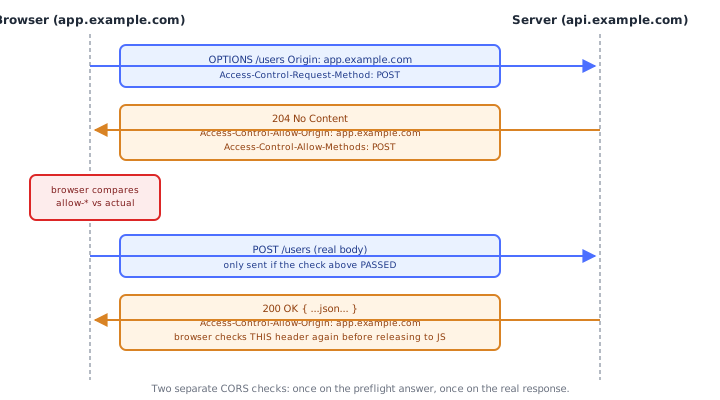
OPTIONS /users HTTP/1.1
Host: api.example.com
Origin: https://app.example.com
Access-Control-Request-Method: POST
Access-Control-Request-Headers: content-type, authorization
The browser builds this OPTIONS request itself — your JS never sees or triggers it directly. It asks the server: "if I were to send a POST from https://app.example.com with these headers, would you allow it?"
HTTP/1.1 204 No Content
Access-Control-Allow-Origin: https://app.example.com
Access-Control-Allow-Methods: GET, POST, PUT, DELETE
Access-Control-Allow-Headers: content-type, authorization
Access-Control-Max-Age: 600
The browser inspects this response and checks it against what it's about to send:
- Is the requesting origin listed (or is
*used — see §6)? - Is the actual method in
Access-Control-Allow-Methods? - Are all the actual custom headers covered by
Access-Control-Allow-Headers?
Only if all checks pass does the browser then send the real request (POST /users with the real body). If any check fails, the browser never sends the real request at all, and your fetch() call rejects — this is the one case where CORS does prevent a request from leaving the browser, because the preflight failed before the real request was ever built.
Access-Control-Max-Age lets the server tell the browser to cache this preflight's answer for N seconds, so identical preflights aren't repeated on every call.
5What Happens on a Simple Request (No Preflight)
For a simple request, the browser sends the actual request immediately (with an Origin header attached) and lets it go to the server. The server processes it and responds normally. The CORS check happens after the response comes back: the browser looks for Access-Control-Allow-Origin in the response headers and compares it to the requesting origin. If it's missing or doesn't match, the browser discards the response from JS's point of view (the request still happened; the side effects still occurred if it was e.g. a POST).
6The Response Headers That Matter
| Header | Meaning |
|---|---|
Access-Control-Allow-Origin | Which origin(s) may read the response. A literal origin, or * for "any origin" (but see credentials note below). |
Access-Control-Allow-Methods | Methods allowed for the actual request (preflight response only). |
Access-Control-Allow-Headers | Request headers allowed for the actual request (preflight response only). |
Access-Control-Allow-Credentials | If true, allows the request to be made with credentials (cookies, HTTP auth) AND allows the response to be read when credentials were sent. |
Access-Control-Expose-Headers | Which response headers, beyond a small default safe set, JS is allowed to read via response.headers.get(...). |
Access-Control-Max-Age | How long (seconds) the browser may cache a preflight response. |
The credentials + wildcard interaction (a frequent gotcha)
Access-Control-Allow-Origin: * cannot be combined with credentialed requests. If a request is sent with fetch(url, { credentials: "include" }), the browser requires the server to echo back the exact requesting origin (not *) in Access-Control-Allow-Origin, AND include Access-Control-Allow-Credentials: true — otherwise the browser blocks the read even though the header technically exists. This is a deliberate spec restriction: a wildcard origin combined with "yes, send my cookies" would let any site read any user's cookie-authenticated data, defeating the entire purpose.
7Common CORS Response Headers Set by a Server (Express-style Example)
app.use((req, res, next) => {
  const allowedOrigins = ["https://app.example.com", "https://admin.example.com"];
  const origin = req.headers.origin;
  if (allowedOrigins.includes(origin)) {
    res.setHeader("Access-Control-Allow-Origin", origin); // echo exact origin, never blindly "*"
    res.setHeader("Access-Control-Allow-Credentials", "true");
  }
  res.setHeader("Access-Control-Allow-Methods", "GET, POST, PUT, DELETE");
  res.setHeader("Access-Control-Allow-Headers", "Content-Type, Authorization");
  if (req.method === "OPTIONS") return res.sendStatus(204); // short-circuit the preflight
  next();
});
Note the pattern: never set Access-Control-Allow-Origin to the literal string * alongside credentials — validate the incoming Origin header against an allowlist and echo it back only if it matches.
Under the HoodExactly What the Browser Does With Each Header▾
This is the mechanical sequence a browser engine actually runs, not a simplification:
- Before sending anything, the browser classifies the request as simple or not-simple using the exact criteria in §3. This classification happens purely from information already available client-side (method, headers you set, body type) — no network round trip needed yet.
- If not-simple, the browser constructs and sends a completely separate
OPTIONSrequest withAccess-Control-Request-MethodandAccess-Control-Request-Headersreflecting what the real request would contain. This is a real, distinct HTTP request/response pair, visible in network tools, that your JS code never directly initiates or sees the response of. - The browser parses the preflight response's CORS headers and does a set-comparison — is the actual method present in the (case-sensitive per the fetch spec, though most implementations normalize) list from
Access-Control-Allow-Methods? Is every header name fromAccess-Control-Request-Headerspresent inAccess-Control-Allow-Headers? This comparison happens entirely inside the browser — the server has no way to know whether the browser's comparison passed or failed after sending its response. - If the preflight comparison fails, the browser aborts — the real request is never sent, and your
fetch()promise rejects with a generic network-level error (browsers deliberately don't expose why CORS failed to JS, for security reasons — you have to check the browser devtools console/network tab, which do show the reason, to debug it). - If the preflight passes (or wasn't needed), the browser sends the real request. The server responds. The browser now performs the second, separate CORS check: compare
Access-Control-Allow-Originon this actual response against the requesting origin. - If this second check fails, the browser has ALREADY received the full response into its network stack — it arrived, it's sitting in browser memory — but the browser deliberately withholds it from your JavaScript.
fetch()'s promise rejects, or (inno-corsmode) resolves with an opaque response: aResponseobject wherestatusreads as0,headersis empty, andbodyis unreadable, by design — the browser hands you a shell object that carries no information, rather than nothing at all. - Opaque responses exist specifically to support the "simple request, no CORS headers needed" case for things like
<img>tags — a cross-origin<img src>load always "succeeds" visually (the browser can render pixels it received) without your page's JS ever being allowed to read the image bytes as data, which is exactly what SOP intends to prevent (e.g., reading a private image via canvas pixel extraction).
⚠️ Common Pitfalls
- Believing a CORS error means the server rejected the request. In almost all cases the server processed it fine; the browser is refusing to expose the response to your script. Check server-side logs/effects before assuming failure.
- Setting
Access-Control-Allow-Origin: *while also trying to send cookies/credentials. The browser will refuse to honor it — you must echo the specific origin and setAccess-Control-Allow-Credentials: true. - Forgetting that adding
Content-Type: application/jsonturns a "simple" POST into a preflighted one. A server that only handles the real method/path and never implementsOPTIONSwill silently break for JSON POST calls from browsers even thoughcurlto the same endpoint works fine. - Assuming preflight caching (
Access-Control-Max-Age) means the browser only preflights once ever. It's cached per method+headers combination and expires; different endpoints or header sets trigger fresh preflights. - Trying to "fix" CORS from the client side. CORS headers must come from the server; there is no client-side header or fetch option that bypasses a server's refusal to grant access (short of a server-side proxy that makes the request same-origin from the browser's perspective).
- Confusing CORS with authentication/authorization. A wide-open
Access-Control-Allow-Origin: *does not grant unauthenticated access to protected data — CORS only governs readability by browser JS; it says nothing about whether the request is authenticated or authorized (a separate concern, and one not solved by CORS — see the CSRF topic for how cross-origin state-changing requests are actually a distinct threat that CORS alone does not fully prevent).
📋 Quick Reference
Simple request (no preflight): GET/HEAD/POST + only safelisted headers +
                                 Content-Type in {form-urlencoded, multipart/form-data, text/plain}
Everything else (PUT/DELETE/PATCH, JSON body, custom headers, Authorization) → preflighted

Preflight:  OPTIONS + Access-Control-Request-Method / -Headers  →  browser-only, auto-sent
Response:   Access-Control-Allow-Origin / -Methods / -Headers / -Credentials / -Max-Age

CORS blocks READING the response in JS. It does NOT prevent the request from
reaching the server, and does NOT by itself authenticate or authorize anything.

Access-Control-Allow-Origin: *  +  credentials: "include"  →  browser refuses; must echo exact origin
🧠 Key takeaways
- CORS relaxes the same-origin policy: the server opts in via response headers, and the browser enforces it.
- Simple requests go straight out; others get an OPTIONS preflight first.
- Key headers:
Access-Control-Allow-Origin,-Methods,-Headers,-Credentials,-Max-Age, plusVary: Origin. - CORS is not server security: curl ignores it, and simple requests still execute. Never reflect arbitrary origins with credentials.
🎤 Interview Q&A
Q1What is CORS and why does it exist?core▾
Cross-Origin Resource Sharing lets a server tell browsers which other origins may read its responses, via Access-Control-Allow-Origin and related headers. It relaxes the same-origin policy safely. It's enforced by browsers only; it doesn't protect servers from non-browser clients.
- Does CORS block the request from being sent? Simple requests are sent; the browser just hides the response.
Q2What is a preflight request?core▾
For non-simple requests (methods other than GET/HEAD/POST, custom headers like Authorization, or JSON content types), the browser first sends OPTIONS with Access-Control-Request-Method/Headers. The server must answer with allowed origins, methods and headers before the real request is sent.
- How do you reduce preflight cost?
Access-Control-Max-Ageto cache preflight results.
Q3How do credentials work with CORS?senior▾
To send cookies cross-origin, the client sets credentials: 'include' and the server must respond with Access-Control-Allow-Credentials: true and a specific origin (not *).
- Why is reflecting any Origin dangerous? With credentials allowed, any site can read authenticated user data.
Q4Common CORS misconfigurations?core▾
Reflecting the request Origin without a whitelist, allowing null origin, regexes that match evil-example.com, and enabling credentials broadly. Use an explicit allowlist.
- Is CORS a CSRF defence? No; CSRF requests can be sent without reading the response.
Q5How do you avoid CORS entirely?core▾
Serve the frontend and API from the same origin (e.g. /api routed by a reverse proxy), or use a backend-for-frontend.
- Dev-time workaround? A dev server proxy (Vite/webpack) forwarding
/api.
🛠️ Practice exercises
Each exercise is a file in this topic folder. Code exercises are self-checking: run them and make the checks pass.
✅ Check yourself
Answer the questions — feedback is instant.