Browser Request Lifecycle
From pressing Enter to pixels on screen: follow a navigation through cache, DNS, TCP, TLS, HTTP, parsing and rendering. Origins show up at every security check along the way.
🎯 What you'll learn
- What triggers a request and which kind it is
- The step-by-step pipeline from URL to paint
- Origin: the unit every security check uses
- Navigation vs fetch requests, redirects, and render-blocking resources
1Why This Topic Sits Under "Browser Security"
Every other topic in this group — CORS, CSRF, WebSockets, WebRTC, hostname vs domain — is really a story about one specific moment in the lifecycle of a browser-initiated request: the moment the browser decides whether to send credentials, whether to let your JavaScript read the response, and what origin it thinks it's talking from. This topic walks the full pipeline once, end to end, so those later topics can each zoom into their one relevant step without re-explaining the whole picture.
2The Trigger: What Starts a Request
A browser request can start from several places, and the source matters for security decisions later:
| Trigger | Example | Credentialed by default? |
|---|---|---|
| Navigation (typing a URL, clicking a link) | <a href="https://example.com"> | Yes |
| HTML resource fetch | <img src>, <script src>, <link href> | Yes (same-origin), varies (cross-origin) |
| Form submission | <form action="..."> | Yes |
fetch() | fetch("/api/data") | Same-origin: yes. Cross-origin: no, unless credentials: "include" |
XMLHttpRequest | xhr.open(...); xhr.send() | Same-origin: yes. Cross-origin: no, unless withCredentials = true |
| WebSocket handshake | new WebSocket("wss://...") | Yes — cookies for the WS origin are attached automatically |
The "credentialed by default" column is the seed of the CSRF topic: browsers attach cookies to many of these automatically, regardless of which site's JavaScript initiated the request.
3Step-by-Step Pipeline
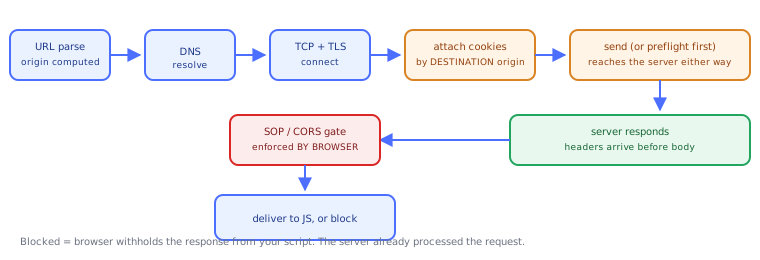
1. URL parsing        → scheme, host, port, path resolved; origin computed
2. DNS resolution      → hostname → IP address (cached per browser/OS policy)
3. Connection setup    → TCP handshake, then TLS handshake if https:
4. HTTP request built  → method, path, headers assembled
5. Credential attach   → cookies for that origin added if policy allows (see §4)
6. CORS preflight?     → OPTIONS sent first IF the request is cross-origin AND "not simple" (CORS topic)
7. Request sent        → over the established connection
8. Server responds     → status, headers, body
9. Response gate       → same-origin policy / CORS check on the response (CORS topic)
10. Response delivered → to the calling code, or blocked from being read
11. Rendering/consumption → HTML parsed & painted, or JS receives the (possibly opaque) response
Steps 6 and 9 are where CORS lives. Step 5 is where CSRF lives. Step 2's DNS resolution against a hostname is where the hostname-vs-domain distinction becomes concrete.
4Origin: The Unit Everything Is Measured Against
An origin is the triple (scheme, host, port). Two URLs are same-origin only if all three match exactly.
https://app.example.com:443/dashboard
https://app.example.com/login
→ SAME origin (default https port is 443, so it matches explicitly-written 443 too)

https://app.example.com/dashboard
http://app.example.com/dashboard
→ DIFFERENT origin (scheme differs)

https://app.example.com/dashboard
https://api.example.com/dashboard
→ DIFFERENT origin (host differs — subdomains are distinct origins)

https://example.com:443/dashboard
https://example.com:8443/dashboard
→ DIFFERENT origin (port differs)
The Same-Origin Policy (SOP) is the browser's default rule: script running on origin A cannot read data belonging to origin B, full stop, unless something explicitly relaxes that (CORS headers, document.domain in legacy cases, postMessage with explicit target origin, etc.). SOP is the baseline; CORS is the escape hatch a server can open in it.
5Navigation Requests vs Subresource/Fetch Requests
The pipeline branches meaningfully depending on what kind of request it is:
- Top-level navigation (typing a URL, following a link, submitting a form without JS): the browser replaces the whole document. There is no "SOP" question to ask yet, because there's no existing-page JavaScript trying to read the result — the response becomes the new page. This is why a plain
<form method="POST">to another origin always "works" from the browser's point of view, even though reading its response cross-origin viafetchwould not — this asymmetry is exactly what CSRF abuses. - Subresource requests (
<img>,<script>,<link>): the browser fetches and uses the resource (renders the image, executes the script) but your page's JS generally can't read the raw response bytes/headers unless the resource type and CORS mode allow it. fetch/XHR/WebSocket: script explicitly requests data and expects to read the response. This is where SOP/CORS enforcement is strictest, because reading arbitrary cross-origin data is exactly what SOP exists to prevent.
6Redirects Mid-Lifecycle
A response can be a redirect (3xx with Location). The browser transparently follows it (for navigations and for fetch's default redirect: "follow"), which re-runs steps 1–9 against the new URL — including recomputing whether the new target is same-origin or not, and whether credentials should be attached to that origin. A same-origin request can redirect to a cross-origin URL, and the CORS/credential rules that apply are the ones for the final hop, not the original one.
Under the HoodWhat "Rendering" Actually Waits On▾
The lifecycle above ends at "rendering/consumption," but that step itself has real, sequenced sub-stages worth naming precisely, because they explain why some security-relevant script only runs after certain network stages complete:
- Response headers arrive first, body streams after. The browser has
Content-Type,Set-Cookie, and CORS headers available before a single byte of the body is parsed. This is why the CORS check (comparingAccess-Control-Allow-Originagainst the requesting origin) can happen — and block the JS from ever touching the body — without the browser needing to download the whole response first. - HTML parsing is incremental and can be blocked by synchronous
<script>. A<script src>withoutasync/deferpauses HTML parsing until that script is fetched and executed — this is a real, observable network-to-render dependency, not a metaphor. It's why render-blocking script tags in the<head>visibly delay first paint. - Cookies are attached at request-build time (step 5), read at response time (
Set-Cookieis processed as headers arrive), and are governed by the requested origin's cookie jar, not the page's origin. A page ona.commaking a request tob.comhasb.com's cookies attached by the browser — nota.com's — because the browser's cookie store is keyed by the cookie's ownDomain/Pathattributes, matched against the destination of the request currently being built. This single fact is the entire mechanical basis of CSRF (see that topic) and is worth internalizing precisely: the browser doesn't know or care which site's JavaScript triggered the request when deciding which cookies to attach — it only looks at where the request is going. - The SOP/CORS check happens in the browser's network stack, not in your JavaScript. By the time your
fetch(...).then(res => ...)callback runs, the browser has already decided whether you're allowed to see the response. A cross-origin request that fails the CORS check still reached the server and the server still processed it — the browser just refuses to hand the response back to your script (TypeError: Failed to fetch, or an opaque response body). This distinction — blocked at the browser, not blocked at the network — is precise and reappears as the central fact of the CORS topic.
⚠️ Common Pitfalls
- Assuming a blocked cross-origin request never reached the server. It usually did (see Under the Hood §4) — CORS is a client-side reading restriction, not a network firewall.
- Confusing "the page loaded" with "same-origin." A page can successfully display cross-origin images, scripts, and stylesheets (subresource loads generally aren't SOP-gated for basic rendering) while still being completely unable to read their contents via JS.
- Forgetting that redirects change the origin context. Credential and CORS decisions apply to the final URL in a redirect chain, not the one you originally requested.
- Treating
fetchand form submission as equivalent. A cross-origin<form>POST is a navigation-style request the browser will happily send (and attach cookies to); a cross-originfetchPOST is subject to CORS on reading the response, and to preflight rules on whether it's even sent as a "simple" request first. - Assuming DNS resolution is part of "the connection" conceptually free. It's a distinct pipeline stage with its own caching and its own security surface (DNS spoofing, hostname confusion — see the Hostname vs Domain topic) before any TCP/TLS handshake begins.
📋 Quick Reference
Origin = (scheme, host, port) — all three must match for "same-origin"
Pipeline: URL parse → DNS → TCP/TLS → build request → attach cookies →
          (preflight?) → send → server responds → SOP/CORS gate → deliver/block
Navigation (<a>, <form>, address bar) → browser always sends it, page is replaced
fetch/XHR/WebSocket                    → SOP/CORS gates whether JS can READ the response
Cookies attached based on DESTINATION origin, not the origin of the initiating script
Redirects re-evaluate origin/credential rules against the FINAL URL
🧠 Key takeaways
- A navigation runs cache → DNS → TCP → TLS → HTTP → parse → subresources → render.
- The origin (scheme, host, port) is what CORS, cookies, storage and CSP checks are measured against.
- Navigation requests and fetch/subresource requests follow different rules (mode, credentials, CORS).
- Redirects re-run the pipeline for the new URL; render-blocking CSS/JS delays the first paint.
🎤 Interview Q&A
Q1What happens in the browser after it receives HTML?core▾
It parses HTML into the DOM, fetches CSS (render-blocking) to build the CSSOM, runs scripts (parser-blocking unless async/defer), builds the render tree, computes layout, paints and composites. Subresources are fetched in parallel with priorities.
- async vs defer? async runs as soon as downloaded (order not guaranteed); defer runs in order after parsing.
Q2What is the same-origin policy?core▾
A browser rule that scripts from one origin (scheme + host + port) can't read responses or DOM from another origin. It's the foundation of web security; CORS selectively relaxes it for reading cross-origin responses.
- Is
https://a.comsame-origin withhttps://a.com:8443? No; ports differ.
Q3How do you improve page load performance?core▾
Reduce and defer JavaScript, inline critical CSS, use HTTP/2/3 and a CDN, compress and cache assets, lazy-load images, preconnect/preload key resources, and measure with Core Web Vitals (LCP, INP, CLS).
- What is LCP? Largest Contentful Paint: when the main content becomes visible; aim under 2.5 s.
Q4What does the browser send automatically with each request?senior▾
Cookies for the target domain (subject to SameSite), Origin or Referer (per policy), User-Agent, Accept-* headers, and cached credentials. This automatic sending is why CSRF exists.
- Which header tells the server where a request came from?
Origin(on CORS and POST requests) andReferer.
Q5What are the main browser storage options and their security implications?core▾
Cookies (sent with requests, can be HttpOnly), localStorage/sessionStorage (accessible to any script, so XSS can steal them), IndexedDB, and Cache Storage. Don't store sensitive tokens where scripts can read them.
- sessionStorage scope? Per tab and origin, cleared when the tab closes.
🛠️ Practice exercises
Each exercise is a file in this topic folder. Code exercises are self-checking: run them and make the checks pass.
✅ Check yourself
Answer the questions — feedback is instant.