HTTP Headers
Headers carry everything about a message except its body: content type, caching, auth, compression, security policy. Read realistic request and response headers with annotations, and learn the rules for custom and repeated headers.
🎯 What you'll learn
- What a header is and how it's parsed
- Common request and response headers
- Header categories and custom headers
- Repeated headers and HPACK/QPACK compression
📚 Before you start
1What a Header Is
A header is a Name: value metadata pair sent alongside a request or response — never part of the "content" itself, but information about that content or about the exchange. Header names are case-insensitive (Content-Type, content-type, and CONTENT-TYPE are the same header), though the conventional casing is Title-Case-With-Hyphens.
Content-Type: application/json; charset=utf-82Common Request Headers
| Header | Purpose | Example |
|---|---|---|
Host | target hostname (required in HTTP/1.1) | Host: api.example.com |
User-Agent | identifies the client software | User-Agent: Mozilla/5.0 (...) |
Accept | media types the client can handle | Accept: application/json |
Accept-Language | preferred human languages | Accept-Language: en-US,en;q=0.9 |
Accept-Encoding | compression the client can decode | Accept-Encoding: gzip, br |
Authorization | credentials for the request | Authorization: Bearer eyJ... |
Content-Type | media type of the request body | Content-Type: application/json |
Content-Length | size of the request body in bytes | Content-Length: 348 |
Cookie | previously stored cookies, re-sent | Cookie: session_id=abc123 |
If-None-Match | conditional request validator | If-None-Match: "33a64df5" |
Origin | origin of a cross-site request (CORS) | Origin: https://app.example.com |
3Common Response Headers
| Header | Purpose | Example |
|---|---|---|
Content-Type | media type of the response body | Content-Type: text/html; charset=utf-8 |
Content-Length | size of the response body in bytes | Content-Length: 1256 |
Set-Cookie | asks the client to store a cookie | Set-Cookie: session_id=abc123; HttpOnly |
Cache-Control | caching directives (see Caching topic) | Cache-Control: max-age=3600, public |
ETag | opaque validator for conditional requests | ETag: "33a64df5" |
Location | redirect target, or created resource URL | Location: /users/43 |
Access-Control-Allow-Origin | CORS: which origins may read this response | Access-Control-Allow-Origin: * |
Vary | which request headers affect caching (see Content Negotiation) | Vary: Accept-Encoding |
WWW-Authenticate | how to authenticate, sent with 401 | WWW-Authenticate: Bearer realm="api" |
4General, Request, Response, and Entity Headers
Headers are conceptually grouped by what they describe:
- General headers apply to the message as a whole, either direction (e.g.
Connection,Date). - Request headers only make sense on a request (
Host,Accept,Authorization). - Response headers only make sense on a response (
Set-Cookie,Location,WWW-Authenticate). - Entity/representation headers describe the body specifically, and can appear on either side (
Content-Type,Content-Length,Content-Encoding).
5Custom Headers
Applications commonly send their own headers for request tracing, API versioning, or internal metadata:
X-Request-Id: 7f3e9c10-...
X-API-Version: 2
The X- prefix convention (marking a header as "non-standard/experimental") is formally deprecated by RFC 6648 — the modern guidance is to just pick a clear, namespaced name without the prefix (e.g. Request-Id or a vendor-prefixed Example-Request-Id), since X- headers historically ended up becoming permanent and then needing the prefix stripped anyway.
6Multiple Values for the Same Header
Some headers may legally appear multiple times, or pack multiple values into one line, comma-separated — these are equivalent per the spec for most headers:
Accept: text/html
Accept: application/json

Accept: text/html, application/json
Set-Cookie is the major exception — it is not safely combinable with commas (cookie values themselves can contain commas and the Expires attribute contains one too), so a server sending multiple cookies must send multiple separate Set-Cookie header lines, and HTTP client APIs (like the Fetch API's Headers object) special-case it: headers.get("Set-Cookie") cannot return all of them, so a dedicated method (getSetCookie()) exists instead.
Under the HoodHeader Compression and Wire Representation▾
HTTP/1.1: headers are just more CRLF-terminated text lines
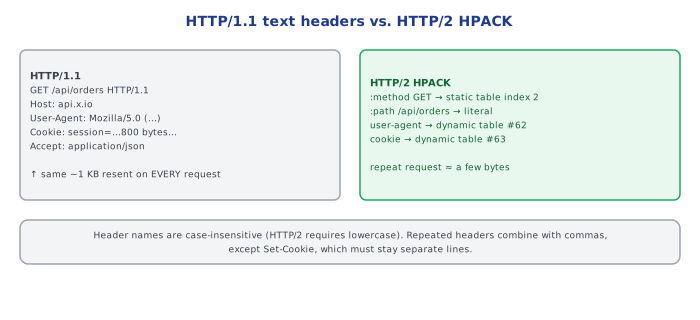
As covered in HTTP Fundamentals, there's no special encoding — each header is one line, Name: value\r\n, and headers routinely account for 500-800+ bytes per request once cookies, user-agent strings, and Accept-* headers are included — resent, largely unchanged, on every single request on a connection.
HTTP/2's HPACK: a shared compression table between client and server
HPACK solves the redundancy above with two mechanisms working together:
- A static table of ~61 predefined common header name/value pairs (e.g.
:method: GET,:status: 200) that both sides always know, referenced by a 1-byte index instead of spelling them out. - A dynamic table built incrementally per-connection: the first time a header like
user-agent: Mozilla/5.0...is sent, both sides add it to their synchronized dynamic table; every subsequent request on that connection references it by index instead of resending the full text — turning a ~70-byte header into a couple of bytes.
This is why HPACK compression only becomes effective after the first few requests on a connection — the dynamic table needs entries in it first, and why the effectiveness of HTTP/2 header compression depends heavily on connection reuse (short-lived connections rebuild the table from scratch every time).
HTTP/3's QPACK: HPACK's core idea, redesigned for out-of-order delivery
HPACK assumes strict in-order delivery of the dynamic-table-update instructions, since it relies on the receiver having processed updates in the exact order the sender issued them — which is guaranteed on a single TCP stream but is not guaranteed across independent QUIC streams (see the HTTP Versions topic on why QUIC deliberately allows streams to be delivered out of order). QPACK is a from-scratch redesign that keeps the static/dynamic table idea but adds explicit stream synchronization so a stream referencing a not-yet-arrived dynamic table entry can be safely decoded once it does arrive, without blocking on strict overall ordering.
⚠️ Common Pitfalls
- Treating header names as case-sensitive in custom code —
req.headers['Content-Type']can silently miss a header sent ascontent-type; always normalize to lowercase (or use an API like Fetch'sHeaders, which does this automatically) before lookup. - Trying to read multiple
Set-Cookievalues with a plainheaders.get()— as noted above, this is the one header where a naive "just join with commas" model breaks; use the dedicated multi-value accessor your HTTP client provides. - Confusing
Content-Lengthcorrectness with server responsibility — sending aContent-Lengththat doesn't match the actual body byte count causes clients to either truncate the body or hang waiting for bytes that never arrive; this is a common bug when a body is transformed (e.g. compressed) after the header was already set. - Assuming an
X--prefixed header is meaningfully different from a non-prefixed custom header — the prefix carries no special protocol behavior; it's purely a deprecated naming convention.
📋 Quick Reference
Name: value          — case-insensitive name, one pair per header
Accept, Accept-Language, Accept-Encoding  — client preferences (content negotiation)
Authorization, Cookie                      — credentials/identity sent by client
Content-Type, Content-Length               — describe the BODY specifically
Set-Cookie                                 — response only, NOT comma-combinable
Cache-Control, ETag, Vary                  — caching / content negotiation signals

HTTP/1.1 headers: plain text, resent in full every request
HTTP/2 headers:   HPACK-compressed via static + dynamic tables
HTTP/3 headers:   QPACK — HPACK's idea, redesigned for out-of-order QUIC streams
🧠 Key takeaways
- Headers are case-insensitive name: value pairs; HTTP/2+ lowercases names and compresses them (HPACK/QPACK).
- Request: Host, Authorization, Accept\, If-\, Cookie, User-Agent. Response: Content-\*, Cache-Control, ETag, Vary, Set-Cookie, security headers.
- Custom headers: don't use the
X-prefix for new standards, but it's fine internally; keep them small. - Repeated headers can be comma-joined, except Set-Cookie.
🎤 Interview Q&A
Q1Which request headers are most important?core▾
Host, Authorization, Content-Type, Accept, Accept-Encoding, Cookie, User-Agent, If-None-Match/If-Modified-Since (conditional requests), Origin (CORS), and custom tracing headers like traceparent.
- What's
Acceptfor? Content negotiation: which media types the client wants.
Q2Which response headers matter most?core▾
Content-Type, Content-Length/Transfer-Encoding, Cache-Control, ETag, Location (redirects, created resources), Set-Cookie, Retry-After, CORS headers (Access-Control-Allow-*) and security headers (CSP, HSTS).
- When is
Locationused with 201? To point to the newly created resource.
Q3What is Vary and why does it matter?senior▾
It tells caches which request headers affect the response (e.g. Vary: Accept-Encoding, Accept-Language), so they store separate variants. Missing Vary can serve the wrong variant; too broad (Vary: Cookie) kills cache hit rates.
- Classic bug? Serving gzipped content to clients that don't support it because Vary was missing.
Q4How do X-Forwarded-For and Forwarded headers work?core▾
Proxies append the client IP they saw, so the backend can find the original client. Only trust entries added by your own proxies, since clients can forge the header.
- Standard version? The
Forwardedheader (RFC 7239).
Q5What are hop-by-hop vs end-to-end headers?core▾
Hop-by-hop headers (Connection, Keep-Alive, Transfer-Encoding, Upgrade) apply to a single connection and must not be forwarded by proxies; end-to-end headers travel to the final recipient.
- Why does this matter for proxies? Mishandling can enable request smuggling.
🛠️ Practice exercises
Each exercise is a file in this topic folder. Code exercises are self-checking: run them and make the checks pass.
✅ Check yourself
Answer the questions — feedback is instant.