Cookies and Sessions
Cookies add state to stateless HTTP. Watch a login set a cookie and every later request carry it, compare server-side sessions with stateless tokens, and set the attributes (HttpOnly, Secure, SameSite, prefixes) that keep it safe.
🎯 What you'll learn
- Why cookies exist
- Anatomy of Set-Cookie and its attributes
- Server-side sessions vs stateless tokens
- Cookie prefixes, SameSite and common pitfalls
📚 Before you start
1Why Cookies Exist
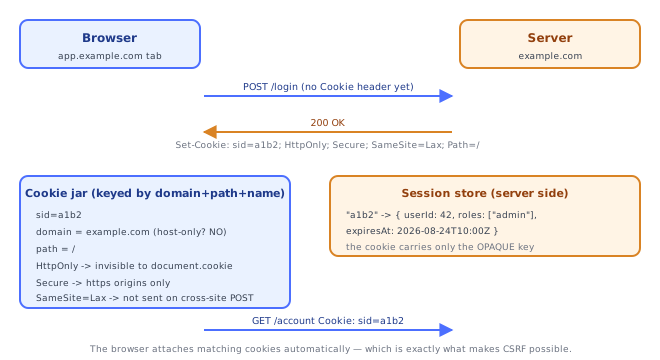
HTTP is stateless: every request is interpreted on its own, and the server has no built-in way to know that the request it is handling now came from the same client as the request a second ago. A cookie is the standard workaround — a small named value the server asks the client to store and then re-send automatically on every subsequent matching request.
# Response from the server
HTTP/1.1 200 OK
Set-Cookie: sid=a1b2c3; Path=/; HttpOnly

# Every later request the browser makes to that site
GET /account HTTP/1.1
Host: example.com
Cookie: sid=a1b2c3
Two headers do all the work: Set-Cookie (response, one cookie per header line) and Cookie (request, all matching cookies joined with ; ).
2Anatomy of Set-Cookie
Set-Cookie: sid=a1b2c3; Domain=example.com; Path=/app; Expires=Wed, 09 Sep 2026 10:00:00 GMT; Max-Age=86400; Secure; HttpOnly; SameSite=Lax| Part | Meaning |
|---|---|
sid=a1b2c3 | the name/value pair — the only mandatory part |
Domain | which hosts the cookie is sent to (see section 6 — it widens scope) |
Path | URL path prefix the cookie is scoped to (/app matches /app/x, not /api) |
Expires | absolute expiry date, HTTP-date format |
Max-Age | lifetime in seconds; takes precedence over Expires where both appear |
Secure | only send over HTTPS |
HttpOnly | hide from document.cookie (JavaScript cannot read it) |
SameSite | Strict / Lax / None — controls sending on cross-site requests |
Note the asymmetry: attributes are only ever sent downward, in Set-Cookie. The Cookie header the browser sends back contains name/value pairs and nothing else — the server never sees which Path, Domain, or SameSite a returning cookie was stored under.
Cookie: sid=a1b2c3; theme=dark; lang=en3Session Cookies vs Persistent Cookies
Set-Cookie: sid=a1b2c3; HttpOnly          # session cookie — dies with the browser session
Set-Cookie: theme=dark; Max-Age=31536000  # persistent — written to disk, survives restarts
A cookie with neither Expires nor Max-Age is a session cookie: it lives in memory and is discarded when the browsing session ends. Anything with a lifetime attribute is persistent and is stored on disk. (In practice, "restore my tabs on startup" features in browsers often revive session cookies too, so "dies with the browser" is a weaker guarantee than it sounds.)
To delete a cookie, you re-set the same name with an expiry in the past — there is no Delete-Cookie header:
Set-Cookie: sid=; Path=/; Max-Age=0The Path (and Domain, if used) must match the original exactly, or you create a different cookie that happens to be empty and leave the real one in place.
4Server-Side Sessions vs Stateless Tokens
There are two mainstream ways to turn "the client holds a cookie" into "the server knows who this is".
Server-side session — the cookie holds an opaque random ID; all real state lives on the server.
// on login
const sid = crypto.randomUUID();
await store.set(sid, { userId: 42, roles: ["admin"] }, { ttlSeconds: 86400 });
res.setHeader("Set-Cookie", `sid=${sid}; Path=/; HttpOnly; Secure; SameSite=Lax`);// on every request
const session = await store.get(parseCookies(req.headers.cookie).sid);
if (!session) return res.writeHead(401).end();Stateless token — the cookie holds a signed payload (e.g. a JWT); the server verifies the signature and reads the claims, storing nothing.
Set-Cookie: token=eyJhbGciOi...<signature>; HttpOnly; Secure; SameSite=Lax| Server-side session | Signed token | |
|---|---|---|
| Server storage | required (Redis/DB) | none |
| Revocation | instant — delete the row | hard; needs a denylist, which reintroduces storage |
| Horizontal scaling | needs a shared store | trivially stateless |
| Cookie size | ~40 bytes | hundreds of bytes, sent on every request |
Revocation is the deciding factor far more often than performance: "log out all devices" and "ban this user right now" are cheap with a session store and awkward without one.
5Cookie Prefixes: __Host- and __Secure-
Set-Cookie: __Host-sid=a1b2; Path=/; Secure; HttpOnly; SameSite=LaxThese are not decoration — browsers enforce them at write time and reject the Set-Cookie otherwise:
__Secure-requires theSecureattribute and an HTTPS origin.__Host-requiresSecure, requiresPath=/, and forbidsDomain— which makes the cookie host-only and therefore impossible for a sibling subdomain to have written.
That last property is the point. Without it, a server receiving Cookie: sid=... cannot tell whether the cookie was set by itself or by a compromised blog.example.com that wrote Domain=example.com. A __Host- prefix makes the name itself a proof of provenance.
6SameSite in Practice
| Value | Sent on same-site requests | Sent on cross-site top-level GET navigation | Sent on cross-site POST / subresource / iframe |
|---|---|---|---|
Strict | yes | no | no |
Lax | yes | yes | no |
None | yes | yes | yes — requires Secure |
Lax is the modern default in major browsers when the attribute is absent. Strict breaks the common "click a link in an email to a logged-in page" flow (the user arrives logged out), which is why Lax is the usual choice for a session cookie, with Strict reserved for high-value cookies where that friction is acceptable.
SameSite=None without Secure is rejected outright — a cookie cannot opt into cross-site sending over plaintext.
Under the HoodHow it works internally▾
HttpOnly removes the cookie from the JavaScript object graph entirely
document.cookie is not a filtered view of the cookie jar that a clever script can bypass — the getter is specified to omit HttpOnly cookies when it builds its string. There is no API path back to the value: no document.cookie entry, no CookieStore entry, nothing in the Fetch API's Headers for a request the page issued (the browser adds the Cookie header after the page's JS has finished touching the request). So an XSS payload that runs in the page with full script privileges still cannot exfiltrate an HttpOnly session ID by reading it.
What HttpOnly does not do is stop the XSS from using the session. The attacker's script can still call fetch("/api/transfer", { method: "POST", credentials: "include" }) and the browser will attach the cookie for it. HttpOnly converts "steal the session and replay it forever from anywhere" into "act as the user only while the injected script is running in their tab" — a large reduction in blast radius, not immunity.
SameSite is the actual CSRF defense; the token is the compatibility layer
CSRF works because of the automatic-attachment rule at the heart of section 1: the browser attaches cookies based on the destination of a request, not on who initiated it. A form on evil.com that POSTs to bank.example.com/transfer gets the bank's cookies attached, because the request goes to the bank.
SameSite=Lax/Strict attacks that premise directly: the browser now considers the initiator's site, and simply does not attach the cookie to a cross-site POST. That is a defense enforced by the browser, applying to every endpoint at once, with no per-form server code. A CSRF token, by contrast, is a per-endpoint check the server has to implement and verify correctly everywhere. Tokens remain necessary for older clients and for genuinely cross-site flows that need SameSite=None, but on a modern browser the cookie attribute is doing the heavy lifting. (CSRF token mechanics — synchronizer tokens, double-submit, per-session vs per-request — live in networking-web/browser-security/03-csrf_and_csrf_tokens; this section is only about why the cookie attribute matters.)
Secure is about the network, and it is weaker than it looks in one direction
Secure prevents the cookie from being sent over plaintext HTTP, closing the classic "user types http://example.com, attacker on the Wi-Fi reads the session ID off the wire" hole. But the cookie jar is shared across schemes for writing: historically a plain-HTTP response on the same host could overwrite a Secure cookie (it cannot read it, but it can clobber it — a "cookie forcing" attack that pins the victim to an attacker-chosen session ID). Browsers have since restricted this considerably, but it is the reason __Secure-/__Host- prefixes exist as an explicit, name-encoded, unforgeable-by-plaintext marker rather than relying on the attribute alone.
The Domain attribute widens scope; it never narrows it
This is the single most-misread cookie attribute. Intuition says Domain= restricts the cookie. It does the opposite.
# Set by https://app.example.com
Set-Cookie: a=1                      -> host-only: sent ONLY to app.example.com
Set-Cookie: b=2; Domain=example.com  -> sent to example.com AND every subdomain
Omitting Domain produces a host-only cookie (an internal host-only flag is set to true), matched by exact hostname equality. Supplying Domain clears that flag and switches matching to a domain-suffix test, so the cookie now goes to the named domain and everything beneath it. You cannot use Domain to send a cookie to fewer hosts than the one that set it, and you cannot use it to target an unrelated host: a server may only set a Domain that is its own hostname or a parent of it — and, critically, not a public suffix (see networking-web/browser-security/06-hostname_vs_domain, where the public suffix list is covered in detail; without that rule Domain=com would let any site write a cookie readable by every .com site).
The practical consequence: Domain=example.com on a session cookie means every subdomain — including a marketing site, a status page, or a customer-controlled *.example.com — receives that session ID on every request. That is why __Host- forbids Domain outright.
Cookies are keyed by (domain, path, name), and the Cookie header loses that key
The jar's uniqueness key is the triple (domain, path, name), not the name alone. So these are three distinct stored cookies:
Set-Cookie: sid=A; Domain=example.com; Path=/
Set-Cookie: sid=B; Path=/
Set-Cookie: sid=C; Path=/app
and a request to https://app.example.com/app/x matches all three, producing:
Cookie: sid=C; sid=B; sid=AEvery attribute has been stripped. The server sees three same-named values, in an order that is only loosely specified (longer paths first, then earlier creation time — and this ordering is not something to depend on), with no way to tell which came from where. Most cookie-parsing libraries build a plain object and let the last (or first) write win, silently picking one. This "shadowed cookie" situation is a real and painful failure mode: a stale sid left over on a parent domain can override the fresh one on every request until the user clears cookies, and the server logs show nothing unusual.
⚠️ Common Pitfalls
- Trying to delete a cookie without matching
Path/Domain.Set-Cookie: sid=; Max-Age=0from/apideletes the/api-scopedsid, not the/-scoped one; the key is the triple, so a mismatched attribute creates or clears a different cookie and the real one survives untouched. - Using
Domain=example.com"to be safe". It widens the cookie to every subdomain, handing your session ID to any host under that domain — including ones you do not control. OmitDomainunless you genuinely need cross-subdomain sharing. - Assuming
HttpOnlystops XSS. It stops exfiltration of the value; the injected script can still make authenticated requests from the victim's browser. TreatHttpOnlyas damage limitation, not as a reason to skip output escaping and CSP. SameSite=NonewithoutSecure. The browser rejects the entireSet-Cookie. The symptom is not an error — the cookie simply never appears, and login "randomly doesn't work" in whichever flow needs it.- Storing anything meaningful in the cookie value in a server-side-session design. If the cookie carries
userId=42rather than an opaque random ID, the client can edit it. The ID must be unguessable and carry no data; the data belongs in the store. - Not rotating the session ID on privilege change. If the pre-login and post-login session ID are the same value, an attacker who can plant a known ID in the victim's jar (session fixation) is logged in as them once they authenticate. Issue a fresh ID at login and discard the old one.
- Forgetting the ~4 KB per-cookie limit and ~50-cookies-per-domain browser caps. Oversized cookies are dropped silently, and blowing the count evicts other cookies — including the session one. This is a common failure when JWTs with many claims are stored in cookies.
- Treating multiple
Set-Cookieheaders as comma-joinable.Expirescontains a comma, so naive joining corrupts them; use the dedicated multi-value accessor (seenetworking-web/http/03-http_headers).
📋 Quick Reference
Set-Cookie: name=value; Domain=; Path=; Expires=; Max-Age=; Secure; HttpOnly; SameSite=
Cookie: name=value; name2=value2          <- attributes are NOT echoed back

Max-Age wins over Expires
No Expires/Max-Age        -> session cookie (memory only)
Max-Age=0 / past Expires  -> delete (Path+Domain must match exactly)

Domain omitted   -> host-only, exact hostname match      <- the safe default
Domain=parent    -> WIDENS to parent + all subdomains
Domain=<public suffix> -> rejected by the browser

HttpOnly  -> not in document.cookie; XSS can't READ it (can still USE it)
Secure    -> HTTPS only when sending
SameSite=Strict -> never cross-site        Lax -> top-level GET only (default)
SameSite=None   -> cross-site allowed, REQUIRES Secure

__Secure-name -> requires Secure
__Host-name   -> requires Secure + Path=/ + NO Domain (host-only, unforgeable)

jar key = (domain, path, name)   -> same name can exist 3x and shadow itself
🧠 Key takeaways
Set-Cookiestores state in the browser; it's sent back automatically to matching requests.- Always set HttpOnly (no JS access), Secure (HTTPS only), SameSite=Lax/Strict; prefer the
__Host-prefix. - Server sessions: opaque ID, instant revocation, needs a shared store. Stateless tokens: no store, hard to revoke.
- Session cookie = no Expires (until browser closes, roughly); persistent = Expires/Max-Age.
🎤 Interview Q&A
Q1How do cookie-based sessions work?core▾
After login, the server creates a session (stored in memory, Redis or DB) and sends a random session ID in a Set-Cookie header. The browser sends the cookie on later requests, and the server looks up the session.
- How do you scale sessions across servers? A shared session store like Redis, or sticky sessions (less robust).
Q2Which cookie attributes should you set?core▾
HttpOnly (no JS access), Secure (HTTPS only), SameSite=Lax or Strict (CSRF mitigation), sensible Max-Age/Expires, narrow Path/Domain, and the __Host- prefix for strict scoping.
- Default SameSite in modern browsers? Lax.
Q3What is session fixation and how do you prevent it?core▾
An attacker sets a known session ID in the victim's browser, then hijacks it after the victim logs in. Prevent by issuing a new session ID on login (and privilege changes) and rejecting unknown IDs.
- What else should trigger regeneration? Role/permission changes and password resets.
Q4First-party vs third-party cookies?senior▾
First-party cookies belong to the site in the address bar; third-party cookies are set by other domains embedded in the page (ads, trackers). Browsers increasingly block third-party cookies by default.
- Impact on embedded apps? Use partitioned cookies (CHIPS) or the Storage Access API.
Q5Sessions vs tokens for authentication?core▾
Sessions: server-side state, easy revocation, small cookie, needs shared storage. Tokens (JWT): stateless, easy across services and domains, harder to revoke. Web apps often use sessions; APIs used by many clients often use tokens.
- What's a hybrid? BFF: session cookie to the browser, tokens server-side.
🛠️ Practice exercises
Each exercise is a file in this topic folder. Code exercises are self-checking: run them and make the checks pass.
Cookie header✅ Check yourself
Answer the questions — feedback is instant.