Caching and Compression
The fastest request is one never made. Learn Cache-Control directives, revalidation with ETag and Last-Modified, where caches actually live, and how compression is negotiated, with an interactive 304 demo and a cache-hierarchy walkthrough.
🎯 What you'll learn
- Why caching exists and Cache-Control directives
- Freshness: max-age, s-maxage, Expires
- Validation with ETag and Last-Modified
- Compression negotiation and where caches live
📚 Before you start
1Why Caching Exists
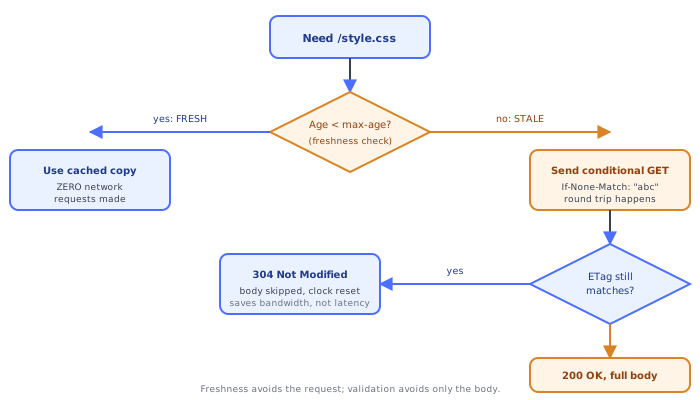
The fastest request is the one never made, and the second-fastest is the one that transfers no body. HTTP caching is built around exactly those two ideas, and — this is the point the rest of this topic keeps coming back to — they are two independent mechanisms, not two strengths of the same feature:
- Freshness (
Cache-Control: max-age) lets a client skip the network entirely and reuse a stored response. - Validation (
ETag/If-None-Match, orLast-Modified/If-Modified-Since) still costs a round trip, but lets the server say "nothing changed" and skip re-sending the body.
Confusing these two is the single most common caching bug in real systems: "the cache didn't update" and "the cache isn't even hitting" are opposite problems with opposite fixes.
2Cache-Control: the Modern Directive Header
Cache-Control: max-age=3600, public
Cache-Control: no-store
Cache-Control: private, no-cache
Cache-Control: max-age=0, must-revalidate
Cache-Control is a comma-separated list of directives, settable by both request and response (a client can send Cache-Control: no-cache to force revalidation of its own cached copy too). The response-side directives that matter most:
| Directive | Meaning |
|---|---|
max-age=N | fresh for N seconds from response generation |
s-maxage=N | like max-age, but only for shared caches (CDN/proxy) — overrides max-age for them |
no-cache | may store the response, but must revalidate with the server before reusing it every time (confusingly, this does NOT mean "don't cache") |
no-store | must not store the response at all, anywhere — the actual "don't cache" directive |
private | only a single-user cache (the browser) may store it; shared caches (CDNs) must not |
public | may be cached even if the request looked like it wouldn't normally qualify (e.g. had an Authorization header) |
must-revalidate | once stale, must not be served without successful revalidation, even if the origin is unreachable (no "serve slightly stale to survive an outage") |
immutable | the resource will never change for the lifetime of this URL — skip revalidation entirely even on a hard refresh (used for hashed asset filenames) |
stale-while-revalidate=N | serve the stale copy immediately, and revalidate in the background for N seconds |
3Expires: the Legacy Freshness Header
Expires: Wed, 09 Sep 2026 10:00:00 GMTExpires predates Cache-Control and sets an absolute expiry timestamp instead of a relative age. Where both are present, Cache-Control: max-age wins — the same "relative overrides absolute" pattern as Max-Age over Expires on cookies (see networking-web/http/04-cookies_and_sessions). Expires is kept only for HTTP/1.0-era compatibility; new code should just use max-age.
4Validation: ETag and If-None-Match
An ETag is an opaque token identifying a specific version of a resource's content — the server doesn't have to explain what it means, only produce the same value again if the content is unchanged.
# First response
HTTP/1.1 200 OK
ETag: "33a64df5"
Cache-Control: max-age=0, must-revalidate
Content-Length: 4096

<body...># Once max-age has expired, the client revalidates instead of re-fetching blind
GET /style.css HTTP/1.1
If-None-Match: "33a64df5"# Content is unchanged -> server confirms with an EMPTY body
HTTP/1.1 304 Not Modified
ETag: "33a64df5"
Cache-Control: max-age=0, must-revalidateA 304 Not Modified still costs a full request/response round trip and all the HTTP/TCP/TLS overhead that implies — it just omits the (often much larger) body. This is the second mechanism from section 1: validation saves bandwidth, not latency.
Strong vs weak validators:
ETag: "33a64df5"      # strong — byte-for-byte identical content required to match
ETag: W/"33a64df5"    # weak — semantically equivalent is good enough (e.g. differs only in whitespace/gzip framing)
A weak validator (the W/ prefix) is allowed to match even if the bytes differ slightly, which matters for range requests and compressed variants where two representations can be "the same resource" without being byte-identical.
5Validation: Last-Modified and If-Modified-Since
Last-Modified: Tue, 15 Aug 2026 14:22:00 GMTIf-Modified-Since: Tue, 15 Aug 2026 14:22:00 GMTLast-Modified is the older validator: a timestamp instead of an opaque hash. It is strictly weaker than ETag for two reasons — its one-second resolution can't distinguish two edits in the same second, and a file can be rewritten with identical content but a new mtime, causing an unnecessary re-download. Servers commonly send both and let the client prefer ETag when present.
6Compression: Accept-Encoding and Content-Encoding
Compression is the orthogonal third mechanism: even a cache miss or a fresh, never-before-seen response can still be transferred smaller.
# Request
Accept-Encoding: gzip, deflate, br# Response
Content-Encoding: br
Vary: Accept-Encoding
Content-Length: 8213The client advertises what it can decode; the server picks one and labels the body with Content-Encoding so the client knows how to reverse it. Vary: Accept-Encoding is not optional here — it tells any cache sitting in between that the gzip'd and brotli'd and uncompressed bodies are genuinely different responses for the same URL, so a cache must key its stored copy on the request's Accept-Encoding too, not just the URL (full negotiation mechanics, including Vary on other headers, are in networking-web/http/06-content_negotiation).
gzip     — universal support, moderate ratio, fast
br       — better ratio than gzip, slightly more CPU, near-universal in modern browsers
deflate  — legacy, rarely chosen today
Content-Encoding must not be confused with Transfer-Encoding: chunked — the former compresses the payload end-to-end (the browser sees compressed bytes described accurately), the latter is a hop-by-hop framing detail for streaming a body of unknown length; a proxy can add/remove chunked framing without touching Content-Encoding at all.
7Where Caches Actually Live
A single Cache-Control header is read by every cache in the chain, but they don't all behave identically:
- Browser cache — private, per-user, honors
private/publicandno-storestrictly. - CDN / reverse proxy cache — shared across users, so it ignores anything marked
private, and preferss-maxageovermax-agewhen both are present (full mechanics innetworking-web/http/08-proxy_and_reverse_proxy). - Application-level cache (Redis, in-memory) — not an HTTP cache at all; it doesn't read these headers, it's a deliberate server-side data cache with its own invalidation logic.
Under the HoodHow it works internally▾
Freshness and validation are genuinely separate lifecycles, not two settings on one feature
A response's cache lifetime has two distinct phases the client tracks independently:
t=0 (response received)                 t=max-age (goes stale)              revalidated or evicted
  |------------- FRESH -------------------|------------- STALE ----------------|
  no network request at all               requires a conditional GET round trip
  (max-age governs this phase)            (ETag/Last-Modified governs this phase)
While fresh, the client never contacts the server — max-age=3600 means literally zero requests for that resource for an hour, full stop, regardless of whether an ETag is even present. Only once the stored copy goes stale does validation enter the picture at all, and only then does the server get a chance to say "same content, reset the clock" via 304. A resource can have an ETag and still cause a full re-fetch every time if max-age=0 with no must-revalidate-compatible setup is misconfigured — the two mechanisms have to be deliberately wired together (max-age for the common case, validators for the "did it actually change" case) to get the intended behavior.
Computing Age, not just trusting max-age blindly
A response doesn't stay "0 seconds old" forever once it leaves the origin — every cache in the chain (browser, CDN, corporate proxy) adds its own residence time into a running Age header:
Age: 120
Cache-Control: max-age=300
freshness is then Age < max-age, computed fresh at every hop, not decided once by the origin. A response that sat in a CDN for 4 minutes and is then fetched by a browser is already 4 minutes into its 5-minute max-age budget by the time the browser sees it — the browser's own clock isn't what governs staleness, the accumulated Age is.
Why compression changes the cache key, not just the payload
Because Content-Encoding varies per client capability, a cache that ignores Vary: Accept-Encoding and stores a single entry per URL will eventually serve a brotli body to a client that only asked for gzip (or, worse, to a client that sent no Accept-Encoding at all and cannot decompress anything). This is exactly the same "the response depends on more than the URL" problem Vary exists to solve in general (see networking-web/http/06-content_negotiation) — compression is simply the most common case of it in practice, so much so that some CDNs hardcode special-case handling for Accept-Encoding specifically rather than trusting arbitrary Vary values.
⚠️ Common Pitfalls
- Reading
no-cacheas "do not cache." It means the opposite of what it sounds like — the response IS stored, but must be revalidated before every reuse. The actual "do not store this anywhere" directive isno-store. - Setting
max-agewithout ever changing the URL when content changes. If a stylesheet is served from a static/style.csspath with a longmax-age, clients keep the old version for the full duration with no way to force an update short of a hard refresh. The standard fix is a hashed filename (style.a1b2c3.css) combined withimmutable— a NEW URL for new content, rather than trying to invalidate an old one. - Forgetting
Vary: Accept-Encodingon a compressed response behind a shared cache. Silently serves the wrong encoding (or an undecodable one) to some clients — see the Under the Hood section. - Relying on
Last-Modifiedalone for content that can change twice within one second, or be rewritten byte-identically with a new mtime. Both cause incorrect cache behavior thatETagavoids. - Setting
Cache-Control: publicon a response that contains per-user data just to get CDN caching. A shared cache will serve user A's response to user B —publicon personalized content is a data leak, not a performance win. - Assuming a
304 Not Modifiedis "free." It's cheaper than a full response, not free — it still pays a full request/response round trip. If latency (not bandwidth) is the bottleneck, only a longermax-ageavoiding the request altogether actually helps. - Not realizing intermediate caches can override or strip headers. A corporate proxy or CDN can rewrite
Cache-Control; if a private response starts appearing for the wrong user, checking every hop's configuration is often the actual root cause, not application code.
📋 Quick Reference
Cache-Control: max-age=N        -> fresh for N seconds, ZERO requests to origin while fresh
Cache-Control: no-cache         -> store it, but MUST revalidate every time (misleading name)
Cache-Control: no-store         -> the real "don't cache this" directive
Cache-Control: private/public   -> single-user cache only / any shared cache may store
Cache-Control: must-revalidate  -> no serving stale on origin failure
Cache-Control: immutable        -> never revalidate, even on hard refresh
Expires                         -> legacy absolute-time version; max-age wins if both present

ETag + If-None-Match            -> strong validator, opaque hash, exact match required
W/"..."                         -> weak validator, semantic-equivalence match is enough
Last-Modified + If-Modified-Since -> timestamp validator, 1-second resolution, weaker

304 Not Modified -> round trip still happens, BODY is skipped (bandwidth, not latency, saved)
Age header        -> accumulated residence time across every cache hop; freshness = Age < max-age

Accept-Encoding (request)  -> what the client can decompress
Content-Encoding (response) -> what the body is actually compressed with
Vary: Accept-Encoding       -> REQUIRED on compressed responses behind any shared cache
🧠 Key takeaways
Cache-Control: max-age (all caches), s-maxage (shared), public/private, no-cache (revalidate), no-store (never store).- Fingerprinted assets:
max-age=31536000, immutable; HTML: short orno-cachewith ETag. - ETag/If-None-Match and Last-Modified/If-Modified-Since →
304saves the body. - Compression via
Accept-Encoding/Content-Encoding(br, gzip) +Vary: Accept-Encoding; don't compress already-compressed images.
🎤 Interview Q&A
Q1Explain the main Cache-Control directives.core▾
max-age=N (fresh for N seconds), s-maxage (for shared caches/CDNs), public/private (whether shared caches may store it), no-cache (store but revalidate before use), no-store (don't store at all), immutable, stale-while-revalidate.
- no-cache vs no-store? no-cache allows storing with revalidation; no-store forbids storing.
Q2How do ETags and conditional requests work?core▾
The server sends an ETag (version identifier). The client later sends If-None-Match: <etag>; if unchanged, the server replies 304 Not Modified with no body, saving bandwidth. Last-Modified/If-Modified-Since work similarly with dates.
- ETags for concurrency control?
If-Matchon PUT gives optimistic locking (412 if changed).
Q3What caching strategy do you use for static assets?core▾
Fingerprinted filenames (app.3f9a1c.js) with Cache-Control: public, max-age=31536000, immutable; HTML with no-cache so it's revalidated and points to new asset names after deploys.
- Why not cache HTML for long? Users would keep old HTML referencing old assets.
Q4Which compression algorithms are used and when?core▾
gzip (universal), Brotli (br, better ratio for text, widely supported), zstd (newer). Compress text (HTML, CSS, JS, JSON, SVG); don't recompress already-compressed formats (JPEG, PNG, video, zip).
- Static vs dynamic compression? Pre-compress static assets at build time with max levels; use faster levels for dynamic responses.
Q5What security issues relate to compression and caching?senior▾
Caching personalized responses as public leaks data between users; compression with secrets in responses alongside attacker-controlled input enables BREACH-style attacks. Use private/no-store for sensitive data.
- What's web cache poisoning? Tricking a cache into storing a malicious response for a shared key via unkeyed headers.
🛠️ Practice exercises
Each exercise is a file in this topic folder. Code exercises are self-checking: run them and make the checks pass.
✅ Check yourself
Answer the questions — feedback is instant.