The OSI Model
The OSI model splits networking into seven layers. Watch a GET request get wrapped in a TCP segment, an IP packet and an Ethernet frame on the way down, and learn why the layer boundaries matter for debugging.
🎯 What you'll learn
- What the OSI model is (a reference, not a protocol)
- The seven layers with real examples
- Encapsulation and decapsulation
- Why layers matter in practice and how devices map to them
1What the OSI Model Actually Is
The OSI (Open Systems Interconnection) model is a 7-layer conceptual framework, published by ISO in 1984, that describes the jobs a network stack must do to get data from one application to another across a network. It is not a protocol, not a piece of software, and (with the partial exception of layer 2/3 device categories) not something you literally install — it's a vocabulary. Engineers say "that's a layer 3 problem" or "this is an L7 load balancer" because everyone agrees on what those numbers mean.
No real network stack implements OSI exactly as specified — the internet runs on TCP/IP (its own topic), a 4-layer model that predates and outlived OSI's specific protocols. OSI survives because its 7-layer breakdown is a better teaching and debugging tool than TCP/IP's coarser 4 layers, so the industry kept the vocabulary even after abandoning the original OSI protocol suite.
2The Seven Layers
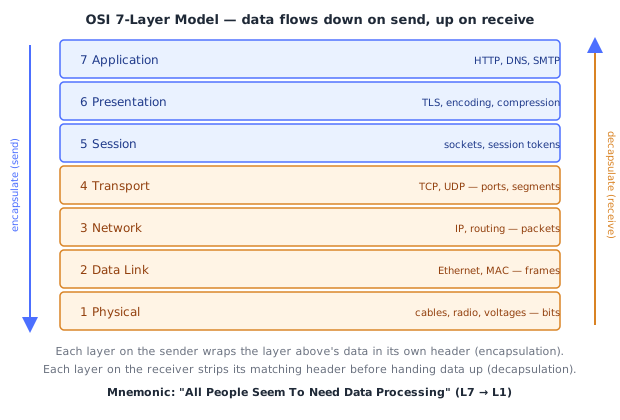
| # | Layer | Unit of data | Job | Real-world examples |
|---|---|---|---|---|
| 7 | Application | Data / Message | The protocol the actual application speaks | HTTP, DNS, SMTP, FTP |
| 6 | Presentation | Data | Format, encrypt/decrypt, compress/decompress | TLS, character encoding (UTF-8), JPEG/MPEG |
| 5 | Session | Data | Establish, manage, and tear down a conversation between two hosts | sockets, session tokens, RPC session state |
| 4 | Transport | Segment (TCP) / Datagram (UDP) | End-to-end delivery between processes, via ports | TCP, UDP |
| 3 | Network | Packet | Logical addressing and routing between different networks | IP, ICMP, routers |
| 2 | Data Link | Frame | Addressing and delivery within a single physical/local network segment | Ethernet, Wi-Fi (802.11), MAC addresses, switches |
| 1 | Physical | Bit | Raw transmission of bits over an actual medium | copper cable voltages, fiber light pulses, radio waves |
Mnemonic for top-to-bottom (7→1): "All People Seem To Need Data Processing." Mnemonic for bottom-to-top (1→7): "Please Do Not Throw Sausage Pizza Away."
3Encapsulation and Decapsulation
Each layer on the sending host wraps ("encapsulates") the data handed down from the layer above inside its own header (and sometimes trailer), without needing to understand what's inside. By the time data reaches layer 1, an application-layer HTTP request is buried inside a stack of nested headers — transport (TCP), network (IP), data link (Ethernet) — like a series of envelopes inside envelopes.
Sender (top → bottom):
  [ HTTP request ]                                    Layer 7
  [ TCP header | HTTP request ]                       Layer 4 — now a "segment"
  [ IP header | TCP header | HTTP request ]            Layer 3 — now a "packet"
  [ Ethernet header | IP header | ... | Eth trailer ]  Layer 2 — now a "frame"
  01001100101...                                       Layer 1 — now raw bits
The receiving host reverses this exactly, layer by layer, from the bottom up: layer 2 strips the Ethernet header, hands the packet to layer 3; layer 3 strips the IP header, hands the segment to layer 4; and so on until the original HTTP request reaches the receiving application untouched. Each layer only ever reads/strips its own header — it never needs to know or care what's inside the payload it's carrying.
4Why the Layer Boundaries Matter in Practice
The point of layering isn't academic — it lets each layer be replaced independently without the others caring:
- Swap Wi-Fi (layer 2) for Ethernet cable (layer 2) — nothing above layer 2 (IP, TCP, HTTP) needs to change.
- Swap HTTP (layer 7) for a different application protocol — nothing below (TCP, IP, Ethernet) needs to change.
- A device only needs to understand up to the layer it operates at: a basic switch only reads layer 2 (MAC addresses); a router reads up through layer 3 (IP addresses); a browser's TLS stack operates at layer 6; an application-aware (L7) load balancer reads all the way up to HTTP headers and URLs.
This is why "what layer does X operate at" is a genuinely useful question in real engineering, not trivia — it tells you what information a device or piece of software is even capable of seeing and acting on.
5OSI vs Real-World Devices
| Device | Primary OSI layer | What it inspects to make decisions |
|---|---|---|
| Repeater / hub | 1 (Physical) | nothing — just repeats electrical signal |
| Switch | 2 (Data Link) | destination MAC address |
| Router | 3 (Network) | destination IP address |
| L4 load balancer | 4 (Transport) | IP address + TCP/UDP port |
| L7 load balancer / reverse proxy | 7 (Application) | HTTP headers, URL path, cookies |
| Firewall (stateless/packet-filter) | 3–4 | IP address, port, protocol |
| Firewall (next-gen/WAF) | 7 | application-layer content (HTTP payload) |
Under the HoodHow it works internally▾
The layers you'll actually touch as a developer, and the ones you won't
In day-to-day backend/web work, you write code almost exclusively at layers 4 and 7 (opening a TCP socket, or making an HTTP request), and you occasionally reason about layer 3 (is this IP address reachable, what subnet is it in). Layers 1, 2, 5, and 6 are almost always handled entirely by the OS kernel, network interface card, and libraries below you — you don't hand-craft an Ethernet frame or manage a "session" object as OSI defines it. This is precisely why TCP/IP's simpler 4-layer model (its own topic) is what real systems are built around: it collapses OSI's 5–7 into one "Application" layer because, in practice, session management and presentation-layer concerns (TLS, serialization) are handled by application-layer libraries anyway, not as separate protocol layers with their own headers.
A concrete encapsulation walk-through
Say a browser sends GET / to example.com. Tracing what actually gets constructed:
- L7: the browser builds the literal ASCII text
GET / HTTP/1.1\r\nHost: example.com\r\n\r\n. - L6/L5: if HTTPS, this plaintext is encrypted by the TLS session established earlier (TLS record layer wraps it); the "session" is the negotiated TLS connection state.
- L4: the OS's TCP stack chops the encrypted bytes into a segment, prepends a TCP header containing the source port (e.g.
51422, chosen by the OS), destination port (443), sequence number, and flags. - L3: the OS's IP stack prepends an IP header with the source IP (your machine) and destination IP (resolved via DNS beforehand), producing a packet.
- L2: the network interface driver prepends an Ethernet header with the source MAC (your NIC) and destination MAC (usually your default gateway's MAC, found via ARP — see the NAT/DHCP/ARP topic), producing a frame.
- L1: the NIC converts the frame's bits into electrical signals (or radio waves for Wi-Fi) and transmits them.
Every router the packet crosses strips and rebuilds only the layer 2 frame (new source/destination MAC for the next hop) while leaving the layer 3 IP header's source/destination IP addresses untouched end-to-end — this is exactly why IP addresses stay constant across an entire route while MAC addresses change at every hop, a distinction that trips up a lot of people learning routing for the first time.
⚠️ Common Pitfalls
- Treating OSI as literally what the internet runs on — the internet runs TCP/IP's 4-layer model; OSI is a teaching/reference framework, and its original 7-layer protocol suite was never widely adopted.
- Confusing "layer" with "physical device" — a single router can process traffic up through layer 3, and a single host's software stack spans nearly all 7 layers simultaneously; layers describe functions, not separate boxes.
- Assuming TLS is "layer 4 security" — TLS operates above transport, historically mapped to layer 6 (presentation), which is why it protects the payload but cannot hide which IP/port you're connecting to (that's still visible at layers 3–4, unless additionally tunneled).
- Forgetting that MAC addresses change hop-by-hop while IP addresses don't — a very common source of confusion when first learning how routing and ARP interact (see the NAT/DHCP/ARP topic).
- Assuming every real protocol maps cleanly to exactly one OSI layer — many modern protocols straddle boundaries (e.g., QUIC folds transport and presentation-layer concerns together); OSI is a useful approximation, not a strict law of nature.
📋 Quick Reference
7 Application   HTTP, DNS         → message
6 Presentation  TLS, encoding     → message
5 Session       sockets           → message
4 Transport     TCP, UDP          → segment/datagram   (ports)
3 Network       IP                → packet             (IP addresses, routing)
2 Data Link     Ethernet, Wi-Fi   → frame               (MAC addresses, switches)
1 Physical      cables, radio     → bits

Send:    L7 → L1  (encapsulation, each layer adds its own header)
Receive: L1 → L7  (decapsulation, each layer strips its own header)

IP address: constant end-to-end.  MAC address: changes at every hop (router).
🧠 Key takeaways
- OSI is a reference model with 7 layers; real stacks (TCP/IP) merge some of them.
- Each layer wraps the one above: data → segment → packet → frame → bits.
- Layers tell you where to look: DNS/HTTP (7), TCP/ports (4), IP/routing (3), MAC/switches (2).
- Devices map roughly: switch = L2, router = L3, L4/L7 load balancers by what they inspect.
🎤 Interview Q&A
Q1Name the OSI layers and an example protocol for each.core▾
7 Application (HTTP, DNS), 6 Presentation (TLS encoding, compression), 5 Session, 4 Transport (TCP, UDP), 3 Network (IP, ICMP), 2 Data link (Ethernet, Wi-Fi MAC, ARP), 1 Physical (cables, radio). In practice layers 5–7 are often grouped as 'application'.
- Where does TLS sit? Between transport and application; often described as layer 6 or 'layer 4.5'.
Q2Why is the OSI model useful to an engineer?core▾
It gives a shared vocabulary for troubleshooting and design: an 'L4 load balancer' routes by IP/port, an 'L7 load balancer' by HTTP content; a DNS failure is different from a TCP timeout or a TLS handshake error.
- How do you troubleshoot bottom-up? Check connectivity (ping/route), then port reachability (nc/telnet), then TLS (openssl), then HTTP (curl).
Q3What happens to data as it moves down the layers?core▾
Encapsulation: each layer wraps the payload with its own header: HTTP data → TCP segment (ports, sequence numbers) → IP packet (addresses) → Ethernet frame (MAC addresses). The receiver strips headers layer by layer.
- What's the MTU? Max frame payload size, typically 1500 bytes on Ethernet; larger packets get fragmented or dropped.
Q4OSI vs TCP/IP model?senior▾
TCP/IP has four layers (Link, Internet, Transport, Application) and describes how the internet actually works; OSI's seven layers are a more detailed reference model.
- Which do engineers use day to day? TCP/IP in practice, OSI terms for naming layers (L4, L7).
Q5At which layer do switches, routers and load balancers operate?core▾
Switches: layer 2 (MAC addresses). Routers: layer 3 (IP). Firewalls: L3/L4 (and L7 for WAFs). Load balancers: L4 (TCP) or L7 (HTTP).
- What's a layer 3 switch? A switch that can also route between VLANs.
🛠️ Practice exercises
Each exercise is a file in this topic folder. Code exercises are self-checking: run them and make the checks pass.
✅ Check yourself
Answer the questions — feedback is instant.