The TCP/IP Model
TCP/IP's four layers (link, internet, transport, application) are what you actually debug. Follow a packet across a switch and a router to see which headers each device reads and rewrites.
🎯 What you'll learn
- What TCP/IP is: the protocol suite the internet runs on
- The four layers and their protocols
- Encapsulation in TCP/IP terms
- Why you debug in TCP/IP terms, not OSI
📚 Before you start
1What TCP/IP Actually Is
Where OSI (previous topic) is a 7-layer teaching reference that was never fully adopted as-is, TCP/IP is the 4-layer model that is literally, physically what the internet runs on. "TCP/IP" names the model after its two flagship protocols — Transmission Control Protocol and Internet Protocol — but the model describes an entire suite: DNS, HTTP, UDP, ICMP, Ethernet, and more all have a defined place in it.
TCP/IP predates OSI's publication by several years (its core protocols were standardized in the early 1980s) and won by being deployed everywhere first, not by being declared the winner on paper. This is a useful fact on its own: a "worse designed" but shipped and adopted standard beats a "cleaner" one that arrives late — a pattern that repeats constantly in software engineering, not just networking.
2The Four Layers
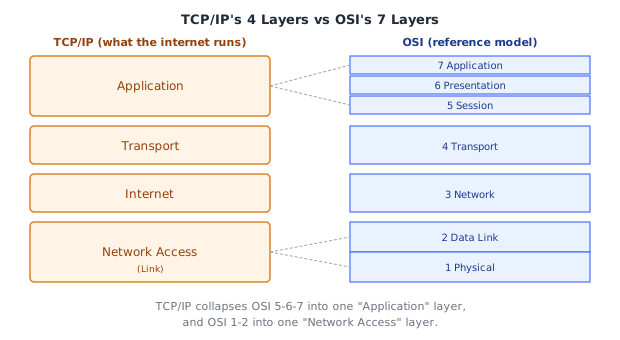
| # | TCP/IP Layer | Roughly = OSI layers | Job | Examples |
|---|---|---|---|---|
| 4 | Application | 7, 6, 5 | Everything the application itself needs: message format, encryption, session state | HTTP, DNS, TLS, SMTP |
| 3 | Transport | 4 | End-to-end delivery between two processes, via ports | TCP, UDP |
| 2 | Internet | 3 | Logical addressing and routing between networks | IP, ICMP |
| 1 | Network Access (a.k.a. Link) | 2, 1 | Delivery within one physical/local segment, and the raw transmission of bits | Ethernet, Wi-Fi, ARP |
The critical difference from OSI isn't just "4 vs 7" — it's why the collapse happens. TCP/IP was designed pragmatically, from working implementations, not from a top-down committee spec. Session management (OSI 5) and presentation concerns like encryption (OSI 6) turned out, in practice, not to need their own protocol layer with dedicated headers — they're handled inside application-layer libraries (a TLS library, an HTTP client's cookie jar) rather than as a separate wire-level layer every application must pass through. Likewise, the physical medium (OSI 1) and how frames are addressed on it (OSI 2) are treated as one inseparable concern: "how do I get a frame onto this specific wire/radio and addressed correctly," which is exactly what a network interface driver handles as one unit.
3Encapsulation in TCP/IP Terms
The same encapsulation idea from OSI applies, just with fewer, TCP/IP-named layers and their own terminology for each unit of data:
Application layer:    HTTP request                                (message)
Transport layer:      [TCP header | HTTP request]                 (segment)
Internet layer:       [IP header | TCP header | HTTP request]      (packet, a.k.a. datagram at this layer)
Network Access layer: [Eth header | IP header | ... | Eth trailer] (frame)
This is why, in practice, engineers say "packet" loosely to mean almost any unit of network data, but precisely it refers to the Internet-layer (IP) unit — a TCP segment becomes an IP packet becomes an Ethernet frame becomes a stream of bits, each name tied to a specific layer.
4Why TCP/IP, Not OSI, Is What You Actually Debug
Every layer you can meaningfully act on as a developer — opening a socket (transport), resolving/routing an IP (internet), inspecting HTTP headers (application) — maps cleanly onto TCP/IP's 4 layers. This is why command-line tools are organized around TCP/IP's boundaries, not OSI's:
| Tool | TCP/IP layer it operates on |
|---|---|
ping, traceroute | Internet (ICMP over IP) |
curl, wget, browser devtools Network tab | Application |
ss, netstat (socket/port state) | Transport |
ip addr, ifconfig, arp | Internet / Network Access |
Under the HoodHow it works internally▾
The Internet layer's one job: best-effort, unreliable, connectionless delivery
IP itself makes no promises. It does not guarantee packets arrive, arrive once, or arrive in order — it is explicitly a best-effort, connectionless protocol. Every IP packet is routed independently, hop by hop, with no memory of previous packets belonging to the "same" conversation at the IP layer itself. Any reliability (retransmission, ordering, deduplication) is deliberately pushed up to the transport layer (TCP), not built into IP — this separation of concerns is why UDP (which skips reliability entirely) and TCP (which adds it) can coexist as two different transport-layer choices on top of the exact same unreliable IP layer. Getting this right is the single most load-bearing design decision in the whole stack: it means routers only need to do one simple job (best-effort forward based on destination IP) and never need to track connection state, which is exactly what let the internet scale to billions of devices — a stateful network layer would require every router to remember every flow passing through it.
Why the "4 layers" boundary is really about who owns which guarantee
- Network Access guarantees delivery only across one physical hop (e.g., your laptop to your Wi-Fi router) — nothing more.
- Internet (IP) stitches hops together into an end-to-end path but guarantees nothing about arrival.
- Transport (TCP) is where actual end-to-end guarantees (if you want them) get added — see the TCP vs UDP topic for exactly how.
- Application is where the meaning of the bytes is finally interpreted.
Each layer trusts the layer below to do its narrow job and nothing more — a router forwarding an IP packet has no idea whether it's UDP or TCP inside, and doesn't need to; a switch forwarding an Ethernet frame has no idea what's inside the IP packet, and doesn't need to. This strict "each layer only understands its own header" rule is what makes the entire stack composable — it is the actual mechanism behind the "swap layers independently" property described in the OSI topic.
⚠️ Common Pitfalls
- Thinking TCP/IP has literally 4 layers of protocols and OSI has 7 different ones — they describe largely the same real protocols; TCP/IP just groups OSI's upper 3 and lower 2 layers together.
- Assuming IP itself provides reliability — it explicitly does not; that's TCP's job, layered on top, not a property of "the internet" itself.
- Confusing "Internet layer" with "the internet" as a whole — Internet layer specifically means the IP/ICMP layer (OSI layer 3 equivalent), not the whole global network.
- Not realizing routers are Internet-layer devices — a router only reads up to the IP header to make a forwarding decision; it does not (and structurally cannot, without deep packet inspection) look at TCP ports or HTTP content to route a packet.
📋 Quick Reference
TCP/IP layer      ≈ OSI layers   Examples              Unit
Application        7,6,5          HTTP, DNS, TLS        message
Transport           4              TCP, UDP              segment/datagram
Internet             3              IP, ICMP              packet
Network Access        2,1            Ethernet, Wi-Fi       frame → bits

IP: best-effort, connectionless, no reliability guarantees (by design)
TCP: adds reliability on top of IP; UDP: doesn't
🧠 Key takeaways
- TCP/IP layers: Link (Ethernet/Wi-Fi), Internet (IP), Transport (TCP/UDP), Application (HTTP, DNS, TLS).
- MAC addresses change every hop; IP addresses stay end-to-end (unless NAT rewrites them).
- Switches read L2, routers L3; hosts unwrap all four layers.
- Debug in TCP/IP terms: can I resolve (DNS)? route (ping/traceroute)? connect (nc)? speak HTTP (curl)?
🎤 Interview Q&A
Q1Describe the TCP/IP model layers.core▾
Link (Ethernet, Wi-Fi: frames between neighbours), Internet (IP: addressing and routing across networks), Transport (TCP/UDP: end-to-end delivery between processes via ports), Application (HTTP, DNS, SMTP).
- Which layer handles reliability? Transport (TCP).
Q2What does IP guarantee?core▾
Very little: best-effort delivery of packets between hosts. Packets can be lost, duplicated, reordered or corrupted; reliability is TCP's job.
- What's TTL in an IP packet? A hop counter decremented by each router to prevent infinite loops.
Q3Walk through what happens when you type a URL into a browser.core▾
DNS resolution (cache → resolver → root → TLD → authoritative), TCP handshake to the IP, TLS handshake (certificate validation, key agreement), HTTP request, server processing, response, then the browser parses HTML, fetches subresources, builds the DOM/CSSOM, runs JS and renders.
- How does HTTP/3 change it? QUIC over UDP combines transport and TLS handshakes, saving round trips.
Q4How does a packet get to a host on another network?senior▾
The host sees the destination is outside its subnet and sends the frame to its default gateway (router MAC via ARP). Routers forward based on routing tables hop by hop, rewriting layer-2 headers each hop, while the IP header stays the same (except TTL, and NAT changes).
- What changes at each hop? MAC addresses and TTL.
Q5What are the main application-layer protocols you use?core▾
HTTP/HTTPS (web APIs), DNS (name resolution), TLS (security), SMTP/IMAP (email), SSH (remote shells), WebSocket (bidirectional over HTTP), gRPC (over HTTP/2), MQTT/AMQP (messaging).
- Which run over UDP? DNS (mostly), QUIC/HTTP3, many streaming and gaming protocols.
🛠️ Practice exercises
Each exercise is a file in this topic folder. Code exercises are self-checking: run them and make the checks pass.
✅ Check yourself
Answer the questions — feedback is instant.