Rate Limiting
Rate limits protect your API from abuse and overload. Play with a token bucket to feel how bursts and refill interact, then see why in-memory counters break behind a load balancer and how a shared store and 429 headers fix it.
🎯 What you'll learn
- Why rate limit at all
- Fixed window, sliding window, token bucket, leaky bucket
- Distributed counting with a shared store
- Choosing scope and the client contract: 429 and headers
📚 Before you start
Part 1 covers the core algorithms a single rate limiter can implement, working against one counter/bucket. Part 2 covers distributing that counter across multiple servers, choosing the right limiting scope (per-user/IP/global), and the client-facing contract (429 response + headers).
1Why Rate Limit at All
An API without limits lets one caller — buggy client code in a retry loop, a scraper, or a deliberate abuser — consume unbounded capacity, degrading service for every other caller. Rate limiting caps how many requests a given caller may make in a given window, trading a small amount of legitimate-traffic friction for protection against runaway or abusive load.
2Fixed Window Counter — Simple, With a Sharp Edge
The simplest approach: count requests in discrete, non-overlapping time windows (e.g. per calendar minute), reset the counter to 0 at each window boundary:
const counters = new Map<string, { count: number; windowStart: number }>();

function allowFixedWindow(key: string, limit: number, windowMs: number, now: number): boolean {
  const entry = counters.get(key);
  const currentWindowStart = Math.floor(now / windowMs) * windowMs;

  if (!entry || entry.windowStart !== currentWindowStart) {
    counters.set(key, { count: 1, windowStart: currentWindowStart });
    return true;
  }
  if (entry.count >= limit) return false;
  entry.count++;
  return true;
}
The sharp edge: a client can send limit requests in the last millisecond of one window, then limit more in the first millisecond of the next — 2 * limit requests in a tiny real time span, even though each window individually respected its cap. This "boundary burst" is fixed window's well-known weakness.
3Sliding Window — Smoothing the Boundary
A sliding window avoids the fixed-window edge by looking back exactly windowMs from now, not from a fixed calendar boundary — typically implemented as a log of recent request timestamps, pruned on each check:
const requestLogs = new Map<string, number[]>();

function allowSlidingWindow(key: string, limit: number, windowMs: number, now: number): boolean {
  const log = requestLogs.get(key) ?? [];
  const cutoff = now - windowMs;
  const recent = log.filter((t) => t > cutoff); // drop anything older than the window

  if (recent.length >= limit) {
    requestLogs.set(key, recent);
    return false;
  }
  recent.push(now);
  requestLogs.set(key, recent);
  return true;
}
This correctly bounds any windowMs-wide slice of time to limit requests, closing the boundary-burst gap — at the cost of storing a timestamp per request instead of a single integer (addressed at scale by an approximation, see Part 2's distributed-counter discussion).
4Token Bucket — Allowing Controlled Bursts
Token bucket takes a different philosophy: instead of a hard per-window cap, a bucket holds up to capacity tokens, refilling at a steady refillRate (tokens/second), and each request consumes one token:
class TokenBucket {
  private tokens: number;
  private lastRefill: number;

  constructor(private capacity: number, private refillRatePerMs: number, now: number) {
    this.tokens = capacity;
    this.lastRefill = now;
  }

  tryConsume(now: number): boolean {
    const elapsed = now - this.lastRefill;
    this.tokens = Math.min(this.capacity, this.tokens + elapsed * this.refillRatePerMs);
    this.lastRefill = now;

    if (this.tokens >= 1) {
      this.tokens -= 1;
      return true;
    }
    return false;
  }
}
Unlike a fixed window, a client that's been idle can "save up" tokens (up to capacity) and spend them in a legitimate burst — useful for bursty-but-not-abusive traffic patterns (a client that fetches a batch of resources at page load, then goes quiet). The bucket's steady-state throughput is bounded by refillRate regardless of burst shape.
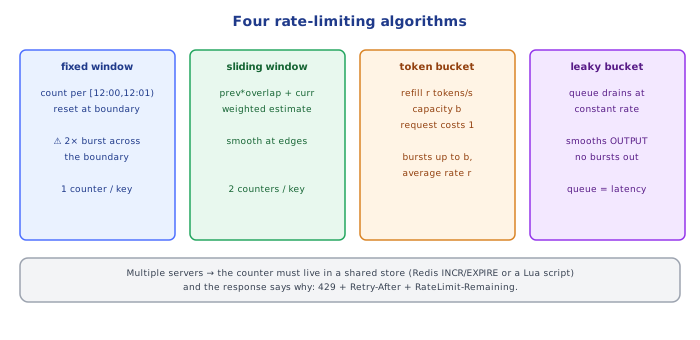
5Leaky Bucket — the Inverse: Smoothing Output, Not Allowing Bursts
Leaky bucket models a queue that drains (processes requests) at a constant rate, no matter how bursty the input — requests that arrive faster than the drain rate queue up (or get rejected once the queue is full), rather than being allowed through in a burst:
Token bucket:  bucket holds TOKENS, refills over time, requests CONSUME a token -- bursts allowed up to capacity
Leaky bucket:  bucket holds REQUESTS (a queue), drains at a FIXED rate -- output is always smooth, bursts get queued/dropped, never let through faster than the drain rate
Token bucket is the more common choice for API rate limiting specifically (it naturally expresses "N requests per second, with some burst tolerance"); leaky bucket shows up more where the goal is strictly smoothing output rate regardless of arrival pattern (e.g. shaping outbound traffic to a downstream system that genuinely cannot handle bursts at all).
⚠️ Common Pitfalls
- Choosing fixed window without realizing the boundary-burst weakness. Section 2's
2 * limitedge case is a real, exploitable gap, not a theoretical curiosity — a client that knows the window boundary can double its effective limit deliberately. - Implementing sliding window with an unbounded log. Without pruning old entries on every check (as shown in section 3), the log grows forever for a high-volume key — always drop entries older than the window on each check, not periodically.
- Confusing token bucket and leaky bucket as the same thing with different names. They model opposite things: token bucket controls how much can be CONSUMED (bursts allowed); leaky bucket controls how fast output DRAINS (bursts smoothed away, never passed through).
- Not accounting for elapsed time correctly in token bucket. Refilling only on a fixed tick (rather than computing elapsed time since
lastRefill, as section 4 does) under- or over-refills depending on how oftentryConsumehappens to be called.
📋 Quick Reference
Fixed window    -- simple counter per calendar window -- boundary-burst weakness (2x limit possible)
Sliding window   -- timestamp log, filtered to the last windowMs -- no boundary weakness, more storage
Token bucket      -- tokens refill steadily, requests consume one -- allows bounded bursts
Leaky bucket       -- fixed-rate drain queue -- smooths bursts away, output rate never exceeds drain rate
Part 1 covered the counting algorithms themselves, all implicitly assuming one process holding the counter in memory. Part 2 covers what breaks once there's more than one server, how to choose what a limit applies to, and how a limited client is supposed to find out and react.
1In-Memory Counters Break the Moment There's More Than One Server
Every algorithm in Part 1 assumed a single process's memory as the counter's home. Behind a load balancer with N server instances, each instance tracking its own in-memory counter means the effective limit is N * limit — a client bounced across instances (or simply lucky with load-balancer routing) can exceed the intended cap entirely, with no single instance ever seeing more than its own local slice of the traffic.
2The Fix: a Shared, Centralized Counter Store
The standard fix is moving the counter out of any one process's memory into a shared store every instance reads and writes — commonly Redis (see databases/caching/01-redis), chosen for its atomic increment-with-expiry primitives and speed:
// Every server instance calls this SAME Redis instance -- one true counter, not N local ones
async function allowFixedWindowRedis(redis: RedisClient, key: string, limit: number, windowSeconds: number): Promise<boolean> {
  const count = await redis.incr(key);       // atomic: increment and return the NEW value in one round trip
  if (count === 1) {
    await redis.expire(key, windowSeconds);  // first request in this window sets the TTL
  }
  return count <= limit;
}
The atomicity of INCR matters specifically because it closes a race two servers could otherwise hit: both reading count=limit - 1 concurrently, both deciding "still under the limit," both incrementing — allowing limit + 1 through. A single atomic increment-and-compare, done by Redis itself rather than read-then-write from the application, removes that race entirely.
3Choosing the Limiting Scope
The same algorithm can be applied at different granularities — and the choice changes what kind of abuse it actually prevents:
| Scope | Key shape | Prevents | Doesn't prevent |
|---|---|---|---|
| Per-user (authenticated) | rate-limit:{userId} | One account hammering the API | An attacker rotating across many accounts/IPs |
| Per-IP | rate-limit:{ip} | One source hammering the API regardless of auth | Distributed abuse (many IPs); false positives behind shared NAT/corporate proxy |
| Per-API-key | rate-limit:{apiKey} | One integration exceeding its allotted tier | Nothing beyond that specific credential's scope |
| Global | rate-limit:global | Total load exceeding what the backend can survive, regardless of source | Any single caller from hogging a disproportionate share within that global budget |
Real systems commonly layer multiple scopes simultaneously — a global cap protecting total backend capacity, plus a per-user/per-key cap protecting fairness between callers — rather than picking exactly one.
4The Client-Facing Contract: 429 and Response Headers
A rate-limited request must communicate clearly enough that a well-behaved client can back off correctly without guessing:
HTTP/1.1 429 Too Many Requests
Retry-After: 42
X-RateLimit-Limit: 100
X-RateLimit-Remaining: 0
X-RateLimit-Reset: 1717000000

{ "error": { "code": "RATE_LIMITED", "message": "Too many requests. Retry after 42 seconds." } }Retry-After(a standard HTTP header, not rate-limit-specific) tells the client exactly how long to wait before retrying — this is what lets a client's retry logic (distributed-systems/fundamentals/06-retry_with_exponential_backoff) back off correctly instead of guessing or hammering immediately again.X-RateLimit-Limit/-Remaining/-Reset(a de facto convention, not a single official standard — exact header names vary slightly by API) let a well-behaved client proactively throttle itself before ever hitting429, by watchingRemainingapproach zero.- The response body follows the same consistent error shape as every other error (
backend/api-design/09-error_response_design) — rate limiting isn't a special case that gets its own bespoke error format.
Returning these headers on every response (not just 429s) is what makes proactive client-side throttling possible — a client that only learns its limit status after already being rejected has already wasted the request that triggered the rejection.
⚠️ Common Pitfalls
- Rate limiting with in-memory state behind a multi-instance deployment. Section 1's
N * limitgap is the single most common real-world rate-limiting bug — it works perfectly in local testing (one process) and silently fails in production (many instances). - Read-then-write instead of an atomic increment for a shared counter. Reintroduces the exact race section 2 describes, even with a centralized store, if the increment isn't atomic.
- Only rate limiting by IP. Misses per-account abuse entirely when many abusive requests share one legitimate corporate NAT IP (false positives), or when a single attacker cycles through many IPs (false negatives) — pair IP-based limiting with per-user/per-key limiting rather than relying on it alone.
- Sending
429with noRetry-After. Forces the client to guess a backoff duration, defeating the entire purpose of a machine-readable retry signal. - Only sending rate-limit headers on the
429response itself. Prevents proactive client-side throttling — see section 4's closing point.
📋 Quick Reference
Single-process counter  -- breaks at N instances: effective limit becomes N * limit
Fix                      -- shared store (Redis), ATOMIC increment-and-check (INCR), not read-then-write

Scopes: per-user, per-IP, per-API-key, global -- often layered, not exclusive

429 Too Many Requests
  Retry-After: <seconds>              -- machine-readable backoff signal
  X-RateLimit-Limit/-Remaining/-Reset -- send on EVERY response, enables proactive throttling
  body: same consistent {error:{...}} shape as every other error
🧠 Key takeaways
- Limits protect availability, cost and fairness; apply per API key/user/IP/tenant (and globally).
- Fixed window is simple but allows 2× bursts at boundaries; sliding window smooths it; token bucket allows controlled bursts; leaky bucket smooths output.
- Multiple servers need a shared atomic counter (Redis + Lua) or a gateway that does it.
- Respond 429 with
Retry-AfterandRateLimit-*headers; clients back off with jitter.
🎤 Interview Q&A
Q1Why rate-limit an API?core▾
To protect availability from abuse and spikes, ensure fair usage among clients, control costs, mitigate brute-force and scraping, and enforce plan limits.
- What do you key limits on? API key, user ID, IP address, or combinations, per endpoint where needed.
Q2How do you communicate rate limits to clients?core▾
Return 429 Too Many Requests with Retry-After, and include headers like RateLimit-Limit, RateLimit-Remaining, RateLimit-Reset (IETF draft) so clients can pace themselves.
- What should clients do? Back off with jitter and respect Retry-After.
Q3Which algorithm would you use?core▾
Token bucket for allowing short bursts with a sustained rate, sliding window counter for accurate per-window limits with little memory. Fixed windows are simplest but allow bursts at boundaries.
- Where do you store counters? Redis with atomic scripts for distributed limits.
Q4Rate limiting vs throttling vs quotas?senior▾
Rate limiting rejects requests over a rate. Throttling slows them down (queueing/delaying). Quotas cap total usage over long periods (monthly API calls by plan).
- Which is best for login endpoints? Strict rate limits plus progressive delays per account and IP.
Q5How do you rate-limit fairly behind proxies and CDNs?core▾
Use the real client IP from trusted X-Forwarded-For entries, prefer authenticated identities over IPs (NATs share IPs), and apply limits at the edge (WAF/CDN) for volumetric abuse.
- Why are IP limits weak? Attackers rotate IPs; many legitimate users share one.
🛠️ Practice exercises
Each exercise is a file in this topic folder. Code exercises are self-checking: run them and make the checks pass.
✅ Check yourself
Answer the questions — feedback is instant.