DynamoDB
DynamoDB is a serverless key-value and document database with single-digit-millisecond latency at any scale, if you design keys from your access patterns. Compare Query vs Scan costs, then build a single-table design with GSIs and streams.
🎯 What you'll learn
- Tables, items, partition and sort keys
- GetItem, Query vs Scan, and writes with conditions
- On-demand vs provisioned capacity, hot keys
- Access-pattern-first single-table design, GSIs and Streams
📚 Before you start
1What DynamoDB Is
Amazon DynamoDB is a fully managed, serverless key-value and document database with single-digit-millisecond latency at virtually any scale. No servers, no connection limits (HTTP API), automatic replication across 3 AZs, optional global tables across regions. The trade-off: you must design the data model around your access patterns up front — there are no joins and no ad-hoc queries over arbitrary attributes.
2Core Concepts
| Concept | Meaning |
|---|---|
| table | collection of items (no fixed schema except the key) |
| item | a record, up to 400 KB, with attributes (string, number, binary, bool, list, map, set) |
| partition key (PK) | required; hashed to choose the physical partition |
| sort key (SK) | optional; items with the same PK are stored sorted by SK — enables range queries |
| primary key | PK alone, or PK + SK (must be unique) |
| GSI (global secondary index) | alternative PK/SK over the same data, eventually consistent, own capacity |
| LSI (local secondary index) | same PK, different SK; must be defined at table creation; 10 GB per PK limit |
3Reading: GetItem, Query, Scan
import { DynamoDBDocumentClient, GetCommand, QueryCommand } from "@aws-sdk/lib-dynamodb";

// GetItem: exact primary key → 1 item
await ddb.send(new GetCommand({ TableName: "app", Key: { PK: "USER#42", SK: "PROFILE" } }));

// Query: one partition key, optional sort-key condition → items in SK order (paginated, 1 MB per page)
await ddb.send(new QueryCommand({
  TableName: "app",
  KeyConditionExpression: "PK = :pk AND begins_with(SK, :prefix)",
  ExpressionAttributeValues: { ":pk": "USER#42", ":prefix": "ORDER#2025-" },
  ScanIndexForward: false,      // newest first
  Limit: 20,
}));- Query is the workhorse: efficient because it reads one partition, ordered by SK.
- Scan reads the whole table (every partition) — expensive and slow; fine for small tables, backfills or exports, never for request paths.
- FilterExpression is applied after reading — you still pay for everything read. Design keys so filters are rarely needed.
- Reads are eventually consistent by default (half the cost);
ConsistentRead: truefor strongly consistent reads (not available on GSIs).
4Writing
await ddb.send(new PutCommand({
  TableName: "app",
  Item: { PK: "USER#42", SK: "ORDER#2025-06-12#o-9", total: 4599, status: "PLACED" },
  ConditionExpression: "attribute_not_exists(PK)",           // create only (idempotent creates, no overwrite)
}));

await ddb.send(new UpdateCommand({
  TableName: "app",
  Key: { PK: "PRODUCT#7", SK: "STOCK" },
  UpdateExpression: "SET qty = qty - :n",
  ConditionExpression: "qty >= :n",                          // atomic, no oversell (advanced-engineering/…/02-race_conditions)
  ExpressionAttributeValues: { ":n": 2 },
}));- Conditional writes give optimistic concurrency (version attributes) and invariants without locks.
- TransactWriteItems: up to 100 items across tables, all-or-nothing (2× cost).
- BatchWriteItem / BatchGetItem: up to 25 / 100 items per call, not atomic, retry
UnprocessedItems. - TTL attribute: items expire automatically (deletion within ~48 h, free) — sessions, idempotency keys, temporary data.
5Capacity Modes
| Mode | How | Use for |
|---|---|---|
| on-demand | pay per request (RRU/WRU); scales automatically | unknown/spiky traffic, new apps |
| provisioned | set RCU/WCU (+ auto scaling); cheaper at steady load | predictable traffic |
1 WCU = one write/s of ≤ 1 KB; 1 RCU = one strongly consistent read/s of ≤ 4 KB (or two eventually consistent). Item size drives cost — keep items small, project only needed attributes into GSIs.
Under the HoodPartitions and Hot Keys▾
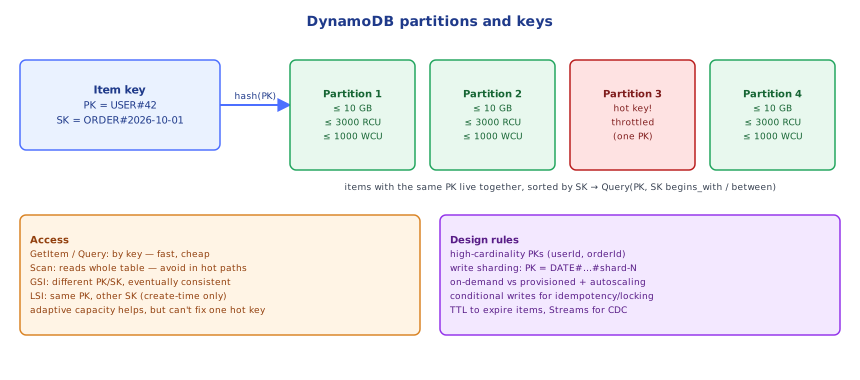
DynamoDB hashes the partition key to place items on partitions — storage nodes each holding up to ~10 GB and serving up to about 3,000 RCU and 1,000 WCU per second. Each partition is replicated to three nodes in three AZs; writes are acknowledged after a quorum (two of three) persists them, with a leader per partition handling writes and strongly consistent reads. As data or throughput grows, DynamoDB splits partitions automatically, and adaptive capacity shifts throughput toward busy partitions. What it can't fix is a single hot key: all requests for PK = "GLOBAL_COUNTER" land on one partition, capping it at ~1,000 writes/s regardless of table capacity → ProvisionedThroughputExceededException / throttling. Spread load with high-cardinality partition keys or write sharding (COUNTER#<0..9> and sum on read) — the same idea as sharded counters in databases/caching/08-distributed_caching.
📋 Quick Reference (Part 1)
PK (+SK) · item ≤ 400 KB · GetItem (exact) · Query (one PK, SK range, sorted) · Scan (avoid in request paths)
filters cost what they read · eventually consistent default · ConditionExpression for invariants · transactions ≤ 100 items
on-demand vs provisioned · TTL for expiry · hot keys cap at ~1k WCU/3k RCU per partition → shard keys1Start From Access Patterns
Relational design starts from entities and normalizes; DynamoDB design starts from the list of queries the application will run, then shapes keys so each query is a GetItem or Query.
Example — an e-commerce app:
| # | Access pattern | Key design |
|---|---|---|
| 1 | get customer profile | PK=CUSTOMER#<id>, SK=PROFILE |
| 2 | list a customer's orders, newest first | PK=CUSTOMER#<id>, SK begins_with ORDER# (SK=ORDER#<iso-date>#<orderId>) |
| 3 | get an order with its items | PK=ORDER#<orderId>, SK=META and SK=ITEM#<n> (one Query) |
| 4 | find an order by id alone | (3) covers it |
| 5 | list orders by status for the warehouse | GSI1: GSI1PK=STATUS#<status>, GSI1SK=<iso-date> |
| 6 | look up a customer by email | GSI2: GSI2PK=EMAIL#<email> |
2Single-Table Design
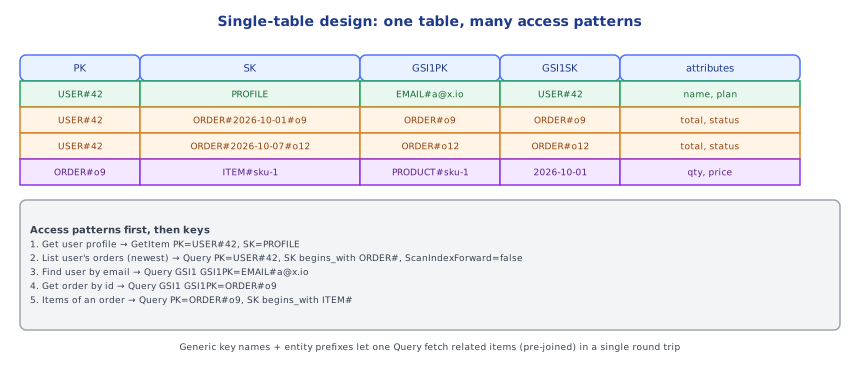
Store different entity types in one table with generic key names (PK, SK, GSI1PK, …) and a type attribute. Items that are read together share a partition key, so one Query returns a whole "aggregate" — the DynamoDB equivalent of a join, precomputed at write time:
PK               SK                         type       attributes
CUSTOMER#42      PROFILE                    customer   name, email, GSI2PK=EMAIL#ana@x.io
CUSTOMER#42      ORDER#2025-06-12#o-9       orderref   total, status
ORDER#o-9        META                       order      customerId, status, GSI1PK=STATUS#PLACED, GSI1SK=2025-06-12
ORDER#o-9        ITEM#1                     item       sku, qty, price
ORDER#o-9 ITEM#2 item ...Pros: fewest requests per page, one table to provision/monitor/back up. Cons: harder to read and evolve, requires knowing access patterns, analytics need export (S3/Athena) or streams. Many teams use a pragmatic middle ground: one table per bounded context/service, single-table inside it.
PK            SK                          GSI1PK          attributes
CUSTOMER#42   PROFILE                     EMAIL#a@x.io    name, plan
CUSTOMER#42   ORDER#2026-10-01#o9         STATUS#PLACED   total
ORDER#o9      ITEM#1                      -               sku, qty

1. profile          → GetItem PK=CUSTOMER#42 SK=PROFILE
2. recent orders    → Query PK=CUSTOMER#42 SK begins_with ORDER# (desc)
3. order + items    → Query PK=ORDER#o9
4. by email         → Query GSI1 PK=EMAIL#a@x.io
5. placed orders → Query GSI1 PK=STATUS#PLACED3Secondary Indexes
- GSI: any attribute as partition/sort key; sparse — only items that have the GSI key attributes appear (great for "orders awaiting shipment": only those items carry
GSI1PK). - Projections:
KEYS_ONLY,INCLUDE(chosen attributes) orALL— every projected byte is written again (cost). - GSIs are updated asynchronously (eventually consistent) and can throttle the base table if under-provisioned.
- Up to 20 GSIs per table; adding one later triggers a backfill.
4Patterns
- Adjacency list for many-to-many (users ↔ groups): items
USER#1 / GROUP#7and the inverse via a GSI. - Composite sort keys for hierarchical queries:
SK = COUNTRY#DE#CITY#Berlin#STORE#12→begins_withat any level. - Version history:
SK = v0(latest) +v1, v2…written in a transaction. - Idempotency / dedup items with TTL.
- Write sharding for hot keys (Part 1 Under the Hood).
5DynamoDB Streams
A stream records every item-level change (new/old images) for 24 hours, ordered per partition key. Consumers (Lambda event source mapping, Kinesis adapter) build:
- materialized views / read models in another table or OpenSearch (CQRS —
distributed-systems/message-brokers/11-event_driven_architecture), - event publishing to EventBridge (a native outbox: write once, the stream guarantees the event),
- aggregations (counters, leaderboards),
- replication/audit trails.
Global tables use streams internally for multi-region, multi-active replication with last-writer-wins conflict resolution (databases/scaling/04-regional_partitioning).
6When DynamoDB Is the Wrong Choice
- Ad-hoc querying, reporting, complex joins → relational DB or analytics (export to S3 + Athena).
- Unknown or rapidly changing access patterns early in a product.
- Large items (> 400 KB) → store in S3, keep a pointer.
- Strong multi-item consistency across many entities beyond transactions' limits.
Under the HoodHow Global Secondary Indexes Are Maintained▾
A GSI is physically another partitioned table. When you write an item, DynamoDB's request router first commits the write to the base table's partition (quorum across AZs), then asynchronously propagates the change to each GSI whose key attributes are present — inserting the new projection and deleting the old one if the GSI key changed. Propagation is usually milliseconds but not transactional, which is why GSI reads are always eventually consistent and why a read-after-write via a GSI can miss a just-written item. If a GSI's partition is throttled (hot GSI key, insufficient provisioned WCU), DynamoDB applies back-pressure to the base table writes so the index can't fall arbitrarily behind — a classic surprise where "the table" throttles because of one badly designed index.
⚠️ Common Pitfalls (Part 2)
- Designing tables like relational schemas — one table per entity and "joins" in code.
- Scans + filters in request paths.
- Low-cardinality partition keys (
status,country) — hot partitions. - Projecting ALL into every GSI — doubled write costs.
- Assuming GSI reads are consistent right after writes.
- No plan for analytics — use exports/streams, not table scans.
📋 Quick Reference (Part 2)
list access patterns → design PK/SK/GSIs so each is Get/Query
single-table: generic keys, type attr, co-locate data read together
GSI: sparse, projections, eventually consistent, can throttle base table
streams: 24 h change log → Lambda → read models / EventBridge / aggregates · global tables = multi-region
🧠 Key takeaways
- Items are addressed by partition key (+ sort key); Query reads one partition in sort order, Scan reads everything.
- Use conditional writes for idempotency and optimistic locking; transactions for multi-item atomicity.
- Choose on-demand for spiky/unknown load, provisioned + autoscaling for steady; avoid hot partition keys.
- Design from access patterns: single-table with generic keys, GSIs for alternate lookups, Streams for change events.
🎤 Interview Q&A
Q1How does DynamoDB partition data?core▾
Items are distributed across partitions by the hash of the partition key; a sort key orders items within a partition. Each partition has throughput limits (~3,000 RCU / 1,000 WCU), so keys must spread load evenly.
- What's a hot partition? A key receiving disproportionate traffic, causing throttling.
Q2How do you model data in DynamoDB?core▾
Start from access patterns, design keys so each pattern is a GetItem or Query on one partition, use composite sort keys (ORDER#2024-01-05), GSIs for alternate access patterns, and often single-table design with several entity types.
- Why avoid Scan? It reads the whole table: slow and expensive.
Q3GSI vs LSI?core▾
GSI: different partition and sort key, eventually consistent, own capacity, can be added anytime. LSI: same partition key, different sort key, strongly consistent reads possible, must be created with the table, 10 GB per partition key limit.
- Which is more common? GSIs.
Q4On-demand vs provisioned capacity?senior▾
On-demand: pay per request, instant scaling, good for unpredictable traffic. Provisioned: set RCU/WCU with auto scaling, cheaper for steady predictable load, can throttle on sudden spikes.
- Switching limits? You can switch modes periodically (limited frequency).
Q5How do transactions and consistency work in DynamoDB?core▾
Reads are eventually consistent by default, strongly consistent on request (not for GSIs). TransactWriteItems gives ACID across up to 100 items. Conditional writes enable optimistic locking and uniqueness checks.
- How do you enforce unique emails? A separate item keyed by email written with a condition in a transaction.
🛠️ Practice exercises
Each exercise is a file in this topic folder. Code exercises are self-checking: run them and make the checks pass.
✅ Check yourself
Answer the questions — feedback is instant.