API Gateway
API Gateway is the managed front door for serverless APIs: routing, auth, throttling and observability. Compare REST, HTTP and WebSocket APIs, follow a request through authorization and throttling, and see where the latency goes.
🎯 What you'll learn
- What API Gateway does and its three flavours
- The request flow: route, authorize, integrate
- Authentication options: JWT, IAM, Lambda authorizers, API keys
- Throttling, quotas, WAF and observability
📚 Before you start
1What It Does
Amazon API Gateway is a managed front door for APIs: it terminates HTTPS, routes requests to backends (Lambda, HTTP endpoints, AWS services, private resources via VPC Link), and adds authentication, throttling, request validation, transformation, caching, usage plans, logging and metrics — without servers.
2Three Flavours
| HTTP API (v2) | REST API (v1) | WebSocket API | |
|---|---|---|---|
| use for | most new APIs | when you need its extra features | real-time bidirectional |
| price | ~$1.00 / million | ~$3.50 / million | per message + connection minutes |
| latency | lower | higher | — |
| auth | JWT authorizers (Cognito, any OIDC), Lambda authorizers, IAM | Cognito user pools, Lambda authorizers, IAM, API keys + usage plans | Lambda / IAM on $connect |
| features | CORS, automatic deployments, VPC Link to ALB/NLB/Cloud Map | request/response mapping templates (VTL), request validation, caching, edge-optimized endpoints, WAF, X-Ray, private APIs, service integrations | routes by message content ($connect, $disconnect, $default, custom) |
Choose HTTP API unless you need API keys/usage plans, response caching, VTL transformations, request validation, private endpoints or WAF directly on the API.
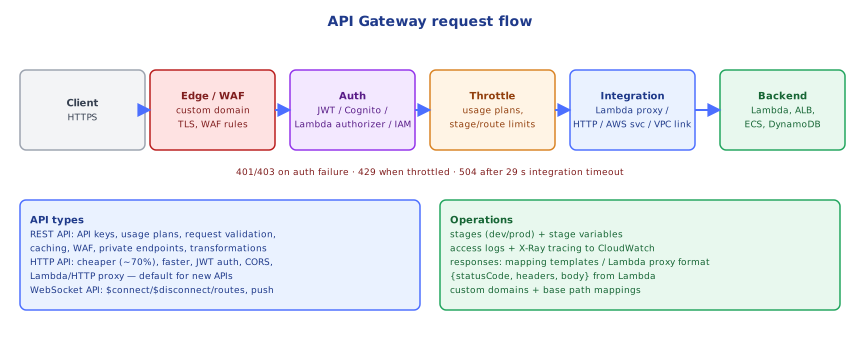
3Request Flow
client → (custom domain + ACM cert) → stage (prod) → route "POST /orders"
       → authorizer (JWT / Lambda / IAM) → throttling → [validation] → integration
→ backend (Lambda proxy / HTTP / AWS service) → response (→ mapping) → client- Routes = method + path (
GET /orders/{id},ANY /{proxy+}). - Integrations: Lambda proxy (the whole request as an event; the function returns status/headers/body), HTTP proxy (forward to an HTTP backend), AWS service (e.g. put directly into SQS or DynamoDB without Lambda — REST API or HTTP API "AWS service integrations").
- Stages (
dev,prod) with stage variables; custom domains map base paths to API stages.
4Authentication and Authorization
- JWT authorizer (HTTP API): validates
iss,aud, signature (JWKS) and expiry of an OIDC/Cognito token; claims are passed to the backend (requestContext.authorizer.jwt.claims) —security/security/04-openid_connect. - Lambda authorizer: your code inspects headers/tokens and returns allow/deny plus context; results can be cached by token (TTL) to avoid invoking it on every request.
- IAM auth: callers sign requests with SigV4 — ideal for service-to-service calls inside AWS.
- API keys + usage plans (REST): identify and meter clients, with quotas and throttles per key. Not an authentication mechanism on their own (keys leak; they're just identifiers).
- Object-level authorization (may this user see order 42?) stays in the backend (
backend/api-design/10-api_security).
5Throttling, Quotas and Protection
- Account-level default: 10,000 requests/s steady with 5,000 burst per region (token bucket —
backend/api-design/07-rate_limiting), shared by all APIs. - Per-stage/route throttles and per-client limits via usage plans protect backends from overload; clients receive
429. - AWS WAF (REST APIs, or in front via CloudFront) blocks common attacks, bad IPs, bots, and rate-based rules.
- Hard limits to design for: 29-second integration timeout (raisable for regional REST APIs at the cost of throttle quota), 10 MB payload — large uploads should go straight to S3 with presigned URLs (
04-s3/).
6Observability
- Access logs (JSON format with requestId, routeKey, status, latency, integrationLatency, authorizer errors) to CloudWatch Logs or Firehose.
- Metrics:
Count,4xx,5xx,Latency(total) vsIntegrationLatency(backend) — the difference is API Gateway overhead (auth, throttling, transformation). - X-Ray tracing (REST) / Lambda tracing to follow requests end to end.
Under the HoodWhere the Latency Goes▾
A request to a regional API first hits API Gateway's fleet in the region (edge-optimized REST APIs go through a CloudFront POP first). The frontend terminates TLS, matches the route, evaluates the authorizer (a JWT check is local and fast once the JWKS is cached; a Lambda authorizer is an extra Lambda invocation unless its result is cached), applies throttling (token buckets per account, stage and route), and invokes the integration. For Lambda proxy integrations, the event is serialized to JSON and Lambda's synchronous Invoke API is called — a cold start shows up in IntegrationLatency. The 29-second limit exists because API Gateway holds the client connection open while waiting; long work should return 202 Accepted and continue asynchronously (SQS/Step Functions), with the client polling or receiving a webhook/WebSocket message.
⚠️ Common Pitfalls
- Using API keys as authentication.
- Long synchronous work hitting the 29 s timeout.
- Uploading large files through the API instead of presigned S3 URLs.
- No per-route throttling — one noisy endpoint consumes the account-wide limit.
- Uncached Lambda authorizers doubling Lambda invocations and latency.
- No access logs — debugging 4xx/5xx becomes guesswork.
📋 Quick Reference
HTTP API (cheap, fast, JWT) vs REST API (keys/usage plans, caching, VTL, validation, WAF, private) vs WebSocket
route → authorizer → throttle → integration (Lambda proxy | HTTP | AWS service | VPC Link)
limits: 29 s integration timeout · 10 MB payload · 10k rps / 5k burst account default
observability: JSON access logs · Latency vs IntegrationLatency · X-Ray
🧠 Key takeaways
- API Gateway provides routing, auth, throttling, transformations and observability as a managed front door.
- HTTP APIs are cheaper and faster (JWT, Lambda/HTTP proxy); REST APIs add usage plans, caching, validation; WebSocket APIs for push.
- Authorize with JWT, IAM (SigV4) or Lambda authorizers; API keys identify clients, they aren't authentication.
- Throttle per route/stage/usage plan, add WAF, and remember the 29 s integration timeout.
🎤 Interview Q&A
Q1REST API vs HTTP API in API Gateway?core▾
HTTP APIs: cheaper, faster, simpler (JWT authorizers, Lambda/HTTP integrations). REST APIs: more features: API keys and usage plans, request validation and transformation, caching, WAF integration, private endpoints, edge-optimized endpoints.
- Default choice? HTTP API unless you need REST API features.
Q2How do you authorize requests in API Gateway?core▾
IAM authorization (SigV4) for AWS clients, Cognito or JWT authorizers for OIDC tokens, Lambda authorizers for custom logic (with result caching), and API keys only for usage plans, not security.
- Why aren't API keys security? They identify clients but are easily shared and not tied to users.
Q3What limits should you know?core▾
29-second integration timeout (REST/HTTP, raisable for some), 10 MB payload, account-level throttling (10,000 rps default), and per-method/stage throttles you can configure.
- What about long-running work? Return 202 and process asynchronously.
Q4How do you version and deploy APIs?senior▾
Stages (dev, prod) with stage variables, canary deployments on REST APIs, custom domains with base path mappings (/v1, /v2), all defined in IaC with OpenAPI.
- Canary in API Gateway? Send a percentage of stage traffic to a new deployment.
Q5When would you not use API Gateway?core▾
High-volume steady traffic where per-request pricing is expensive (an ALB may be cheaper), WebSockets at large scale, or when you need features like long timeouts.
- ALB with Lambda? Possible and cheaper at high volume, with fewer API features.
🛠️ Practice exercises
Each exercise is a file in this topic folder. Code exercises are self-checking: run them and make the checks pass.
✅ Check yourself
Answer the questions — feedback is instant.