Multi-Account Strategy and AWS Organizations
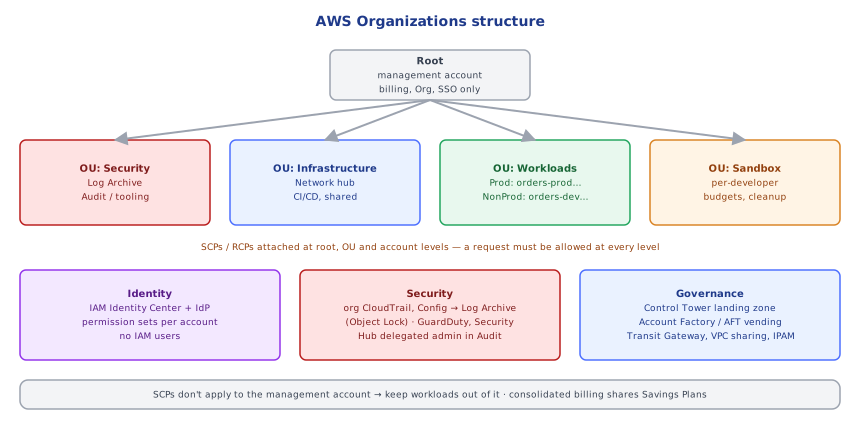
One account for everything is one blast radius for everything. Design an organization with OUs for security, infrastructure, workloads and sandboxes; enforce guardrails with SCPs; and centralize identity, networking, logging and security.
🎯 What you'll learn
- Why many accounts and which account types
- AWS Organizations: OUs, SCPs, RCPs and other policies
- Control Tower, landing zones and account vending
- Identity, networking and central security across accounts
📚 Before you start
1Why Many Accounts
An AWS account is the strongest isolation boundary AWS offers: separate IAM, quotas, billing, and blast radius. Putting everything in one account means one compromised credential, one runaway script or one quota exhaustion affects everything. The recommended practice is many accounts, organized by purpose:
| Account type | Examples |
|---|---|
| management (payer) | only Organizations, billing, SSO admin — no workloads |
| security | log archive (CloudTrail/Config logs, immutable), security tooling (GuardDuty/Security Hub delegated admin) |
| infrastructure / shared services | networking hub (Transit Gateway, DNS), CI/CD, shared ECR |
| workloads | per application/team and per environment: orders-dev, orders-staging, orders-prod |
| sandbox | individual experimentation with budgets and auto-cleanup |
2AWS Organizations
- Accounts grouped into organizational units (OUs):
Security,Infrastructure,Workloads/Prod,Workloads/NonProd,Sandbox,Suspended. - Consolidated billing (volume discounts, shared Savings Plans/RIs) —
24-cost_optimization_and_well_architected/. - Policies:
- SCPs (service control policies) — maximum permissions for accounts in an OU (even root): deny regions, deny disabling security services, deny leaving the org, require IMDSv2… (
21-iam_deep_dive/) - RCPs (resource control policies) — maximum permissions on resources (e.g. no S3/KMS/Secrets access from outside the organization)
- declarative policies (EC2 baseline settings), tag policies, backup policies, AI opt-out policies
- SCPs (service control policies) — maximum permissions for accounts in an OU (even root): deny regions, deny disabling security services, deny leaving the org, require IMDSv2… (
- Delegated administrators for security services so the management account stays clean.
{
  "Version": "2012-10-17",
  "Statement": [{
    "Sid": "DenyOutsideApprovedRegions",
    "Effect": "Deny",
    "NotAction": ["iam:*", "organizations:*", "sts:*", "support:*", "cloudfront:*", "route53:*", "budgets:*"],
    "Resource": "*",
    "Condition": { "StringNotEquals": { "aws:RequestedRegion": ["eu-west-1", "eu-central-1"] } }
  }]
}3Control Tower and Landing Zones
A landing zone is the pre-configured multi-account baseline. AWS Control Tower builds and governs one: creates the Security OU with log archive and audit accounts, sets up IAM Identity Center, an organization-wide CloudTrail, AWS Config, and applies controls (preventive = SCPs/RCPs, detective = Config rules, proactive = CloudFormation Hooks). Account Factory (or Account Factory for Terraform, AFT) vends new accounts with baselines (VPC, roles, budgets) in minutes.
4Identity Across Accounts
- IAM Identity Center with your IdP: users get permission sets (e.g.
ReadOnly,Developer,Admin) per account; no IAM users anywhere. - Workloads and CI use cross-account roles (
OrganizationAccountAccessRoleonly for break-glass; purpose-built deploy roles otherwise). - Use
aws:PrincipalOrgIDin resource policies to allow "anyone in our org" safely.
5Networking Across Accounts
- Transit Gateway (hub-and-spoke routing between VPCs and on-prem), VPC sharing via Resource Access Manager (central network team owns subnets, workload accounts launch into them), PrivateLink for exposing specific services.
- Centralized egress/inspection VPC (NAT + Network Firewall) and centralized DNS (Route 53 Resolver rules shared via RAM).
- Plan non-overlapping CIDRs across all accounts from day one (IPAM).
6Central Security and Logging
- Organization CloudTrail → log archive account bucket (object lock, restricted access).
- GuardDuty, Security Hub, Config, IAM Access Analyzer, Inspector enabled org-wide with a delegated admin in the security account.
- Budgets and cost anomaly detection per account; tags enforced by tag policies.
Under the HoodHow SCPs Combine With IAM▾
An SCP grants nothing by itself; it defines the maximum permissions available to principals in an account. When a principal in a member account makes a request, AWS evaluates the SCPs attached to every level from the organization root down through each parent OU to the account — the request must be allowed at every level (the default FullAWSAccess SCP allows everything, so in practice guardrails are written as explicit Deny statements). The SCP result is intersected with the account's own identity and resource policies (21-iam_deep_dive/ evaluation logic). SCPs don't apply to the management account or to service-linked roles, which is one reason the management account must not host workloads — and why sensitive operations there must be tightly controlled.
⚠️ Common Pitfalls
- Workloads in the management account.
- One account for prod and dev.
- IAM users per account instead of Identity Center.
- Overlapping VPC CIDRs that block peering/Transit Gateway later.
- SCPs tested in production OUs first — test in a sandbox OU.
- No log archive isolation — attackers delete trails in the same account.
📋 Quick Reference
accounts: management (no workloads) · security (log archive, audit) · infrastructure · workloads per app×env · sandbox
Organizations: OUs + SCPs/RCPs/tag/backup policies · consolidated billing · delegated admins
landing zone: Control Tower (+ Account Factory / AFT) · Identity Center permission sets
network: Transit Gateway, VPC sharing (RAM), PrivateLink, IPAM · org-wide CloudTrail, GuardDuty, Security Hub, Config
🧠 Key takeaways
- Accounts are the strongest isolation boundary: separate workloads by team × environment, keep the management account empty.
- Organize with OUs; SCPs/RCPs set maximum permissions (deny regions, protect security services).
- Use Control Tower (landing zone + controls) and Account Factory/AFT to vend accounts with baselines.
- Centralize Identity Center, networking (TGW/VPC sharing/IPAM), org CloudTrail → log archive, GuardDuty/Security Hub.
🎤 Interview Q&A
Q1Why use multiple AWS accounts?core▾
Accounts are the strongest isolation boundary: separate blast radius, billing, quotas and permissions for environments (dev/staging/prod), teams and workloads. A compromised dev account can't touch production.
- What's a landing zone? A pre-configured multi-account setup with security baselines (Control Tower).
Q2How do you organize accounts with AWS Organizations?core▾
OUs such as Security (log archive, audit), Infrastructure (shared networking), Workloads (prod/non-prod per team), Sandbox, with SCPs per OU and consolidated billing.
- Where do CloudTrail logs go? A central, locked-down log archive account.
Q3How do people access many accounts?senior▾
IAM Identity Center (SSO) with permission sets mapped to groups from the corporate IdP, giving temporary role credentials per account; no IAM users per account.
- CLI access?
aws sso loginwith profiles.
Q4How do you share networking across accounts?core▾
A shared networking account with Transit Gateway or VPC sharing via Resource Access Manager, centralized egress and inspection, and Route 53 Resolver rules shared across accounts.
- Benefit of VPC sharing? Teams deploy into central subnets without managing networking.
Q5How do you enforce guardrails across accounts?core▾
SCPs (deny disabling security services, restrict regions), AWS Config conformance packs, Security Hub, GuardDuty delegated admin, tag policies and Control Tower controls.
- Preventive vs detective controls? SCPs prevent; Config/Security Hub detect.
🛠️ Practice exercises
Each exercise is a file in this topic folder. Code exercises are self-checking: run them and make the checks pass.
✅ Check yourself
Answer the questions — feedback is instant.