IAM Deep Dive
Go beyond basic policies: principals and STS, the full evaluation logic across policy types, conditions, cross-account access, federation, permissions boundaries, ABAC, and the privilege-escalation paths attackers look for.
🎯 What you'll learn
- Principals, trust policies and STS temporary credentials
- All policy types and the complete evaluation logic
- Least privilege as a process, cross-account and federation
- Boundaries, ABAC, escalation paths (iam:PassRole) and monitoring
📚 Before you start
01-fundamentals_and_iam/ introduced users, groups, roles and policies. This deep dive covers how authorization decisions are actually made, how roles and temporary credentials work, and the policy types that matter in real organizations.
1Principals and Credentials
| Principal | Credentials | Use |
|---|---|---|
| IAM user | long-lived access keys / password | avoid for humans and workloads; legacy or break-glass only |
| IAM role | temporary credentials from STS (15 min – 12 h) | workloads (EC2/ECS/Lambda/EKS), cross-account access, humans via SSO, CI via OIDC |
| federated identity | IAM Identity Center (SSO), SAML, OIDC → role session | humans |
| AWS service principal | lambda.amazonaws.com, ecs-tasks.amazonaws.com | in trust policies |
| root user | account owner | lock away with MFA; almost never used |
2A Role Has Two Policies
// TRUST policy — WHO may assume the role (resource policy on the role)
{
  "Version": "2012-10-17",
  "Statement": [{
    "Effect": "Allow",
    "Principal": { "Service": "ecs-tasks.amazonaws.com" },
    "Action": "sts:AssumeRole",
    "Condition": { "ArnLike": { "aws:SourceArn": "arn:aws:ecs:eu-west-1:111111111111:*" } }
  }]
}

// PERMISSIONS policy — WHAT the role may do once assumed
{
  "Version": "2012-10-17",
  "Statement": [{
    "Effect": "Allow",
    "Action": ["s3:GetObject", "s3:PutObject"],
    "Resource": "arn:aws:s3:::petpal-uploads/*"
  }]
}// trust policy: WHO may assume the role (GitHub OIDC, one repo, main branch)
{ "Effect": "Allow",
"Principal": { "Federated": "arn:aws:iam::111111111111:oidc-provider/token.actions.githubusercontent.com" },
"Action": "sts:AssumeRoleWithWebIdentity",
"Condition": { "StringEquals": {
"token.actions.githubusercontent.com:sub": "repo:petpal/api:ref:refs/heads/main" } } }
// permissions policy: WHAT the role may do once assumed
{ "Effect": "Allow", "Action": ["ecr:PutImage", "ecs:UpdateService"], "Resource": "…" }3Policy Types
| Type | Attached to | Effect |
|---|---|---|
| identity-based (managed or inline) | users, groups, roles | grants permissions |
| resource-based | S3 buckets, KMS keys, SQS queues, SNS topics, Lambda functions, Secrets, role trust policies | grants access to principals (incl. other accounts) |
| permissions boundary | users/roles | caps what identity policies can grant |
| SCP (Service Control Policy) | AWS Organizations OU/account | caps everything in the account (even root) — 23-multi_account_and_organizations/ |
| RCP (Resource Control Policy) | Organizations | caps what resource policies can allow (e.g. no access from outside the org) |
| session policy | passed when assuming a role | further restricts that session |
| ACLs | legacy S3/VPC | avoid |
4The Evaluation Logic
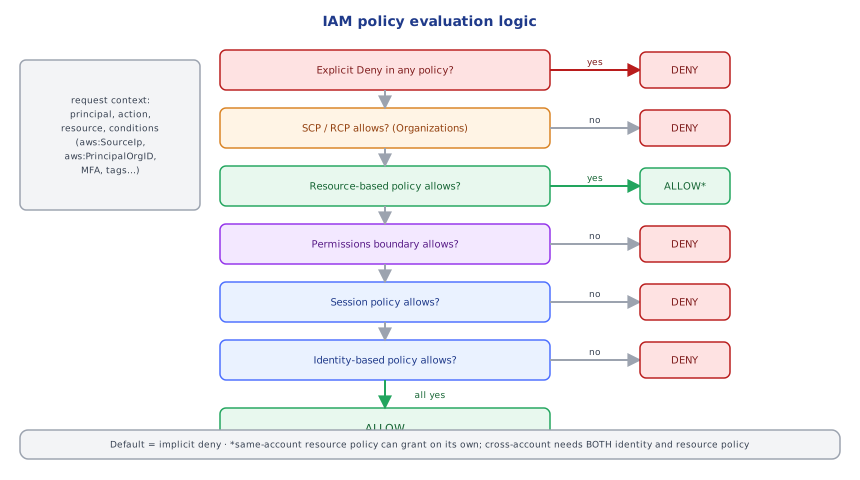
For a request in a single account:
1. explicit DENY in any applicable policy?            → DENY  (deny always wins)
2. SCPs / RCPs allow it?                              → if not, DENY
3. resource-based policy allows the principal?         → (can grant on its own within the same account)
4. identity policy allows it?                          → needed unless 3 granted it
5. permissions boundary allows it?                     → must also allow (for identity grants)
6. session policy allows it?                           → must also allow
default → implicit DENYCross-account: the request must be allowed by both the caller's identity policy (in account A) and the resource policy in account B (or the role trust policy, if assuming a role in B).
5Statement Anatomy and Conditions
{
  "Sid": "ReadOwnTenantData",
  "Effect": "Allow",
  "Action": ["dynamodb:GetItem", "dynamodb:Query"],
  "Resource": "arn:aws:dynamodb:eu-west-1:111111111111:table/helpdesk",
  "Condition": {
    "ForAllValues:StringLike": { "dynamodb:LeadingKeys": ["TENANT#${aws:PrincipalTag/tenant}*"] },
    "Bool": { "aws:SecureTransport": "true" }
  }
}
Useful condition keys: aws:PrincipalTag/* and aws:ResourceTag/* (ABAC — attribute-based access control), aws:SourceIp, aws:SourceVpce, aws:PrincipalOrgID, aws:SecureTransport, aws:MultiFactorAuthPresent, aws:RequestedRegion, service-specific keys (s3:prefix, kms:ViaService, ec2:InstanceType). Policy variables (${aws:username}, ${aws:PrincipalTag/team}) let one policy serve many principals.
NotAction / NotResource invert matches — powerful and easy to get wrong (an Allow with NotAction grants almost everything).
Under the HoodSTS and Temporary Credentials▾
sts:AssumeRole (or AssumeRoleWithWebIdentity for OIDC tokens, AssumeRoleWithSAML for SAML) returns three values: AccessKeyId (starting with ASIA… for temporary keys), SecretAccessKey, and a SessionToken that encodes the role, session name, tags, session policy and expiry. Every API call is signed with SigV4 using the secret key; the receiving service validates the signature and token, then evaluates policies for the role session principal (arn:aws:sts::111111111111:assumed-role/RoleName/SessionName). Because credentials expire automatically, a leaked session key is useful only until expiry (and can be revoked by denying sessions issued before a time via aws:TokenIssueTime). SDKs refresh credentials transparently from the instance/task metadata endpoints or the OIDC token file — which is why workloads should never be given long-lived keys.
📋 Quick Reference (Part 1)
humans: SSO → roles · workloads: roles (instance profile, task role, Lambda role, Pod Identity) · CI: OIDC → role
role = trust policy (who) + permissions (what) · STS temporary creds (ASIA…)
evaluation: explicit deny > SCP/RCP > resource ∪ identity > boundary > session > implicit deny
cross-account: caller identity policy AND target resource/trust policy
conditions: PrincipalTag/ResourceTag (ABAC), PrincipalOrgID, SourceVpce, SecureTransport, MFA, ViaService1Least Privilege Is a Process
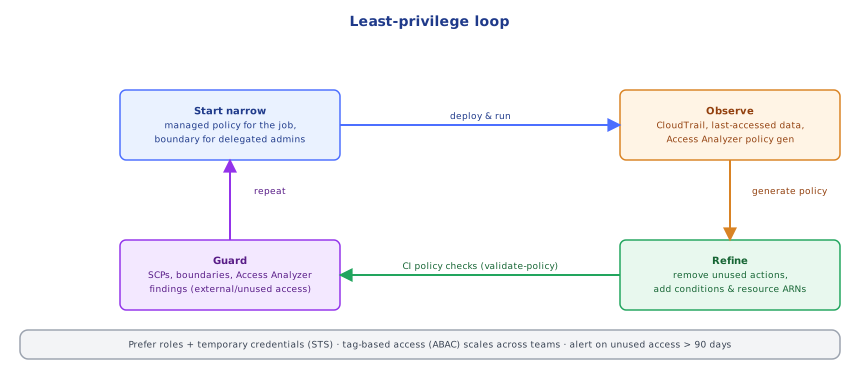
Nobody writes perfect policies up front. The practical loop:
- Start from AWS managed policies only for prototypes; for production write customer managed policies scoped to specific actions and resource ARNs.
- Use IAM Access Analyzer: policy validation (syntax, security warnings), policy generation from CloudTrail activity ("generate a policy from what this role actually did in the last 90 days"), unused access findings (roles, keys, permissions not used), and external access findings (resources shared outside the account/org).
- Use last accessed data (service and action level) to remove unused permissions.
- Enforce guardrails centrally with SCPs, permissions boundaries and RCPs.
2Cross-Account Access Patterns
account A (CI/tools)                       account B (prod)
role ci-deployer ── sts:AssumeRole ──►  role deploy-prod
                                         trust: { "Principal": { "AWS": "arn:aws:iam::A:role/ci-deployer" },
"Condition": { "StringEquals": { "sts:ExternalId": "…" } } } ← ExternalId for third parties- Prefer role assumption over sharing resources with resource policies, except for things like S3/KMS where resource policies are natural (with
aws:PrincipalOrgIDconditions). - ExternalId protects against the confused deputy problem when a third party (a SaaS vendor) assumes roles in many customers' accounts.
aws:SourceArn/aws:SourceAccountconditions protect service principals from confused-deputy issues (e.g. SNS publishing to your SQS queue).
3Federation for Humans and CI
- IAM Identity Center (SSO): users from your IdP (Okta, Entra ID, Google) get permission sets in specific accounts; short-lived role sessions via the CLI (
aws sso login) — no IAM users (security/security/09-identity_providers). - GitHub Actions / GitLab OIDC: the CI system's OIDC token is exchanged for role credentials with conditions on the repository, branch or environment (
devops-cloud/terraform/07-terraform_in_ci_cd).
4Permissions Boundaries: Safe Delegation
Let developers create roles for their Lambda functions without being able to escalate privileges:
// developers may create roles only if they attach this boundary
{
  "Effect": "Allow",
  "Action": ["iam:CreateRole", "iam:PutRolePolicy", "iam:AttachRolePolicy"],
  "Resource": "arn:aws:iam::111111111111:role/app/*",
  "Condition": { "StringEquals": { "iam:PermissionsBoundary": "arn:aws:iam::111111111111:policy/AppBoundary" } }
}
The boundary caps effective permissions of any role they create, no matter what policy they attach.
5ABAC: Scaling With Tags
Instead of one policy per team per resource, tag principals and resources and write one policy:
{
  "Effect": "Allow",
  "Action": ["secretsmanager:GetSecretValue"],
  "Resource": "*",
  "Condition": { "StringEquals": { "aws:ResourceTag/team": "${aws:PrincipalTag/team}" } }
}
New team members and new secrets need only tags. Protect the tags themselves (deny iam:TagRole/*:TagResource for the controlling tag keys except to admins).
6Privilege Escalation Paths to Block
Permissions that let a principal grant itself more: iam:CreatePolicyVersion, iam:SetDefaultPolicyVersion, iam:AttachUserPolicy/AttachRolePolicy, iam:PutUserPolicy, iam:UpdateAssumeRolePolicy, iam:PassRole (to a more privileged role) combined with lambda:CreateFunction/ec2:RunInstances/ecs:RunTask, iam:CreateAccessKey for other users. Scope iam:PassRole to specific role ARNs and iam:PassedToService.
7Monitoring
- CloudTrail (organization trail, all regions, log file validation) — who did what.
- Alerts on root usage, IAM policy changes, access key creation,
AssumeRolefrom unexpected sources,AccessDeniedspikes. - GuardDuty for anomalous credential use (keys used from unusual locations, instance credentials used outside AWS).
Under the HoodHow iam:PassRole Works▾
Many services act as a role you choose: Lambda runs with its execution role, ECS tasks with task roles, EC2 with an instance profile, CloudFormation with a service role. When you create such a resource, the service doesn't check what the role can do — it checks whether you are allowed to iam:PassRole that role to that service. PassRole isn't an API call; it's a permission evaluated implicitly during CreateFunction, RunInstances, RegisterTaskDefinition, etc. If it's granted on *, any user who can create a Lambda function can attach the account's most powerful role to it and run arbitrary code with those permissions — one of the most common escalation paths. Scope it: "Resource": "arn:aws:iam::111111111111:role/app/*" with "Condition": { "StringEquals": { "iam:PassedToService": "lambda.amazonaws.com" } }.
⚠️ Common Pitfalls (Part 2)
Action: "*"/Resource: "*"in workload roles.- IAM users with access keys for humans or apps.
iam:PassRoleon*.- Trust policies with
"Principal": {"AWS": "*"}(anyone!) or missing ExternalId for vendors. - Ignoring Access Analyzer external-access findings (buckets/keys shared publicly).
- Unprotected ABAC tags — users change their own tags to gain access.
📋 Quick Reference (Part 2)
Access Analyzer: validate · generate from CloudTrail · unused access · external access
cross-account: role assumption, ExternalId for third parties, PrincipalOrgID, SourceArn/SourceAccount
humans: Identity Center permission sets · CI: OIDC with repo/branch conditions
delegation: permissions boundaries · scale: ABAC (PrincipalTag = ResourceTag) · block escalation: scope PassRole
🧠 Key takeaways
- A role has a trust policy (who can assume it) and permissions policies (what it can do); STS issues temporary credentials.
- Evaluation: explicit deny > SCP/RCP limits > resource policy > boundary > session policy > identity policy; default deny.
- Least privilege is a loop: start narrow, observe (Access Analyzer, last-accessed), refine; federate humans and CI via SSO/OIDC.
- Use permissions boundaries for delegation, ABAC tags to scale, and block escalation paths like broad iam:PassRole.
🎤 Interview Q&A
Q1Identity-based vs resource-based policies?core▾
Identity-based policies attach to users/roles and say what they can do. Resource-based policies attach to resources (S3 buckets, KMS keys, SQS queues) and say who can access them; they enable cross-account access without assuming a role.
- Cross-account access needs? Permission on both sides unless the resource policy grants the external principal directly.
Q2How does assuming a role work?core▾
A principal calls sts:AssumeRole; the role's trust policy must allow that principal; STS returns temporary credentials with the role's permissions (optionally narrowed by a session policy).
- What's an external ID? A condition preventing the confused-deputy problem for third-party access.
Q3How do you write least-privilege policies?senior▾
Grant specific actions on specific resource ARNs, use conditions (tags, source VPC, MFA), start from access analyzer-generated policies based on CloudTrail activity, and review with last-accessed data.
- What's ABAC in AWS? Policies matching principal tags to resource tags to scale permissions.
Q4What are SCPs?core▾
Service Control Policies in AWS Organizations set the maximum permissions for accounts in an OU; they don't grant permissions, only restrict. Used for guardrails like denying disabling CloudTrail or using unapproved regions.
- Do SCPs apply to the management account? No.
Q5How do you debug an AccessDenied error?core▾
Read the error message (newer messages state which policy type denied), check identity policies, resource policies, SCPs, permission boundaries and session policies, KMS key policies, and use the IAM policy simulator and CloudTrail.
- Often overlooked? KMS key policies for encrypted resources.
🛠️ Practice exercises
Each exercise is a file in this topic folder. Code exercises are self-checking: run them and make the checks pass.
✅ Check yourself
Answer the questions — feedback is instant.