Terraform in CI/CD
Run Terraform from a pipeline, not laptops: plans posted on pull requests, approvals, then apply of exactly the reviewed plan using short-lived OIDC credentials. Follow one change from PR to production, including drift detection.
🎯 What you'll learn
- Why pipelines beat laptops for Terraform
- The standard flow: fmt/validate → plan on PR → approve → apply saved plan
- OIDC credentials instead of long-lived keys
- Monorepo change detection and scheduled drift detection
📚 Before you start
1Why Run Terraform in a Pipeline
Running terraform apply from laptops means: unreviewed changes, inconsistent Terraform/provider versions, powerful credentials on personal machines, no audit trail, and "it worked for me" state conflicts. A pipeline gives every infrastructure change the same path as application code: pull request → automated checks → reviewed plan → approved apply (devops-cloud/cicd/01-ci_cd_fundamentals).
2The Standard Flow
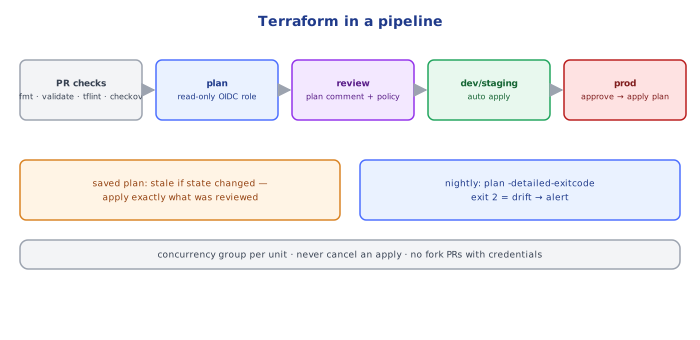
pull request opened/updated
  ├─ fmt -check, validate, tflint, security scan (checkov/trivy)       (09-testing_and_policy_as_code/)
  ├─ terraform plan -out=tfplan  (per changed unit/environment)
  ├─ post the plan summary as a PR comment; upload tfplan as an artifact
  └─ policy checks on the plan (OPA/Conftest, Sentinel)
review + approve the PR (CODEOWNERS for infra)
merge to main
  ├─ dev/staging: terraform apply tfplan (or re-plan + apply) automatically
  └─ prod: wait for manual approval (protected environment) → apply the reviewed plan
scheduled (nightly): terraform plan -detailed-exitcode on every unit → alert on drift
Apply what was reviewed: either apply the saved plan file from the PR (if nothing changed since), or re-plan on main and require the new plan to be approved before apply. Applying a fresh plan nobody looked at defeats the purpose.
3A GitHub Actions Example
name: terraform
on:
  pull_request: { paths: ["infra/**"] }
  push: { branches: [main], paths: ["infra/**"] }

permissions: { contents: read, id-token: write, pull-requests: write }

jobs:
  plan:
    runs-on: ubuntu-24.04
    defaults: { run: { working-directory: infra/live/prod/services } }
    concurrency: { group: tf-prod-services }      # one run per unit at a time
    steps:
      - uses: actions/checkout@v4
      - uses: hashicorp/setup-terraform@v3
        with: { terraform_version: 1.9.8 }
      - uses: aws-actions/configure-aws-credentials@v4
        with:
          role-to-assume: arn:aws:iam::111111111111:role/tf-plan-prod   # READ-ONLY role for plans
          aws-region: eu-west-1
      - run: terraform init -input=false
      - run: terraform fmt -check -recursive
      - run: terraform validate
      - run: terraform plan -input=false -no-color -out=tfplan
      - run: terraform show -no-color tfplan > plan.txt
      - uses: actions/upload-artifact@v4
        with: { name: tfplan-prod-services, path: infra/live/prod/services/tfplan }
      # post plan.txt as a PR comment (e.g. actions/github-script)

  apply:
    if: github.ref == 'refs/heads/main'
    needs: plan
    environment: production                        # required reviewers configured in repo settings
    runs-on: ubuntu-24.04
    steps:
      # checkout, setup-terraform, credentials with role tf-apply-prod (WRITE), init, download artifact
- run: terraform apply -input=false tfplan4Credentials
- Use OIDC federation from the CI provider to the cloud (no long-lived access keys in CI secrets).
- Separate roles: a read-only
planrole (can run on PRs, including from branches) and a writeapplyrole usable only from the protected branch/environment (IAM trust policy conditions on the OIDCsubclaim, e.g.repo:acme/infra:environment:production). - Never run
planfor untrusted fork PRs with secrets available — a malicious external data source or provider could exfiltrate credentials.
Long-lived keys in CI secrets
env:
  AWS_ACCESS_KEY_ID: ${{ secrets.AWS_KEY }}
  AWS_SECRET_ACCESS_KEY: ${{ secrets.AWS_SECRET }}
# valid forever, copied around, admin by default
OIDC role per environment
permissions: { id-token: write, contents: read }
- uses: aws-actions/configure-aws-credentials@v4
  with:
    role-to-assume: arn:aws:iam::111111111111:role/tf-plan
    aws-region: eu-west-1
# 1-hour credentials, trust limited to this repo + branch5Monorepos: Plan Only What Changed
With many units, detect changed directories (path filters, git diff) and plan only those — plus units depending on changed shared modules. Tools: Atlantis (PR-driven plan/apply via comments, locking per directory), Terragrunt (run-all with dependency ordering), HCP Terraform, Spacelift, env0, Digger.
6Drift Detection
terraform plan -detailed-exitcode exits 0 (no changes), 2 (changes present) or 1 (error). Run it on a schedule for every unit; exit code 2 on main means reality drifted (console changes, out-of-band automation) → alert the owning team, then codify or revert (03-state_and_remote_backends/ exercise 2, incident C).
Under the HoodWhat a Saved Plan Contains▾
terraform plan -out=tfplan writes a binary file (a zip) containing the full planned changes, the prior state snapshot it was based on, the configuration, the variable values (including sensitive ones — protect the artifact), and the provider and Terraform version requirements. terraform apply tfplan executes exactly those changes without re-planning — but only if the state hasn't changed since: if another apply modified the state in between (its serial/lineage differs), Terraform refuses with "Saved plan is stale". That's the mechanism that makes "apply the reviewed plan" safe; combined with a concurrency group (one run per unit) it prevents two pipelines from racing on the same state.
⚠️ Common Pitfalls
- Applying a plan nobody reviewed (re-plan on main without approval).
- Long-lived admin keys in CI secrets — use OIDC + scoped roles.
- No concurrency control — two applies on one unit.
- Running plans for fork PRs with credentials.
- Plan artifacts publicly downloadable — they contain variable values.
- No drift detection — the code silently stops describing reality.
📋 Quick Reference
PR: fmt -check · validate · tflint · checkov · plan -out (read-only role) · comment plan · policy check
main: apply reviewed plan (dev auto, prod approval, write role via OIDC) · concurrency per unit
nightly: plan -detailed-exitcode (2 = drift) → alert
tools: Atlantis · Terragrunt · HCP Terraform · Spacelift
🧠 Key takeaways
- Pipelines give reviewable plans, audit trails, consistent tooling and no laptop credentials.
- Flow: static checks → plan on PR (posted) → approval → apply the saved plan.
- Use OIDC short-lived roles, separate plan (read) and apply (write) roles per environment.
- Plan only changed units in monorepos; schedule drift detection with
-detailed-exitcode.
🎤 Interview Q&A
Q1What does a Terraform CI/CD pipeline look like?core▾
On PR: fmt check, validate, lint, security scan, plan with output posted to the PR. On merge: apply the saved plan (or re-plan and apply) with approvals for production, using OIDC credentials and state locking.
- Why save the plan file? So exactly the reviewed changes are applied.
Q2How do you authenticate CI to the cloud?core▾
OIDC federation (GitHub Actions/GitLab → AWS IAM role with conditions on repo and branch), separate roles for plan (read-only) and apply, no long-lived keys.
- Why separate plan and apply roles? PR plans from untrusted branches shouldn't have write access.
Q3What tools help run Terraform collaboratively?senior▾
Atlantis (plan/apply via PR comments), Terraform Cloud/Enterprise, Spacelift, env0, or plain CI with careful locking.
- Benefit of Atlantis? Locks per directory and keeps apply tied to PR review.
Q4How do you detect drift?core▾
Scheduled terraform plan -detailed-exitcode jobs that alert when changes are detected (exit code 2), then reconcile by updating code or reverting manual changes.
- What causes drift? Console changes, other tools, or autoscaling-managed attributes.
Q5How do you handle dangerous changes?core▾
Review plans for destroys/replacements, prevent_destroy on critical resources, policy checks blocking deletions, and manual approval gates for production.
- What does 'forces replacement' mean? The change requires destroying and recreating the resource.
🛠️ Practice exercises
Each exercise is a file in this topic folder. Code exercises are self-checking: run them and make the checks pass.
✅ Check yourself
Answer the questions — feedback is instant.
terraform plan -detailed-exitcode returns 2 when…