Workspaces and Environments
dev, staging and prod should come from the same code but never share state or credentials. Compare CLI workspaces, a directory per environment and HCP Terraform workspaces side by side, then design promotion between environments.
🎯 What you'll learn
- What environments need: same code, separate state and credentials
- CLI workspaces and their risks
- Directory per environment (recommended) and HCP Terraform workspaces
- Promotion and keeping environments honest
📚 Before you start
1The Goal
Dev, staging and production should be built from the same code, differing only in inputs (sizes, counts, domains, feature toggles) — so that what you tested in staging is what runs in production. Each environment needs its own state so changes can be planned and applied independently.
There are three common ways to organize that.
2Option A: CLI Workspaces
terraform workspace new staging
terraform workspace select staging
terraform apply -var-file=staging.tfvarslocals {
env = terraform.workspace # "default", "staging", "prod"
size = { staging = "t4g.small", prod = "m7g.large" }[local.env]
}Each workspace gets a separate state (in S3: env:/staging/<key>). Pros: no code duplication, quick. Cons: the environment is invisible in the code and easy to get wrong ("which workspace am I in?" → applied to prod); all environments share one backend configuration and the same credentials; environments can't diverge structurally. HashiCorp itself recommends CLI workspaces mainly for short-lived variations (e.g. per-branch test environments), not for prod vs dev isolation.
3Option B: Directory per Environment (Recommended for Most Teams)
infra/
  modules/                 # reusable modules (service, network, database)
  live/
    dev/
      network/   main.tf  backend.tf  terraform.tfvars
      services/  main.tf  backend.tf  terraform.tfvars
    staging/ …
    prod/
      network/   main.tf  backend.tf (key = prod/network)  terraform.tfvars
      services/ …
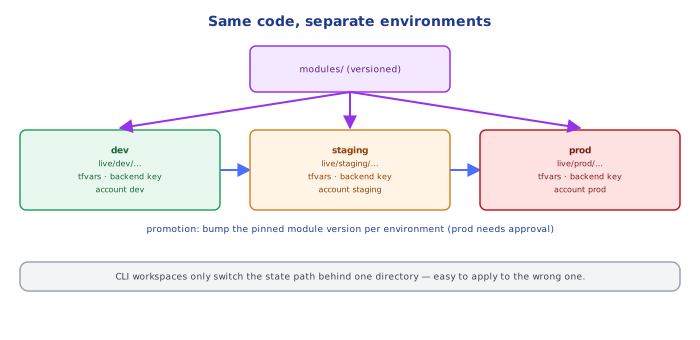
Each live/<env>/<unit> is a tiny root module that calls shared modules with environment-specific values and has its own backend key (and ideally its own AWS account and credentials). Pros: explicit, reviewable, per-environment permissions, environments can roll out module versions at different times (dev on v2.1, prod still on v2.0). Cons: some boilerplate (backend and provider blocks repeated) — tools like Terragrunt remove it with include and generated backends.
4Option C: HCP Terraform / Terraform Enterprise Workspaces
Not the same as CLI workspaces: each workspace is a fully separate configuration binding (VCS repo/directory + variables + state + permissions + run history), with policy checks and approvals. Common in larger organizations; conceptually similar to Option B with a managed control plane.
5Promotion Between Environments
PR merged → plan+apply dev automatically
           → plan staging, apply after tests pass
           → plan prod, apply after manual approval (protected environment)
Promote the same module versions and the same artifact references (image digests). With directory-per-environment, promotion is a PR that bumps the module ref/version or variable in the next environment's folder.
6Keeping Environments Honest
- Differences between environments should be intentional and few: counts, sizes, domains — not different resource types or missing components.
- Separate AWS accounts per environment (blast radius, IAM isolation, cost visibility) —
devops-cloud/aws/…multi_account…. - Production apply credentials only in the pipeline, not on laptops.
- Ephemeral preview environments per PR (where cost allows) using workspaces or a unique prefix, destroyed on merge.
Under the HoodHow Workspaces Change the State Path▾
For the S3 backend, the default workspace stores state at key; any other workspace stores it at <workspace_key_prefix>/<workspace>/<key> (prefix defaults to env:). terraform workspace select simply changes which object Terraform reads and locks; nothing else in the configuration changes unless you reference terraform.workspace. The current workspace name is stored locally in .terraform/environment — which is exactly why it's easy to be in the wrong one: a fresh clone defaults to default, and a stale terminal keeps whatever was selected last. Directory-per-environment avoids this hidden state: the environment is the path you cd into, visible in the code review, the CI job and the backend key.
⚠️ Common Pitfalls
- Applying to the wrong CLI workspace.
- Copy-pasted environment folders that drift (resources added only in prod).
- Shared credentials across environments — a dev mistake can touch prod.
- Promoting by re-editing prod by hand instead of promoting versions.
terraform.workspaceconditionals everywhere — environment logic scattered across resources.
📋 Quick Reference
same code, different inputs, separate state per environment
CLI workspaces: quick, hidden context — ok for ephemeral envs
directory per env (+ Terragrunt): explicit, per-env backend/account/permissions — default choice
promote module versions + artifact digests dev → staging → prod with approvals
🧠 Key takeaways
- Environments share code but must have separate state, credentials and ideally accounts.
- CLI workspaces just switch the state path, so they're easy to misuse for prod.
- A directory per environment calling versioned modules is explicit and reviewable; HCP workspaces add managed runs and policies.
- Promote by bumping module versions env by env, and detect drift between environments.
🎤 Interview Q&A
Q1What are Terraform workspaces?core▾
Multiple state files for the same configuration (terraform workspace new staging); terraform.workspace can drive naming and sizing. Good for identical, short-lived environments.
- Terraform Cloud workspaces? A different concept: separate configurations/runs with their own settings.
Q2Why are CLI workspaces often discouraged for prod vs dev?core▾
Environments usually differ (sizes, features, accounts, credentials), and it's easy to apply to the wrong workspace. Separate directories or root modules per environment with shared modules make differences explicit and access separable.
- How do you separate credentials? Different backends and roles per environment/account.
Q3How do you structure a multi-environment repo?senior▾
modules/ for reusable components, envs/dev, envs/staging, envs/prod root configs calling them with environment-specific values and backends; or tools like Terragrunt to reduce repetition.
- What does Terragrunt add? DRY backend/provider configuration and dependency orchestration.
Q4How do you promote infrastructure changes?core▾
Change modules, apply to dev, then staging, then prod via pipelines; pin module versions per environment so promotion is a version bump.
- Why pin per environment? Prod only gets changes already proven in lower environments.
Q5How do you create ephemeral preview environments?core▾
Workspaces or parameterized stacks per PR with unique names, automatically destroyed on merge/close, with cost limits.
- Risk? Orphaned resources if destroy fails; add cleanup jobs.
🛠️ Practice exercises
Each exercise is a file in this topic folder. Code exercises are self-checking: run them and make the checks pass.
✅ Check yourself
Answer the questions — feedback is instant.