A Production AWS Stack with Terraform
Put it all together: a production AWS stack (VPC, RDS, ECS Fargate behind an ALB, least-privilege IAM and alarms) split into units with separate state. See the order of operations and how application deploys avoid fighting Terraform.
🎯 What you'll learn
- Target architecture and splitting it into units
- Repository layout and security defaults baked into modules
- Key HCL: network module, RDS, ECS service, IAM policy documents, alarms
- What happens on apply, and how image versions flow without drift
📚 Before you start
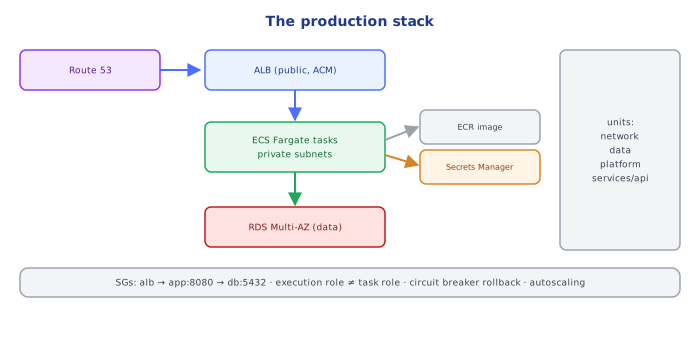
Topics 01–07 covered Terraform mechanics. This topic builds a realistic stack end to end: a containerized web API on ECS Fargate behind an ALB, with RDS PostgreSQL, in a multi-AZ VPC, with DNS, TLS, logs, alarms and least-privilege IAM. It connects the AWS track (devops-cloud/aws/) with Terraform practice.
1Target Architecture
Route 53 (api.petpal.io) ─► ALB (public subnets, ACM cert, HTTPS only)
                              │  target group (ip), health check /healthz
                              ▼
                      ECS service on Fargate (private subnets, 2-12 tasks, autoscaling)
                       │ image from ECR · logs → CloudWatch · secrets from Secrets Manager
                       ▼
               RDS PostgreSQL Multi-AZ (data subnets, encrypted, managed password)
VPC 10.20.0.0/16 · 3 AZs · public / private / data subnets · NAT per AZ · S3 gateway endpoint2Units and State
| Unit (root module) | Contains | Changes |
|---|---|---|
network | VPC, subnets, route tables, NAT, endpoints | rarely |
data | RDS, subnet group, parameter group, its security group | rarely, risky |
platform | ECS cluster, ECR repositories, shared ALB, ACM cert, DNS zone records | occasionally |
services/api | task definition, service, target group, listener rule, autoscaling, alarms, IAM roles | daily |
Each unit has its own backend key (prod/network/terraform.tfstate, …) and reads the others via data sources or SSM parameters (03-… Part 2 §5).
3Repository Layout
infra/
  modules/
    network/        # wraps terraform-aws-modules/vpc + endpoints
    postgres/       # RDS with secure defaults
    ecs_service/    # task def + service + TG + rule + scaling + alarms + IAM
  live/prod/
    network/   main.tf backend.tf terraform.tfvars
    data/      ...
    platform/  ...
services/api/ ...4Security Defaults Baked into the Modules
- Tasks and the database in private/data subnets; only the ALB is public.
- Security groups reference each other:
alb-sg → app-sg:8080 → db-sg:5432(devops-cloud/aws/09-security_groups). - RDS:
storage_encrypted = true,deletion_protection = true,manage_master_user_password = true,backup_retention_period >= 7,multi_az = truein prod,prevent_destroy. - ECS: task execution role (pull image, write logs, read the specific secrets) separate from the task role (what the app itself may call, e.g. one S3 bucket); no wildcards.
- ALB: HTTPS listener with a modern TLS policy, HTTP → HTTPS redirect, access logs to S3, deletion protection.
- Everything tagged via provider
default_tags.
5Order of Operations
- Bootstrap state backend (
03-…exercise 1). network→ publishes VPC and subnet IDs.data→ RDS in data subnets; publishes endpoint + secret ARN.platform→ cluster, ECR, ALB, certificate (DNS validation), base listener.services/api→ reads all of the above, deploys the service; CI updates only the image tag per deploy.
Under the HoodHow the Image Version Flows Without Fighting Terraform▾
The application pipeline builds an image and pushes it to ECR with an immutable tag (the commit SHA). Two patterns keep Terraform and deploys from fighting over the task definition:
- Terraform owns the image tag: the deploy job runs
terraform apply -var image_tag=<sha>forservices/api. Simple and fully declarative; every deploy is a Terraform run. - The deploy tool owns the image: Terraform creates the service with an initial task definition and
lifecycle { ignore_changes = [task_definition] }; deployments register new task definition revisions via the ECS API / CodeDeploy (blue-green). Terraform still manages everything else.
Either way, avoid both systems updating the same attribute — that produces perpetual diffs or rollbacks of the running version.
Terraform defines the service and an initial task definition, with lifecycle { ignore_changes = [task_definition] }. CI registers new task definition revisions per release. Terraform never 'reverts' a deploy, and deploys never need a Terraform run.
📋 Quick Reference (Part 1)
units: network → data → platform → services/* (separate states, data sources between them)
secure defaults: private subnets, SG references, encrypted + protected RDS, managed passwords, split IAM roles
image flow: TF var image_tag per deploy OR ignore_changes + deploy tool1Network (via the registry module)
module "vpc" {
  source  = "terraform-aws-modules/vpc/aws"
  version = "~> 5.0"

  name             = "petpal-prod"
  cidr             = "10.20.0.0/16"
  azs              = ["eu-west-1a", "eu-west-1b", "eu-west-1c"]
  public_subnets   = ["10.20.0.0/24", "10.20.1.0/24", "10.20.2.0/24"]
  private_subnets  = ["10.20.10.0/24", "10.20.11.0/24", "10.20.12.0/24"]
  database_subnets = ["10.20.20.0/24", "10.20.21.0/24", "10.20.22.0/24"]

  enable_nat_gateway     = true
  one_nat_gateway_per_az = true
  create_database_subnet_group = true
}

resource "aws_ssm_parameter" "private_subnets" {
  name  = "/prod/network/private_subnet_ids"
  type  = "StringList"
  value = join(",", module.vpc.private_subnets)
}2Database
resource "aws_db_instance" "main" {
  identifier                  = "petpal-prod"
  engine                      = "postgres"
  engine_version              = "16.4"
  instance_class              = "db.r6g.large"
  allocated_storage           = 100
  storage_type                = "gp3"
  storage_encrypted           = true
  multi_az                    = true
  db_subnet_group_name        = data.aws_db_subnet_group.main.name
  vpc_security_group_ids      = [aws_security_group.db.id]
  username                    = "petpal_admin"
  manage_master_user_password = true            # secret in Secrets Manager, not in state
  backup_retention_period     = 14
  deletion_protection         = true
  performance_insights_enabled = true
  auto_minor_version_upgrade  = true
  skip_final_snapshot         = false
  final_snapshot_identifier   = "petpal-prod-final"
  lifecycle { prevent_destroy = true }
}3ECS Service
resource "aws_ecs_task_definition" "api" {
  family                   = "petpal-api"
  requires_compatibilities = ["FARGATE"]
  network_mode             = "awsvpc"
  cpu                      = 512
  memory                   = 1024
  execution_role_arn       = aws_iam_role.execution.arn   # pull image, write logs, read secrets
  task_role_arn            = aws_iam_role.task.arn        # what the app may call
  runtime_platform { cpu_architecture = "ARM64", operating_system_family = "LINUX" }

  container_definitions = jsonencode([{
    name         = "api"
    image        = "${data.aws_ecr_repository.api.repository_url}:${var.image_tag}"
    essential    = true
    portMappings = [{ containerPort = 8080 }]
    secrets      = [{ name = "DATABASE_PASSWORD", valueFrom = "${local.db_secret_arn}:password::" }]
    environment  = [{ name = "DATABASE_HOST", value = local.db_host }]
    logConfiguration = {
      logDriver = "awslogs"
      options   = { awslogs-group = aws_cloudwatch_log_group.api.name, awslogs-region = "eu-west-1", awslogs-stream-prefix = "api" }
    }
  }])
}

resource "aws_ecs_service" "api" {
  name            = "api"
  cluster         = data.aws_ecs_cluster.main.arn
  task_definition = aws_ecs_task_definition.api.arn
  desired_count   = 2
  launch_type     = "FARGATE"
  network_configuration {
    subnets         = local.private_subnet_ids
    security_groups = [aws_security_group.app.id]
  }
  load_balancer {
    target_group_arn = aws_lb_target_group.api.arn
    container_name   = "api"
    container_port   = 8080
  }
  deployment_circuit_breaker { enable = true, rollback = true }   # auto-rollback failed deploys
  lifecycle { ignore_changes = [desired_count] }                   # autoscaling owns it
}

resource "aws_appautoscaling_target" "api" {
  service_namespace  = "ecs"
  resource_id        = "service/${local.cluster_name}/${aws_ecs_service.api.name}"
  scalable_dimension = "ecs:service:DesiredCount"
  min_capacity       = 2
  max_capacity       = 12
}

resource "aws_appautoscaling_policy" "api_requests" {
  name               = "requests-per-target"
  policy_type        = "TargetTrackingScaling"
  service_namespace  = aws_appautoscaling_target.api.service_namespace
  resource_id        = aws_appautoscaling_target.api.resource_id
  scalable_dimension = aws_appautoscaling_target.api.scalable_dimension
  target_tracking_scaling_policy_configuration {
    target_value = 500
    predefined_metric_specification {
      predefined_metric_type = "ALBRequestCountPerTarget"
      resource_label         = "${data.aws_lb.main.arn_suffix}/${aws_lb_target_group.api.arn_suffix}"
    }
  }
}4Least-Privilege IAM with Policy Documents
data "aws_iam_policy_document" "task" {
  statement {
    actions   = ["s3:GetObject", "s3:PutObject"]
    resources = ["${data.aws_s3_bucket.uploads.arn}/*"]
  }
}
resource "aws_iam_role_policy" "task" {
  role   = aws_iam_role.task.id
  policy = data.aws_iam_policy_document.task.json
}
aws_iam_policy_document gives syntax checking, interpolation and readable diffs compared to raw JSON strings.
5Alarms Next to the Service
Put the service's alarms (5xx ratio, p99 latency, unhealthy hosts, running task count below desired) in the same module as the service, so every service ships with monitoring by default (devops-cloud/aws/08-cloudwatch).
Under the HoodWhat Happens on terraform apply for a New Service▾
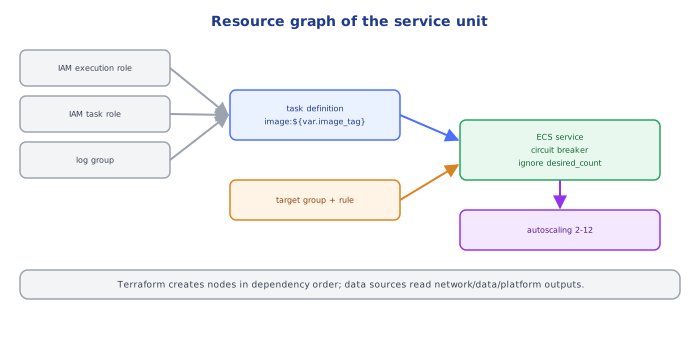
Terraform walks the dependency graph: IAM roles and the log group first (no dependencies), then the target group, then the listener rule (needs the target group), then the task definition (needs roles and log group), then the ECS service (needs task definition, target group, SGs). For the service, the AWS provider calls CreateService and — by default — waits until the deployment reaches a steady state only if wait_for_steady_state = true; otherwise it returns as soon as ECS accepts the request, and tasks may still be failing health checks. Enabling the deployment circuit breaker (or wait_for_steady_state) makes a broken image visible as a failed deployment/rollback instead of a silently "successful" apply.
📋 Quick Reference (Part 2)
VPC: registry module, NAT per AZ in prod, publish IDs to SSM
RDS: encrypted, Multi-AZ, managed password, deletion protection, prevent_destroy, backups ≥ 7 days
ECS: Fargate awsvpc in private subnets, execution vs task role, secrets via valueFrom, circuit breaker rollback,
     ignore_changes desired_count + app autoscaling on ALBRequestCountPerTarget
IAM: aws_iam_policy_document, resource-scoped actions · alarms ship with the service module
🧠 Key takeaways
- Split the stack into units by lifecycle: network, data, services, each with its own state and role.
- Bake security defaults into modules: encryption, private subnets, deletion protection, least-privilege IAM via policy documents.
- Pass values between units with outputs/data sources; keep alarms next to the service they watch.
- Let CI own image versions (ignore_changes on task definitions) so deploys and Terraform don't fight.
🎤 Interview Q&A
Q1How would you lay out a typical AWS web stack in Terraform?core▾
Modules for VPC (subnets, NAT, endpoints), security groups, data (RDS, ElastiCache), compute (ECS/EKS or ASG), load balancer and DNS/certificates, observability, and IAM roles, wired together through outputs, with separate state per layer.
- Use community modules? terraform-aws-modules are solid starting points; pin versions.
Q2How do you handle the RDS master password in Terraform?core▾
Let RDS manage it in Secrets Manager (manage_master_user_password = true), or generate it in Secrets Manager outside of Terraform state; never hard-code it.
- Why avoid random_password in state? The secret ends up in state in plain text.
Q3How do you apply tags consistently?senior▾
Provider-level default_tags plus a common tags local, enforced by tag policies and policy-as-code checks.
- Why tags? Cost allocation, ownership, automation and compliance.
Q4How do you deploy application versions with Terraform-managed infrastructure?core▾
Usually separate concerns: Terraform manages infrastructure; CI/CD deploys app versions (new task definition/image tags, Helm), possibly with ignore_changes on fields the deploy pipeline updates.
- Why separate? App deploys are frequent and shouldn't require infra plans.
Q5How do you manage multiple AWS accounts in Terraform?core▾
Provider aliases with assume_role per account/region, separate states per account, and an organization-level baseline module (CloudTrail, Config, guardrails).
- Provider alias usage?
provider = aws.prodon resources or passed into modules.
🛠️ Practice exercises
Each exercise is a file in this topic folder. Code exercises are self-checking: run them and make the checks pass.
✅ Check yourself
Answer the questions — feedback is instant.