Cost Optimization and the Well-Architected Framework
Review architectures against the six Well-Architected pillars and cut cloud bills methodically: visibility first, then waste, right-sizing, Graviton, commitments and data transfer. Estimate savings for a real bill.
🎯 What you'll learn
- The six Well-Architected pillars and reviews
- Cost visibility: tags, Cost Explorer, CUR, budgets, anomalies
- The big levers and hidden cost traps
- FinOps and how Savings Plans are applied
📚 Before you start
1The Well-Architected Framework
AWS's Well-Architected Framework is a set of questions and best practices for evaluating architectures across six pillars:
| Pillar | Key questions |
|---|---|
| Operational excellence | Can we deploy, observe and improve safely? IaC, small reversible changes, runbooks, post-incident learning |
| Security | Identity (least privilege, no long-lived keys), detection, infrastructure protection, data protection (encryption), incident response |
| Reliability | Fault isolation (multi-AZ/region), automatic recovery, tested backups, quotas, change management |
| Performance efficiency | Right resource types (Graviton, serverless), caching, measurement, experimentation |
| Cost optimization | Expenditure awareness, cost-effective resources, matching supply to demand, optimizing over time |
| Sustainability | Utilization, efficient hardware, minimizing data movement and idle resources |
A Well-Architected Review (self-service in the WA Tool, with Lenses for serverless, SaaS, containers, etc.) produces a list of high- and medium-risk issues to prioritize — an excellent structure for design reviews.
2Know Where the Money Goes
- Cost Explorer: spend by service, account, region, usage type, tag; forecasts.
- Cost and Usage Report (CUR 2.0) / Data Exports → S3 + Athena/QuickSight for detailed analysis.
- Cost allocation tags (
team,service,env) — activate them and enforce them (tag policies); untagged spend is unaccountable spend. - Budgets (alerts at 80/100% of forecast), Cost Anomaly Detection (ML alerts on unusual spikes).
- Unit economics: cost per order, per active user, per API request — the metric that tells you whether growth is efficient.
3The Big Levers
| Lever | Typical saving | How |
|---|---|---|
| Turn off / delete waste | 10–30% | idle instances, unattached EBS volumes, old snapshots, unused Elastic IPs, forgotten load balancers, dev environments running nights/weekends |
| Right-size | 10–40% | Compute Optimizer recommendations; most instances run at < 20% CPU |
| Graviton (arm64) | ~20% price/perf | EC2, RDS, ElastiCache, Lambda, Fargate |
| Commitments | up to ~66–72% | Savings Plans (Compute SP: flexible across EC2/Fargate/Lambda; EC2 Instance SP: higher discount, specific family/region) or Reserved Instances (RDS, ElastiCache, OpenSearch, Redshift) for steady baseline |
| Spot | up to ~90% | fault-tolerant work: CI runners, batch, stateless workers, Karpenter/ECS Spot capacity |
| Storage tiering | large | S3 lifecycle to IA/Glacier, S3 Intelligent-Tiering, gp2 → gp3 EBS volumes, delete old logs (CloudWatch Logs retention!) |
| Data transfer | often surprising | NAT gateway processing (use VPC endpoints for S3/DynamoDB/ECR), cross-AZ traffic, internet egress (CloudFront is cheaper than direct egress) |
| Architecture | structural | serverless for spiky loads, caching, autoscaling to zero in non-prod, batching |
Buy commitments only for the steady baseline after right-sizing; cover peaks with on-demand/Spot.
4Hidden Cost Traps
- NAT gateways: $/hour per AZ plus $/GB processed — a chatty service pulling images and S3 data through NAT can cost more than its compute.
- CloudWatch Logs: ingestion ($/GB) and infinite retention by default.
- Cross-AZ data transfer between chatty microservices and replicas.
- Idle provisioned capacity: provisioned concurrency, DynamoDB provisioned tables, over-sized RDS.
- Public IPv4 addresses (charged hourly).
- Old EBS snapshots and AMIs; incomplete S3 multipart uploads (lifecycle rule to abort them).
- Data stored in the wrong S3 class, or tiny objects in Glacier (per-object overheads).
5FinOps: Making It Continuous
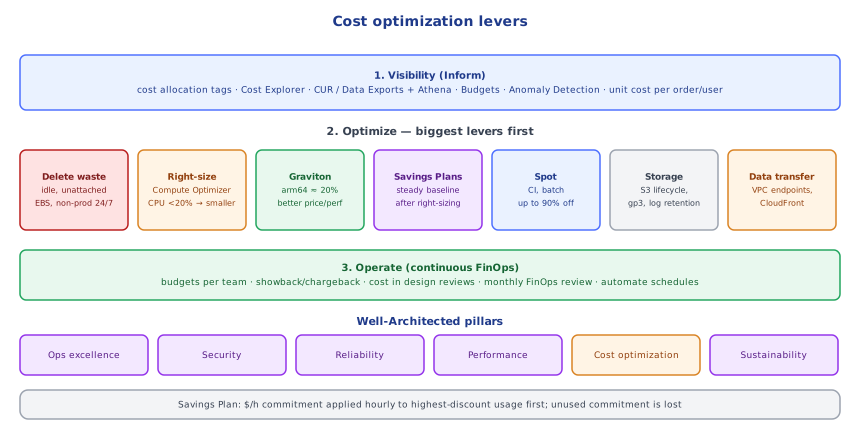
FinOps brings finance, engineering and product together: Inform (visibility, allocation, showback/chargeback per team), Optimize (rightsizing, commitments, architecture), Operate (budgets, policies, KPIs, regular reviews). Engineers see the cost of their services in their dashboards, cost is a non-functional requirement in design reviews, and savings are tracked like any other metric.
Under the HoodHow Savings Plans Are Applied▾
A Savings Plan is a commitment to spend a fixed $/hour on eligible usage for 1 or 3 years (all/partial/no upfront). Every hour, AWS's billing engine looks at your eligible usage across all accounts in the consolidated billing family (unless sharing is restricted), sorts it by highest discount percentage first, and applies the committed amount at the discounted Savings Plan rates until the commitment for that hour is used up; usage beyond it is billed at on-demand rates. Unused commitment in an hour is lost (it doesn't roll over). That's why commitments should target the reliable minimum of your hourly usage curve — buying for the average or the peak means paying for hours you don't use. Compute Savings Plans apply across instance families, sizes, regions, OS, tenancy, Fargate and Lambda, so they keep applying as you migrate to Graviton or containers.
⚠️ Common Pitfalls
- Buying commitments before right-sizing — locking in waste.
- No tagging — nobody owns the bill.
- Ignoring data transfer and NAT costs.
- Non-prod running 24/7.
- Optimizing pennies (micro-tuning) while big levers are untouched.
- Cost reviews once a year instead of continuous FinOps.
📋 Quick Reference
WA pillars: ops excellence · security · reliability · performance · cost · sustainability (WA Tool + lenses)
visibility: Cost Explorer · CUR/Data Exports + Athena · tags · budgets · anomaly detection · unit costs
levers: delete waste > right-size > Graviton > Savings Plans (baseline) > Spot (interruptible) > storage tiers > data transfer
traps: NAT processing · CloudWatch Logs · cross-AZ · idle provisioned capacity · public IPv4 · snapshots
🧠 Key takeaways
- Six pillars: operational excellence, security, reliability, performance, cost, sustainability; run reviews with the WA Tool.
- Visibility first: tags, Cost Explorer, CUR/Data Exports, budgets and anomaly detection, unit costs.
- Levers in order: delete waste → right-size → Graviton → Savings Plans/RIs (baseline) → Spot → storage tiers → data transfer.
- Watch NAT processing, CloudWatch Logs, cross-AZ traffic, idle provisioned capacity; make it continuous with FinOps.
🎤 Interview Q&A
Q1What are the pillars of the Well-Architected Framework?core▾
Operational excellence, security, reliability, performance efficiency, cost optimization, and sustainability. Reviews against them identify risks and improvements.
- Tool? The Well-Architected Tool with question sets and lenses.
Q2What are the biggest levers for reducing AWS costs?core▾
Right-sizing over-provisioned resources, Savings Plans/Reserved Instances for steady load, Spot for interruptible work, shutting down idle and non-prod resources, storage lifecycle policies, reducing data transfer (NAT, cross-AZ, egress), and Graviton instances.
- Most common hidden costs? NAT gateway data, cross-AZ traffic, unattached EBS volumes, idle load balancers, log retention.
Q3How do you build cost visibility?senior▾
Cost allocation tags enforced by policy, per-account/team budgets and alerts, Cost Explorer and CUR reports, anomaly detection, and showing teams their own costs (showback/chargeback).
- What's unit economics? Cost per business unit (per order, per active user) to track efficiency as you grow.
Q4How do you design for cost from the start?core▾
Choose managed and serverless services for spiky workloads, containers for steady loads, cache aggressively, keep data close to compute, set retention policies, and make cost a non-functional requirement in design reviews.
- Serverless always cheaper? No; at high steady volume, containers/instances can be cheaper.
Q5How do you balance cost against reliability?core▾
Match spending to SLOs: multi-AZ for production, maybe single-AZ for dev; multi-region only when the business requires it; and quantify the cost of downtime to justify redundancy.
- Example? A NAT gateway per AZ costs more but avoids an AZ failure cutting egress.
🛠️ Practice exercises
Each exercise is a file in this topic folder. Code exercises are self-checking: run them and make the checks pass.
✅ Check yourself
Answer the questions — feedback is instant.